Help center
How to transfer stock between branches
Send stock from one branch to another and receive it at the other end. Stock leaves the sending branch when you send, joins the receiving branch when it is received, and short deliveries are recorded with a note.
Updated
With more than one branch or a godown, stock often moves between locations. A transfer keeps both branches correct: the sender’s stock goes down when the goods leave, and the receiver’s stock goes up only when someone there confirms what arrived.
Open Transfers in the sidebar under Inventory (the page header reads Stock transfer). Transfers are valued at cost; they are not sales. Staff tied to one branch only see transfers that touch their branch.
Send and receive stock
Step 1: Start a transfer
Press Maal bhejein (send goods).
Step 2: Choose the branches
Under Kahan se pick the sending branch, and under Kahan the receiving branch. They must be different.
Step 3: Add items
Search or scan items. Pick the unit (pcs, carton or box) and quantity. Each line shows stock now and after sending, and you cannot send more than you have.
Step 4: Add a reason and note
Tap a reason under Kis liye bhej rahe hain, and add a note such as who is carrying the goods. The note prints on the slip.
Step 5: Confirm
Press Aage, check the summary, and press Haan, bhej dein. Print the slip with Print slip if the goods travel with a rider.
Step 6: Receive at the other branch
At the receiving branch, open the transfer under Aane wala (incoming) and press Receive karein. Choose Sab poora aaya if everything arrived, or enter what actually came.
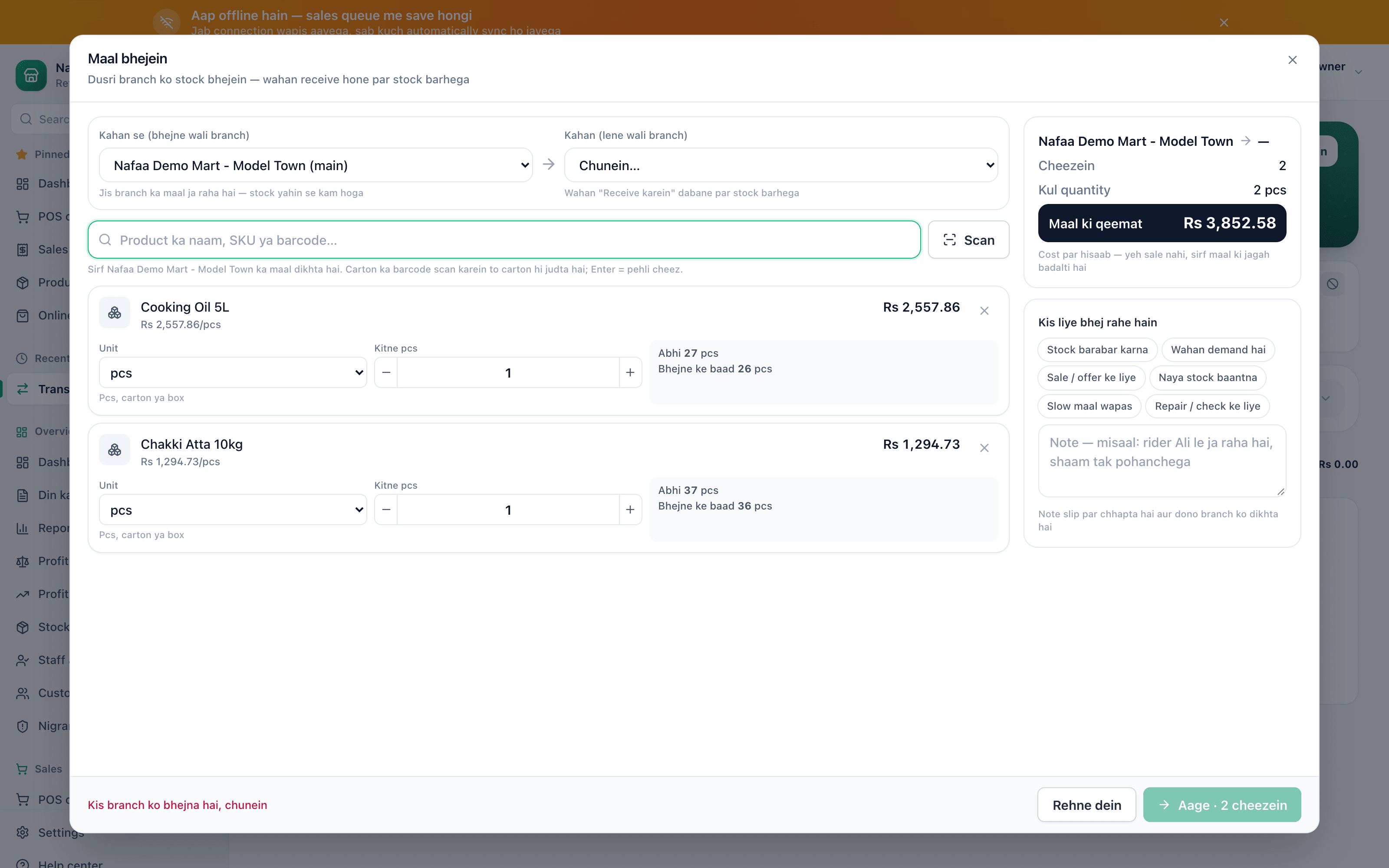
- From
- To
- Search or scan
- Stock now and after
- Reason
- Next
Questions
When does stock change?
The sending branch loses the stock as soon as you send. The receiving branch gains it when the transfer is received.
Can I cancel a transfer?
Yes, while it is still on the way. Open it, press Cancel, write a reason and confirm with Cancel karein. The stock goes back to the sending branch. A transfer that has been received cannot be cancelled.
Related
- Product
Multi-branch
Nafaa Multi-Branch runs every shop, warehouse or godown from one account: each branch keeps its own counter, stock and cash, head office compares sales and profit side by side, stock moves between branches with transfers that the other side receives, and each staff member works in the branch they are assigned to. - Product
Inventory
Nafaa Inventory keeps stock right in every unit and every branch: products with cost, price and margin, barcodes and labels, combos, low-stock alerts, damage and adjustments with reasons, stock transfers between branches, and a full movement history. Import from Excel or paste from a spreadsheet, and change many prices at once in the bulk editor. - Page
How to add a branch, warehouse or godown
Add a second shop, a warehouse or a godown to the same Nafaa account, give it a manager login, and switch between branches from the top bar. Every branch keeps its own stock, cash drawer and sales, and reports can combine all of them. - Page
How to adjust stock and record damage
Correct stock by hand when it does not match the shelf: add stock, remove it, or record damaged and lost goods with a reason. Use a stock count to enter what you actually counted and let Nafaa post the difference. - Solution
Retail chains
Nafaa for retail chains runs every branch from one account: each branch has its own counter, stock and cash, head office compares sales and profit across branches, stock moves by transfer with a check on arrival, staff only reach their own branches, and every refund and discount is on the record.
Terms used here
Stock Transfer
A stock transfer moves goods from one branch, store or warehouse of the same business to another, reducing stock at one place and adding it at the other.Multi-Branch Management
Multi-branch management is running several shops or outlets from one system, with each branch's stock, cash and sales kept separately and seen together.Delivery Challan
A delivery challan is a document that goes with goods being delivered, listing the items and quantities, which the receiver signs to confirm delivery.IMEI
An IMEI is the 15-digit number that identifies a mobile phone handset.
Stop guessing your stock
Nafaa updates stock on every bill and purchase, and shows what to reorder and what has not sold. Try it free for 7 days.