Help center
How to print barcode labels
Give products a barcode and print price stickers on a thermal label roll or an A4 sticker sheet. Add items by search, scan or whole category, design the label once for the shop, test print one label, then print the full list.
Updated
Barcodes make billing faster and stop wrong prices at the counter. Packaged goods usually already have a barcode printed on them; loose items, your own products and repacked goods need a label.
Open Barcode labels in the sidebar under Inventory. You can also press Label (or L) on a product’s page to send it to the label list.
Print labels
Step 1: Add items to the list
Search by name, SKU or barcode, or scan the item with a scanner gun. To label a whole delivery, choose a category in Poori category ek saath dalain.
Step 2: Set how many labels
Change the count on each line, or use Sab ko to set ×1, ×2, ×5, ×10 or Stock jitne (one per item in stock) for all lines.
Step 3: Give missing barcodes
If some items have no barcode, press Barcode banayen. Each gets a new EAN-13 code that any scanner can read, and it is saved on the product.
Step 4: Choose the paper
Under Label ka design, pick Thermal roll with your roll size (such as 50×30) or A4 sheet, or set Apna naap (your own size).
Step 5: Choose what prints
Turn on the shop name, product name, price, barcode digits, unit, variant or expiry. The design is saved for the whole shop.
Step 6: Test, then print
Press Test print to print one label and check the size. Then press Print with the label count.
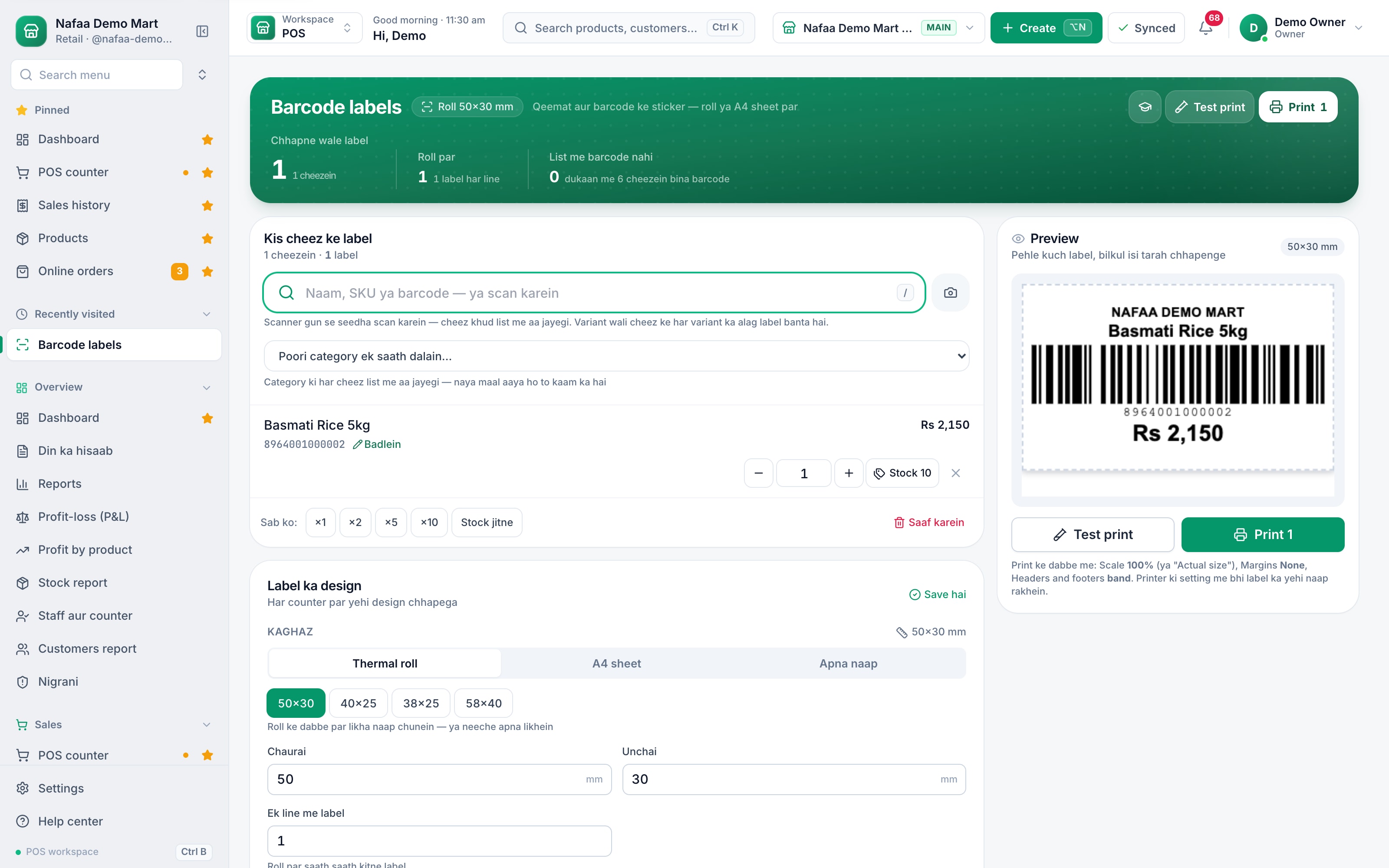
- Search or scan
- Whole category
- Label count
- Live preview
- Roll or A4
Questions
Which barcode type should I use?
Keep Code 128: every scanner reads it and it works with any code. If you choose EAN-13, only valid 13-digit codes print as EAN-13 and the rest fall back to Code 128.
Can I print the carton price on a carton label?
Yes. Add the pack unit to the list. If the pack has no price of its own, the label shows the piece price times the pack count.
Related
- Product
Inventory
Nafaa Inventory keeps stock right in every unit and every branch: products with cost, price and margin, barcodes and labels, combos, low-stock alerts, damage and adjustments with reasons, stock transfers between branches, and a full movement history. Import from Excel or paste from a spreadsheet, and change many prices at once in the bulk editor. - Tool
Barcode Generator
Make EAN-13 or Code 128 barcodes for your products and print them as a label sheet on A4, or download them as SVG for packaging. Check digits are worked out for you, in-store numbers can be filled in, and nothing you type leaves your browser. - Page
How to add a product in Nafaa
Add a new item to your shop in three short steps: name and category, cost and selling price, and the stock you have today. The product then shows on the POS counter, in search, on barcode labels and in every stock and profit report. - Page
How to sell in units and packs
Sell the same item loose and by the pack: dozen, box, carton or bori. Each pack gets its own rate and barcode, stock is always counted in the base unit, and scanning a carton barcode at the counter puts the carton on the bill. - Page
Set up receipts and a receipt printer
Connect a thermal receipt printer by USB, serial or Bluetooth, print a test bill, set 80 mm or 58 mm paper, choose what the receipt shows, and open the cash drawer automatically on cash sales.
Terms used here
Barcode
A barcode is a machine-readable pattern of bars or squares printed on a product or label that a scanner reads to identify the item.EAN-13
EAN-13 is the 13-digit barcode standard printed on most retail products sold outside North America, including in Pakistan.UPC (Universal Product Code)
UPC is the 12-digit barcode standard used mainly in the United States and Canada, readable by the same scanners as EAN-13.SKU (Stock Keeping Unit)
An SKU is a code for one exact product variant in stock, so each size, colour or pack size is counted separately.Thermal Receipt Printer
A thermal receipt printer prints bills on heat-sensitive paper rolls without ink, usually 58 mm or 80 mm wide.
Stop guessing your stock
Nafaa updates stock on every bill and purchase, and shows what to reorder and what has not sold. Try it free for 7 days.