Help center
How to sell in units and packs
Sell the same item loose and by the pack: dozen, box, carton or bori. Each pack gets its own rate and barcode, stock is always counted in the base unit, and scanning a carton barcode at the counter puts the carton on the bill.
Updated
Many shops sell one item in more than one way. A soap sells as a single piece and as a carton of 120; a drink sells as a bottle and as a box of 24. In Nafaa the product keeps one base unit (for example pcs), and each pack is a named multiple of it with its own price.
Stock is always counted in the base unit. When you sell one carton of 24, stock goes down by 24 pieces. When you buy 4 cartons, stock goes up by the right number of pieces.
You can add packs in two places: inside the product editor on the Qeemat step, or on the Multi-units page (Inventory → Multi-units), which is faster for many products.
Add a pack to a product
Step 1: Open Multi-units
In the sidebar under Inventory, open Multi-units. Every product is listed with one-tap buttons such as + Dozen and + Box.
Step 2: Add the pack
Tap a preset, or press + Pack to write your own. Enter the Naam (for example Carton) and how many base units it holds.
Step 3: Set rate and cost
Enter the pack’s Bechne ki qeemat (selling price) and cost. If the rate is left empty, Nafaa uses the loose rate times the quantity. A warning shows if the pack sells below cost.
Step 4: Add the pack barcode
Scan the barcode printed on the carton or box into Barcode, or let Nafaa make one with Barcode banayein. Scanning it at the counter adds the pack, not a single piece.
Step 5: Choose the default
Turn on POS par pehle ye if this pack should open first when the product is picked at the counter, for example cartons in a wholesale shop.
Step 6: Save
Press Pack jorein (add pack). It is available on the POS and in purchases right away.
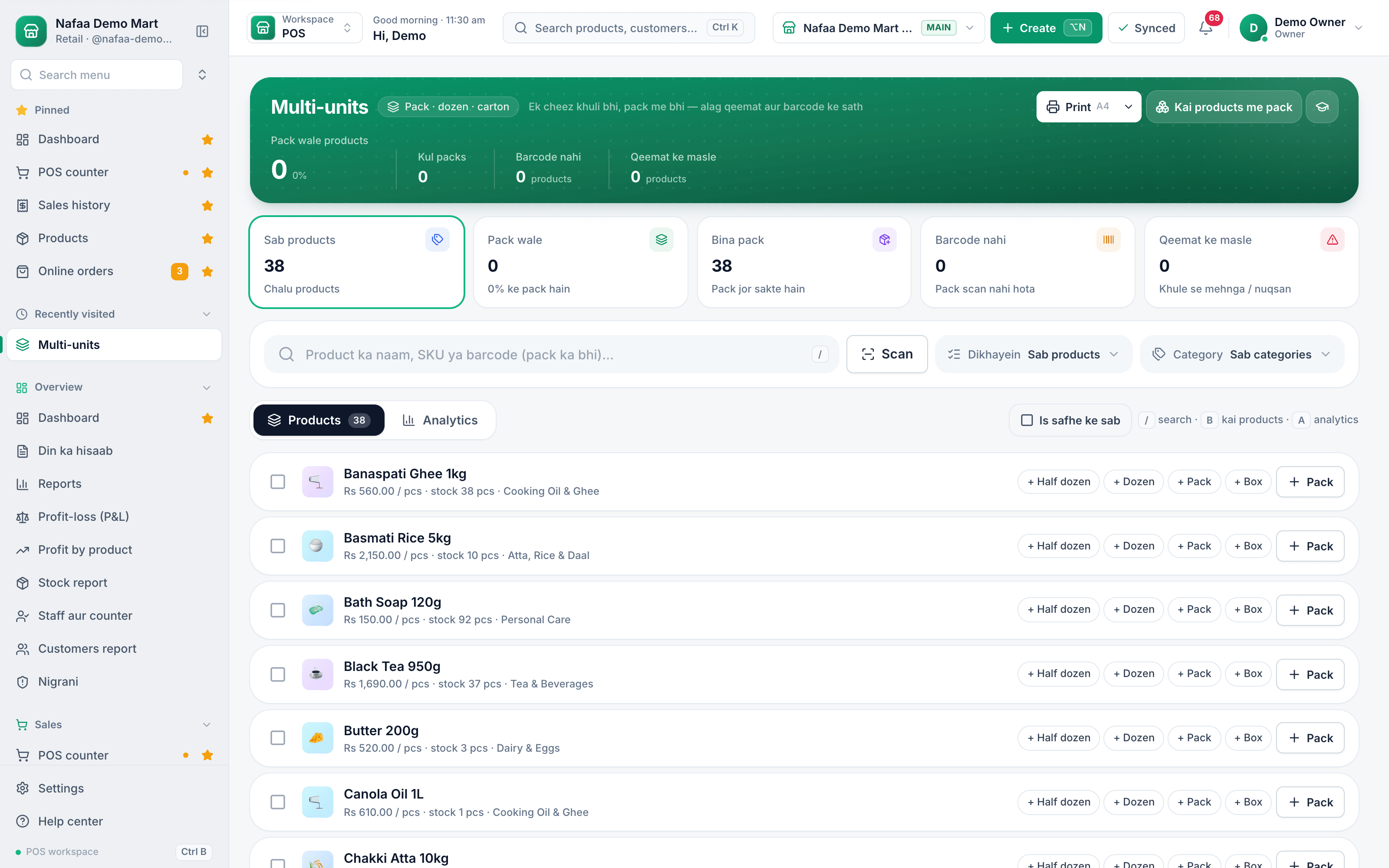
- One-tap presets
- Your own pack
- Tick to bulk add
- Same pack for many
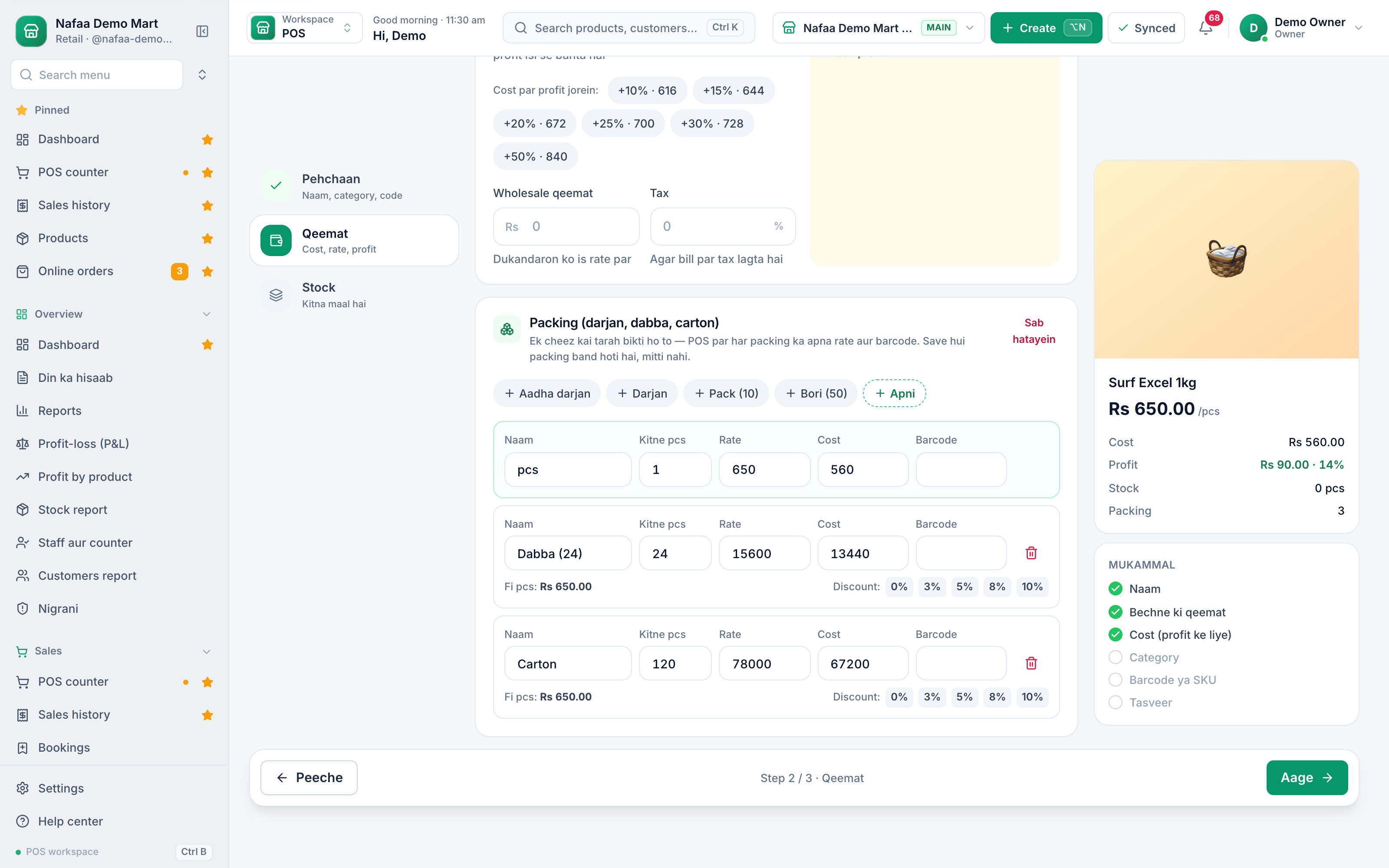
- Pack presets
- Pieces, rate, cost
- Pack barcode
- Price per piece
Questions
Does selling a pack change stock correctly?
Yes. Stock is kept in the base unit, so one carton of 24 reduces stock by 24 pieces.
Can I buy in cartons and sell loose?
Yes. Choose the carton unit on the purchase line. Stock goes up in pieces and the cost per piece is worked out from the carton price.
Related
- Product
Inventory
Nafaa Inventory keeps stock right in every unit and every branch: products with cost, price and margin, barcodes and labels, combos, low-stock alerts, damage and adjustments with reasons, stock transfers between branches, and a full movement history. Import from Excel or paste from a spreadsheet, and change many prices at once in the bulk editor. - Page
How to add a product in Nafaa
Add a new item to your shop in three short steps: name and category, cost and selling price, and the stock you have today. The product then shows on the POS counter, in search, on barcode labels and in every stock and profit report. - Page
How to print barcode labels
Give products a barcode and print price stickers on a thermal label roll or an A4 sticker sheet. Add items by search, scan or whole category, design the label once for the shop, test print one label, then print the full list. - Page
How to make purchase orders and receive goods
Order stock from a supplier, send the order on WhatsApp, and receive the goods when they arrive, in full or in part. Received goods go into stock at the right cost, the supplier’s balance updates, and a goods received note can be printed. - Solution
Wholesale
Nafaa for wholesalers and distributors handles trade the way it is done in Pakistan: carton and piece prices, a separate wholesale price, khata and credit limits for every trade customer, supplier accounts and purchase orders, stock across godowns and branches, A4 invoices and price lists you can send on WhatsApp.
Terms used here
Unit of Measure
A unit of measure is the unit in which a product is bought, stocked or sold, such as piece, dozen, carton, kg, litre or metre.Loose Sale
A loose sale is selling part of a pack, such as single tablets from a strip, single cigarettes or a few eggs from a tray, at a per-unit price.Wholesale Price
A wholesale price is the lower price charged to buyers who purchase in bulk or resell the goods, such as retailers, contractors or institutions.Barcode
A barcode is a machine-readable pattern of bars or squares printed on a product or label that a scanner reads to identify the item.
Stop guessing your stock
Nafaa updates stock on every bill and purchase, and shows what to reorder and what has not sold. Try it free for 7 days.