Help center
How to adjust stock and record damage
Correct stock by hand when it does not match the shelf: add stock, remove it, or record damaged and lost goods with a reason. Use a stock count to enter what you actually counted and let Nafaa post the difference.
Updated
Stock in Nafaa changes by itself with every sale, return and purchase. An adjustment is for everything else: breakage, expiry, theft, items taken for the shop’s own use, or a count that does not match the system.
Open Adjustments in the sidebar under Inventory (the page header reads Stock adjustments). Every adjustment keeps who made it, when, the reason and the value in rupees, so you can see later where stock went.
Make an adjustment
Step 1: Start a new adjustment
Press Naya adjustment or the N key.
Step 2: Add products
Type a name and press Enter, or scan barcodes. You can add several products to one adjustment.
Step 3: Choose what happened
For each line choose Barhayein (increase), Kam karein (decrease), Kharab (damaged) or Gum (lost), and enter the quantity.
Step 4: Write the reason
Wajah (reason) is required. Tap a quick reason such as "Ginti me kam nikla" or type your own. Add a Note if useful.
Step 5: Save
Press Save karein, or Ctrl + Enter. Stock changes at once and the line appears in the record.
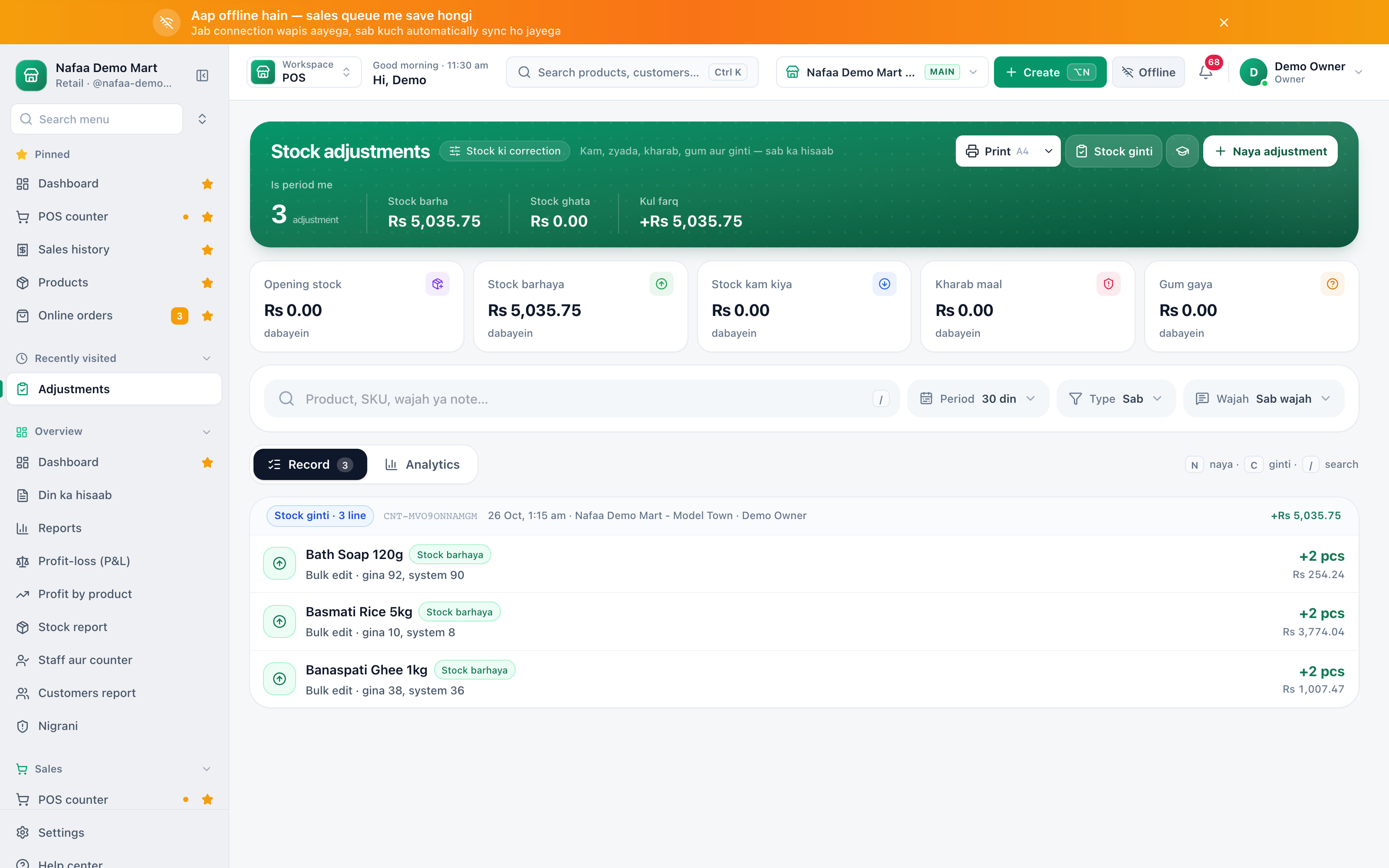
- New adjustment
- Count the shelf
- Value by type
- Each change, with reason
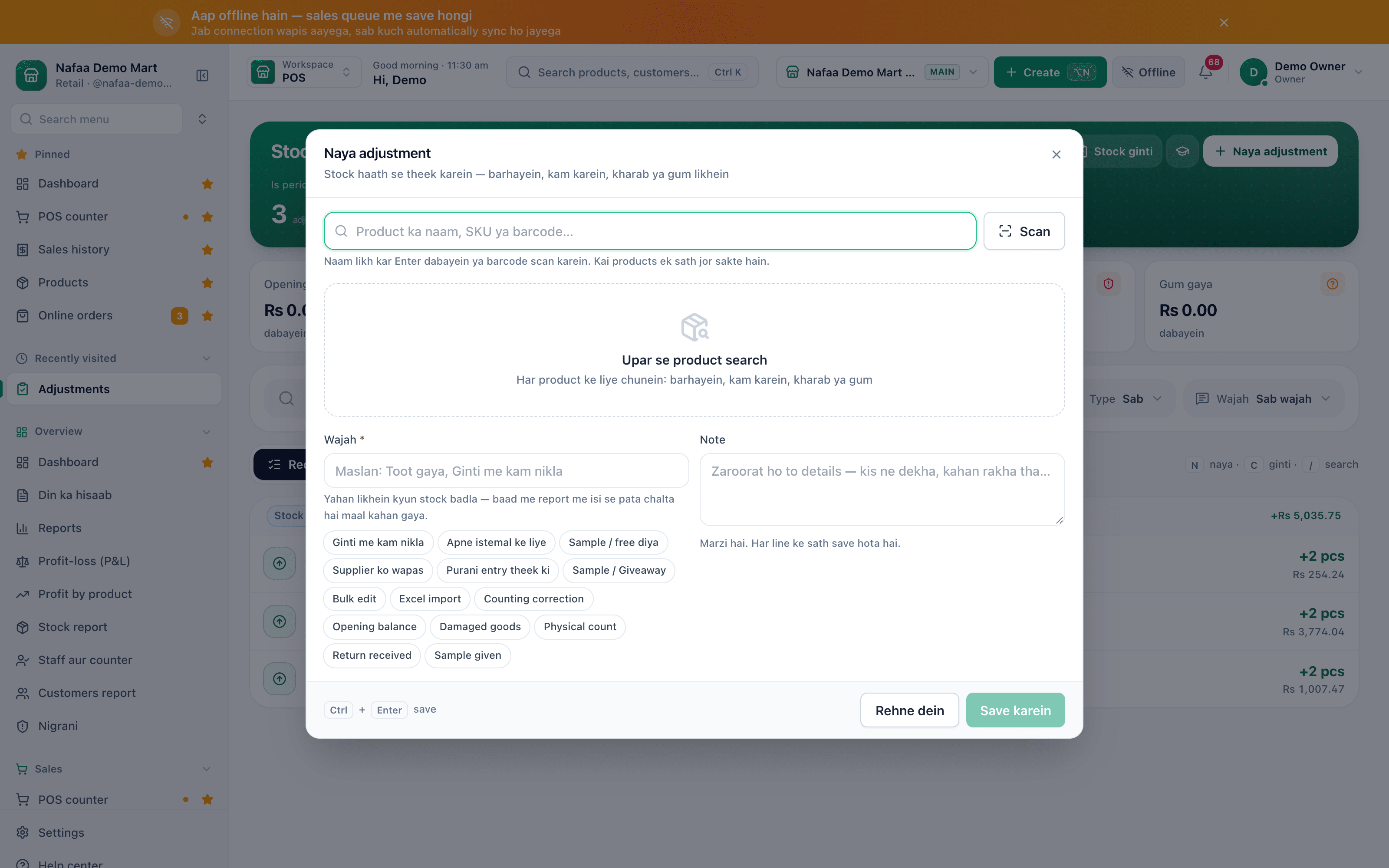
- Search or scan
- Reason is required
- Quick reasons
- Save
Questions
Can stock go below zero?
Only if Stock khatam hone par bhi bechein is turned on in Settings → Stock rules. Otherwise Nafaa stops an adjustment that would take stock below zero.
Where do damaged goods show in reports?
Damaged and lost lines are recorded as a loss with their cost value. The Analytics tab on Adjustments shows where stock went.
Related
- Product
Inventory
Nafaa Inventory keeps stock right in every unit and every branch: products with cost, price and margin, barcodes and labels, combos, low-stock alerts, damage and adjustments with reasons, stock transfers between branches, and a full movement history. Import from Excel or paste from a spreadsheet, and change many prices at once in the bulk editor. - Template
Stock Take Sheet (Excel, Printable)
A printable stock count sheet: product, SKU, unit, system stock and a box for the counted quantity. Type the counts back in and the sheet works out the difference and its value at cost, with a total for the shrinkage or gain. - Page
How to set low stock alerts and reorder
Set a low stock level on each product and see what is out, low, running out soon or near expiry in every branch. Nafaa works out how many days the stock will last and turns the list into purchase orders or a WhatsApp message to the supplier. - Page
How to edit many products at once
Change names, categories, prices, costs, barcodes, low stock levels and stock for many products in one spreadsheet. Only changed cells are saved, you see every change before saving, and stock changes are recorded as adjustments. - Page
How to transfer stock between branches
Send stock from one branch to another and receive it at the other end. Stock leaves the sending branch when you send, joins the receiving branch when it is received, and short deliveries are recorded with a note. Blog post
Festival and Season Planning for Shops in Pakistan, Beyond Ramadan
Eid ul Adha, 14 August, back-to-school, wedding season and winter each bring a different rush, and each needs its own stock, staff and cash plan about six weeks ahead. Start from what sold in the same weeks last year, arrange the cash before you order, and plan the clearance before the season ends.
Terms used here
Stock Adjustment
A stock adjustment is a manual correction to a product's stock quantity, with a reason, when the system figure does not match reality.Stock Take
A stock take is a physical count of the goods on the shelves and in the store, compared with what the system says should be there.Shrinkage
Shrinkage is stock that is lost without being sold, through theft, damage, spoilage, counting mistakes or supplier short deliveries.Wastage
Wastage is stock that is damaged, spoilt, expired or used up without being sold, and must be written off.
Get low-stock alerts before the shelf is empty
Set a reorder level per item, count stock and move it between branches. Start a 7-day free trial.