Help center
How to create your Nafaa account
Sign up for Nafaa in two short parts: name your business and pick its type, then add your name, email and password. Verify the email with a 6-digit code and the 7-day free trial starts, with no card needed.
Updated
Your Nafaa account holds the business, its branches, products, customers and staff. The person who signs up becomes the owner (Malik in the app) and can do everything; staff get their own logins later.
Sign-up has two parts on one page and takes a couple of minutes. The trial runs for 7 days and the sign-up page itself says no card is needed. You can also sign up with Google, in which case Nafaa only asks for the shop name after Google.
Create the account
Step 1: Open the sign-up page
Click Start free trial on this site. The page opens with the heading Apni dukaan banayein (create your shop).
Step 2: Name your business
Type it in Dukaan / business ka naam. This name prints on bills and receipts, and you can change it later in Settings.
Step 3: Pick your business type
Under Aap ka kaam kya hai? (what is your business?) choose the closest match, or search for it. Nafaa uses it to switch on the screens your trade needs, such as batches for a pharmacy or tables for a restaurant.
Step 4: Continue
Click Aage barhein (continue).
Step 5: Add the owner login
Fill in Aap ka naam, Email and Password (at least 8 characters). Mobile is optional. If someone gave you a referral code, click Referral code hai? and enter it.
Step 6: Create the account
Click Account banayein. Nafaa sends a 6-digit code to your email.
Step 7: Verify your email
Type or paste the code on the Email verify karein screen and click Verify karein. The code is valid for 10 minutes. You can also click Baad me verify karunga and verify later.
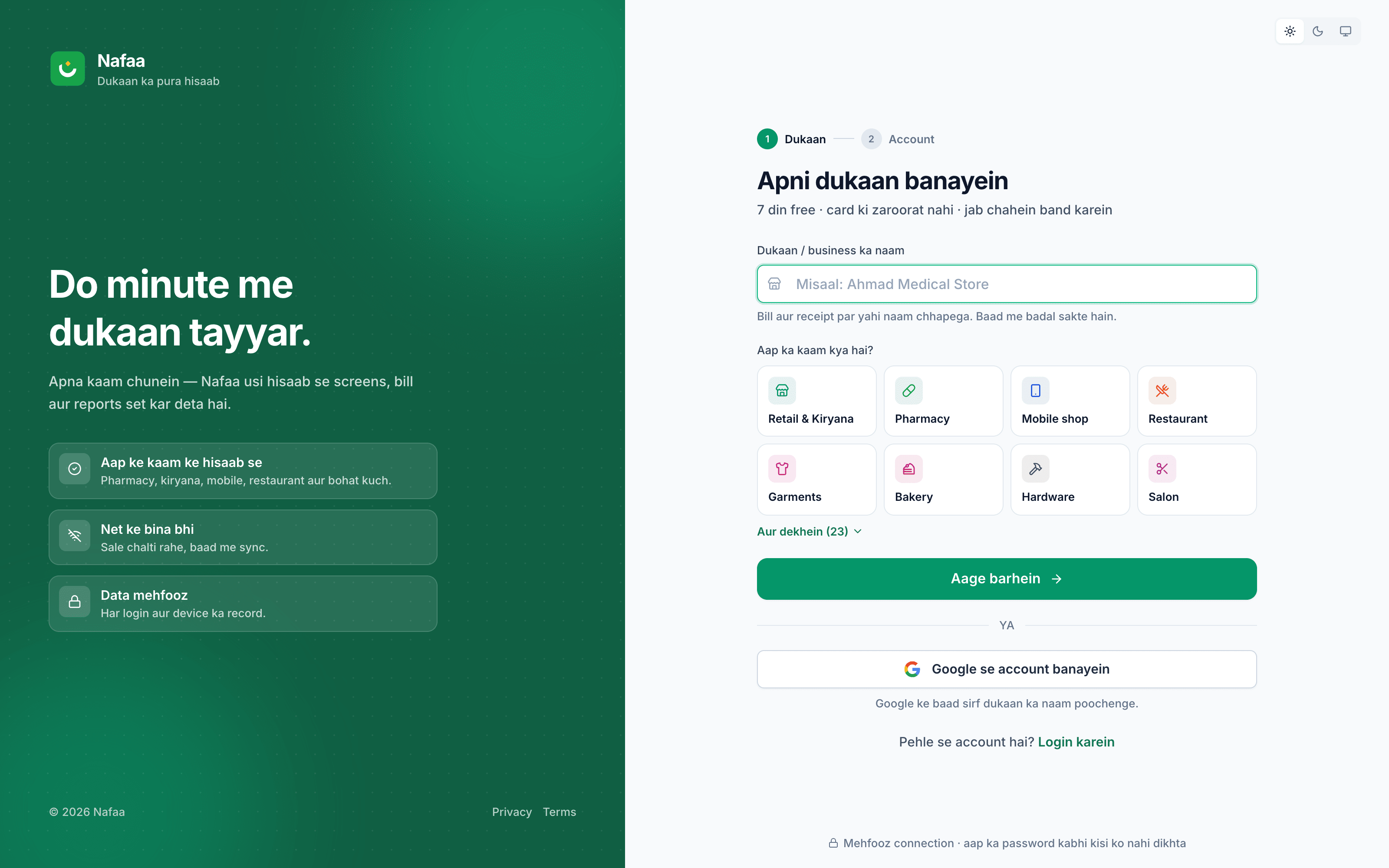
- Business name, printed on bills
- Pick the closest business type
- Continue to the owner login
- Or sign up with Google
Questions
Do I need a card to start the trial?
No. The sign-up page states that the 7-day trial needs no card. You choose a plan in Plan & billing when you want to continue.
I did not get the email code. What now?
Check the spam folder first. On the verify screen, click naya code mangwaein to send a new one once the short countdown ends.
Can I change the business type later?
Yes. Open Settings → Business type. The same page turns individual features on or off.
Related
- Product
POS
Nafaa POS is the billing counter for any business: scan a barcode or tap a quick key, sell by piece, dozen or carton, take cash, card, JazzCash, Easypaisa or khata in one bill, print or WhatsApp the receipt, and keep billing when the internet drops. It runs on the phone, tablet or computer you already have. - Page
How to set up your shop after sign-up
Finish the five-step shop setup: business details, first branch, first products, bill and payment settings, and staff. Only the first step is required. Everything else can be skipped and filled in later from Settings, where shop details save by themselves. - Page
How to add staff and give them a login
Add each person who works for you, then give a login to those who use the app. Pick a role (Manager, Cashier or Staff), lock the login to one branch if needed, adjust permissions, and print the login slip with the first password. - Page
Devices, login and counter hardware
Nafaa runs in the browser on a computer, tablet or phone. Learn how to log in and keep a device remembered, connect a receipt printer, cash drawer, barcode scanner, scale or customer screen on each counter, and log out a lost device. - Page
Pricing
Nafaa pricing in Pakistani rupees: start with the 7-day free trial, then choose a plan by the number of products, users, shops and monthly sales you need. Paid plans start at Rs 1,500 a month, quarterly and yearly payment cost less, and no card is needed to start. - Changelog entry
Shorter sign-up and five-step onboarding
Sign-up now asks for the business type up front, and onboarding went from eight steps to five, with only the business step required.
Make bills faster at your counter
Scan or search, hold a bill, split the payment and print a receipt, even when the internet drops. 7-day free trial.