Help center
How to read the daily sales report
Din ka hisaab is Nafaa’s day report: net sale, money received, profit, the galla, discounts, returns, udhaar and expenses for one day, with tabs for items, staff and checks. Learn how to open any day, read it and share or print it.
Updated
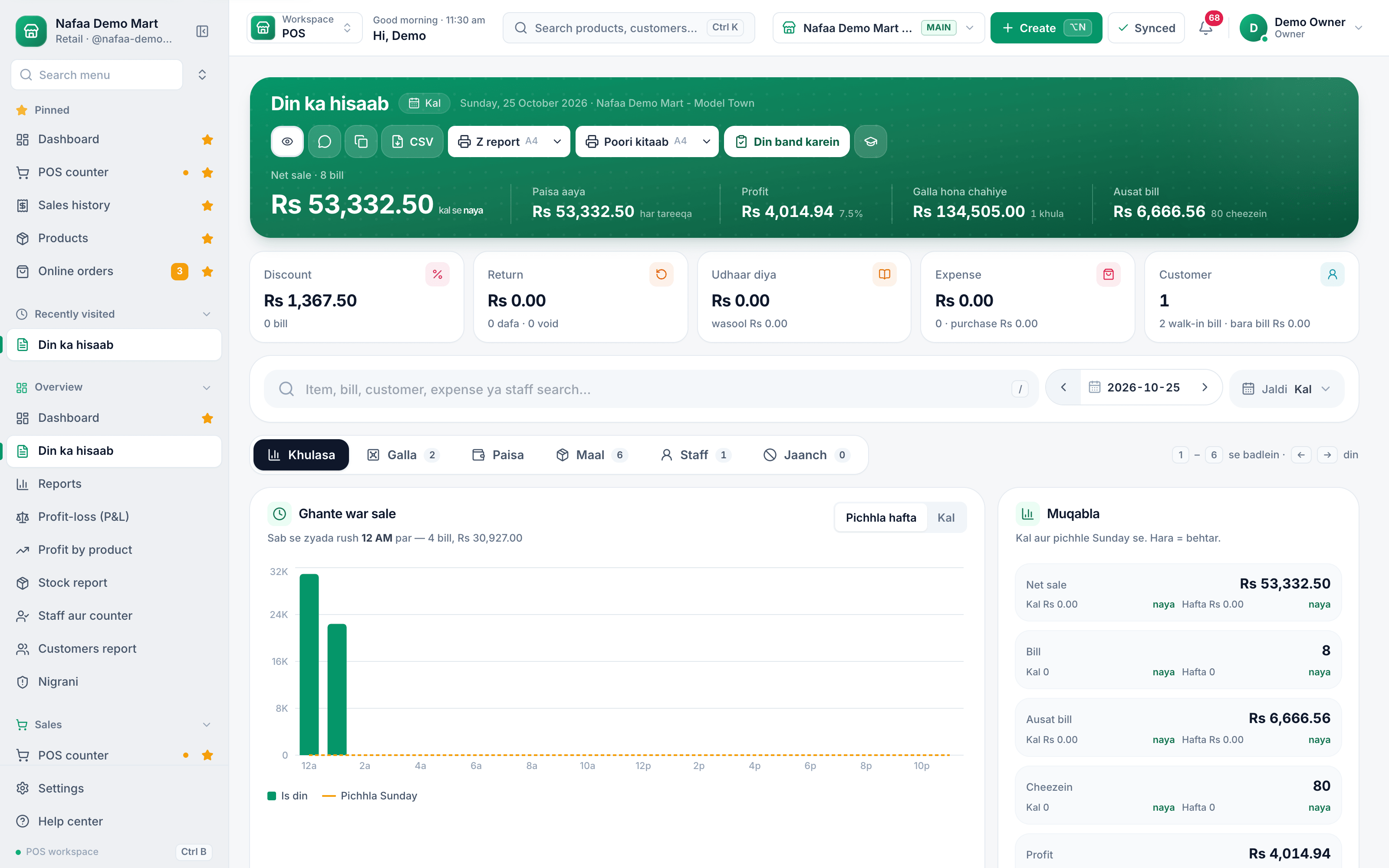
The day report in Nafaa is called Din ka hisaab (the day’s account). It puts everything that happened in one day on one page: sales, money received by each method, profit, the cash drawer, udhaar given and collected, expenses and purchases. Today’s report updates live while the shop is open.
Open it from the sidebar under Overview → Din ka hisaab.
Open and read a day
Step 1: Pick the day
Today opens first. Use the arrows or the ← and → keys for the previous or next day, click the date to choose any day, or use Jaldi (quick) for Aaj, Kal or Pichhle hafte ka yehi din (same day last week). Owners can also filter by Branch.
Step 2: Read the top line
Net sale is the bill amount minus that day’s returns; void bills are not counted. Paisa aaya is money received by every method, Profit is gross profit, and the galla figure shows what the drawer should hold or how far the count was off.
Step 3: Check the boxes below
Discount, Return, Udhaar diya (udhaar given, with the amount collected), Expense (with purchases) and Customer. Click a box to jump to the tab with the details.
Step 4: Use the tabs
Khulasa (summary) shows sales by hour and compares the day with yesterday and the same weekday last week. Galla shows each register, Paisa money in and out, Maal the items sold, Staff each person’s bills, and Jaanch (checks) the voids, returns and discounts with who did them.
Step 5: Share or print
Use the WhatsApp icon to share the summary, the copy icon to paste it anywhere, CSV for the item list, Z report for a short closing slip and Poori kitaab (full book) for the whole day on A4 or PDF.
Step 6: Close the day
Click Din band karein (close the day), go through the checklist, then print the Z report.
- Share, copy, CSV
- Z report
- Din band karein
- Pick the day
- Tabs
Questions
What is the difference between net sale and money received?
Net sale is the value of the day’s bills minus returns. Money received (Paisa aaya) is what actually came in by any method, including udhaar collected. A credit sale adds to net sale but not to money received.
Where are the other reports?
The sidebar under Overview has Reports, Profit-loss (P&L), Profit by product, Stock report, Staff aur counter and Customers report.
Related
- Product
Reports
Nafaa Reports answer the owner's questions in plain numbers: today's sale and profit on the dashboard, profit by product, profit and loss with expenses, the day book, stock value, staff and customer reports, with Excel export and journals for QuickBooks, Xero, Zoho Books or Tally. - Page
How to see your profit
See profit in Nafaa two ways: Profit by product shows what each item earned after its cost, and Profit-loss (P&L) shows the whole business after expenses and stock losses. Learn how each figure is worked out and how to find items that lose money. - Page
How to close the cash drawer
Close the galla at the end of a shift in Nafaa’s Cash register: count the cash, compare it with what the system expects, give a reason for any difference, and print the Z-report. Also covers opening a shift and recording cash in or out. - Page
Process a return and the refund PIN
Take goods back on an earlier bill, choose what goes back on the shelf and what is written off, refund in cash, wallet, bank or card, and understand when the owner’s PIN is asked for. The refund PIN is on by default. - Template
Daily Cash (Galla) Closing Sheet
A one-page galla closing sheet: opening cash, cash sales and other cash in, less expenses, supplier payments, refunds and withdrawals, gives the cash that should be in the drawer. Count the notes, and the sheet shows whether the galla is over or short. A month log tracks the pattern.
Terms used here
Day Book
A day book is the daily record of every transaction in a business, in the order they happened: sales, receipts, payments and expenses.Z-Report
A Z-report is the end-of-shift or end-of-day summary that totals the sales, payments, returns and cash for a till and closes it.Gross Profit
Gross profit is sales minus the cost of the goods sold, before rent, salaries, bills and other expenses are taken off.Galla
A galla is the cash box or drawer at a shop counter where the day's cash sales are kept and change is given from.
Close the day and know the numbers
Day report, cash closing and profit by product from the same bills your counter makes. Try it free for 7 days.