Help center
How to add a customer
Add a customer in Nafaa from the Customers page or straight from the POS counter. Only the name is required; a phone number lets you send bills and udhaar reminders on WhatsApp. This article covers the quick add, the full form and the counter shortcut.
Updated
Every udhaar sale, loyalty point and WhatsApp bill in Nafaa belongs to a customer record. You can create one in three places: the quick Naya (new) button on the Customers page, the full customer form, or the POS counter while you are making a bill.
Only the name is required. Add the phone number whenever you can: Nafaa uses it to send the bill and udhaar reminders on WhatsApp, and to warn you when the same person is being added twice.
Add a customer from the Customers page
Step 1: Open Customers
In the sidebar, open Customers → Customers. The page lists every customer with what they bought and what they owe.
Step 2: Quick add or full form
Click Naya for a short form with Naam, Phone and a VIP customer switch, then Jor dein (add). For all the details, click the person icon next to it to open the Naya customer page.
Step 3: Fill in the name and phone
On the full form, Poora naam (full name) is the only required field. Type the WhatsApp number in Phone. If the number already belongs to someone, the form shows that customer so you can open their khata instead of making a copy.
Step 4: Add the optional details
Fill what you need: Email for A4 bills, Jins (gender) so messages say bhai or baji correctly, the address under Pata, CNIC and NTN under Pehchan, a birthday for greetings, and an internal Note.
Step 5: Set the udhaar limit
Under Udhaar, type a limit in Udhaar ki limit (Rs) or leave it empty to use the shop’s default. See credit limits.
Step 6: Save
Click Customer jorein or press Ctrl + S. Use Save + naya (Ctrl + Shift + S) when you are entering several customers in a row.
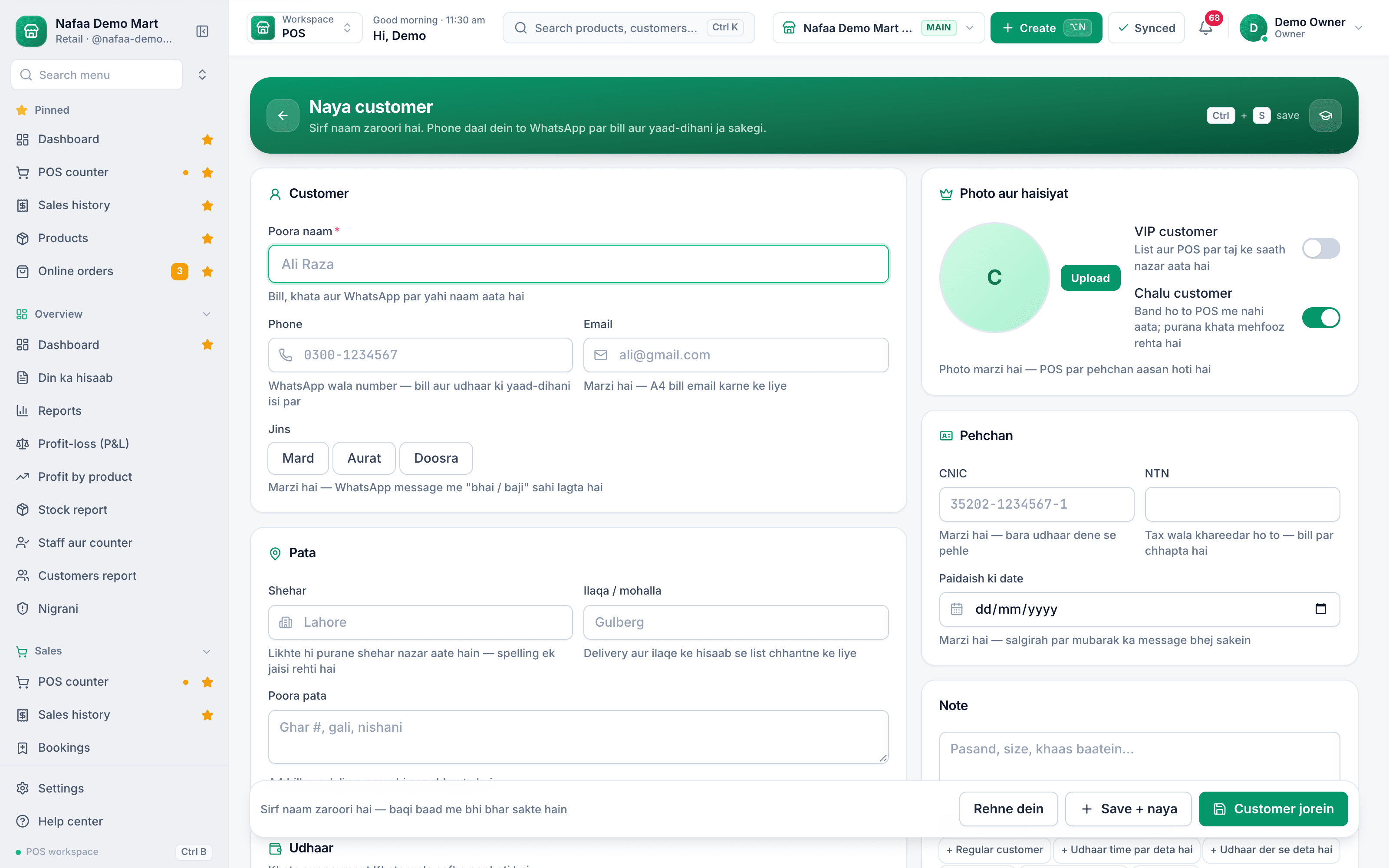
- Poora naam (required)
- WhatsApp number
- Chalu customer switch
- Customer jorein (Ctrl + S)
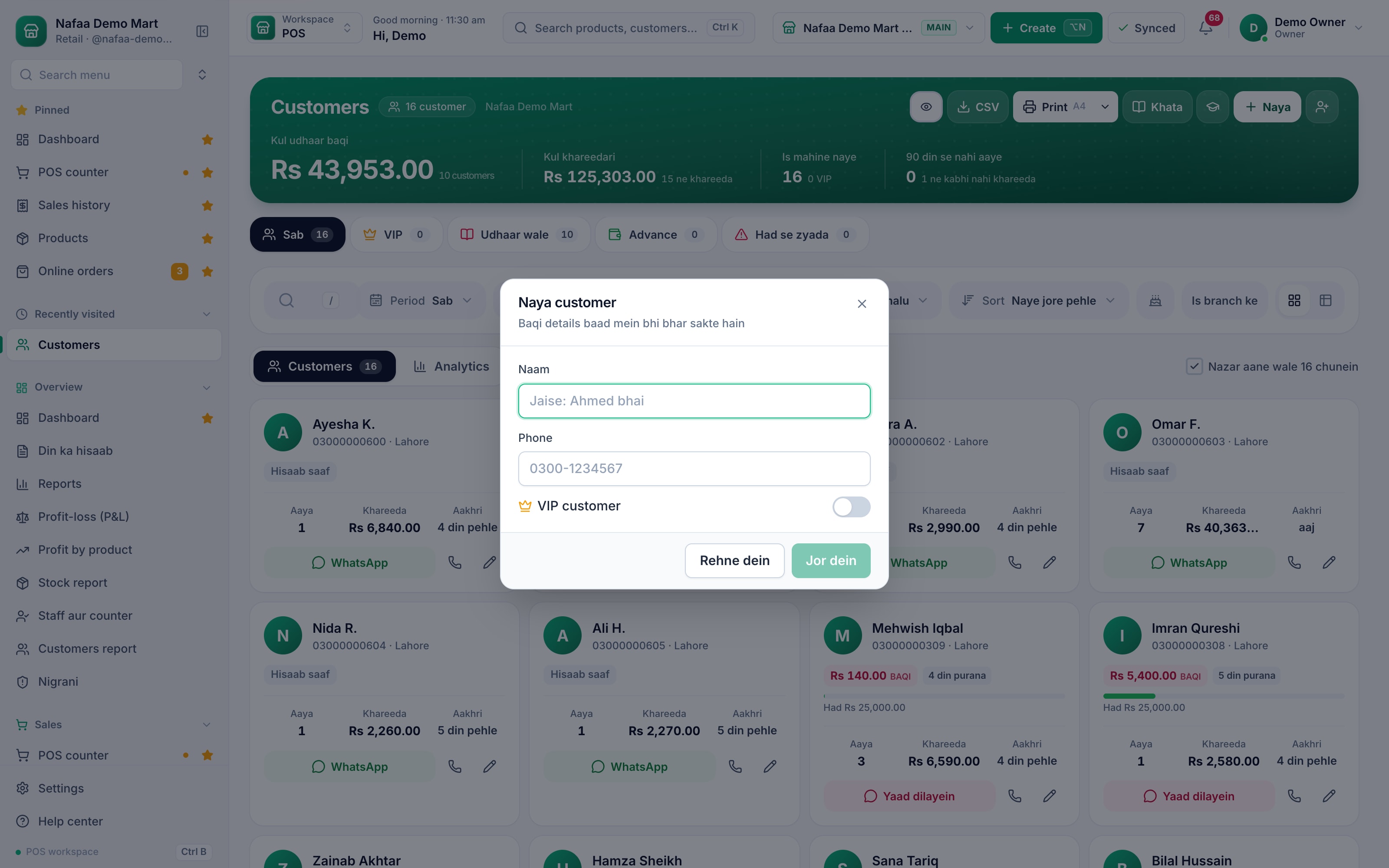
- Naya (quick add)
- Naam
- Phone
- Jor dein
Questions
Is a phone number required to add a customer?
No. Only the name is required. Without a phone number you cannot send the bill or an udhaar reminder on WhatsApp, and Nafaa cannot warn you about duplicates by number.
What happens if I add the same customer twice?
When you type a phone number that already exists, the form shows the existing customer with a link to open them, so their khata stays in one place.
Can I delete a customer who owes money?
A customer with sales or khata entries is not erased. Deleting closes the record, and the old bills and khata remain available.
Related
- Product
Khata
Nafaa Digital Khata replaces the paper udhaar register: every credit sale lands in the customer's khata from the counter, payments and old balances are recorded, balances are grouped by age, credit limits stop runaway udhaar, and a WhatsApp reminder goes out in one tap. - Page
How to sell on udhaar (credit)
Make a credit sale at the Nafaa POS counter: pick the customer, then put the whole bill or the unpaid part in their khata. The customer’s old balance shows on the bill, and the credit limit is checked before the bill is saved. - Page
How to add an opening balance (old khata)
Move udhaar from your paper register into Nafaa with Purana khata. The old amount is added to the customer’s khata without a bill, shows up in the total you are owed, and is collected like any other udhaar. - Page
How to set a credit limit
Set how much udhaar a customer can take. Nafaa has a default limit for new customers and a limit on each customer, checks it at the counter before a credit bill is saved, and lists everyone who has gone over it. - Page
How to set up loyalty points
Turn on loyalty points so named customers earn points on every bill, set how many points a rupee earns and what a point is worth, let customers spend points at the counter, and add or remove points by hand with a reason. - Glossary term
Credit Sale
A credit sale is a sale where the customer takes the goods now and pays later, so the amount is recorded as money owed to the shop.
Keep your udhaar in a digital khata
Each customer gets a balance, credit limit and WhatsApp reminder, and every payment is on record. 7-day free trial.