Updated
ProductReports
Know your real profit, every single day
Not just sales. Nafaa subtracts cost and expenses so you see what you actually earned, which products carry the shop, and where the cash went, in English or Roman Urdu.
- Profit after cost
- Day book
- Excel export
- 7 din Free Trial
- Keeps billing offline
- Help on WhatsApp
- English and Roman Urdu
- Phone, tablet or computer
Short answer
Nafaa Reports answer the owner's questions in plain numbers: today's sale and profit on the dashboard, profit by product, profit and loss with expenses, the day book, stock value, staff and customer reports, with Excel export and journals for QuickBooks, Xero, Zoho Books or Tally.
Roman Urdu mein
Nafaa sirf bikri nahi, asal munafa batata hai: cost aur kharche nikal kar. Kaun si cheez kitna kama rahi hai, galle me kitna hai, aur poora P&L, sab ek jagah.
Key facts
- Dashboard
- Today's sale, profit, cash in the drawer, online sales and udhaar
- Profit
- By product and as a full P&L with expenses
- Daily close
- Day book of cash in and out, with a closing summary sent to you
- Every report
- Any period, compared with the one before; A4, PDF or thermal print and CSV
- Export
- Excel, PDF, and journals for QuickBooks, Xero, Zoho Books or Tally
Inside the app
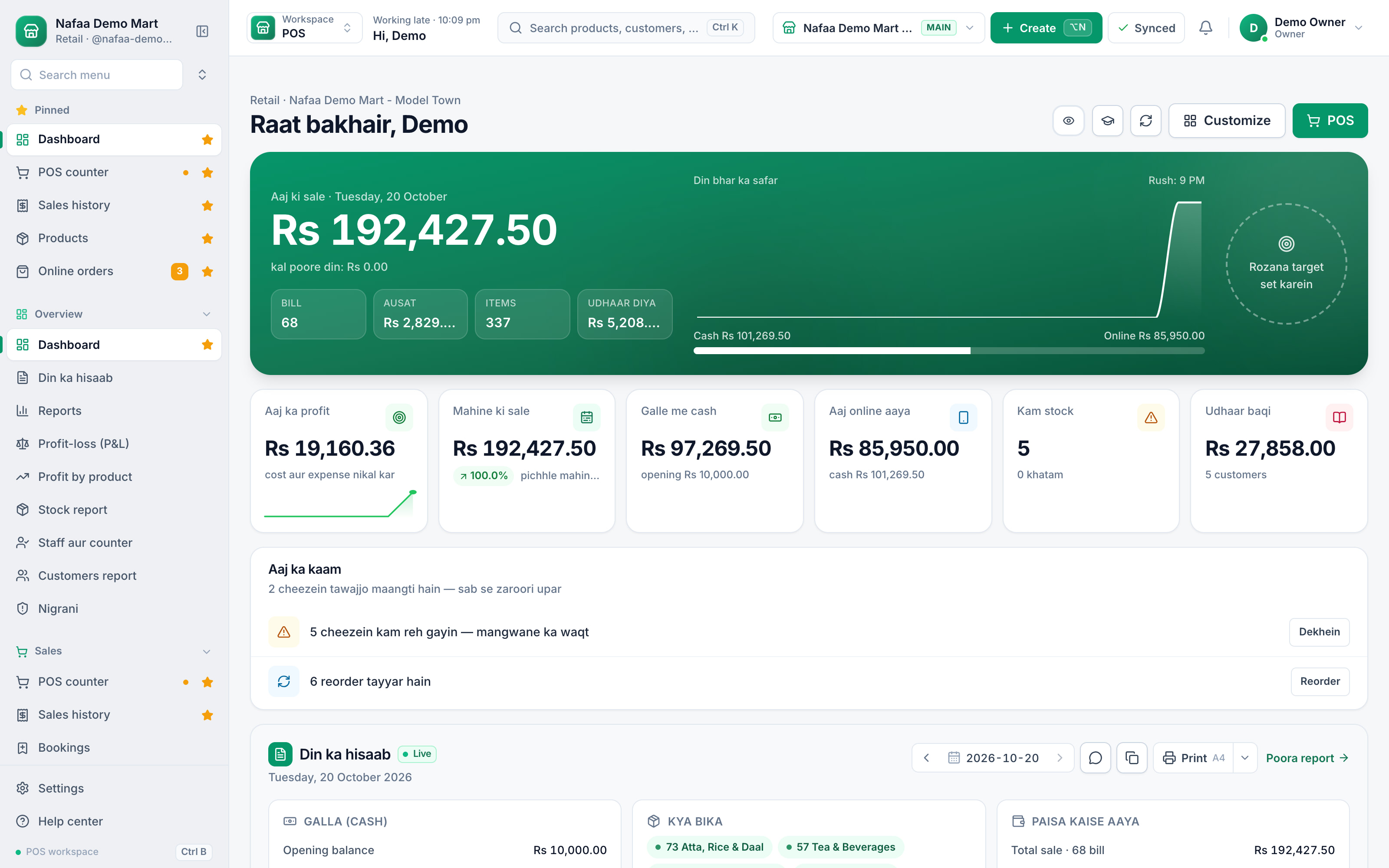
The whole day on one screen
Today's sale with bills, average bill and udhaar given, the day's path from morning to the rush hour, profit after cost and expenses, cash in the drawer, online sale, low stock and udhaar still to collect. Below it, a short list of what needs you today and the live day book.
- Today's sale
- Profit after cost and expenses
- Cash in the drawer
- Udhaar to collect
- What needs you today
Every report from the same data
Features
Reports owners actually open
Profit by product
Sale, cost, profit and margin for every item, and by category, brand, supplier, staff or day.
Profit and loss
Net sale, gross profit, expenses and net profit for any period, month by month and branch by branch.
Day book
Opening cash, every payment method, drawers, expenses, purchases and khata for one day, printable as a Z report.
Stock report
Stock at cost and sale price by category and branch, with dead, slow and near-expiry items.
Staff and customers
Sales, discounts, voids and drawer results per person; new and returning customers, top buyers and udhaar ageing.
Export and accounting
Excel and PDF, plus daily journals to QuickBooks, Xero or Zoho Books, or a Tally export.
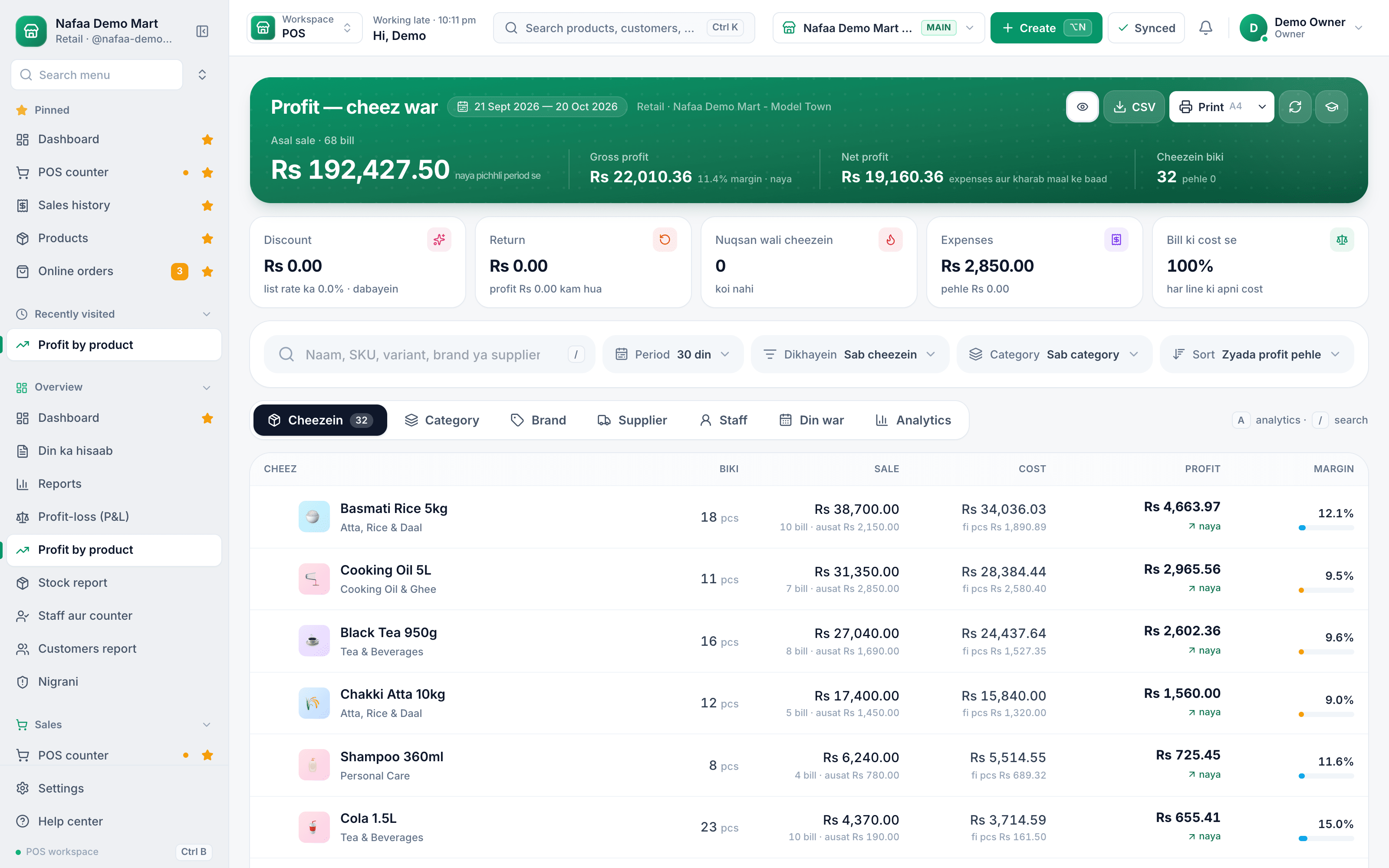
Which products really make money
Profit by product sorts your catalogue by what it earns, not what it sells. Each line shows quantity, sale, cost per piece, profit and margin, and the tabs regroup the same figures by category, brand, supplier, staff or day.
- Net profit after expenses
- By category, brand, supplier, staff
- Profit per item
- Margin
From one sale to every report
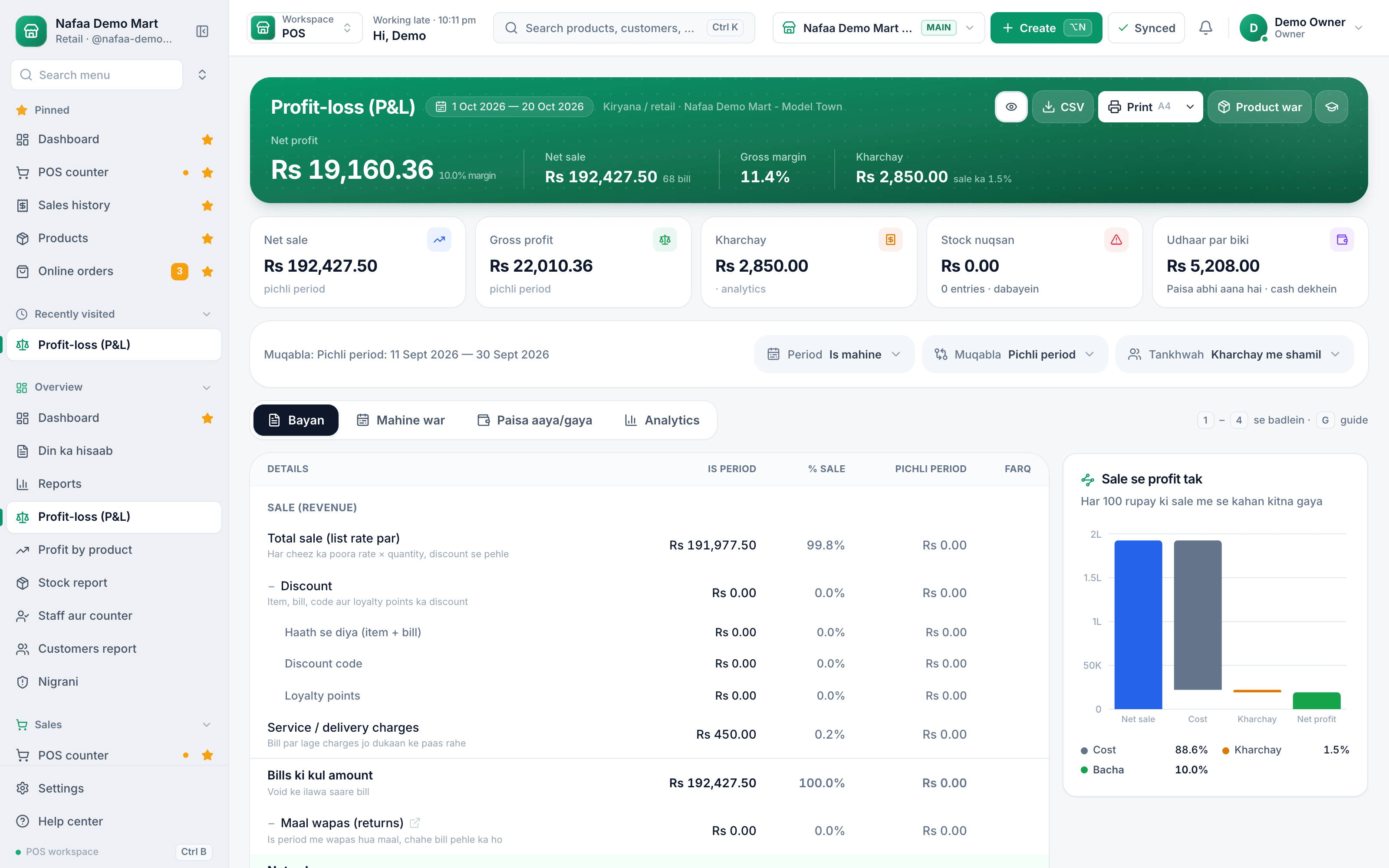
A P&L your accountant will accept
Net sale, cost of goods, gross profit, expenses and net profit, for a day, a month or a year, against the previous period or the same dates last year. Print it on A4 or download it as CSV.
The question, and the report that answers it
| Feature | Open this report | What you will see |
|---|---|---|
| How much did I really earn this month? | Profit and loss | Net sale less cost of goods and expenses, against last month |
| Which items should I stop stocking? | Profit by product, and the stock report | Low-margin items, and stock that has not moved for weeks |
| Does the cash in the drawer match the sales? | Day book and cash register | Expected cash per drawer, the count, and any short or over |
| Which cashier gives the most discounts or voids? | Staff report and Nigrani (audit) | Discounts, voids, refunds and PIN use per person |
| Who owes me the most, and since when? | Customers report | Udhaar by age and what was collected |
| Which branch is slipping? | Branch analytics | Sales and profit per branch against the last period |
A closing summary without asking
At the time you choose, Nafaa sends the day's closing summary as an app notification: sale, profit, cash, udhaar given and collected, and the lines you picked. Tap "WhatsApp" and it opens in your WhatsApp ready to forward to a partner. You also decide which money figures staff may see, so a cashier can run the counter without seeing your profit.
Who it is for
Owners who close the shop and still do not know what they earned that day. A kiryana owner reading today's profit after cost, a restaurant comparing outlets, a pharmacy checking near-expiry stock value, or a wholesaler sending month-end journals to an accountant. Reports work the same in every industry, and each industry adds its own tab where it needs one.
Common questions
Can I export reports to Excel or my accountant's software?
Yes. Reports export to Excel and print as PDF, so you can share them with a partner or keep them for your records. Businesses with an accountant can also send each day's sales, returns, expenses and payments as a journal to QuickBooks, Xero or Zoho Books, or export them for Tally.
How much does Nafaa cost?
Paid plans start at Rs 1,500 a month. The pricing page lists every plan with its price and limits, taken straight from our plan settings, so it is always current. You can start with the free trial first, and no credit card is needed to sign up.
Do I need a computer to use Nafaa?
No. Nafaa runs in a web browser, so the phone, tablet or computer you already have will do. A barcode scanner and a receipt printer can be added later but are not required to start. The counter also keeps working without internet and sends the sales to your account when the connection returns.
Industries using it
Kiryana & Grocery Store
Nafaa is POS and khata software for kiryana and grocery stores in Pakistan. Scan barcodes at the counter, sell by piece, dozen or carton, keep every customer's udhaar in a digital khata with WhatsApp reminders, import products from Excel, and keep billing when the internet drops.General Retail Shop
Nafaa works for any shop that does not fit a specific industry: a fast counter with quick keys and barcodes, combos, stock with low-stock and damage records, bulk import from Excel, a digital khata for udhaar, and reports on sales and profit, all in one app.Restaurant & Cafe
Nafaa runs dine-in, takeaway and delivery for restaurants and cafes: a table layout, kitchen order tickets (KOT) sent to each station's printer or screen, add-ons on dishes, recipes, riders for delivery, happy-hour prices, and bills paid by cash, card, wallet, split or khata.Pharmacy & Medical Store
Nafaa is software for pharmacies and medical stores in Pakistan: search medicines by salt or formula and find substitutes, track batches and expiry, keep prescriptions and doctors, record controlled and narcotic sales in a register with patient and doctor details, and log fridge temperatures for the cold chain.Hardware & Building Materials
Nafaa runs hardware and building material shops: items by size and shade, retail, contractor and bulk rates, quotations that turn into bills, delivery challans, contractor sites with their own khata, brands, and reorder rules that flag what to buy before it runs out.Bakery & Sweets
Nafaa runs bakeries and sweet shops: take custom cake orders with an advance, plan the day's baking, keep raw materials with their cost, see each recipe's live cost, track freshness and waste, and manage wedding and event bulk orders, alongside the normal counter, stock and khata.
Related
Enterprise
Nafaa for enterprises connects many branches, teams and systems: permissions per person and branch, audit and activity logs, the Nafaa API and webhooks, daily accounting journals to QuickBooks, Xero or Zoho Books, owner-only backups, and custom modules and data migration from our own team.How to Read a Profit and Loss Report for Your Shop
A profit and loss report starts with what you sold, takes off discounts, returns and the cost of the goods, then takes off running expenses and stock losses to show what the shop really earned. This guide explains each line with a worked example and gives a monthly routine for reading it.A Daily Cash Closing Routine for Shops
Closing the day properly means starting from a counted float, recording every rupee that goes in or out of the galla, counting the drawer note by note, and comparing it with the cash that should be there. This guide gives the full routine, a worked example, and how to check wallet, bank and card payments before you lock up.Day Book
A day book is the daily record of every transaction in a business, in the order they happened: sales, receipts, payments and expenses.Reports and cash
Read the day’s sales, see profit by product and for the whole business, and close the cash drawer at the end of the day with the expected amount and the difference.
More from Nafaa
Multi-Branch
Nafaa Multi-Branch runs every shop, warehouse or godown from one account: each branch keeps its own counter, stock and cash, head office compares sales and profit side by side, stock moves between branches with transfers that the other side receives, and each staff member works in the branch they are assigned to.AI Business Assistant
The Nafaa AI business assistant answers questions about your own sales, stock and khata in plain English or Roman Urdu. Ask in your own words and get a short answer from your Nafaa data, with the numbers behind it. It only reads the business data your account is allowed to see.POS & Billing
Nafaa POS is the billing counter for any business: scan a barcode or tap a quick key, sell by piece, dozen or carton, take cash, card, JazzCash, Easypaisa or khata in one bill, print or WhatsApp the receipt, and keep billing when the internet drops. It runs on the phone, tablet or computer you already have.Inventory
Nafaa Inventory keeps stock right in every unit and every branch: products with cost, price and margin, barcodes and labels, combos, low-stock alerts, damage and adjustments with reasons, stock transfers between branches, and a full movement history. Import from Excel or paste from a spreadsheet, and change many prices at once in the bulk editor.Digital Khata
Nafaa Digital Khata replaces the paper udhaar register: every credit sale lands in the customer's khata from the counter, payments and old balances are recorded, balances are grouped by age, credit limits stop runaway udhaar, and a WhatsApp reminder goes out in one tap.FBR & PRA Invoicing
Nafaa is an FBR & PRA approved POS integrator. Every sale can be reported to FBR, PRA, SRB or KPRA from the counter, the fiscal invoice number and QR code print on the receipt, failed invoices retry by themselves, and tax reports are ready for your return.
See today's real profit tonight
Start the free trial and your dashboard fills itself from the first bill.
- 7 din Free Trial
- Keeps billing offline
- Help on WhatsApp