Help center
How to close the cash drawer
Close the galla at the end of a shift in Nafaa’s Cash register: count the cash, compare it with what the system expects, give a reason for any difference, and print the Z-report. Also covers opening a shift and recording cash in or out.
Updated
Nafaa tracks the galla (cash drawer) in shifts. You open a shift with the cash already in the drawer, Nafaa adds every cash sale and khata payment and takes off cash out and cash purchases, and at closing you count the drawer. Nafaa shows what should be there, what you counted and the difference.
Open it from the sidebar under Sales → Cash register. Card, wallet, bank and udhaar sales are not part of the galla; they are listed below the till for reference.
Open, run and close a shift
Step 1: Open the shift
At the start of the day, click Shift kholein (open shift) or press O. Enter the cash in the drawer under Galle me cash (opening float), or choose Note gin kar to count it note by note, then click Shift kholein.
Step 2: Record cash in and out
When you add change or take money out for something, use Cash in (I) or Cash out (U) on the till and write the Wajah (reason). Sales and cash khata payments are added by themselves.
Step 3: Start closing
At the end of the shift, click Shift band karein (close shift) or press C.
Step 4: Count the drawer
Count the cash before you look at the expected figure. Choose Note gin kar and enter how many of each note and coin, or Kul amount and type the total in Galle me gina hua cash.
Step 5: Check the difference
The top of the form shows Hona chahiye (should be), Gina (counted) and the difference. If the cash is short or over, Farak ki wajah (reason for the difference) is required.
Step 6: Close and print
Click Shift band karein. Nafaa tells you whether the galla matched or how much was short or over. Open the shift from Shifts record to print its Z-report on A4, PDF or a thermal printer.
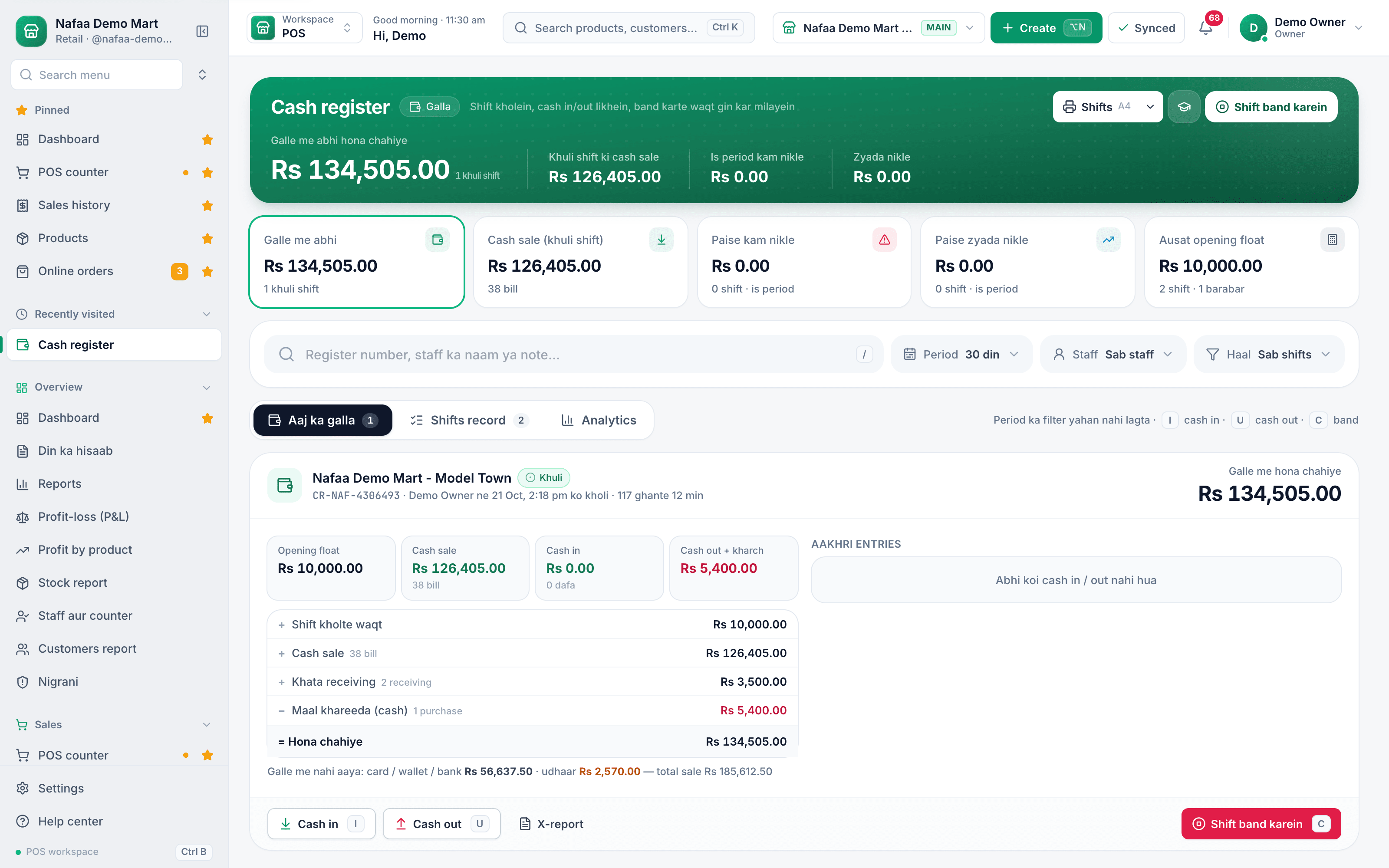
- Should be in the galla
- How it is worked out
- Cash in / Cash out
- Shift band karein (C)
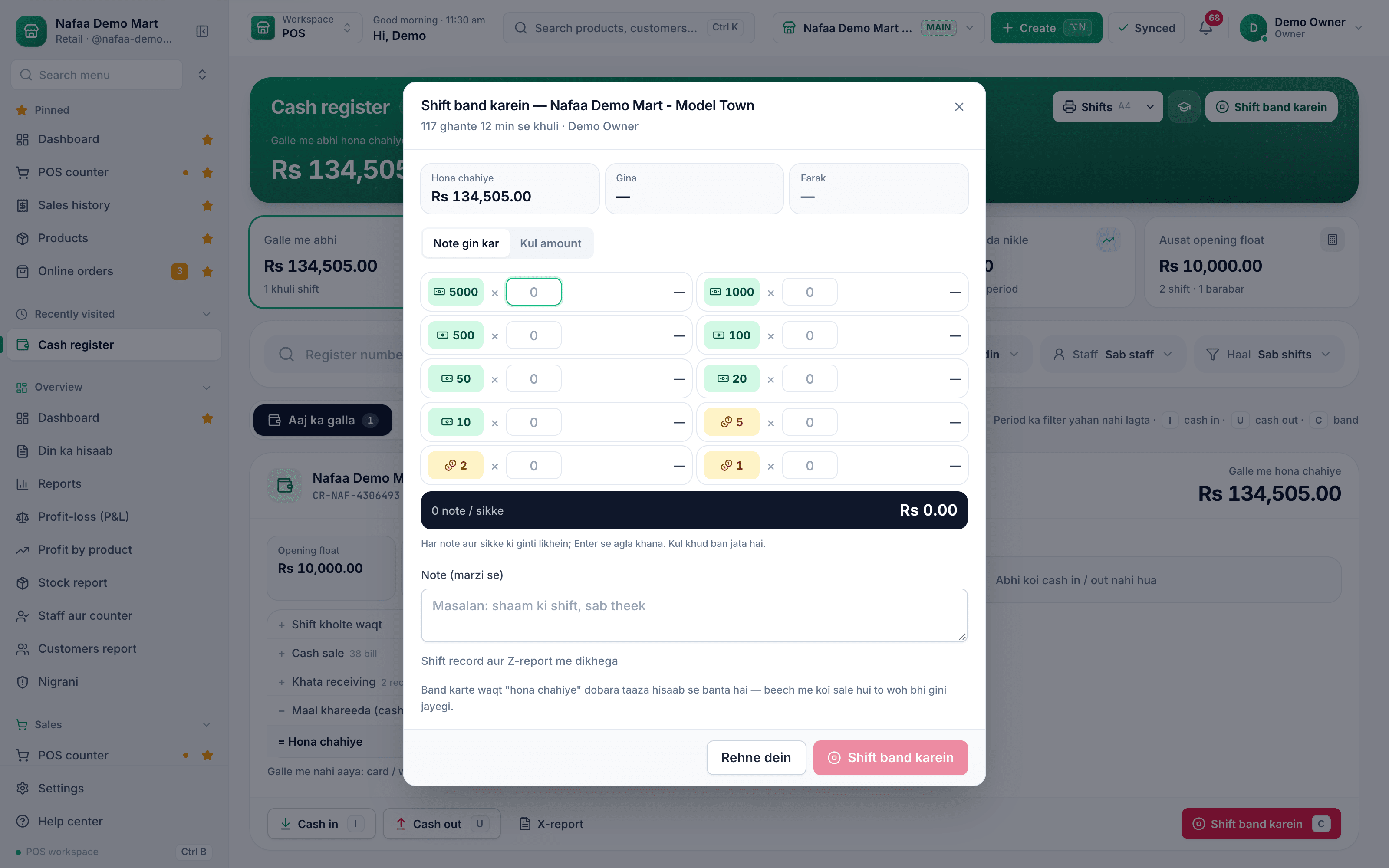
- Hona chahiye
- Farak
- Note gin kar / Kul amount
- Count each note
- Shift band karein
Questions
What does Nafaa expect to be in the galla?
The opening float, plus cash sales and cash khata payments, minus cash out, cash expenses and cash purchases. The till shows each line so you can check it.
What if the cash does not match?
Write the reason in Farak ki wajah and close the shift. The difference is saved with the shift and shows in Paise kam nikle or Paise zyada nikle on the Cash register page.
Do card and JazzCash sales go in the galla?
No. Only cash is counted in the drawer. Card, wallet and bank sales and udhaar are shown separately under the till.
Related
- Product
Reports
Nafaa Reports answer the owner's questions in plain numbers: today's sale and profit on the dashboard, profit by product, profit and loss with expenses, the day book, stock value, staff and customer reports, with Excel export and journals for QuickBooks, Xero, Zoho Books or Tally. - Product
POS
Nafaa POS is the billing counter for any business: scan a barcode or tap a quick key, sell by piece, dozen or carton, take cash, card, JazzCash, Easypaisa or khata in one bill, print or WhatsApp the receipt, and keep billing when the internet drops. It runs on the phone, tablet or computer you already have. - Page
How to read the daily sales report
Din ka hisaab is Nafaa’s day report: net sale, money received, profit, the galla, discounts, returns, udhaar and expenses for one day, with tabs for items, staff and checks. Learn how to open any day, read it and share or print it. - Page
How to receive a khata payment
Record money a customer pays against their udhaar. Pick the customer on the Khata page, enter the amount and how it was paid, and Nafaa lowers the balance, counts cash in the drawer and settles the oldest udhaar first. - Template
Daily Cash (Galla) Closing Sheet
A one-page galla closing sheet: opening cash, cash sales and other cash in, less expenses, supplier payments, refunds and withdrawals, gives the cash that should be in the drawer. Count the notes, and the sheet shows whether the galla is over or short. A month log tracks the pattern. - Page
How to see your profit
See profit in Nafaa two ways: Profit by product shows what each item earned after its cost, and Profit-loss (P&L) shows the whole business after expenses and stock losses. Learn how each figure is worked out and how to find items that lose money.
Terms used here
Cash Drawer
A cash drawer is the lockable drawer under the counter that holds notes and coins and opens when a cash sale is completed.Opening Float
The opening float is the fixed amount of change placed in the cash drawer at the start of a shift, before any sale is made.Cash Over and Short
Cash over and short is the difference between the cash counted in the drawer at closing and the cash the bills say should be there.Z-Report
A Z-report is the end-of-shift or end-of-day summary that totals the sales, payments, returns and cash for a till and closes it.Galla
A galla is the cash box or drawer at a shop counter where the day's cash sales are kept and change is given from.
Close the day and know the numbers
Day report, cash closing and profit by product from the same bills your counter makes. Try it free for 7 days.