Updated
ProductStaff & payroll
Trust the counter, even when you are not there
Give each person their own login and only the access they need. Refunds and big discounts wait for the manager PIN, attendance and commission add up by themselves, and every sensitive action is on record.
- Roles and PIN
- Attendance
- Commission and payroll
- 7 din Free Trial
- Keeps billing offline
- Help on WhatsApp
- English and Roman Urdu
- Phone, tablet or computer
Short answer
Nafaa Staff gives every team member a login and a role, sets counter rules like the refund PIN, tracks attendance and leave, works out sales commission, runs payroll with advances and payslips, and logs every sensitive action with a name, so the owner can trust the counter without standing behind it.
Roman Urdu mein
Har staff ka apna login aur sirf zaroori ijazat. Refund aur bara discount manager PIN se, haazri aur commission khud jurte hain, aur har aham kaam ka record rehta hai.
Key facts
- Access
- Roles with permission boxes you can tick or untick, per branch
- Counter rules
- Manager PIN for refunds, cancelled bills and discounts over your limit
- People
- Attendance and leave, commission, payroll with advances and payslips
- Records
- Activity log and an audit view of refunds, voids, discounts and drawer shorts
Inside the app
Your team at a glance
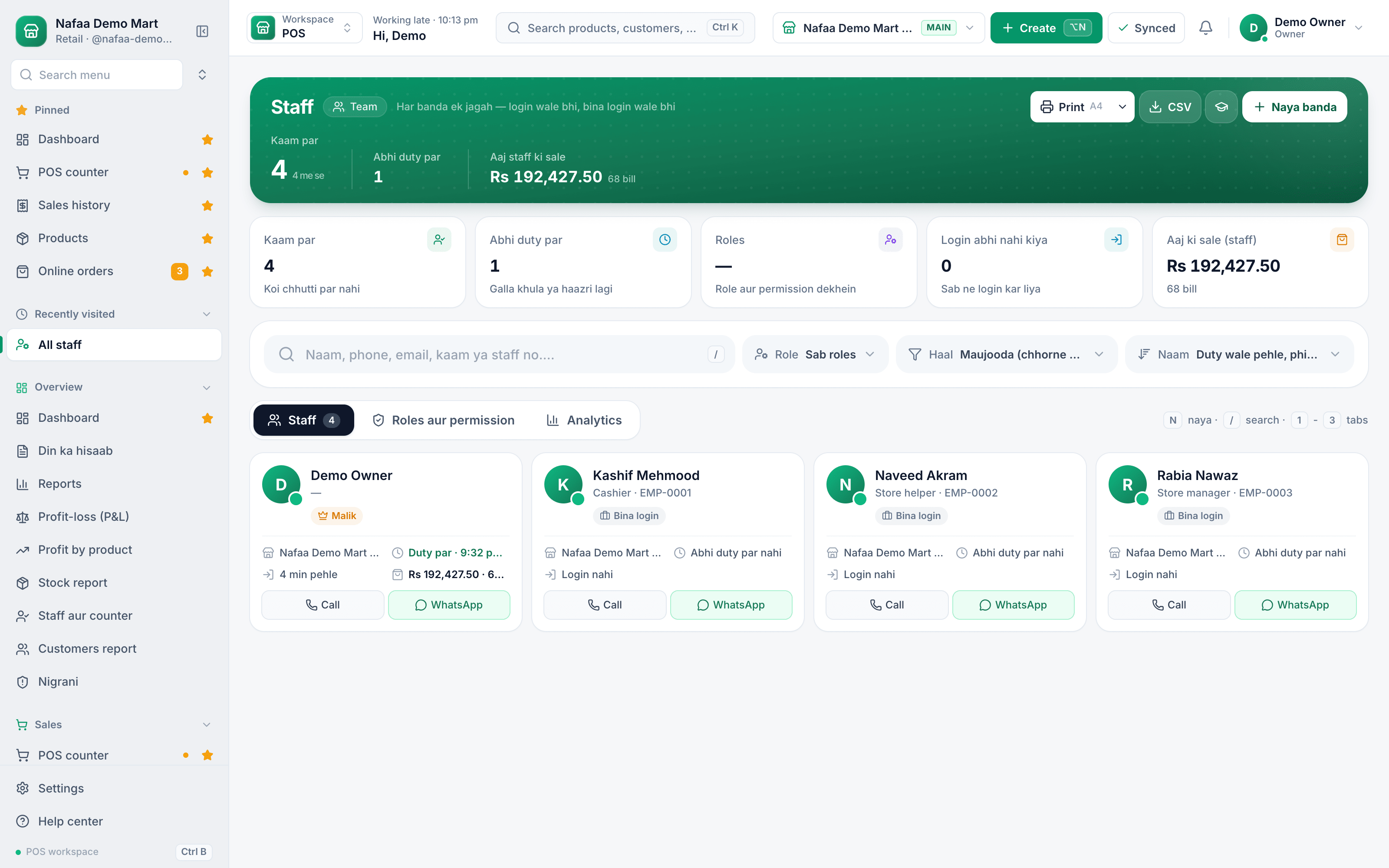
Everyone who works at the shop, with or without a login: who is on duty right now, their role, branch, last login and today's sales. Helpers who never touch the app can still be on the list for attendance and payroll.
- On duty now
- Today's sales by staff
- Roles and permissions
- Staff without a login
- Add a person
Everything about your team in one place
Features
Control without micromanaging
Roles and permissions
Pick a role and its boxes fill in; then tick or untick who can sell, refund, edit prices, see profit or open settings.
Manager PIN
Refunds, cancelled bills, discounts over your limit and udhaar over a customer's limit wait for the PIN.
Attendance and leave
A live board of who is in, late or on leave, a month grid for payroll, and leave requests with decisions.
Commission
Commission from each person's own sales, with returns taken off, what is paid and what is still due.
Payroll
Base pay, overtime, commission, advances, bonuses and deductions, paid from the drawer or an account, with payslips.
Audit and activity
Voids, refunds, big discounts, PIN use and drawer shorts per person, with a risk score to show where to look first.
How it works
Bring your team on board
- 1
Add the person
Name, phone and branch. Give a login with email and a temporary password, and print the login slip.
- 2
Set counter rules
Choose what needs the manager PIN and the highest discount a cashier may give.
- 3
Track the month
Attendance, late minutes, overtime and commission build up as they work.
- 4
Pay
Run payroll for the branch, hand over payslips and see salaries in your profit and loss.
Trust the counter when you are away
Counter rules you control
| Feature | What Nafaa does | On record |
|---|---|---|
| Refunds | Asks for the manager PIN when the refund PIN is on | Who refunded, what, and who approved |
| Cancelled bills | Asks for the PIN when the void PIN is on | Shown in the audit view |
| Discounts | Above your discount limit, asks for the PIN | Large discounts listed per cashier |
| Udhaar over the limit | Asks for the PIN before the bill goes on the khata | On the customer's khata |
| Seeing profit | Only people you allow see profit and cost figures | Permission set per person |
Who it is for
Owners who cannot stand at the counter all day: a kiryana with two cashiers and a helper, a salon paying stylists commission on their services, a restaurant with waiters on shifts, and multi-branch businesses with a manager in each branch. If you have ever wondered why the galla was short on a day you were away, the audit view answers it.
What to look for in staff software
- Rules that the counter enforces. A discount limit only works if the cashier cannot go past it without someone else's PIN.
- Names on every sensitive action. Shared logins hide who did what. Every person should have their own.
- Attendance that feeds payroll. Late minutes, leave and overtime should reach the salary without a second register.
- Commission from real sales. Returns should come off the commission in the month they come back.
Common questions
Can I stop staff from giving discounts or refunds?
Yes. Each staff member gets a role with its own permissions, and counter rules decide what needs a manager. By default a refund needs the manager PIN, and a discount above the limit you set needs it too. Every sensitive action is written to the activity log with the name of the person who did it.
How much does Nafaa cost?
Paid plans start at Rs 1,500 a month. The pricing page lists every plan with its price and limits, taken straight from our plan settings, so it is always current. You can start with the free trial first, and no credit card is needed to sign up.
Industries using it
Salon & Beauty Parlour
Nafaa runs salons and beauty parlours: book appointments on a calendar, keep a service list with prices, pay stylists commission per service, sell memberships, prepaid packages and gift vouchers, keep customer profiles, and bill services and products together at the salon counter.Restaurant & Cafe
Nafaa runs dine-in, takeaway and delivery for restaurants and cafes: a table layout, kitchen order tickets (KOT) sent to each station's printer or screen, add-ons on dishes, recipes, riders for delivery, happy-hour prices, and bills paid by cash, card, wallet, split or khata.General Retail Shop
Nafaa works for any shop that does not fit a specific industry: a fast counter with quick keys and barcodes, combos, stock with low-stock and damage records, bulk import from Excel, a digital khata for udhaar, and reports on sales and profit, all in one app.Kiryana & Grocery Store
Nafaa is POS and khata software for kiryana and grocery stores in Pakistan. Scan barcodes at the counter, sell by piece, dozen or carton, keep every customer's udhaar in a digital khata with WhatsApp reminders, import products from Excel, and keep billing when the internet drops.Gym & Fitness Club
Nafaa runs gyms and fitness clubs: fast member check-in, memberships and renewals, plans, personal training packages with trainer commission, group classes, lockers and machine records, with fees and payments kept in one place. It runs in the browser on a phone, tablet or computer.
Related
How to Hire and Train Counter Staff for Your Shop
Hire a cashier for honesty, numbers and patience, test them on a paid trial day, and train them for a week with a written plan before they run the counter alone. Give each person their own login and role, keep voids and refunds behind the owner's PIN, and review their numbers every month.Staff approval PIN and discount above the limit
Owners can give a trusted staff member their own approval PIN, and a separate permission lets chosen cashiers give a hand discount above the limit.
More from Nafaa
Multi-Branch
Nafaa Multi-Branch runs every shop, warehouse or godown from one account: each branch keeps its own counter, stock and cash, head office compares sales and profit side by side, stock moves between branches with transfers that the other side receives, and each staff member works in the branch they are assigned to.Reports
Nafaa Reports answer the owner's questions in plain numbers: today's sale and profit on the dashboard, profit by product, profit and loss with expenses, the day book, stock value, staff and customer reports, with Excel export and journals for QuickBooks, Xero, Zoho Books or Tally.POS & Billing
Nafaa POS is the billing counter for any business: scan a barcode or tap a quick key, sell by piece, dozen or carton, take cash, card, JazzCash, Easypaisa or khata in one bill, print or WhatsApp the receipt, and keep billing when the internet drops. It runs on the phone, tablet or computer you already have.Inventory
Nafaa Inventory keeps stock right in every unit and every branch: products with cost, price and margin, barcodes and labels, combos, low-stock alerts, damage and adjustments with reasons, stock transfers between branches, and a full movement history. Import from Excel or paste from a spreadsheet, and change many prices at once in the bulk editor.Digital Khata
Nafaa Digital Khata replaces the paper udhaar register: every credit sale lands in the customer's khata from the counter, payments and old balances are recorded, balances are grouped by age, credit limits stop runaway udhaar, and a WhatsApp reminder goes out in one tap.FBR & PRA Invoicing
Nafaa is an FBR & PRA approved POS integrator. Every sale can be reported to FBR, PRA, SRB or KPRA from the counter, the fiscal invoice number and QR code print on the receipt, failed invoices retry by themselves, and tax reports are ready for your return.
Give your team the right keys
- 7 din Free Trial
- Keeps billing offline
- Help on WhatsApp