Updated
SolutionFor retail & shops
Your whole shop in one app, from the first bill
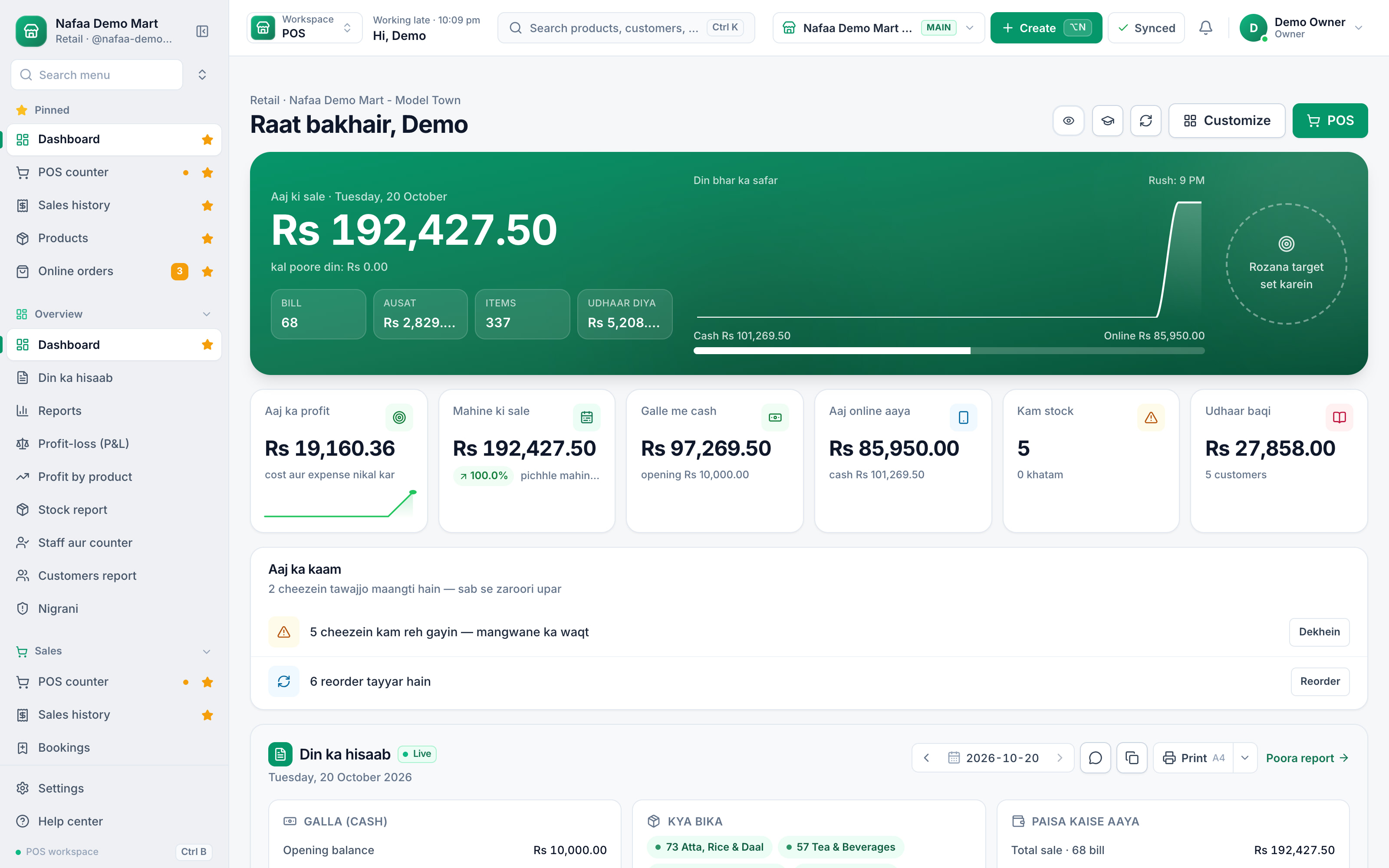
Billing, stock, udhaar and profit, on the phone or computer you already have. Set up in an afternoon, keep selling through load-shedding, and see what you really earned before you lock up.
- Offline billing
- Digital khata
- Daily profit
- 7 din Free Trial
- Keeps billing offline
- Help on WhatsApp
- English and Roman Urdu
- Phone, tablet or computer
Short answer
Nafaa for a single shop puts the whole business on the device you already own: a fast counter that works offline, stock in every unit, a digital khata with WhatsApp reminders, and a daily profit report, from a 7-day free trial.
Roman Urdu mein
Ek dukaan ke liye poora system: bill, stock, udhaar aur munafa ek app me. Jo phone ya computer hai usi par chalta hai, aur bijli ya internet jaye to bhi bill bante rehte hain.
Key facts
- Who it is for
- Kiryana, pharmacy, garments, mobile, hardware, cosmetics and every other shop
- In the box
- POS, inventory, khata, reports, staff, WhatsApp receipts
- Devices
- Phone, tablet or computer; scanner and printer optional
- Price
- Paid plans from Rs 1,500 a month after the free trial
How it runs
A day in the shop with Nafaa
- 1
Open
Count the opening cash and check the low-stock list over chai.
- 2
Sell
Scan or tap, take cash, wallet or udhaar, and print or WhatsApp the receipt.
- 3
Collect
Send udhaar reminders from the khata during the quiet hour.
- 4
Close
Count the drawer and read today's profit after cost and expenses.
From one sale to every report
Capabilities
Everything a shop needs, nothing it does not
Fast counter
Barcode, quick keys and units, with split payments and returns.
Works offline
Bills keep going without internet and sync later.
Stock in every unit
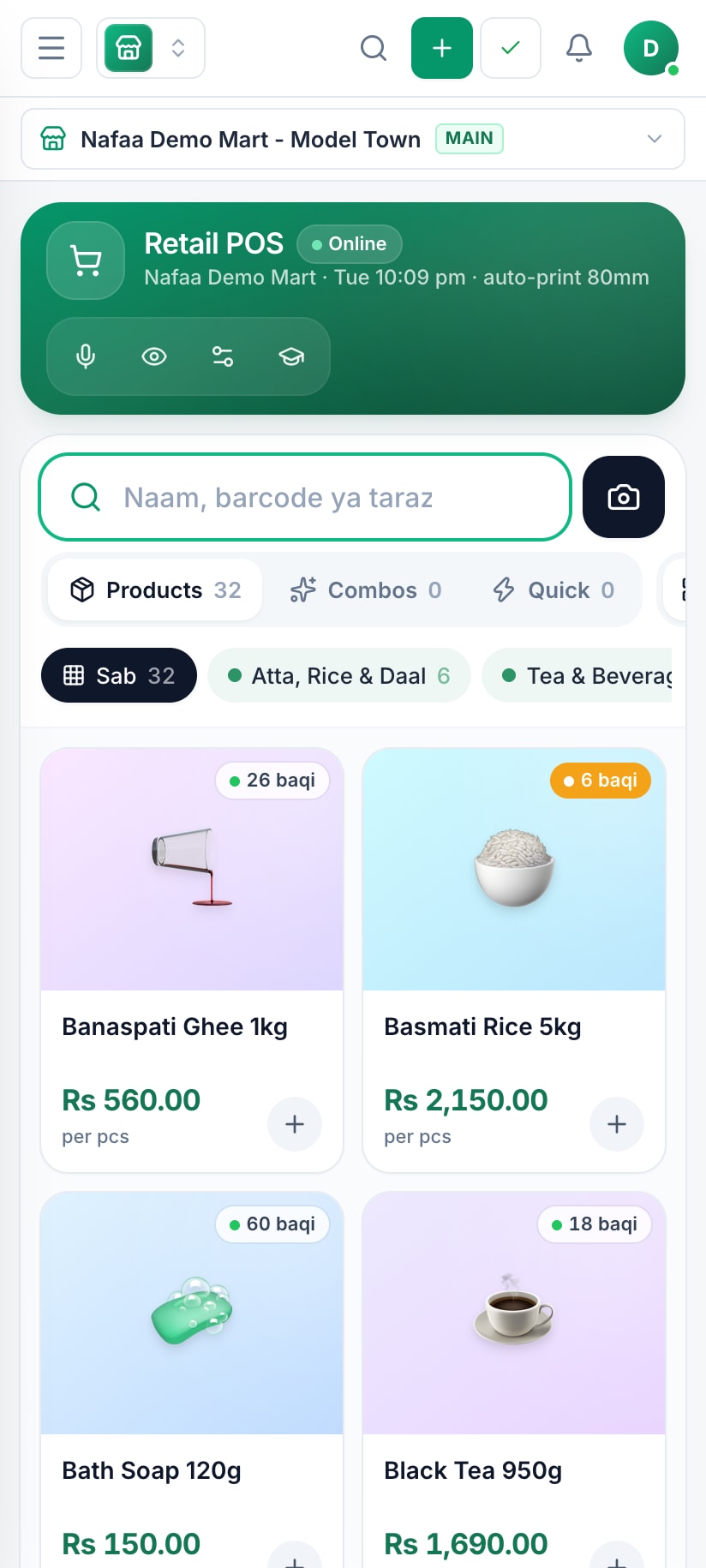
Cartons in, pieces out, with low-stock alerts.
Digital khata
Udhaar from the counter, credit limits and WhatsApp reminders.
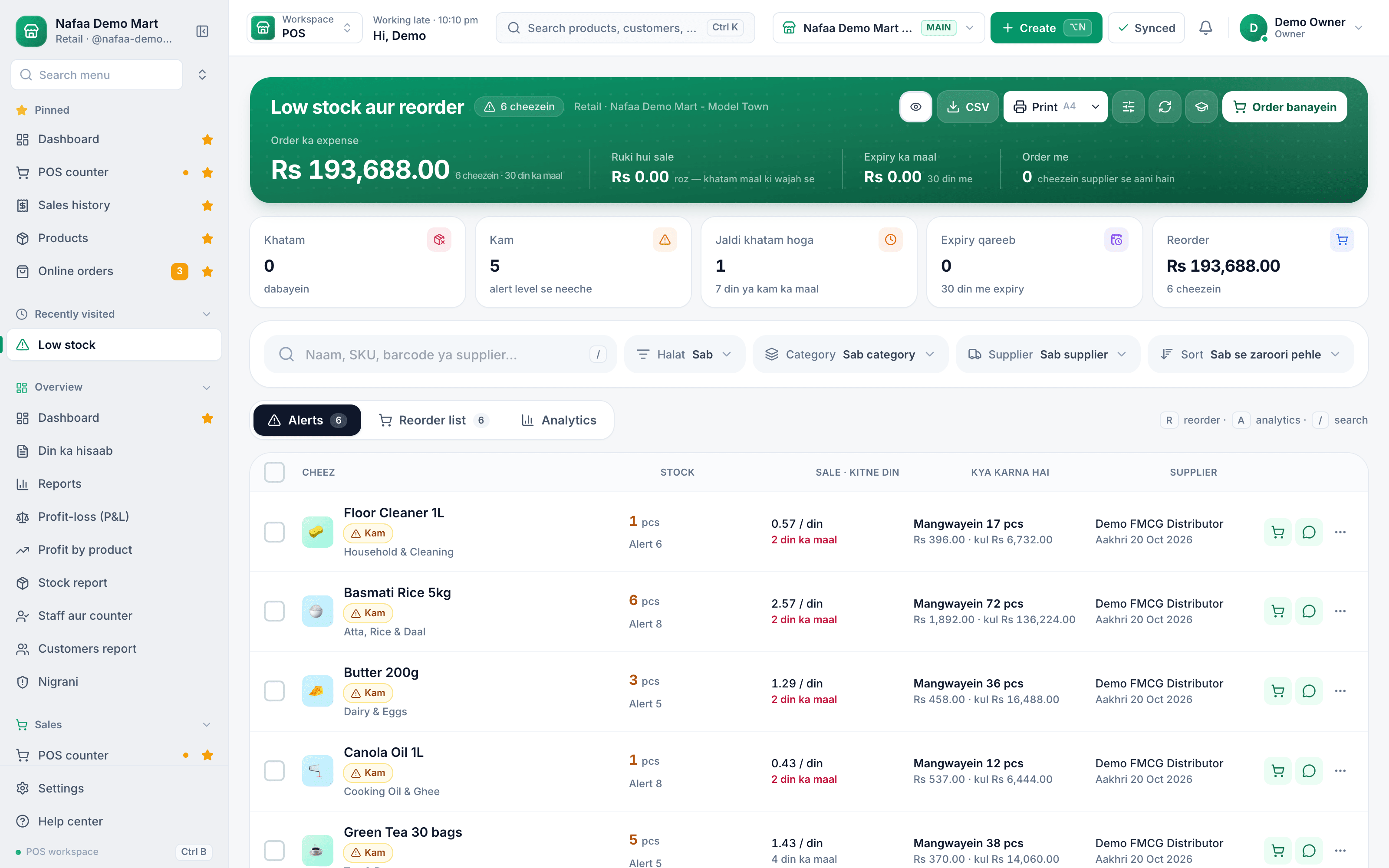
Daily profit
Profit after cost and expenses, by product and for the day.
Tax invoices
Optional FBR/PRA integration, only if your business needs it.
Inside the app
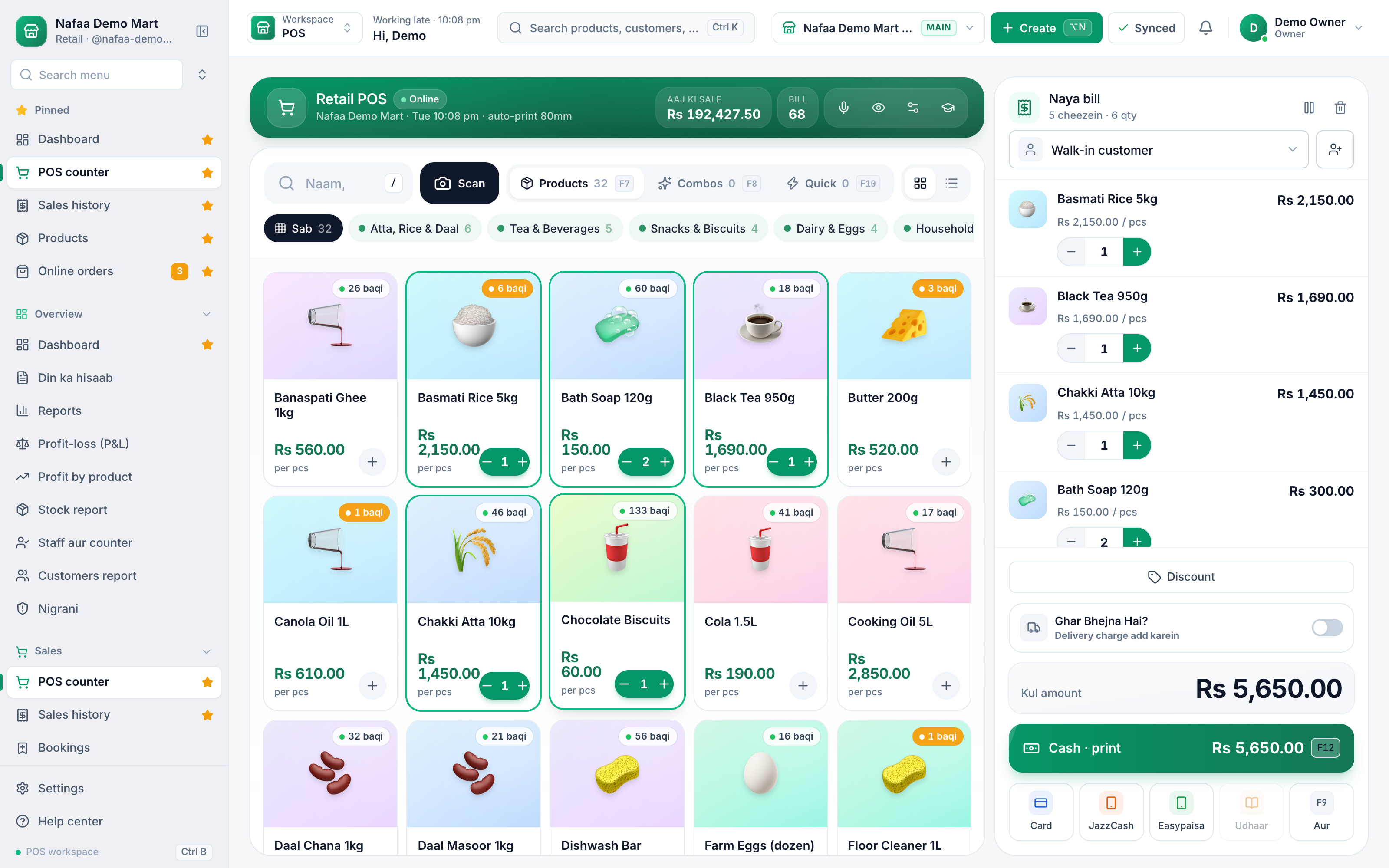
The counter your staff learn in one morning
Large tiles, clear prices and stock on every item. The bill is always on screen, and every way to pay is one tap away.
Billing never stops
Start free, then pick a plan
Free Trial
7 din Free Trial
7-day Free Trial
What is included
- 30 products
- 100 sales a month
- 2 users
- 1 shop
Basic
Chhoti dukan ke liye perfect
Rs 1,500/ monthRs 4,000/ quarterSave 11%Rs 15,000/ yearSave 16%Get startedStarts with a 7-day free trial
What is included
- 500 products
- 2,000 sales a month
- 3 users
- 1 shop
Pro
RecommendedBari shops aur multi-branch ke liye
Rs 3,500/ monthRs 9,500/ quarterSave 9%Rs 36,000/ yearSave 14%Get startedStarts with a 7-day free trial
What is included
- 5,000 products
- 10,000 sales a month
- 10 users
- 3 shops
Enterprise
Unlimited everything + 24/7 support
Rs 9,500/ monthRs 27,000/ quarterSave 5%Rs 99,000/ yearSave 13%Get startedStarts with a 7-day free trial
What is included
- Unlimited products
- Unlimited sales
- Unlimited users
- Unlimited shops
Common questions
Do I need a computer to use Nafaa?
No. Nafaa runs in a web browser, so the phone, tablet or computer you already have will do. A barcode scanner and a receipt printer can be added later but are not required to start. The counter also keeps working without internet and sends the sales to your account when the connection returns.
Does Nafaa work without internet?
Yes, the counter keeps billing when the internet drops. Sales made offline are saved on the device and sent to your account automatically when the connection comes back, and you can see the sales still waiting to be sent. Reports and other branches see those sales once they have synced.
Can Nafaa send udhaar reminders on WhatsApp?
Yes. The khata keeps each customer's udhaar, payments and balances brought over from the old register. From the khata you send a customer a WhatsApp reminder with their balance in one tap. Reminders go one by one from your own WhatsApp, and the wording gets firmer as the udhaar gets older.
How much does Nafaa cost?
Paid plans start at Rs 1,500 a month. The pricing page lists every plan with its price and limits, taken straight from our plan settings, so it is always current. You can start with the free trial first, and no credit card is needed to sign up.
Is Nafaa only for shops?
No. Nafaa started at the shop counter, but the same account runs restaurants (tables, kitchen tickets, delivery), online sellers (your own store and the Nafaa Bazaar marketplace), service businesses (bookings, memberships, commission), wholesalers (carton prices, credit limits, suppliers) and companies with many branches. Each business type gets its own screens on top of the same POS, stock, khata and reports.
Products in this setup
POS & Billing
Nafaa POS is the billing counter for any business: scan a barcode or tap a quick key, sell by piece, dozen or carton, take cash, card, JazzCash, Easypaisa or khata in one bill, print or WhatsApp the receipt, and keep billing when the internet drops. It runs on the phone, tablet or computer you already have.Inventory
Nafaa Inventory keeps stock right in every unit and every branch: products with cost, price and margin, barcodes and labels, combos, low-stock alerts, damage and adjustments with reasons, stock transfers between branches, and a full movement history. Import your list from Excel in minutes.Digital Khata
Nafaa Digital Khata replaces the paper udhaar register: every credit sale lands in the customer's khata from the counter, payments and old balances are recorded, balances are grouped by age, credit limits stop runaway udhaar, and a WhatsApp reminder goes out in one tap.Reports
Nafaa Reports answer the owner's questions in plain numbers: today's sale and profit on the dashboard, profit by product, profit and loss with expenses, the day book, stock value, staff and customer reports, with Excel export and journals for QuickBooks, Xero, Zoho Books or Tally.
Industries it fits
Kiryana & Grocery Store
Nafaa is POS and khata software for kiryana and grocery stores in Pakistan. Scan barcodes at the counter, sell by piece, dozen or carton, keep every customer's udhaar in a digital khata with WhatsApp reminders, import products from Excel, and keep billing when the internet drops.Pharmacy & Medical Store
Nafaa is software for pharmacies and medical stores in Pakistan: search medicines by salt or formula and find substitutes, track batches and expiry, keep prescriptions and doctors, record controlled and narcotic sales in a register with patient and doctor details, and log fridge temperatures for the cold chain.Garments & Boutique
Nafaa runs garment shops and boutiques that sell ready-made and custom-stitched clothes: stock by size and colour, tailoring (silai) orders, alterations, saved customer measurements, items put on hold, qist plans, exchanges, collections and size charts, alongside the counter, khata and reports.Mobile Phone Shop
Nafaa runs mobile phone shops: keep stock by IMEI, record each phone's PTA status, buy used phones and take trade-ins, open repair job cards, and sell on instalments with a qist plan, while the counter, khata and reports work the same as in any shop.
Other solutions
Retail Chains
Nafaa for retail chains runs every branch from one account: each branch has its own counter, stock and cash, head office compares sales and profit across branches, stock moves by transfer, staff only reach their own branches, and every refund and discount is on the record.E-commerce Sellers
Nafaa for e-commerce sellers runs your own online store and the Nafaa Bazaar marketplace from the same stock as your shop: orders from your website, Shopify, WooCommerce and Daraz in one list, courier booking with TCS, Leopards, PostEx and more, COD risk checks and payment links.Restaurants & Cafés
Nafaa for restaurants and cafés runs dine-in, takeaway and delivery from one system: a table layout with running bills, kitchen order tickets sent to each station, a menu with modifiers and recipes that take ingredients out of stock, riders for delivery and Foodpanda orders.Wholesale & Distribution
Nafaa for wholesalers and distributors handles trade the way it is done in Pakistan: carton and piece prices, separate wholesale prices, credit limits and khata for every trade customer, supplier accounts and purchasing, stock across godowns and branches, and A4 invoices.Manufacturing
Nafaa for manufacturers and food producers covers raw materials, recipes with costing and daily production plans, purchasing from suppliers, finished-goods stock across godowns and branches, and sales through the counter, trade khata and online. General bills of materials and work orders are coming soon.
Open your shop on Nafaa today
Seven days free. No card. Your first bill in minutes.
- 7 din Free Trial
- Keeps billing offline
- Help on WhatsApp