Help center
How to connect your online store to Nafaa
Connect a WooCommerce, Shopify or Daraz store, or your own website, as a sales channel. Its orders arrive in Online orders, accepting one makes the bill and cuts stock, and stock goes back to the store from the branch you pick.
Updated
A sales channel is any place you sell online. Once a channel is connected, its orders land in Online orders inside Nafaa, with a bell and a count in the sidebar. Accepting an order creates the bill and receipt and reduces stock, so the counter and the website sell from the same stock.
Channels are managed in Settings → Integrations → Sales channels. You need the owner login or the settings permission.
Connect a sales channel
Step 1: Open Sales channels
Go to Settings → Integrations → Sales channels and click Channel jorein (connect a channel).
Step 2: Pick the platform
Under Kahan bechte hain? choose WordPress / WooCommerce, Shopify, Apni website / Instagram or Daraz.
Step 3: Pick how to connect
Under Kaise jorna hai? choose Automatic (marked Recommended where available) to approve access in a popup, or Manual to get a key and secret for your developer.
Step 4: Enter the store details
Type the Website ka address (or the Shopify store name), an optional Naam shown in the sidebar, and Stock kis branch se: the branch whose stock the website shows.
Step 5: Approve the connection
Click the connect button and approve in the popup. Nafaa asks for orders, products and stock only, never passwords or payment details.
Step 6: Link products and test
After connecting, click Products jorein to match each website product and variant to a Nafaa product, then send a Test order to check the flow.
Step 7: Accept orders
Open Online orders. Click Accept on a new order to create the bill and cut stock, then move it through packing, ready and delivery.
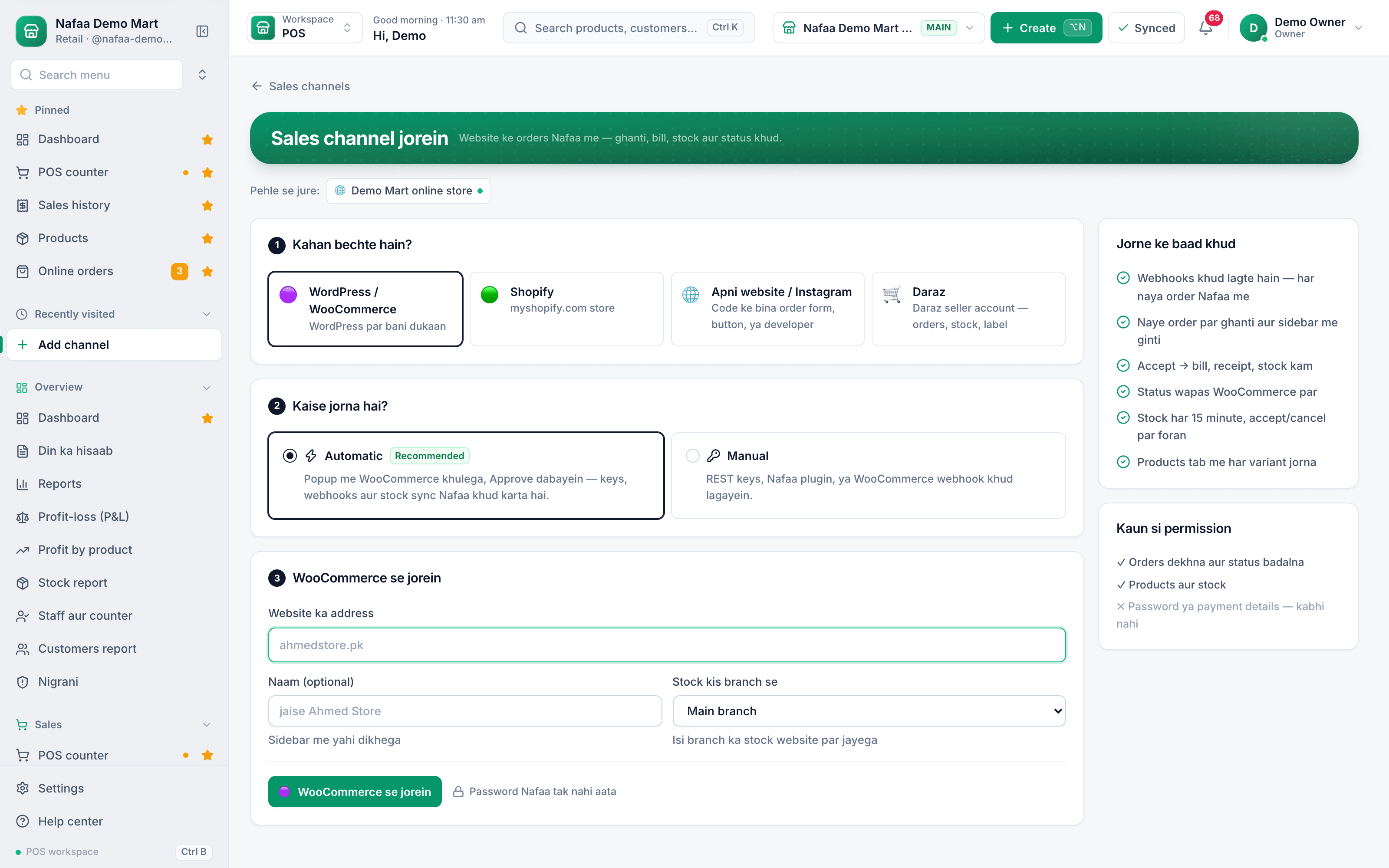
- 1. Where you sell
- 2. Automatic or manual
- 3. Website address
- Branch whose stock goes online
- Connect and approve
- What happens after
Questions
Do I need a developer?
Not for WooCommerce or Shopify with Automatic: you approve access in a popup. Manual and a fully custom website give your developer a key, a secret and sample code.
Can website orders take stock from a different branch than the counter?
Yes. Pick the branch in Stock kis branch se when you connect the channel.
What happens to cash-on-delivery money?
COD orders are tracked in Online store → COD & courier, where you can see what the courier still owes.
Related
- Product
Online store
Nafaa brings online selling into the same account as the shop: orders from your own website, Shopify, WooCommerce, Daraz and Foodpanda arrive next to counter sales, take stock from the same shelf, and ship with TCS, Leopards, M&P, PostEx, Trax or CallCourier booked from the order. - Page
How to add a branch, warehouse or godown
Add a second shop, a warehouse or a godown to the same Nafaa account, give it a manager login, and switch between branches from the top bar. Every branch keeps its own stock, cash drawer and sales, and reports can combine all of them. - Page
How to add a product in Nafaa
Add a new item to your shop in three short steps: name and category, cost and selling price, and the stock you have today. The product then shows on the POS counter, in search, on barcode labels and in every stock and profit report. - Page
How to make a bill at the POS counter
Open the POS counter, add items by barcode, name or tile, set quantities, pick the customer and take payment. Covers the one-key cash bill (F12), the checkout window for other payment methods, and what to do on the success screen. - Guide
Starting to Sell Online in Pakistan: A Guide for Shops
A step-by-step guide for Pakistani shops that want to start selling online: choosing between WhatsApp, your own website and marketplaces, preparing products and photos, pricing with delivery and cash on delivery in mind, taking payments, working with couriers, cutting returned parcels and keeping shop and online stock in step. - Glossary term
E-commerce
E-commerce is buying and selling goods or services over the internet, through a website, an app, a marketplace or social media.
Terms used here
COD (Cash on Delivery)
Cash on delivery means the customer pays when the order is delivered, not when it is placed.Payment Gateway
A payment gateway is a service that lets a website or app accept card, wallet or bank payments online and passes the money to the seller's account.RTO (Return to Origin)
RTO is a parcel that the courier could not deliver, or the customer refused, and that is sent back to the seller.
Manage COD orders without double stock
Online orders arrive in Nafaa with status and area, and stock changes once. Try it free for 7 days.