Help center
How to add an opening balance (old khata)
Move udhaar from your paper register into Nafaa with Purana khata. The old amount is added to the customer’s khata without a bill, shows up in the total you are owed, and is collected like any other udhaar.
Updated
Most shops start on Nafaa with an old udhaar register. You do not have to re-enter past bills. Enter what each customer owes today as an opening balance with Purana khata (old khata). Nafaa adds it to the customer’s khata, so it counts toward the total you are owed and can be collected with a normal payment.
An opening balance is added to whatever the customer already owes in Nafaa. It never replaces or deletes existing entries.
Add an old balance from the paper register
Step 1: Open the Khata page
In the sidebar, open Customers → Khata (credit).
Step 2: Click Purana khata
Click Purana khata at the top. A list opens titled Kis ka purana khata? (whose old khata?).
Step 3: Pick the customer
Type the name or phone and pick the customer. If they are not in Nafaa yet, click Naya customer banayein (create new customer), add the name and phone, and the form opens for them.
Step 4: Enter the amount
Type the amount from your register, or tap one of the quick amounts. The box at the bottom shows Abhi (now) and Is ke baad (after) so you can check the new balance.
Step 5: Add a note
Write where the figure came from, for example the register page number. The note stays with the khata entry.
Step 6: Save
Click Jor dein (add). The customer now appears under Udhaar wale with the new balance.
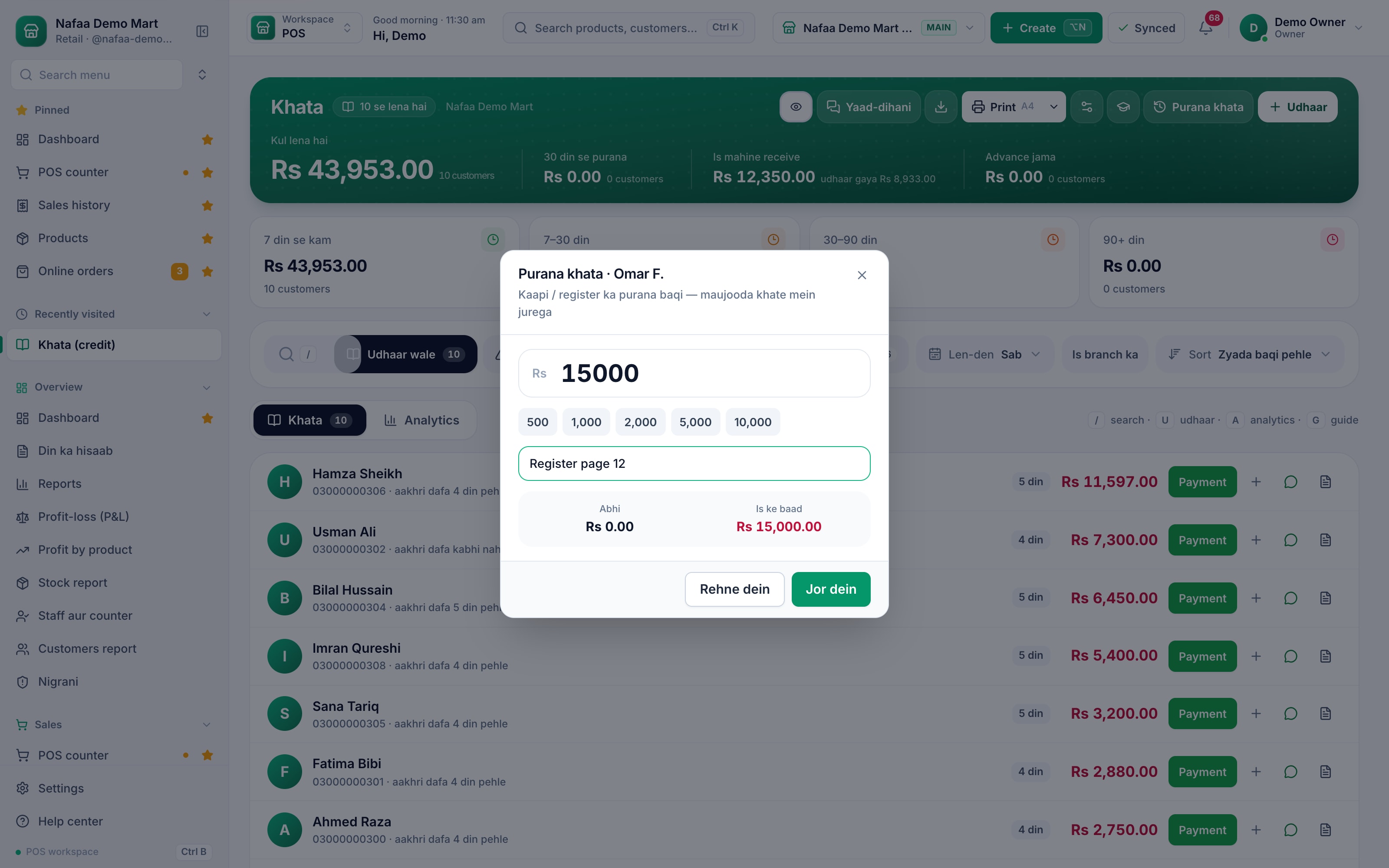
- Purana khata
- Amount from the register
- Note
- Balance now and after
- Jor dein
Questions
Does Purana khata create a sale?
No. It adds an amount to the customer’s khata without a bill, so it does not change your sales or profit reports.
What if the customer already has udhaar in Nafaa?
The old balance is added to it. Nothing that is already in the khata is removed.
Who can add an opening balance?
The Purana khata button is shown to staff who are allowed to manage the khata.
Related
- Product
Khata
Nafaa Digital Khata replaces the paper udhaar register: every credit sale lands in the customer's khata from the counter, payments and old balances are recorded, balances are grouped by age, credit limits stop runaway udhaar, and a WhatsApp reminder goes out in one tap. - Page
How to add a customer
Add a customer in Nafaa from the Customers page or straight from the POS counter. Only the name is required; a phone number lets you send bills and udhaar reminders on WhatsApp. This article covers the quick add, the full form and the counter shortcut. - Page
How to receive a khata payment
Record money a customer pays against their udhaar. Pick the customer on the Khata page, enter the amount and how it was paid, and Nafaa lowers the balance, counts cash in the drawer and settles the oldest udhaar first. - Template
Khata (Udhaar) Register Template
A digital khata register in Excel: list your customers once, add every udhaar and payment as a line, and each customer's balance, last payment date and days since payment fill in by themselves. Balances over the credit limit and payments older than 30 days turn red. - Guide
Managing Udhaar and Khata: A Complete Guide for Shops
How to give udhaar without losing money: who should get credit, how much, how to record it so nobody can argue, how to tell which balances are going bad, how to remind customers without losing them, how to recover old balances, and how to handle the credit you take from your own suppliers. - Glossary term
Credit Sale
A credit sale is a sale where the customer takes the goods now and pays later, so the amount is recorded as money owed to the shop.
Terms used here
Khata
A khata is a ledger, traditionally a paper register, that records what each customer owes a shop on credit and what they have paid back.Udhaar
Udhaar is credit given to a customer: goods are taken now and paid for later.Accounts Receivable
Accounts receivable is the money customers owe a business for goods or services already supplied on credit.
Collect udhaar without chasing it by memory
See who owes what by age of the balance and send a reminder in one tap. Try it free for 7 days.