Help center
Garments: sizes and colours as variants
Create one garment product and let Nafaa make a variant for every size and colour, each with its own stock and barcode. Sell the exact size by scanning its barcode, and see which sizes are running out on the Size reorder tab.
Updated
In a garments account a design is one product, and each size and colour of it is a variant. A kurta in sizes S, M, L and colours black and white becomes six variants, each with its own stock count and barcode. Reports and reorder lists then work per size, so you can see that medium sold out while large is still on the shelf.
Products are added with Naya product · Garments from Products (or Naya on the Maal screen).
Add a garment with sizes and colours
Step 1: Describe the item
In Pehchaan, write the name, choose Ready-made, Silai bhi hoti hai or Unstitched kapra, who it is for (Gents, Ladies, Bachay and so on), the garment type and season. Add the article code under Design / article code if the brand has one.
Step 2: Set the price
In Qeemat, enter the sale price and cost. Every variant uses this price unless you give it its own rate later.
Step 3: Pick sizes and colours
In the Stock step, find Size × rang. Choose a size set (S-M-L, Number, Desi, Bachay or Free size) and tap the sizes, then tap the colours. Type your own size and press Enter if it is not listed.
Step 4: Make the variants
Enter the opening stock per variant under Har variant ka stock, keep Har variant ka barcode khud banayein ticked and press variant banayein. The table below lets you change the rate, stock and barcode of each one.
Step 5: Print labels and sell
Print size labels from Barcode labels. At the counter, scanning a label puts that exact size and colour on the bill. Tapping the product opens a size picker.
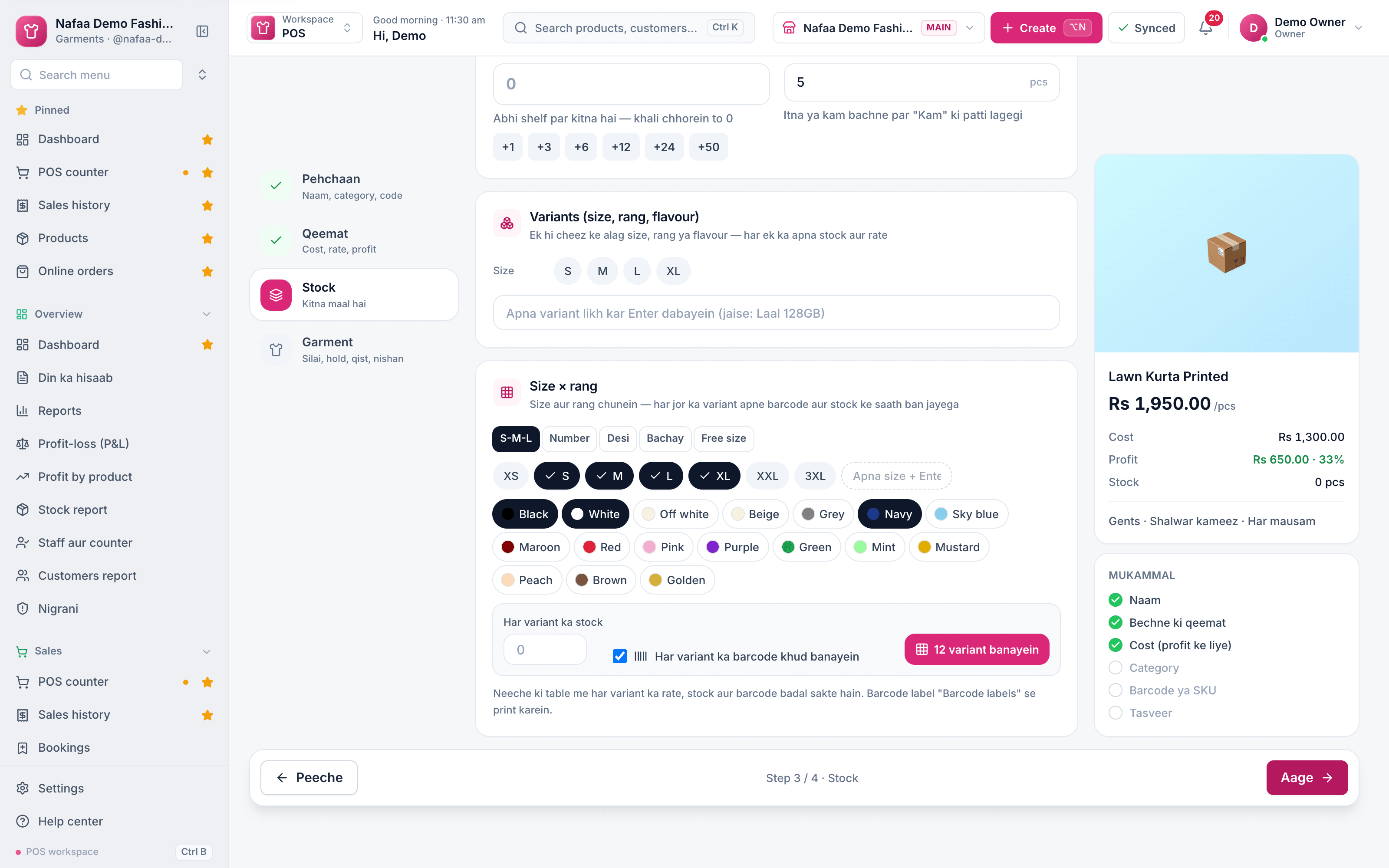
- Size set
- Sizes
- Colours
- One barcode per variant
- 12 variant banayein
Questions
Can I add a new size to an existing product?
Yes. Edit the product, go to the Stock step and use Size × rang again. Sizes and colours that already exist are skipped, so only the new pairs are added.
How do I sell unstitched fabric by the meter?
Choose Unstitched kapra when you add it and sell it by meter or by suit. The counter takes the quantity in that unit.
Related
- Industry
Garments
Nafaa runs garment shops and boutiques that sell ready-made and custom-stitched clothes: stock by size and colour, tailoring (silai) orders, alterations, saved customer measurements, items put on hold, qist plans, exchanges, collections and size charts, alongside the counter, khata and reports. - Product
Inventory
Nafaa Inventory keeps stock right in every unit and every branch: products with cost, price and margin, barcodes and labels, combos, low-stock alerts, damage and adjustments with reasons, stock transfers between branches, and a full movement history. Import from Excel or paste from a spreadsheet, and change many prices at once in the bulk editor. - Page
How to print barcode labels
Give products a barcode and print price stickers on a thermal label roll or an A4 sticker sheet. Add items by search, scan or whole category, design the label once for the shop, test print one label, then print the full list. - Page
How to add a product in Nafaa
Add a new item to your shop in three short steps: name and category, cost and selling price, and the stock you have today. The product then shows on the POS counter, in search, on barcode labels and in every stock and profit report. - Page
How to set low stock alerts and reorder
Set a low stock level on each product and see what is out, low, running out soon or near expiry in every branch. Nafaa works out how many days the stock will last and turns the list into purchase orders or a WhatsApp message to the supplier. - Page
Kapre ki Dukaan ka Software
What a clothing shop or boutique in Pakistan needs from software, in simple Roman Urdu: stock by size and colour, stitching (silai) orders with saved measurements, alterations, exchanges, holding items for customers, season and Eid planning, and profit per article. Includes a setup plan and how Nafaa handles each part.
Terms used here
Product Variant
A product variant is one version of a product that differs by size, colour, flavour or similar, and has its own stock, price and code.SKU (Stock Keeping Unit)
An SKU is a code for one exact product variant in stock, so each size, colour or pack size is counted separately.Barcode
A barcode is a machine-readable pattern of bars or squares printed on a product or label that a scanner reads to identify the item.Layaway
Layaway is reserving an item and paying for it in parts; the customer takes it home once it is fully paid.Reorder Level
A reorder level is the stock quantity at which a new order should be placed, so stock arrives before the shelf runs empty.
Manage stock by size and colour
Keep every article with its sizes and colours, see which sizes ran out and sell with a barcode. 7-day free trial.