Updated
ProductOnline store
Your shop and your website, finally on one stock
Orders from your website, Shopify, WooCommerce, Daraz and Foodpanda pop up at the counter, take stock from the same shelf and ship with the courier you already use. No more selling what you sold an hour ago.
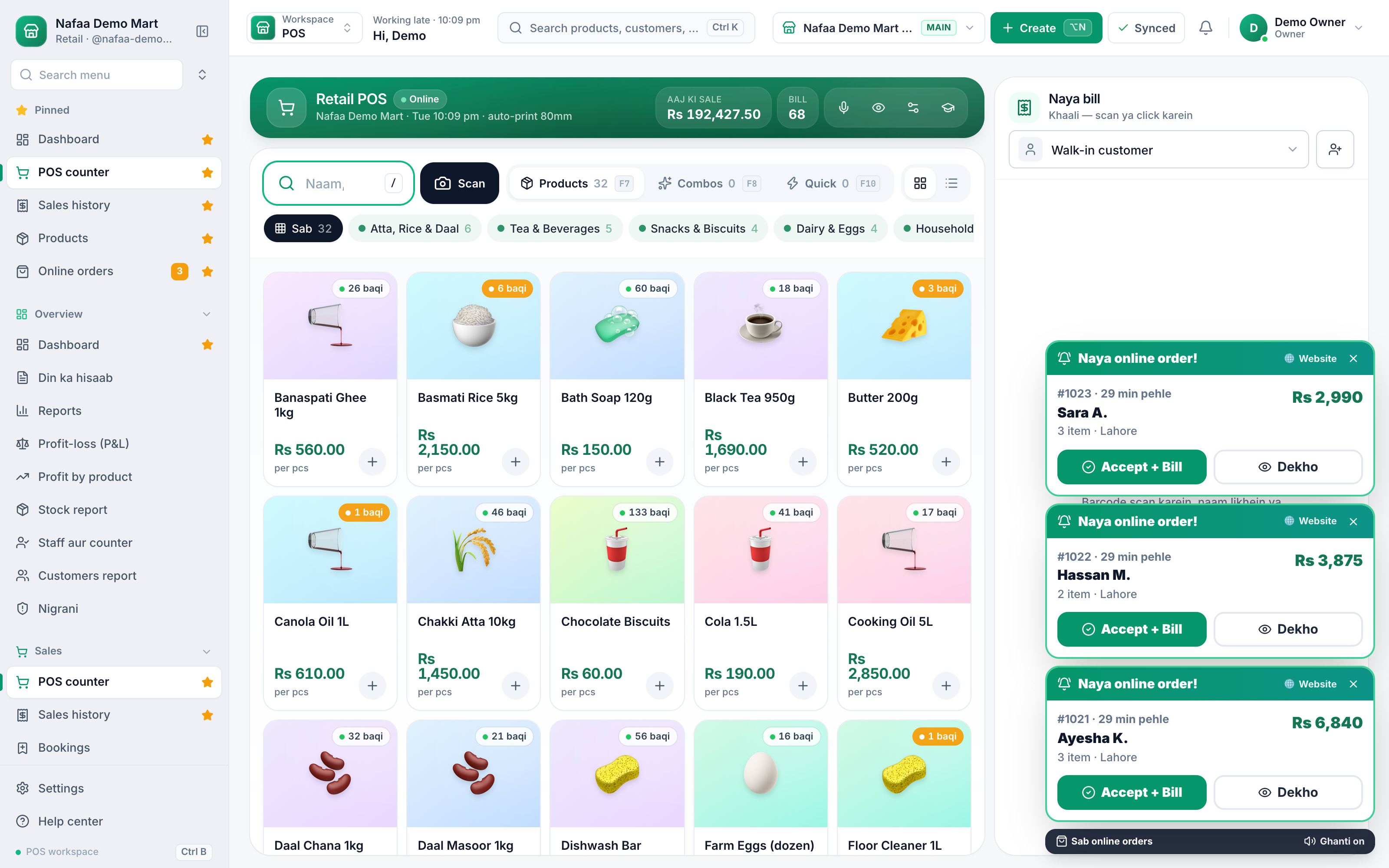
- Website, Shopify, WooCommerce
- Courier booking
- One stock
- 7 din Free Trial
- Keeps billing offline
- Help on WhatsApp
- English and Roman Urdu
- Phone, tablet or computer
Short answer
Nafaa brings online selling into the same account as the shop: orders from your own website, Shopify, WooCommerce, Daraz and Foodpanda arrive next to counter sales, take stock from the same shelf, and ship with TCS, Leopards, M&P, PostEx, Trax or CallCourier booked from the order.
Roman Urdu mein
Website, Shopify, WooCommerce, Daraz aur Foodpanda ke orders seedha Nafaa me aate hain, dukaan wale stock se kat-te hain, aur TCS, Leopards ya PostEx ki booking order se hi ho jati hai.
Key facts
- Channels
- Website on Nafaa, Shopify, WooCommerce, Daraz, Foodpanda and Nafaa Bazaar
- Stock
- One stock for counter and online; channels update when items sell
- Couriers
- TCS, Leopards, M&P, PostEx, Trax and CallCourier
- Payments
- COD, plus JazzCash and Easypaisa payment links
Inside the app
Every online order in one list
Orders from every channel land in one list with their status, the buyer's area and payment. Accept, pack, book the courier and track it without leaving Nafaa.
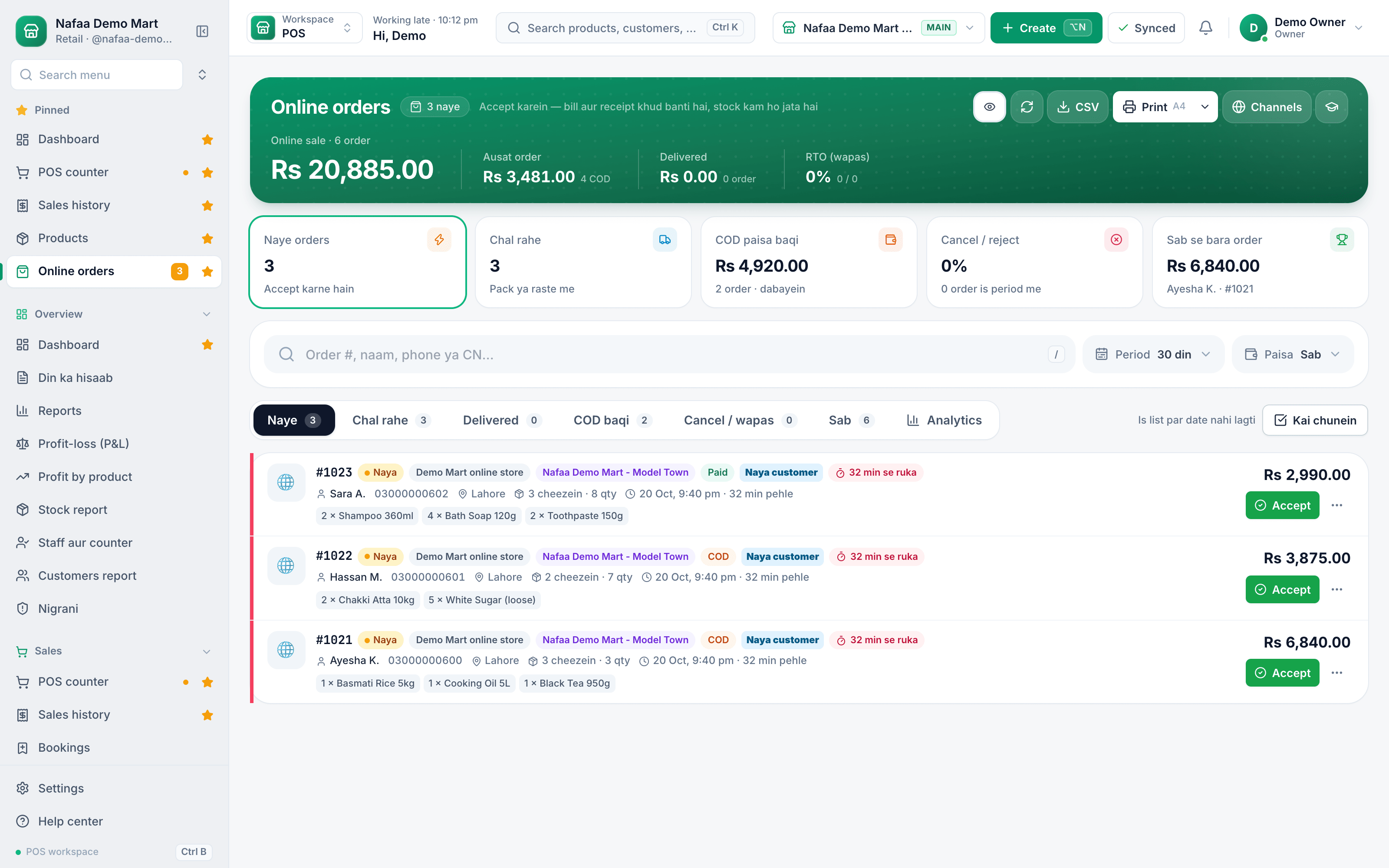
One stock for the shop, the website and the marketplace
Features
Run online like you run the counter
Your own website
Connect a website built on Nafaa, or link Shopify and WooCommerce stores you already have.
Alerts at the counter
A new order pops up over the POS so nobody misses it in a busy hour.
Courier booking
Book TCS, Leopards, M&P, PostEx, Trax or CallCourier from the order and track it.
COD risk check
See a buyer's past orders and refusals before you ship cash-on-delivery.
Payment links
Send a JazzCash or Easypaisa link so the buyer pays before dispatch.
Google listings
Share your product feed with Google so shoppers can find your items.
Connect a channel in minutes
The sales channels screen shows what is connected and what you can add. Products are matched once, then prices and stock flow by themselves.
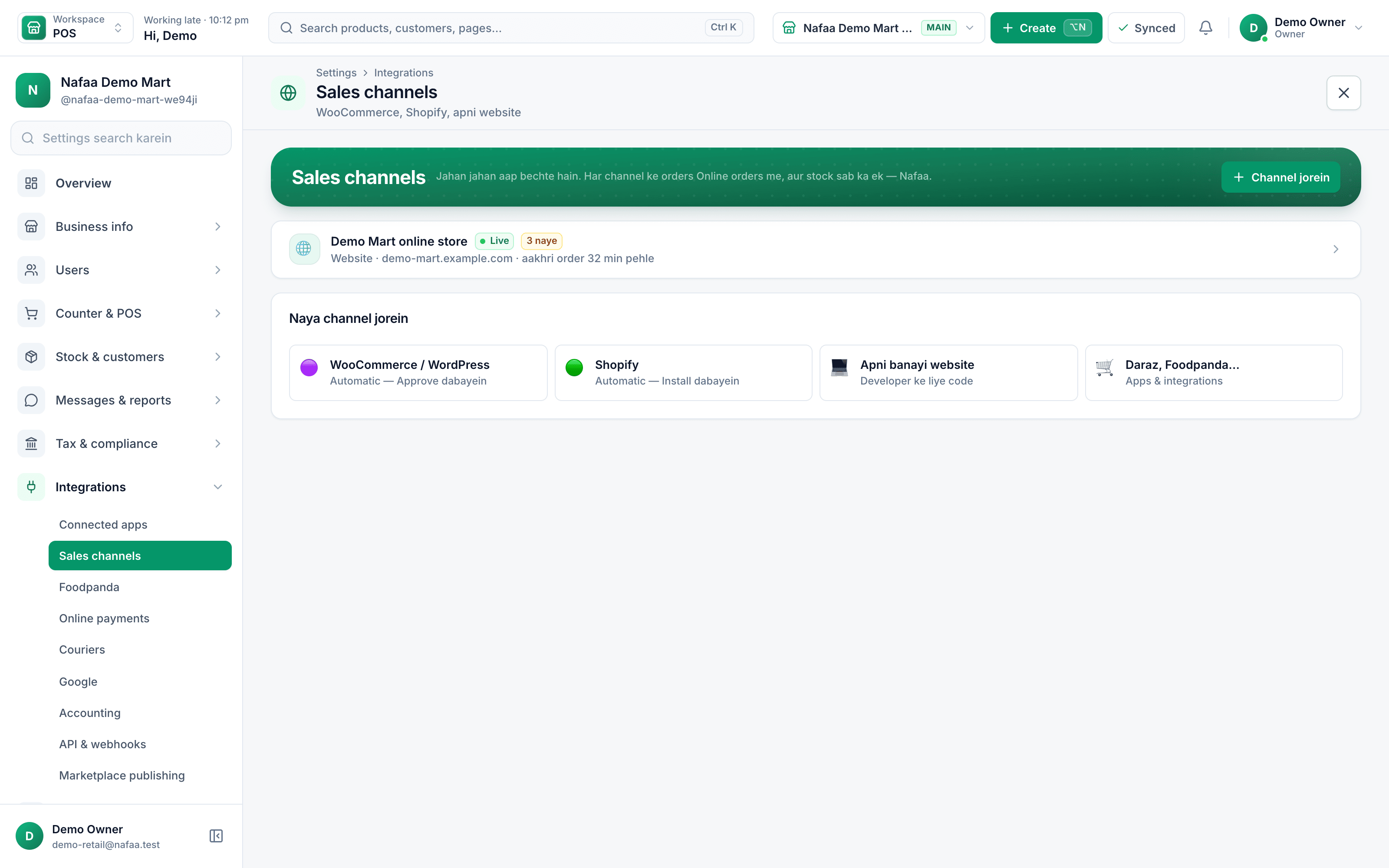
From the click to the doorstep
How it works
From click to doorstep
- 1
Order arrives
From any channel, with the buyer, address and payment method.
- 2
Accept and pack
Stock is reserved from the same shelf the counter sells from.
- 3
Book the courier
Choose the courier, print the label and hand over the parcel.
- 4
Collect the cash
Mark COD as collected when the courier pays out; reports show what is still due.
Common questions
Which online stores and couriers can I connect?
Orders can come from a website built on Nafaa, a Shopify store, a WooCommerce store, Daraz and Foodpanda. For delivery you can book parcels with TCS, Leopards, M&P, PostEx, Trax and CallCourier from the order screen, and stock is updated on every connected channel when something sells.
Will my online store and shop share one stock?
Yes. Website, Shopify, WooCommerce, Daraz and Nafaa Bazaar orders take stock from the same products as the counter. When the last piece sells in the shop, the online channels are updated, so you do not sell what you no longer have.
Can I sell online with Nafaa?
Yes. Orders from your own website, a Shopify store or a WooCommerce store come into Nafaa next to your counter sales and take stock from the same shelf. You can also list products on Nafaa Bazaar, the Nafaa marketplace, to reach new buyers.
Industries using it
Garments & Boutique
Nafaa runs garment shops and boutiques that sell ready-made and custom-stitched clothes: stock by size and colour, tailoring (silai) orders, alterations, saved customer measurements, items put on hold, qist plans, exchanges, collections and size charts, alongside the counter, khata and reports.Cosmetics & Beauty Shop
Nafaa runs cosmetics and beauty shops that sell makeup, skincare, fragrance and haircare: brands and shades, batch expiry, tester records, deals and gift sets, and a loyalty programme for regular customers, with the counter, stock and khata built in. It runs in the browser on a phone, tablet or computer.Electronics & Gadgets
Nafaa runs electronics and gadget shops: serial and IMEI tracking, warranty claims, brands, technical specs on products, bundles, and condition grading for used or open-box items, together with the counter, stock and khata used by every Nafaa shop. It runs in the browser on a phone, tablet or computer.Shoe & Footwear Store
Nafaa runs shoe stores: every pair by size and colour with its own barcode, brands and seasons, size-wise reorder, exchanges, a list of sizes customers asked for that were out of stock, and size charts, together with the counter, stock and khata.Restaurant & Cafe
Nafaa runs dine-in, takeaway and delivery for restaurants and cafes: a table layout, kitchen order tickets (KOT) sent to each station's printer or screen, add-ons on dishes, recipes, riders for delivery, happy-hour prices, and bills paid by cash, card, wallet, split or khata.
Related
COD (Cash on Delivery)
Cash on delivery means the customer pays when the order is delivered, not when it is placed.E-commerce Sellers
Nafaa for e-commerce sellers runs your own online store and the Nafaa Bazaar marketplace from the same stock as your shop: orders from your website, Shopify, WooCommerce and Daraz in one list, courier booking with TCS, Leopards, PostEx and more, COD risk checks and payment links.
More from Nafaa
POS & Billing
Nafaa POS is the billing counter for any business: scan a barcode or tap a quick key, sell by piece, dozen or carton, take cash, card, JazzCash, Easypaisa or khata in one bill, print or WhatsApp the receipt, and keep billing when the internet drops. It runs on the phone, tablet or computer you already have.Inventory
Nafaa Inventory keeps stock right in every unit and every branch: products with cost, price and margin, barcodes and labels, combos, low-stock alerts, damage and adjustments with reasons, stock transfers between branches, and a full movement history. Import your list from Excel in minutes.Digital Khata
Nafaa Digital Khata replaces the paper udhaar register: every credit sale lands in the customer's khata from the counter, payments and old balances are recorded, balances are grouped by age, credit limits stop runaway udhaar, and a WhatsApp reminder goes out in one tap.FBR & PRA Invoicing
Nafaa is an FBR & PRA approved POS integrator. Every sale can be reported to FBR, PRA, SRB or KPRA from the counter, the fiscal invoice number and QR code print on the receipt, failed invoices retry by themselves, and tax reports are ready for your return.Multi-Branch
Nafaa Multi-Branch runs every shop or branch from one account: each branch keeps its own counter, stock and cash, head office compares sales and profit side by side, stock moves between branches with transfers, and staff only see the branches they work in.
Bring your online orders home
Connect your store and see every order next to your counter sales.
- 7 din Free Trial
- Keeps billing offline
- Help on WhatsApp