Updated
ProductFBR & PRA invoicing
Tax-ready on every bill, without slowing the counter
Connect your POS ID once. From then on each sale is reported to FBR or your provincial authority, the fiscal number and QR code print on the receipt, and anything the tax server misses is sent again on its own.
- FBR & PRA approved POS integrator
- SRB and KPRA too
- 7 din Free Trial
- Keeps billing offline
- Help on WhatsApp
- English and Roman Urdu
- Phone, tablet or computer
Short answer
Nafaa is an FBR & PRA approved POS integrator. Every sale can be reported to FBR, PRA, SRB or KPRA from the counter, the fiscal invoice number and QR code print on the receipt, failed invoices retry by themselves, and tax reports are ready for your return.
Roman Urdu mein
Nafaa FBR aur PRA se approved POS integrator hai. Har bill FBR, PRA, SRB ya KPRA ko report hota hai, receipt par fiscal number aur QR chhapta hai, aur internet na ho to baad me khud bhej deta hai.
Key facts
- Status
- FBR & PRA approved POS integrator
- Authorities
- FBR (Tier-1 retail), PRA (Punjab), SRB (Sindh), KPRA (Khyber Pakhtunkhwa)
- On the receipt
- Fiscal invoice number and verification QR code
- When offline
- Invoices queue and retry automatically; failures are listed with the reason
- Tax returns
- Monthly figures per authority, with A4 print and CSV
Inside the app
One setup screen for every authority
Pick the authority, enter your business name as registered, the PCT code and the tax rates, then add each branch with its own POS ID and NTN. Send a test bill to the sandbox first and switch to live when it is accepted.
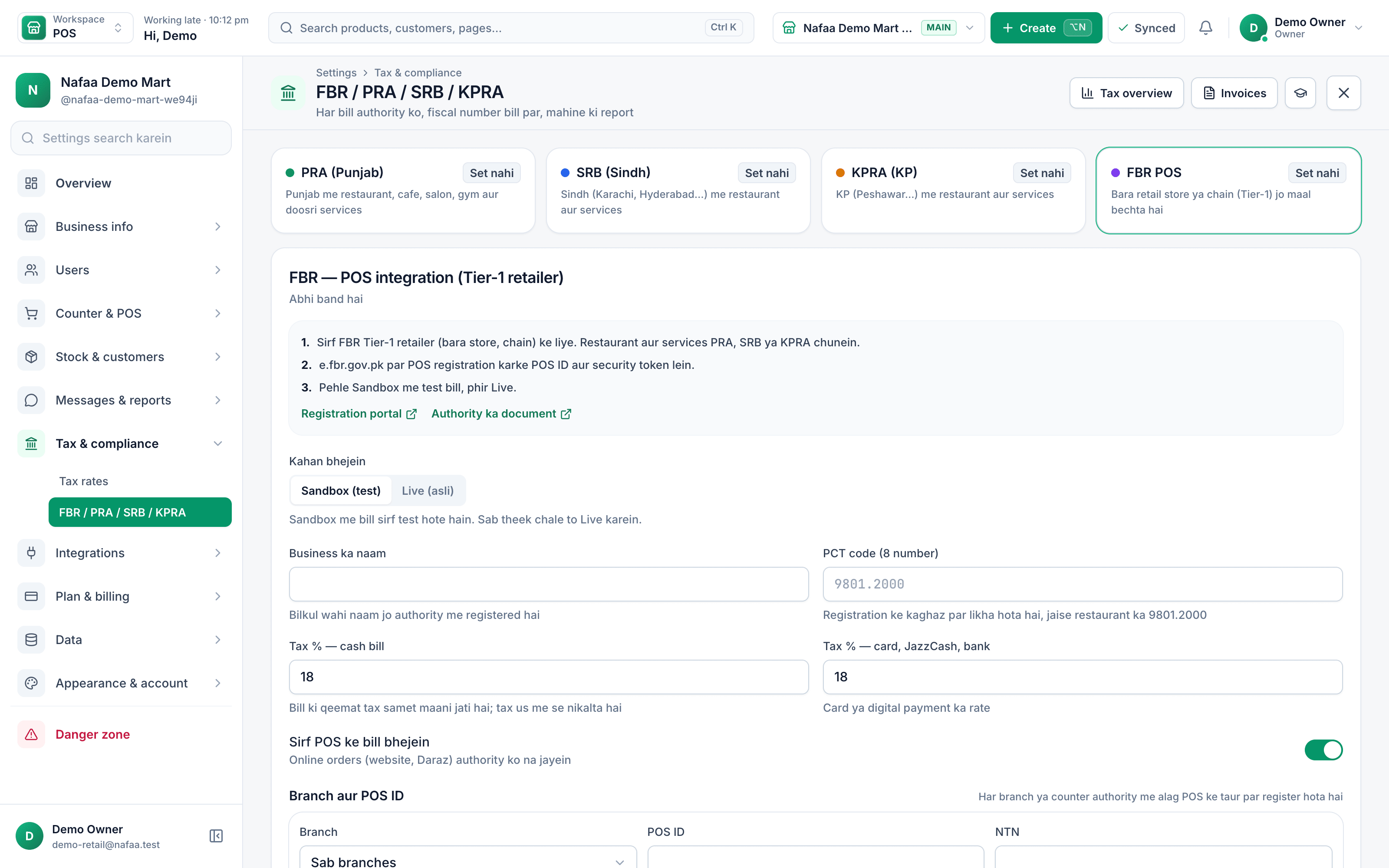
- PRA, SRB, KPRA or FBR
- Sandbox first, then live
- Rate for cash and for card or wallet
- Only counter bills, or online too
- POS ID and NTN per branch
How a tax invoice is made
How it works
How a fiscal invoice is made
- 1
Sell as usual
The cashier bills normally; nothing extra to type at the counter.
- 2
Nafaa reports it
The invoice goes to FBR or your provincial authority in the background, from the branch's own POS ID.
- 3
Number and QR print
The fiscal invoice number and QR code print on the receipt for the customer to verify.
- 4
Misses are retried
If the tax server is slow or the internet is down, the invoice waits in a queue and is sent again.
Features
Compliance that runs itself
Approved integrator
Nafaa is an FBR & PRA approved POS integrator.
Four authorities
FBR for Tier-1 retailers selling goods, plus PRA, SRB and KPRA for services such as restaurants and salons.
Receipt QR
Customers can verify the invoice from the QR on the receipt.
Automatic retry
Queued invoices go out when the connection returns; errors from the tax server are explained in plain words.
Returns reported
A return is reported against the original invoice, so your tax figures go down with it.
Tax reports
Taxable sale, tax and returns per authority for every month, printable on A4 and as CSV for your accountant.
If the tax server is slow
Which authority applies to you
| Feature | Authority | Area |
|---|---|---|
| Tier-1 retailers selling goods | Federal Board of Revenue (FBR) | All of Pakistan |
| Restaurants, salons and other services | Punjab Revenue Authority (PRA) | Punjab |
| Services | Sindh Revenue Board (SRB) | Sindh |
| Services | Khyber Pakhtunkhwa Revenue Authority (KPRA) | Khyber Pakhtunkhwa |
How it works
The Tax section, tab by tab
- 1
Overview
Taxable sale, tax and returns per authority for this month against last, and how many bills are still waiting.
- 2
Invoices
Every bill that was sent, with its fiscal number, QR and the authority's answer. Anything not yet accepted has a retry button.
- 3
Reports
Monthly sales tax figures per authority for your return, printable on A4 and downloadable as CSV.
- 4
Settings
Authorities, branches, POS IDs, keys, rates and the test bill, in one place.
Who needs FBR POS integration
The Sales Tax Act, 1990 defines Tier-1 retailers in section 2(43A). The definition covers, for example, retailers that are part of a national or international chain and retailers above limits for shop size or yearly electricity bill set in the law. Under Chapter XIV-AA of the Sales Tax Rules, 2006, Tier-1 retailers must report every sale to FBR in real time through an integrated POS. The limits change with Finance Acts, so confirm your status with FBR (fbr.gov.pk) or your tax adviser.
Services are taxed by the provinces. Restaurants, cafes, salons, gyms and other service businesses in Punjab report to PRA, in Sindh to SRB, and in Khyber Pakhtunkhwa to KPRA, each with its own POS registration. A business with branches in two provinces can set up both authorities; each branch reports to one.
Details that matter at the counter
- Prices include tax. Nafaa treats the shelf price as tax-inclusive and works the tax out of it, so the customer pays the price on the tag.
- Card and wallet rates. Some authorities charge a lower rate when the customer pays by card or digital wallet. Nafaa keeps one rate for cash bills and another for card, JazzCash and bank payments, and applies the right one to each bill.
- Online orders. You choose whether website and marketplace orders are reported or only counter bills.
- Customer verification. Customers can check an FBR invoice by scanning the receipt QR with FBR's Tax Asaan app.
Before you switch to live
Register the POS with your authority (FBR, PRA, SRB or KPRA; see the FBR integration guide and sales tax on services) and get the POS ID and credentials for each branch, enter them in Nafaa, and send a test bill to the sandbox. When the test is accepted, switch to live. Our team can do this with you as a paid setup if you prefer.
Common questions
Which tax authorities does Nafaa report invoices to?
Nafaa is an FBR & PRA approved POS integrator. It reports sales invoices to FBR for Tier-1 retailers and to the provincial authorities for services: PRA in Punjab, SRB in Sindh and KPRA in Khyber Pakhtunkhwa. Each bill gets its fiscal invoice number and QR code printed on the receipt.
What happens to fiscal invoices when the internet is down?
The counter keeps billing. Invoices that could not reach the tax authority are kept in a queue and sent again automatically when the connection returns, and failed ones are listed with the reason so you can fix them. You never have to stop selling because the tax server is slow.
Does Nafaa work without internet?
Yes, the counter keeps billing when the internet drops. Sales made offline are saved on the device and sent to your account automatically when the connection comes back, and you can see the sales still waiting to be sent. Reports and other branches see those sales once they have synced.
Industries using it
Restaurant & Cafe
Nafaa runs dine-in, takeaway and delivery for restaurants and cafes: a table layout, kitchen order tickets (KOT) sent to each station's printer or screen, add-ons on dishes, recipes, riders for delivery, happy-hour prices, and bills paid by cash, card, wallet, split or khata.General Retail Shop
Nafaa works for any shop that does not fit a specific industry: a fast counter with quick keys and barcodes, combos, stock with low-stock and damage records, bulk import from Excel, a digital khata for udhaar, and reports on sales and profit, all in one app.Salon & Beauty Parlour
Nafaa runs salons and beauty parlours: book appointments on a calendar, keep a service list with prices, pay stylists commission per service, sell memberships, prepaid packages and gift vouchers, keep customer profiles, and bill services and products together at the salon counter.Kiryana & Grocery Store
Nafaa is POS and khata software for kiryana and grocery stores in Pakistan. Scan barcodes at the counter, sell by piece, dozen or carton, keep every customer's udhaar in a digital khata with WhatsApp reminders, import products from Excel, and keep billing when the internet drops.Pharmacy & Medical Store
Nafaa is software for pharmacies and medical stores in Pakistan: search medicines by salt or formula and find substitutes, track batches and expiry, keep prescriptions and doctors, record controlled and narcotic sales in a register with patient and doctor details, and log fridge temperatures for the cold chain.Garments & Boutique
Nafaa runs garment shops and boutiques that sell ready-made and custom-stitched clothes: stock by size and colour, tailoring (silai) orders, alterations, saved customer measurements, items put on hold, qist plans, exchanges, collections and size charts, alongside the counter, khata and reports.
Related
FBR & PRA Integration Setup
Our team sets up FBR, PRA, SRB or KPRA invoicing in Nafaa with you: checking your registration details and POS ID, connecting the sandbox, testing invoices and receipts, and switching to live, so fiscal invoices print from the first real bill.FBR POS Integration
FBR POS integration is the live link between a retailer's point of sale and the Federal Board of Revenue, so that each sale invoice is reported to FBR and carries an FBR invoice number and QR code.Tier-1 Retailer
Tier-1 retailer is the sales tax category for larger retailers, such as chain-store outlets and shops in air-conditioned malls, that must integrate their POS with FBR.NTN (National Tax Number)
The National Tax Number is a taxpayer's identification number with FBR, obtained through FBR's IRIS portal.STRN (Sales Tax Registration Number)
The Sales Tax Registration Number identifies a business registered with FBR for sales tax.FBR POS Integration and E-Invoicing: A Guide for Shops
What FBR POS integration asks of retailers, how it differs from FBR digital invoicing, who it applies to and how to get set up, with each rule linked to the FBR notice it comes from.Integrations
Nafaa connects to the services Pakistani businesses already use: Shopify, WooCommerce, Daraz and Foodpanda orders; PostEx, Leopards, Trax, TCS, M&P and Call Courier; JazzCash and Easypaisa; QuickBooks, Xero, Zoho Books and Tally; WhatsApp; Google product feeds; and a REST API with webhooks for anything else.Tax and Compliance
Plain guides to the rules that reach the shop counter in Pakistan: FBR POS integration for Tier-1 retailers, provincial sales tax on services with PRA, SRB and KPRA, and drug sale rules for pharmacies. Each page cites the law or the authority's own site and says what Nafaa does about it.
More from Nafaa
POS & Billing
Nafaa POS is the billing counter for any business: scan a barcode or tap a quick key, sell by piece, dozen or carton, take cash, card, JazzCash, Easypaisa or khata in one bill, print or WhatsApp the receipt, and keep billing when the internet drops. It runs on the phone, tablet or computer you already have.Inventory
Nafaa Inventory keeps stock right in every unit and every branch: products with cost, price and margin, barcodes and labels, combos, low-stock alerts, damage and adjustments with reasons, stock transfers between branches, and a full movement history. Import from Excel or paste from a spreadsheet, and change many prices at once in the bulk editor.Digital Khata
Nafaa Digital Khata replaces the paper udhaar register: every credit sale lands in the customer's khata from the counter, payments and old balances are recorded, balances are grouped by age, credit limits stop runaway udhaar, and a WhatsApp reminder goes out in one tap.Online Store
Nafaa brings online selling into the same account as the shop: orders from your own website, Shopify, WooCommerce, Daraz and Foodpanda arrive next to counter sales, take stock from the same shelf, and ship with TCS, Leopards, M&P, PostEx, Trax or CallCourier booked from the order.Multi-Branch
Nafaa Multi-Branch runs every shop, warehouse or godown from one account: each branch keeps its own counter, stock and cash, head office compares sales and profit side by side, stock moves between branches with transfers that the other side receives, and each staff member works in the branch they are assigned to.
Get compliant without changing how you sell
Our team can set up the integration with you. Start with the free trial.
- 7 din Free Trial
- Keeps billing offline
- Help on WhatsApp