Updated
ProductMulti-branch
Three branches, one clear picture
Each branch bills, stocks and closes its own day. You see all of them together: sales, profit, cash and stock, branch by branch, from your phone or the head-office desk.
- Branch P&L
- Stock transfers
- Staff by branch
- 7 din Free Trial
- Keeps billing offline
- Help on WhatsApp
- English and Roman Urdu
- Phone, tablet or computer
Short answer
Nafaa Multi-Branch runs every shop, warehouse or godown from one account: each branch keeps its own counter, stock and cash, head office compares sales and profit side by side, stock moves between branches with transfers that the other side receives, and each staff member works in the branch they are assigned to.
Roman Urdu mein
Har branch apna counter, stock aur galla chalati hai, aur aap sab branches ki bikri, munafa aur stock ek jagah dekhte hain. Ek branch se doosri me stock transfer bhi asaan.
Key facts
- Each branch
- Its own counter, stock, cash register and day book
- Head office
- Sales, profit and loss, staff and customers compared side by side
- Branch types
- Shops that sell, plus warehouses and godowns that only hold and send stock
- Stock
- Transfers with send and receive confirmation
- Plans
- Number of shops per plan comes from the pricing page
Inside the app
Compare branches at a glance
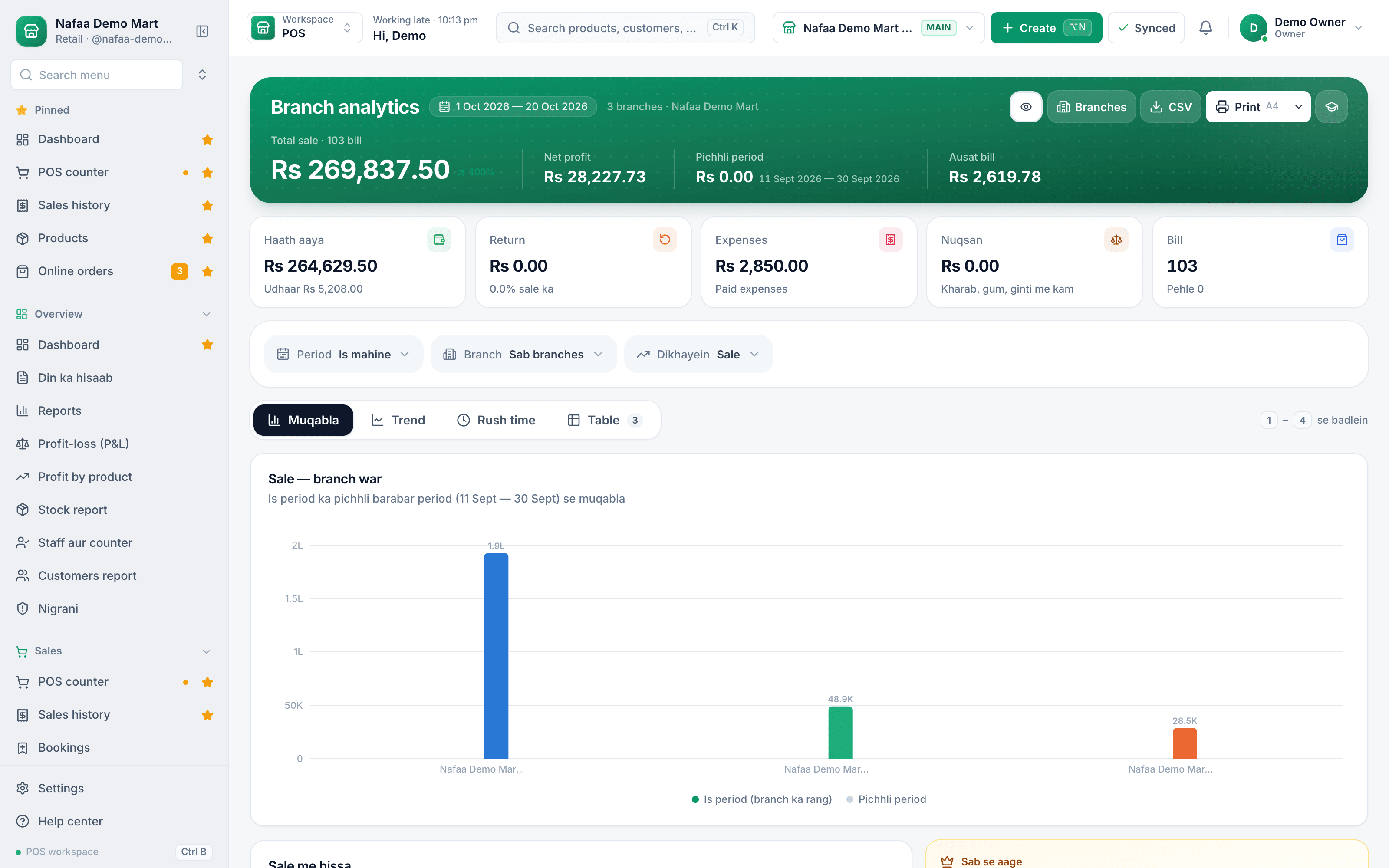
Branch analytics put every branch side by side for any period: sales, net profit and bills against the previous period of the same length, each branch's share of sales, the daily trend and the busy hours. The figures use the same maths as the reports, so the numbers always agree.
- Total sale, all branches
- Net profit
- Pick the period and branch
- Compare, trend, rush time, table
- Sale by branch
Every branch, one dashboard
Features
Built for owners who cannot be everywhere
Branch analytics
Sales, profit, bills and average bill by branch, against the last period.
Branch P&L
Profit and loss per branch and for the whole business.
Day book
Each branch's cash in and out, closed at the end of the day, or all branches together.
Stock transfers
Send stock between branches; the other side receives it and a short delivery is recorded.
Warehouses and godowns
Keep bulk stock in a godown that does not sell, and send it to the shops that do.
Audit by branch
Voids, refunds, big discounts, drawer shorts and transfers that arrived short, filtered by branch and staff.
Every branch on one list
Each branch card shows today's sale, the cash in its drawer, its stock at cost, items running low and who is on duty. Open a branch to see its analytics, call or WhatsApp it, or switch into its counter.
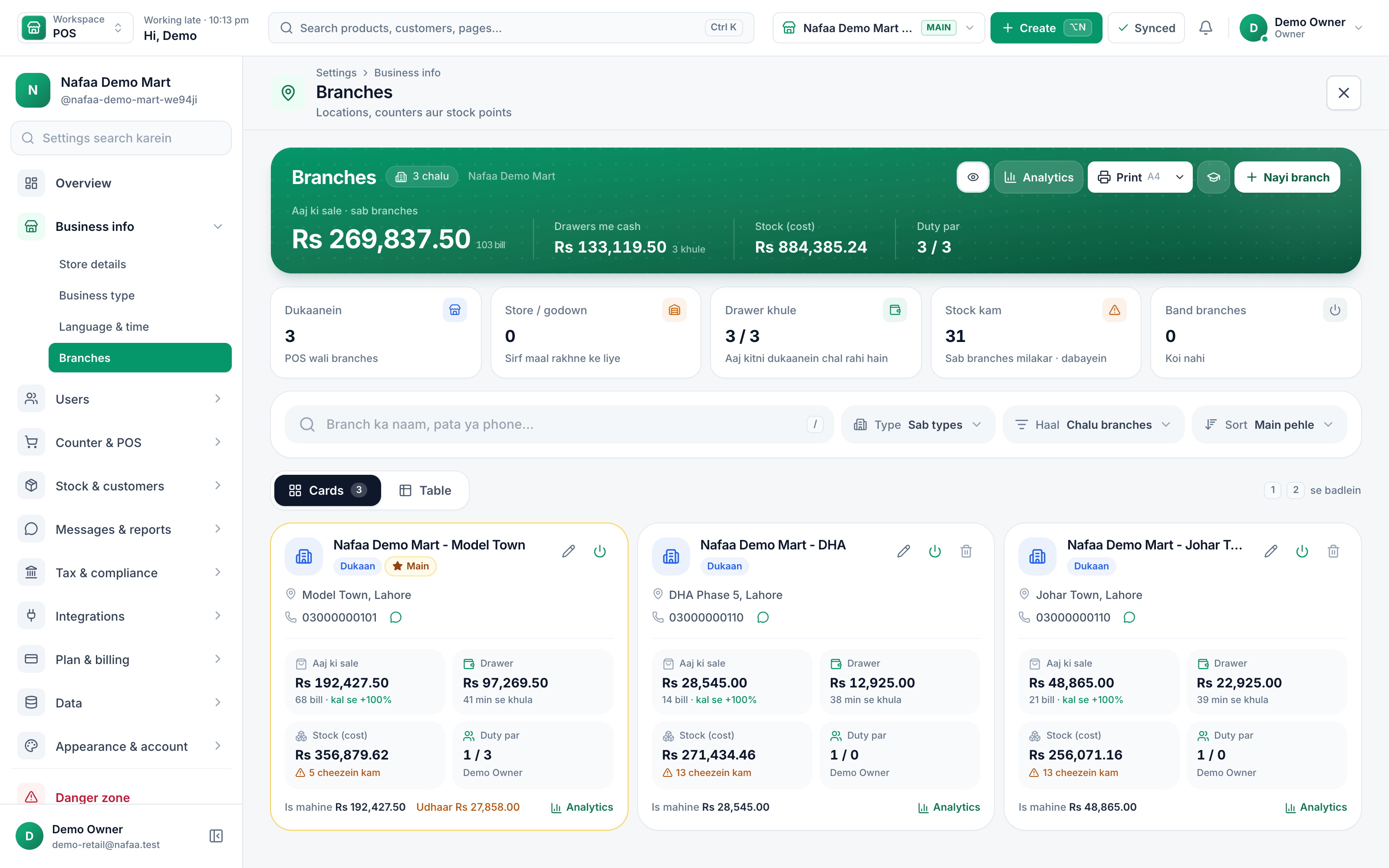
- Today's sale
- Cash in the drawer
- Stock and items low
- Staff on duty
Move stock where it sells
What each branch runs, and what head office sees
| Feature | At each branch | At head office |
|---|---|---|
| Sales | Its own counter, bills and returns | Sales, profit and bills for every branch, side by side |
| Stock | Its own stock, low-stock list and damage | Stock value per branch, transfers in transit, what is low everywhere |
| Cash | Its own drawer, shifts and day book | Cash in every open drawer and the day book for one branch or all |
| Staff | People assigned to that branch | Staff sales, attendance and audit across branches |
| Online orders | Packs the orders sent to it | Chooses which branch ships each order |
How it works
Add a branch in four steps
- 1
Create the branch
Name, type (shop, warehouse or godown), phone and address. Create the branch manager's login in the same step.
- 2
Give it stock
Transfer opening stock from the main shop or a godown, or import its own list from Excel.
- 3
Add the team
Add staff and assign each person to the branch they work in.
- 4
Start billing
The new counter reports into the same account from its first sale.
Who it is for
Owners with a second shop in another bazaar, chains of pharmacies or grocery stores across a city, restaurants with more than one outlet, and wholesalers who keep stock in a godown and sell from a shop front. It also suits a single shop with a separate store room, which can be set up as a godown so its stock is counted on its own.
What to check before you open the next branch
- Separate cash per branch. Each drawer should close on its own, or a short in one branch hides inside the total.
- Transfers with a receiving step. Stock that leaves one branch should only arrive in the other when someone there confirms it.
- One product list. Adding a product once should make it available everywhere, with stock counted per branch.
- Head office on the phone. You should see every branch's sale tonight without calling anyone.
Common questions
Can I move stock from one branch to another?
Yes. Create a stock transfer from one branch, and the receiving branch confirms what arrived. Stock leaves one shop and lands in the other with a record of who sent and received it. Head office sees every branch's stock, sales and profit and loss side by side.
Does Nafaa work without internet?
Yes, the counter keeps billing when the internet drops. Sales made offline are saved on the device and sent to your account automatically when the connection comes back, and you can see the sales still waiting to be sent. Reports and other branches see those sales once they have synced.
How much does Nafaa cost?
Paid plans start at Rs 1,500 a month. The pricing page lists every plan with its price and limits, taken straight from our plan settings, so it is always current. You can start with the free trial first, and no credit card is needed to sign up.
Industries using it
General Retail Shop
Nafaa works for any shop that does not fit a specific industry: a fast counter with quick keys and barcodes, combos, stock with low-stock and damage records, bulk import from Excel, a digital khata for udhaar, and reports on sales and profit, all in one app.Pharmacy & Medical Store
Nafaa is software for pharmacies and medical stores in Pakistan: search medicines by salt or formula and find substitutes, track batches and expiry, keep prescriptions and doctors, record controlled and narcotic sales in a register with patient and doctor details, and log fridge temperatures for the cold chain.Restaurant & Cafe
Nafaa runs dine-in, takeaway and delivery for restaurants and cafes: a table layout, kitchen order tickets (KOT) sent to each station's printer or screen, add-ons on dishes, recipes, riders for delivery, happy-hour prices, and bills paid by cash, card, wallet, split or khata.Garments & Boutique
Nafaa runs garment shops and boutiques that sell ready-made and custom-stitched clothes: stock by size and colour, tailoring (silai) orders, alterations, saved customer measurements, items put on hold, qist plans, exchanges, collections and size charts, alongside the counter, khata and reports.Kiryana & Grocery Store
Nafaa is POS and khata software for kiryana and grocery stores in Pakistan. Scan barcodes at the counter, sell by piece, dozen or carton, keep every customer's udhaar in a digital khata with WhatsApp reminders, import products from Excel, and keep billing when the internet drops.Bakery & Sweets
Nafaa runs bakeries and sweet shops: take custom cake orders with an advance, plan the day's baking, keep raw materials with their cost, see each recipe's live cost, track freshness and waste, and manage wedding and event bulk orders, alongside the normal counter, stock and khata.
Related
Wholesale & Distribution
Nafaa for wholesalers and distributors handles trade the way it is done in Pakistan: carton and piece prices, a separate wholesale price, khata and credit limits for every trade customer, supplier accounts and purchase orders, stock across godowns and branches, A4 invoices and price lists you can send on WhatsApp.Opening a Second Branch: Checks, Costs and the First 90 Days
Open a second branch only when the first shop runs well without you at the counter, you have cash for several months of slow sales, and you have someone you trust to run it. This guide covers the readiness checks, choosing a location, a simple break-even estimate, staff, opening stock, prices and the first 90 days.Stock Transfer
A stock transfer moves goods from one branch, store or warehouse of the same business to another, reducing stock at one place and adding it at the other.
More from Nafaa
Reports
Nafaa Reports answer the owner's questions in plain numbers: today's sale and profit on the dashboard, profit by product, profit and loss with expenses, the day book, stock value, staff and customer reports, with Excel export and journals for QuickBooks, Xero, Zoho Books or Tally.Inventory
Nafaa Inventory keeps stock right in every unit and every branch: products with cost, price and margin, barcodes and labels, combos, low-stock alerts, damage and adjustments with reasons, stock transfers between branches, and a full movement history. Import from Excel or paste from a spreadsheet, and change many prices at once in the bulk editor.Staff & Payroll
Nafaa Staff gives every team member a login and a role, sets counter rules like the refund PIN, tracks attendance and leave, works out sales commission, runs payroll with advances and payslips, and logs every sensitive action with a name, so the owner can trust the counter without standing behind it.POS & Billing
Nafaa POS is the billing counter for any business: scan a barcode or tap a quick key, sell by piece, dozen or carton, take cash, card, JazzCash, Easypaisa or khata in one bill, print or WhatsApp the receipt, and keep billing when the internet drops. It runs on the phone, tablet or computer you already have.Digital Khata
Nafaa Digital Khata replaces the paper udhaar register: every credit sale lands in the customer's khata from the counter, payments and old balances are recorded, balances are grouped by age, credit limits stop runaway udhaar, and a WhatsApp reminder goes out in one tap.
Open the next branch with confidence
Run it from the same account and see it next to the others from day one.
- 7 din Free Trial
- Keeps billing offline
- Help on WhatsApp