Help center
How to see your profit
See profit in Nafaa two ways: Profit by product shows what each item earned after its cost, and Profit-loss (P&L) shows the whole business after expenses and stock losses. Learn how each figure is worked out and how to find items that lose money.
Updated
Nafaa has two profit reports, both under Overview in the sidebar.
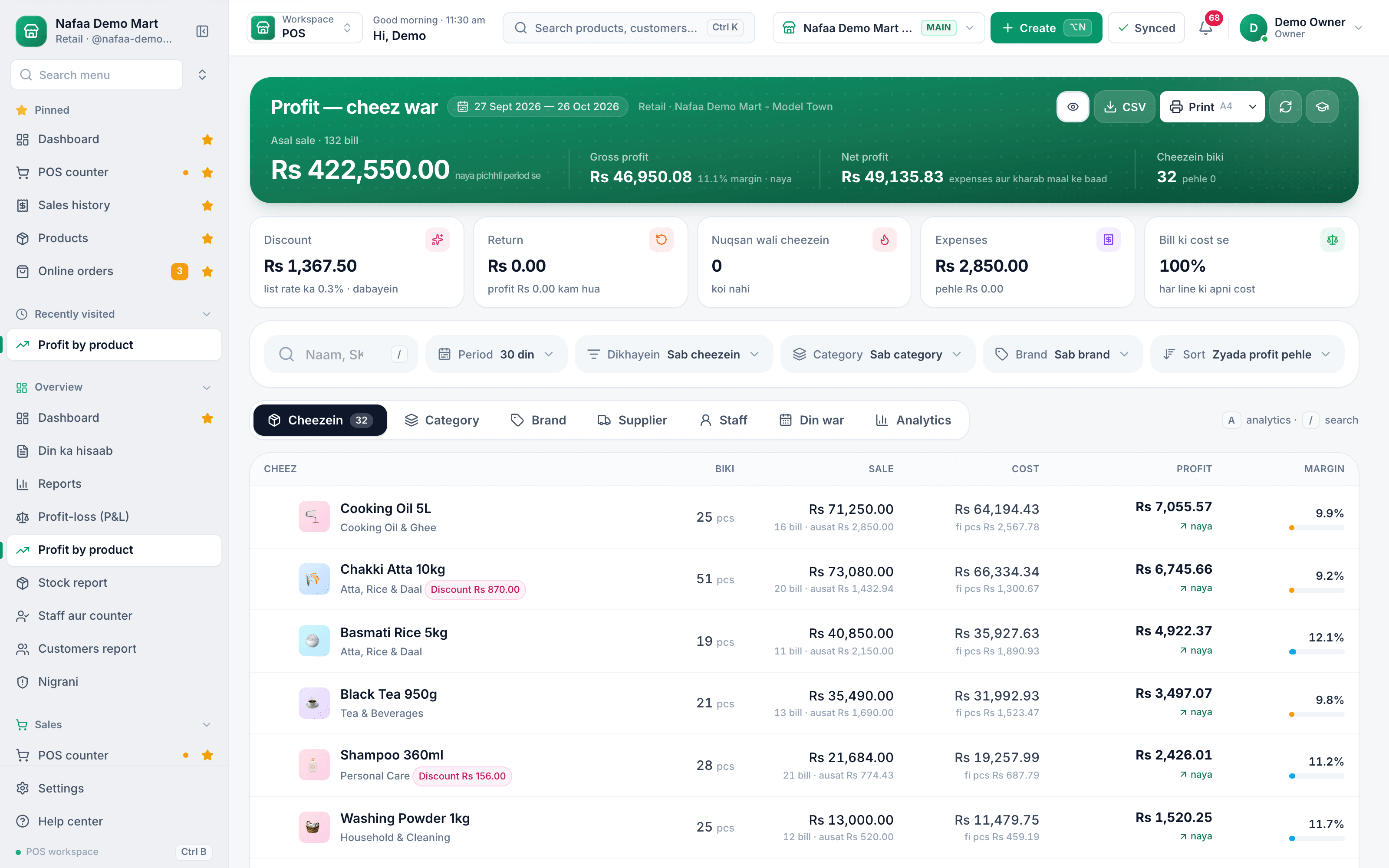
- Profit by product (the page is titled Profit — cheez war, profit item by item) shows sale, cost and profit for every item, so you can see what earns and what does not.
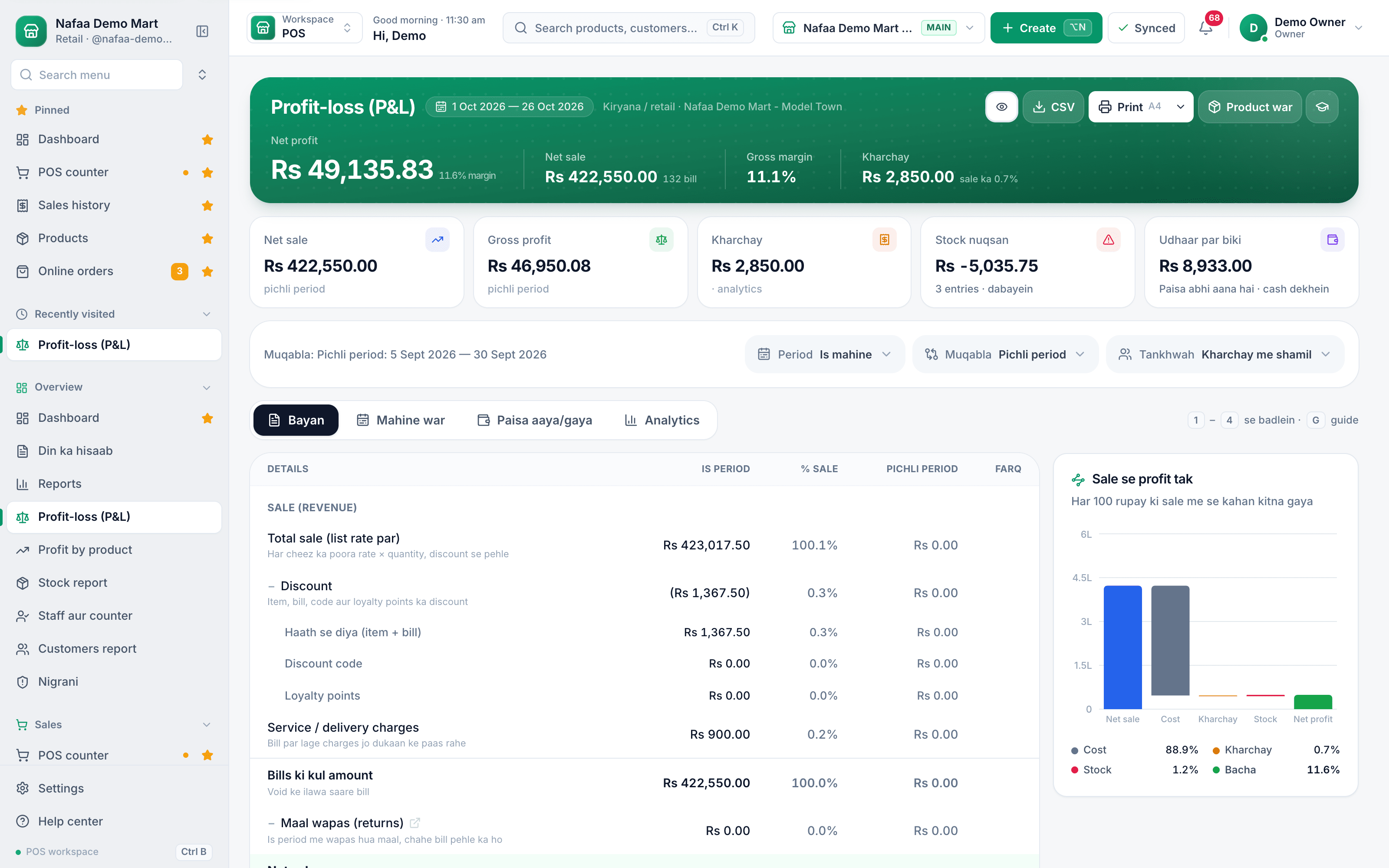
- Profit-loss (P&L) is the statement for the whole business: sales, cost, expenses, stock losses and net profit for the period.
Both use the cost the item had when the bill was made, so a later price change does not rewrite old profit.
Check profit by product
Step 1: Open the report
In the sidebar, open Overview → Profit by product.
Step 2: Choose the period
Use Period to pick today, 7 days, this month or your own dates. Each figure is compared with the same length of time before it.
Step 3: Read the top figures
Asal sale (actual sale) is the list price minus discounts and returns. Gross profit is actual sale minus the cost of the goods. Net profit takes off expenses and damaged or lost stock.
Step 4: Find problem items
Click Nuqsan wali cheezein (items sold at a loss), Discount or Return to show only those items. Sort and filter by Category, Brand or Staff.
Step 5: See where profit comes from
Switch tabs to Category, Brand, Supplier, Staff or Din war (day by day). Click a row to filter the item list by it.
Step 6: Export
Use CSV or Print for the full list.
- Period
- Items sold at a loss
- Category, brand, supplier, staff
- Margin per item
The profit and loss statement
Open Overview → Profit-loss (P&L) for the whole business. Bayan (statement) lists sales, discounts, returns, cost, expenses and stock losses down to net profit. Mahine war shows month by month, Branch war each branch, and Paisa aaya/gaya money in and out, including sales on udhaar that are not collected yet. Use Muqabla to compare with the previous period or the same dates last year, and Tankhwah to choose whether staff salaries count as expenses.
- Net profit
- Sold on udhaar
- Muqabla
- Bayan, Mahine war, Paisa
Questions
Why is my profit different from cash in the drawer?
Profit counts the bill value minus cost, including sales on udhaar that are not paid yet. The drawer holds only cash. Paisa aaya/gaya in the P&L shows the money side.
Which cost does Nafaa use?
The cost the item had when the bill was made. For old bills saved without a cost, today’s cost is used and a notice tells you how many lines that affects.
Can my staff see profit?
Cost and profit are shown only to people whose role allows them to see cost.
Related
- Product
Reports
Nafaa Reports answer the owner's questions in plain numbers: today's sale and profit on the dashboard, profit by product, profit and loss with expenses, the day book, stock value, staff and customer reports, with Excel export and journals for QuickBooks, Xero, Zoho Books or Tally. - Page
How to read the daily sales report
Din ka hisaab is Nafaa’s day report: net sale, money received, profit, the galla, discounts, returns, udhaar and expenses for one day, with tabs for items, staff and checks. Learn how to open any day, read it and share or print it. - Page
Give a discount at the counter
Give a bill discount as a percentage or in rupees, round the bill off, apply a discount code or loyalty points, and set the limit a cashier can give without the owner’s PIN. - Page
How to adjust stock and record damage
Correct stock by hand when it does not match the shelf: add stock, remove it, or record damaged and lost goods with a reason. Use a stock count to enter what you actually counted and let Nafaa post the difference. - Tool
Profit Margin Calculator
Work out profit, margin and markup from your cost and selling price, or find the price that gives the margin you want. Built for shops in Pakistan: type rupee amounts, add a quantity for total profit, and see why a 25% markup is only a 20% margin.
Terms used here
Gross Profit
Gross profit is sales minus the cost of the goods sold, before rent, salaries, bills and other expenses are taken off.Net Profit
Net profit is what is left from sales after the cost of goods and all business expenses have been taken off.Profit and Loss Statement (P&L)
A profit and loss statement is a report of sales, costs and expenses over a period that shows whether the business made a profit or a loss.COGS (Cost of Goods Sold)
Cost of goods sold is the purchase cost of the items a business actually sold in a period, which is subtracted from sales to find gross profit.Gross Margin
Gross margin is gross profit shown as a percentage of the selling price: (selling price minus cost) divided by selling price.
Close the day and know the numbers
Day report, cash closing and profit by product from the same bills your counter makes. Try it free for 7 days.