Every tradeIndustries
Made for your trade, built on one strong core
A pharmacy needs batches and expiry, a mobile shop needs IMEI, a restaurant needs tables and a kitchen. Nafaa turns on the screens your trade needs on top of the same counter, stock and khata.
- Screens for each trade
- Same counter, stock and khata
- Switch on what you need
- 7 din Free Trial
- Keeps billing offline
- Help on WhatsApp
- English and Roman Urdu
- Phone, tablet or computer
How industry screens work
Nafaa has screens made for each trade on top of the same counter, stock and khata: kiryana and grocery, pharmacy, bakery, restaurant, mobile phone shops, garments, hardware, jewellery, salons, clinics and more. Pick your trade to see the features, real screens and questions that matter to it.
Roman Urdu mein
Har karobar ka core ek hai: counter, stock aur khata. Uske upar aapke karobar ki khaas screens khulti hain, jaise pharmacy me batch aur expiry, mobile shop me IMEI, restaurant me table aur kitchen.
Key facts
- Core
- POS, stock, khata, reports and staff, the same for every trade
- On top
- Trade screens such as batches and expiry, IMEI, tables and KOT, sizes and colours
- Switching
- Pick your trade at signup; change it later in settings
Find your trade
Grouped by kind of business. Each page shows the features made for that trade and the real screens.
Retail shops8
Kiryana
Nafaa is POS and khata software for kiryana and grocery stores in Pakistan. Scan barcodes at the counter, sell by piece, dozen or carton, keep every customer's udhaar in a digital khata with WhatsApp reminders, import products from Excel, and keep billing when the internet drops.Mobile shop
Nafaa runs mobile phone shops: keep stock by IMEI, record each phone's PTA status, buy used phones and take trade-ins, open repair job cards, and sell on instalments with a qist plan, while the counter, khata and reports work the same as in any shop.Garments
Nafaa runs garment shops and boutiques that sell ready-made and custom-stitched clothes: stock by size and colour, tailoring (silai) orders, alterations, saved customer measurements, items put on hold, qist plans, exchanges, collections and size charts, alongside the counter, khata and reports.Bookstore
Nafaa runs bookstores, stationery and art supply shops: books with ISBN, authors and publishers, textbooks by grade and board, school book lists, stationery and art supplies, and book rentals, with the same counter, stock and khata as every Nafaa shop.Appliances
Nafaa runs home appliance shops: serial numbers and warranties, installations, repairs with technicians, AMC contracts, heavy deliveries, qist plans with a guarantor, trade-ins of old appliances, and brand warranty claims, alongside the normal counter, stock and khata. It runs in the browser on a phone, tablet or computer.Electronics
Nafaa runs electronics and gadget shops: serial and IMEI tracking, warranty claims, brands, technical specs on products, bundles, and condition grading for used or open-box items, together with the counter, stock and khata used by every Nafaa shop. It runs in the browser on a phone, tablet or computer.Retail
Nafaa works for any shop that does not fit a specific industry: a fast counter with quick keys and barcodes, combos, stock with low-stock and damage records, bulk import from Excel, a digital khata for udhaar, and reports on sales and profit, all in one app.Shoe store
Nafaa runs shoe stores: every pair by size and colour with its own barcode, brands and seasons, size-wise reorder, exchanges, a list of sizes customers asked for that were out of stock, and size charts, together with the counter, stock and khata.
Food & beverage4
Bakery
Nafaa runs bakeries and sweet shops: take custom cake orders with an advance, plan the day's baking, keep raw materials with their cost, see each recipe's live cost, track freshness and waste, and manage wedding and event bulk orders, alongside the normal counter, stock and khata.Restaurant
Nafaa runs dine-in, takeaway and delivery for restaurants and cafes: a table layout, kitchen order tickets (KOT) sent to each station's printer or screen, add-ons on dishes, recipes, riders for delivery, happy-hour prices, and bills paid by cash, card, wallet, split or khata.Meat
Nafaa runs meat and butcher shops: set today's rate, take orders by weight, keep live animals bought from the mandi, record halal slaughter and cutting, supply restaurants and hotels on account, and handle Qurbani and Aqeeqa orders, alongside the counter, stock and khata.Dairy
Nafaa runs dairy and milk shops: record milk bought from gawalas, deliver to homes on routes, send a monthly bill to each delivery customer, make dahi and makhan and record spoiled stock, run quality tests, and sell loose milk at the counter.
Health & medical3
Pharmacy
Nafaa is software for pharmacies and medical stores in Pakistan: search medicines by salt or formula and find substitutes, track batches and expiry, keep prescriptions and doctors, record controlled and narcotic sales in a register with patient and doctor details, and log fridge temperatures for the cold chain.Clinic
Nafaa runs clinics: reception gives tokens and shows the live line, each visit carries its prescription and lab orders, patient records stay in one place, doctor fees close with the day, and vaccinations are tracked, all in the same app as billing.Optical
Nafaa runs optical shops: eye tests and prescriptions with SPH, CYL, axis, ADD and PD, glasses orders with an advance, lab tracking and pickup, repairs, optometrists, and stock of frames and contact lenses, alongside the counter and khata. It runs in the browser on a phone, tablet or computer.
Services4
Salon
Nafaa runs salons and beauty parlours: book appointments on a calendar, keep a service list with prices, pay stylists commission per service, sell memberships, prepaid packages and gift vouchers, keep customer profiles, and bill services and products together at the salon counter.Hotel
Nafaa runs hotels, guest houses, motels and resorts: a room board, bookings and guests, housekeeping, room types, seasonal and weekend rates, extra charges posted to the room bill, and a night audit report, with billing and khata built in. It runs in the browser on a phone, tablet or computer.Gym
Nafaa runs gyms and fitness clubs: fast member check-in, memberships and renewals, plans, personal training packages with trainer commission, group classes, lockers and machine records, with fees and payments kept in one place. It runs in the browser on a phone, tablet or computer.Services
Nafaa runs field service businesses such as plumbers, electricians, AC technicians, IT support and cleaners: create jobs, dispatch technicians, send quotes, keep a service catalogue, manage AMC contracts and warranties, and bill and collect payment in the same app. It runs in the browser on a phone, tablet or computer.
Specialty trade6
Carpet
Nafaa handles carpet, flooring and matting shops that sell by the roll: keep each roll's length in stock, cut pieces to size with a length-by-width calculator, price by square foot, keep the leftover cut pieces as stock, and import rolls in bulk from a spreadsheet.Auto parts
Nafaa runs auto parts shops and workshops: parts matched to vehicle make and model, customer vehicles, workshop job cards with mechanics, service reminders for oil change, token tax and insurance, and returned old parts, together with the counter, stock and khata.Hardware
Nafaa runs hardware and building material shops: items by size and shade, retail, contractor and bulk rates, quotations that turn into bills, delivery challans, contractor sites with their own khata, brands, and reorder rules that flag what to buy before it runs out.Jewellery
Nafaa runs jewellery shops: set today's gold and silver rate, keep each piece with its metal and stones, sell at the counter, take custom orders, buy back old gold, handle repairs, track work given to karigars, and keep metal stock by weight.Agri
Nafaa runs agri stores that sell seeds, fertiliser, pesticides and animal feed: keep farmer accounts with credit, take bulk orders, record crop advisories, plan stock by season, and track government subsidy claims, alongside the counter, stock and khata. It runs in the browser on a phone, tablet or computer.Furniture
Nafaa runs furniture showrooms with their own workshops: custom orders against a deposit, karigar workload, and large deliveries with assembly, together with ready stock at the showroom counter, a khata for customers who pay in parts, and reports. It runs in the browser on a phone, tablet or computer.
Lifestyle & leisure6
Cosmetics
Nafaa runs cosmetics and beauty shops that sell makeup, skincare, fragrance and haircare: brands and shades, batch expiry, tester records, deals and gift sets, and a loyalty programme for regular customers, with the counter, stock and khata built in. It runs in the browser on a phone, tablet or computer.Florist
Nafaa runs florists and flower shops: bouquet and occasion orders, today's delivery list, wedding decoration contracts, regular flower subscriptions, and freshness tracking so ageing stock is sold or written off in time, with the counter and khata built in. It runs in the browser on a phone, tablet or computer.Gaming
Nafaa runs gaming shops and cyber cafes: live billing for PC and console stations, console rentals, PSN, Xbox and PUBG top-ups, tournaments, and sales of consoles, games and PC parts at the counter, with stock and khata in the same app.Pet shop
Nafaa runs pet shops and vet stores: pet food, accessories, aquarium items and vet medicine at the counter, live animals with health records, and grooming appointments with groomers, with the stock, khata and reports that every Nafaa shop uses. It runs in the browser on a phone, tablet or computer.Sports
Nafaa runs sports goods shops that sell cricket, football and gym equipment: team orders with printing and an advance, bat and racket repairs, and brand records, alongside the counter, stock, khata and reports that every Nafaa shop uses. It runs in the browser on a phone, tablet or computer.Toys
Nafaa runs toy stores: filter toys by age, review safety certification, build gift packs, help parents with a gift finder, and keep children's birthdays for reminders, while the counter, stock and khata work the same as in every Nafaa shop.
Your trade, switched on
Every trade gets
What every trade gets
A fast counter
Barcodes, quick keys, units and split payments.
Stock you can trust
Low-stock alerts, purchasing and stock counts.
Digital khata
Udhaar with WhatsApp reminders and statements.
Real profit
Profit by product and a clear profit and loss.
Staff and roles
Each person sees only what their job needs.
Every way to pay
Cash, card, JazzCash, Easypaisa and khata in one bill.
Inside the app
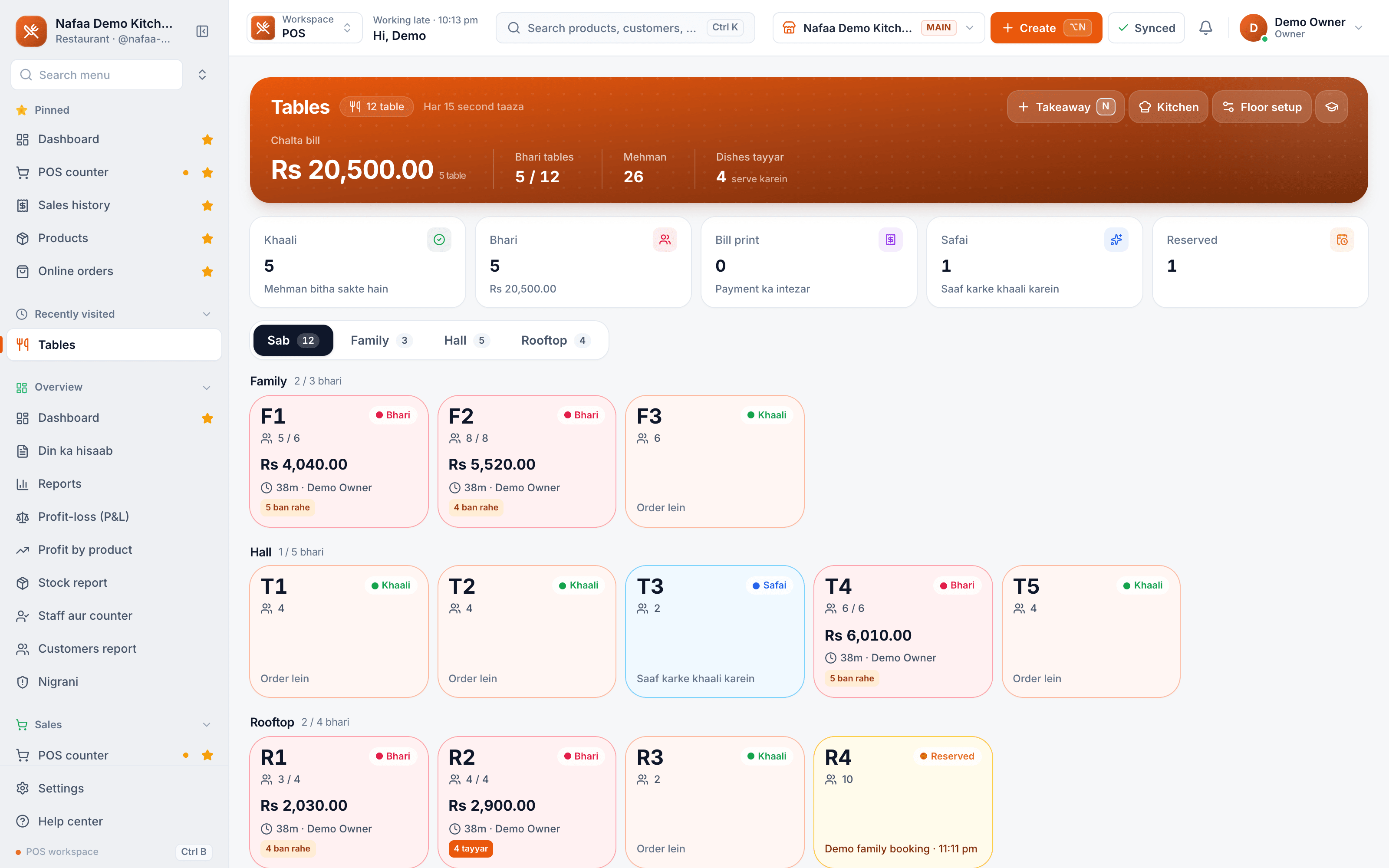
Same app, your screens
A restaurant opens on its table plan, a grocery opens on its counter. The menu, words and shortcuts follow the trade you chose.
From one sale to every report
Common questions
Is Nafaa only for shops?
No. Nafaa started at the shop counter, but the same account runs restaurants (tables, kitchen tickets, delivery), online sellers (your own store and the Nafaa Bazaar marketplace), service businesses (bookings, memberships, commission), wholesalers (carton prices, credit limits, suppliers) and companies with many branches. Each business type gets its own screens on top of the same POS, stock, khata and reports.
Do I need a computer to use Nafaa?
No. Nafaa runs in a web browser, so the phone, tablet or computer you already have will do. A barcode scanner and a receipt printer can be added later but are not required to start. The counter also keeps working without internet and sends the sales to your account when the connection returns.
Can I add my products from Excel?
Yes. Download the template made for your business, fill it or paste your list, and upload it. Nafaa first checks every line in a dry run, flagging duplicates by name, SKU or barcode and bad prices, without saving anything. Then the import runs in chunks, and lines that need fixing download as Excel with the reason.
Do not see your trade?
The core works for any business that sells. Tell us how yours works and we will show you the right setup.
- 7 din Free Trial
- Keeps billing offline
- Help on WhatsApp