Updated
ProductPoint of sale
The counter that never makes a customer wait
Scan, tap or search, sell in any unit, split the bill across cash, card and wallets, and hand over a printed or WhatsApp receipt in seconds. When the internet drops, Nafaa keeps billing and syncs later.
- Works offline
- JazzCash & Easypaisa
- WhatsApp receipts
- 7 din Free Trial
- Keeps billing offline
- Help on WhatsApp
- English and Roman Urdu
- Phone, tablet or computer
Short answer
Nafaa POS is the billing counter for any business: scan a barcode or tap a quick key, sell by piece, dozen or carton, take cash, card, JazzCash, Easypaisa or khata in one bill, print or WhatsApp the receipt, and keep billing when the internet drops. It runs on the phone, tablet or computer you already have.
Roman Urdu mein
Nafaa POS se barcode scan karein ya quick key dabayein, piece, darjan ya carton me bechein, cash, card, JazzCash, Easypaisa ya udhaar me paise lein aur receipt print ya WhatsApp karein. Internet chala jaye to bhi bill bante rehte hain.
Key facts
- Runs on
- Any web browser on a phone, tablet or computer, plus a Windows desktop app
- Without internet
- Sales are saved on the device and sent when the connection returns
- Payments
- Cash, card, JazzCash, Easypaisa, bank transfer and khata, split in one bill
- Hardware
- Optional: barcode scanner, 58 or 80 mm thermal printer, cash drawer
- Price
- Paid plans from Rs 1,500 a month, after a 7-day free trial
Inside the app
Built for the rush hour
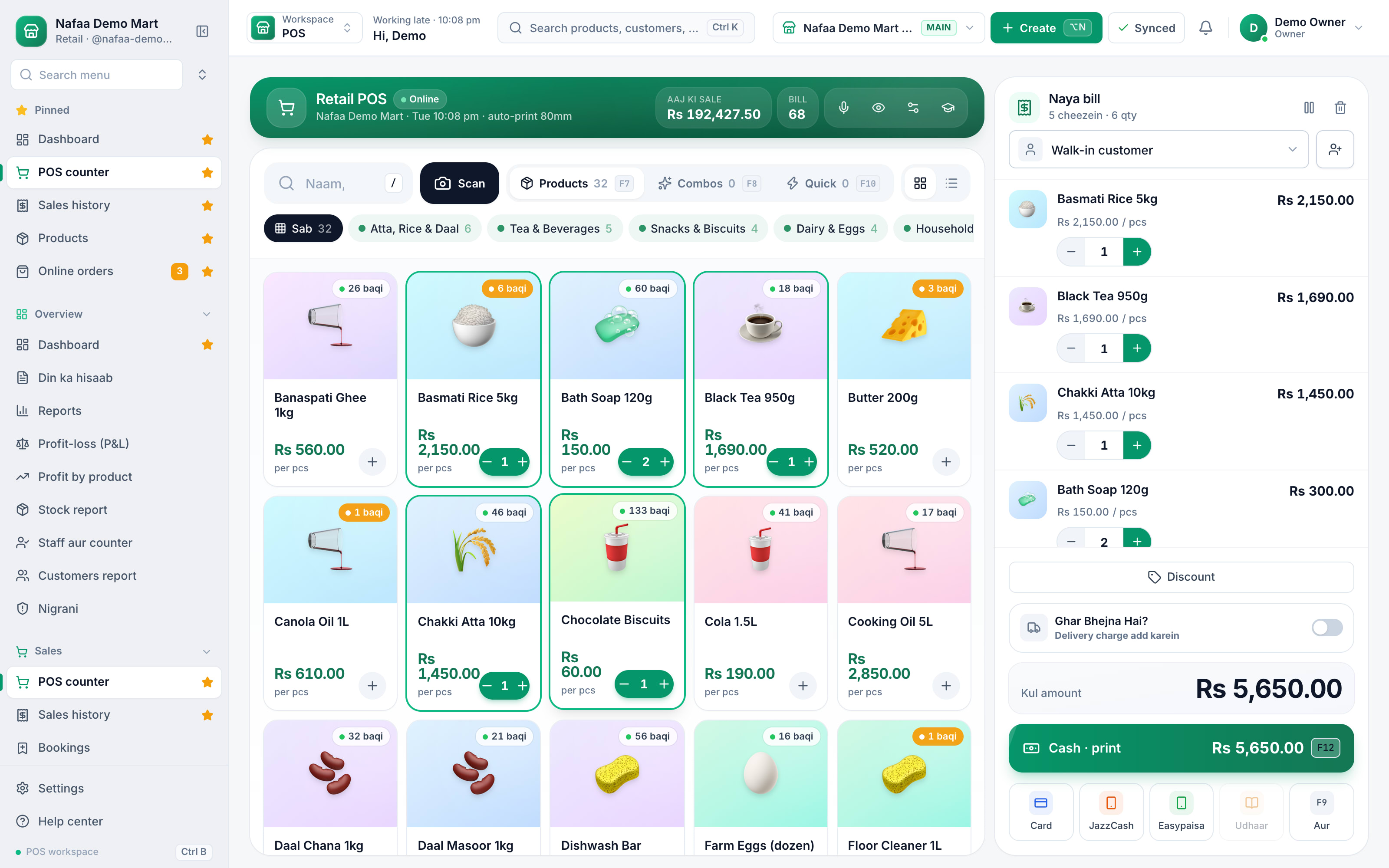
This is the Classic layout: products in big tiles by category with their stock on each one, so a new cashier finds them on day one. The bill stays on the right, with the customer, discount, delivery charge and every way to pay one tap away. The green button finishes a cash bill and prints it, and F12 does the same from the keyboard.
- Categories and quick keys
- Stock left on every tile
- The bill, with the customer
- F12: cash and print
- Card, JazzCash, Easypaisa, udhaar
From one sale to every report
How it works
From scan to receipt in four moves
- 1
Find the item
Scan the barcode, search by name, or tap a quick key for loose items like sugar or eggs.
- 2
Pick the unit
Sell by piece, dozen or carton. Each unit has its own price, and stock is counted in the base unit.
- 3
Take payment
Cash, card, JazzCash, Easypaisa or bank transfer, or put it on the customer's khata. Split one bill across several.
- 4
Hand over the receipt
Print on a thermal printer or send it on WhatsApp, with your shop name, logo and return policy on it.
Features
Everything the counter needs
Keeps billing offline
When the internet drops, sales are saved on the device and sync on their own when it returns. You can see what is still waiting to be sent.
Units and packs
Piece, dozen, carton or any pack you define, each with its own price and barcode.
Split payments
One bill, many ways to pay: part cash, part card, part on the khata.
Counter rules
Refunds and big discounts need the manager PIN. Every sensitive action is logged with a name.
Returns and exchanges
Find the old bill, take back items, and the stock and khata update by themselves.
WhatsApp receipts
Send the bill to the customer's WhatsApp instead of paper.
A whole sale from the keyboard
Four counter layouts, one counter
| Feature | What the screen shows | Best for |
|---|---|---|
| Classic | Product tiles on the left, the bill on the right | Most shops, and new cashiers who like to see the items |
| Express | A large search box with the bill as a table below it | Barcode scanners and fast typists at a busy counter |
| Cart-focus | A large bill on the left and a slim product list on the right | Long bills that need checking line by line, like wholesale |
| Touch | Bigger tiles and buttons | Tablets and touch screens |
Keyboard first, mouse optional
A cashier who knows the keys can finish a bill without looking away from the customer. Type 3* before a name or barcode to add three at once, or type a mobile number like 0300 1234567 to find or add that customer. F2 opens the customer, F3 moves into the bill lines to change quantity or rate, F4 opens the discount, F6 holds the bill and brings it back, F8 opens payment where keys 1 to 6 choose cash, card, JazzCash, Easypaisa, udhaar or split, and F12 takes cash and prints. Alt+R repeats the last bill, Alt+1 to 9 add this counter's most sold items, and ? shows every key on screen.
The owner also decides what the counter shows: product images, categories, quick keys, stock on tiles, the delivery charge, the discount button, line notes, price editing, sounds, auto-print and quick discount buttons such as 5% and 10%. A small shop can keep the screen simple and a busy one can switch on everything.
Billing never stops
In your pocket too
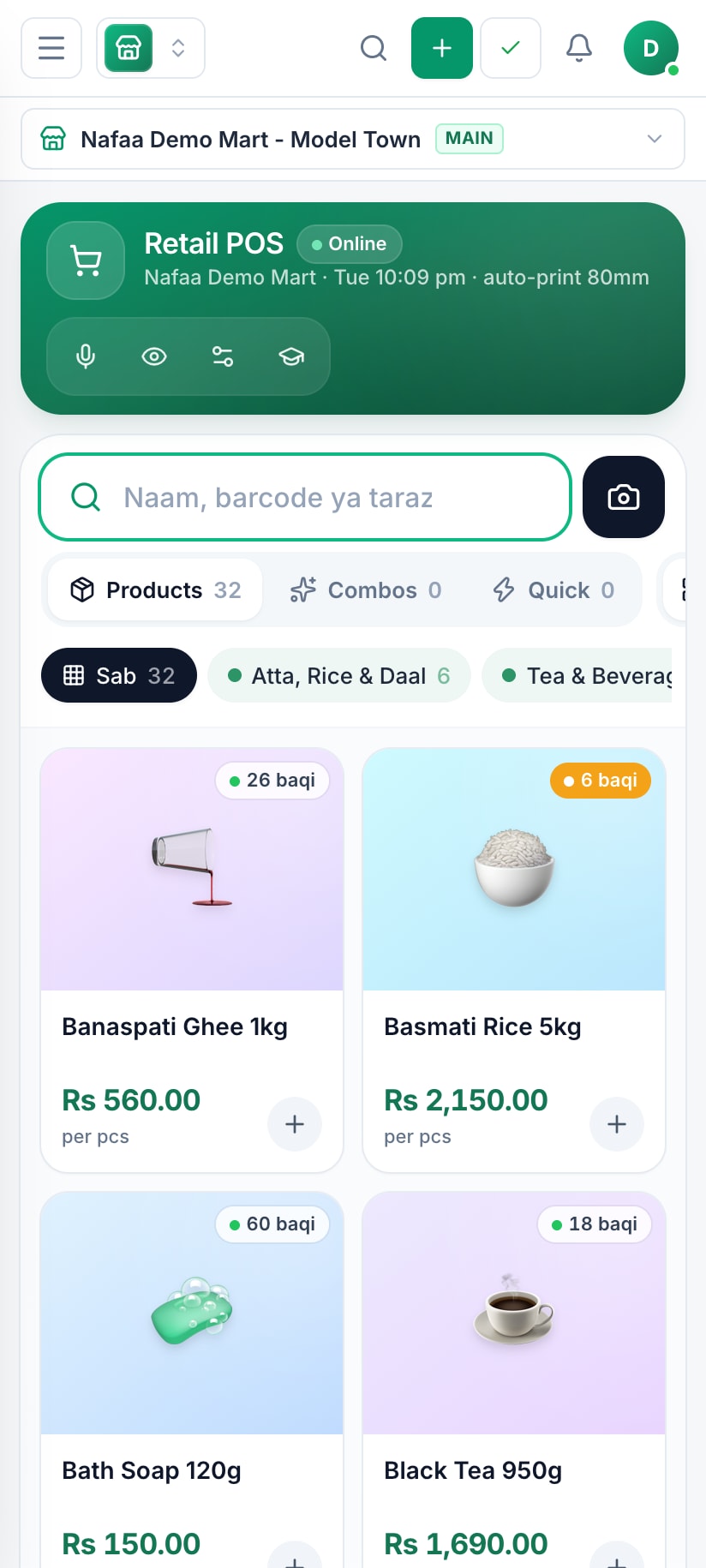
The same counter runs on an Android phone, so a small shop can start with nothing else. Add a Bluetooth printer and scanner when you are ready.
Made for how Pakistani shops really sell
Most billing software is built for one price per item and one way to pay. Pakistani counters are different: the same cooking oil sells by the bottle and by the carton, regular customers pay at the end of the month, and more and more bills are paid on JazzCash or Easypaisa. Nafaa handles all of that on one screen, in English or Roman Urdu.
It is also built for the realities of load-shedding and weak signal. The counter does not stop when the internet does, and the Windows desktop app prints straight to the receipt printer and opens the cash drawer without extra clicks. If you are still choosing, the guide to choosing POS software lists what to check in any demo.
Start free, upgrade when you grow
Free
Choti dukaan ke liye hamesha muft: 1 dukaan, 1 user, 300 bill mahana.
Rs 0
What is included
- 100 products
- 300 sales a month
- 1 user
- 1 shop
Basic
Chhoti dukan ke liye perfect
Rs 1,500/ monthRs 4,000/ quarterSave 11%Rs 15,000/ yearSave 16%Get startedStarts with a 7-day free trial
What is included
- 5,000 products
- Unlimited sales
- 3 users
- 1 shop
Pro
RecommendedBari shops aur multi-branch ke liye
Rs 3,500/ monthRs 9,500/ quarterSave 9%Rs 36,000/ yearSave 14%Get startedStarts with a 7-day free trial
What is included
- Unlimited products
- Unlimited sales
- 10 users
- 3 shops
Enterprise
Unlimited everything + 24/7 support
Rs 9,500/ monthRs 27,000/ quarterSave 5%Rs 99,000/ yearSave 13%Get startedStarts with a 7-day free trial
What is included
- Unlimited products
- Unlimited sales
- Unlimited users
- Unlimited shops
Common questions
Which printers and scanners work with the Nafaa POS?
Any USB or Bluetooth barcode scanner that types like a keyboard works without setup. Receipts print on 58 mm and 80 mm thermal printers, and the Windows desktop app prints without a dialog and can open the cash drawer. You can also skip paper and send the receipt on WhatsApp.
Can one bill be paid partly in cash and partly by card or wallet?
Yes. At checkout you can split one bill across cash, card, JazzCash, Easypaisa, bank transfer and the customer's khata. Each part is recorded with its method, so the cash drawer, the wallet totals and the khata balance all stay correct in the day book.
Do I need a computer to use Nafaa?
No. Nafaa runs in a web browser, so the phone, tablet or computer you already have will do. A barcode scanner and a receipt printer can be added later but are not required to start. The counter also keeps working without internet and sends the sales to your account when the connection returns.
Does Nafaa work without internet?
Yes, the counter keeps billing when the internet drops. Sales made offline are saved on the device and sent to your account automatically when the connection comes back, and you can see the sales still waiting to be sent. Reports and other branches see those sales once they have synced.
How much does Nafaa cost?
Paid plans start at Rs 1,500 a month. The pricing page lists every plan with its price and limits, taken straight from our plan settings, so it is always current. You can start with the free trial first, and no credit card is needed to sign up.
Industries using it
Kiryana & Grocery Store
Nafaa is POS and khata software for kiryana and grocery stores in Pakistan. Scan barcodes at the counter, sell by piece, dozen or carton, keep every customer's udhaar in a digital khata with WhatsApp reminders, import products from Excel, and keep billing when the internet drops.Pharmacy & Medical Store
Nafaa is software for pharmacies and medical stores in Pakistan: search medicines by salt or formula and find substitutes, track batches and expiry, keep prescriptions and doctors, record controlled and narcotic sales in a register with patient and doctor details, and log fridge temperatures for the cold chain.Restaurant & Cafe
Nafaa runs dine-in, takeaway and delivery for restaurants and cafes: a table layout, kitchen order tickets (KOT) sent to each station's printer or screen, add-ons on dishes, recipes, riders for delivery, happy-hour prices, and bills paid by cash, card, wallet, split or khata.Garments & Boutique
Nafaa runs garment shops and boutiques that sell ready-made and custom-stitched clothes: stock by size and colour, tailoring (silai) orders, alterations, saved customer measurements, items put on hold, qist plans, exchanges, collections and size charts, alongside the counter, khata and reports.Mobile Phone Shop
Nafaa runs mobile phone shops: keep stock by IMEI, record each phone's PTA status, buy used phones and take trade-ins, open repair job cards, and sell on instalments with a qist plan, while the counter, khata and reports work the same as in any shop.Bakery & Sweets
Nafaa runs bakeries and sweet shops: take custom cake orders with an advance, plan the day's baking, keep raw materials with their cost, see each recipe's live cost, track freshness and waste, and manage wedding and event bulk orders, alongside the normal counter, stock and khata.
Related
POS Hardware
Nafaa helps you choose and set up counter hardware that works with the app: barcode scanners, 58 or 80 mm thermal receipt printers, label printers, cash drawers, weighing scales and a customer display, on Windows, Android or in the browser, with setup and testing on your own devices.POS (Point of Sale)
The point of sale is where a sale is completed: items are scanned or picked, payment is taken and a receipt is given.Hold Bill
Holding a bill means parking an unfinished sale at the counter so the cashier can serve the next customer and resume the first bill later.Customer Display
A customer display is a second screen facing the customer at the counter that shows the items, the total and the change as the bill is made.Bill Banane Wali App
How to make a proper shop bill, in simple Roman Urdu: what every bill should show, thermal receipt or A4 invoice, which printer to buy, and sending the bill on WhatsApp instead of paper. Includes the free receipt maker and invoice template, and how Nafaa makes the bill while it updates stock and udhaar.Free POS Software Pakistan: Sach Kya Hai
An honest Roman Urdu answer to "free POS software Pakistan": the kinds of free offers (free trial, free plan with limits, cracked desktop copies), the hidden costs of each, what you can genuinely do for free with a register, Excel and our free tools and templates, and when a paid POS such as Nafaa starts paying for itself.Keyboard-first POS counter and four layouts
The POS counter now works fully from the keyboard, has a compact cart, and offers four layouts with feature toggles that each shop can set as defaults.POS Software by City
Nafaa in your city: a page for each of more than thirty Pakistani cities with the trades and markets there, how billing keeps going through local power and internet cuts, which authority collects sales tax on services, and how setup works remotely.Dukaan ka Hisaab Rakhne Wali App
How to keep a shop's accounts in Pakistan, explained in simple Roman Urdu: the five things to record every day (sale, expense, purchase, udhaar and stock), how to do it on paper, the free sheets and calculators that help, and how Nafaa records all of it from each bill.Getting started
Create your Nafaa account, set up the shop, add your staff with their own logins and roles, and get the counter running on the computer, tablet or phone you already have.Counter and POS
Make bills fast at the counter: keyboard shortcuts, layouts, hold and recall, discounts, split payments, returns with the refund PIN, billing without internet, and receipt printers.
More from Nafaa
Inventory
Nafaa Inventory keeps stock right in every unit and every branch: products with cost, price and margin, barcodes and labels, combos, low-stock alerts, damage and adjustments with reasons, stock transfers between branches, and a full movement history. Import from Excel or paste from a spreadsheet, and change many prices at once in the bulk editor.Digital Khata
Nafaa Digital Khata replaces the paper udhaar register: every credit sale lands in the customer's khata from the counter, payments and old balances are recorded, balances are grouped by age, credit limits stop runaway udhaar, and a WhatsApp reminder goes out in one tap.Payments
Nafaa takes every way Pakistan pays: cash, card, JazzCash, Easypaisa, bank transfer, QR and the customer's khata, split across one bill if needed, with a cash register that balances at the end of every shift and payment links for online and phone orders.Offline POS
Nafaa keeps billing when the internet drops. Products, prices and customers are kept on the device, new sales, khata payments, customers and expenses wait in an offline queue, and everything syncs to your account on its own when the connection returns, with a Sync Center that shows what is still waiting.FBR & PRA Invoicing
Nafaa is an FBR & PRA approved POS integrator. Every sale can be reported to FBR, PRA, SRB or KPRA from the counter, the fiscal invoice number and QR code print on the receipt, failed invoices retry by themselves, and tax reports are ready for your return.
Open your counter in minutes
Start the 7-day free trial on the device you already have. No card needed.
- 7 din Free Trial
- Keeps billing offline
- Help on WhatsApp