Help center
Process a return and the refund PIN
Take goods back on an earlier bill, choose what goes back on the shelf and what is written off, refund in cash, wallet, bank or card, and understand when the owner’s PIN is asked for. The refund PIN is on by default.
Updated
A return in Nafaa always starts from the original bill. That way the refund uses the price the customer actually paid (after any discount), the stock goes back to the right product, and any udhaar on that bill is cleared first.
Because returns pay money out of the galla, Nafaa asks for the owner’s PIN before a refund by default. A manager whose role can approve refunds can enter their own approval PIN instead.
Return goods on a bill
Step 1: Find the bill
Go to Returns (sidebar → Sales) and click Nayi return (or press N), then type the bill number, customer name or phone, or scan the barcode on the receipt. You can also open the bill in Sales history and click Maal wapas, or press R on the bill’s receipt page.
Step 2: Pick what came back
Under Kya wapas aaya set the quantity for each item, or take the whole bill back.
Step 3: Shelf or damaged
For each item choose Stock me wapas (back on the shelf) or Kharab — stock me nahi (damaged, not back in stock). Damaged items are recorded as a loss.
Step 4: Choose how the money goes back
Under Paisa kaise wapas pick Cash, JazzCash, EasyPaisa, Bank or Card. If the bill had udhaar, the refund reduces the khata first and only the rest is paid out.
Step 5: Give a reason
Pick a reason under Wapas kyun aaya, such as Cheez kharab nikli (item was faulty), or type your own. Reasons show in the returns analytics.
Step 6: Confirm and enter the PIN
Click Return karein. When the refund PIN is on, the Malik ka PIN window opens; the return is saved after the PIN is checked.
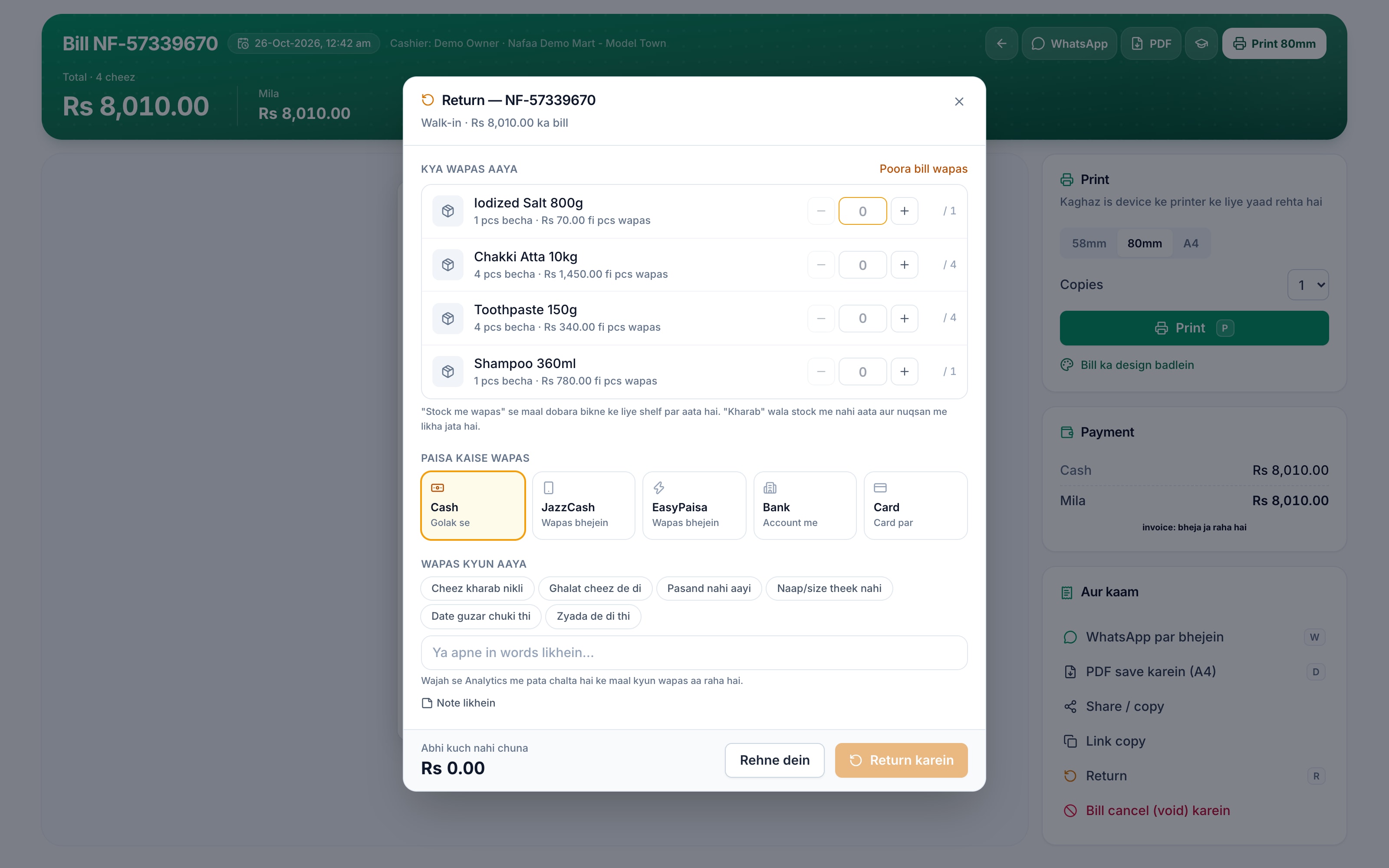
- Items and quantity
- Whole bill
- Refund method
- Reason
- Return karein
Turn the refund PIN on or off
Go to Settings → Counter & POS → Counter rules, card Malik ka PIN kab maangein:
- Return par PIN asks for the PIN before money is paid back. It is on for new shops.
- Bill cancel par PIN asks for it before a completed bill is cancelled (void).
The owner sets the PIN itself in Settings → Security & PIN. Until a PIN is set, these rules cannot ask for one.
Questions
Can I exchange an item instead of refunding?
Make the return, then sell the replacement on a new bill. Garments shops can also set how many days an exchange is allowed in Counter rules.
Does a return change today’s sales?
Yes. The refunded amount is taken off the sales of the day the return is made, and the Returns page shows totals, reasons and which returns were approved with a PIN.
Related
- Product
POS
Nafaa POS is the billing counter for any business: scan a barcode or tap a quick key, sell by piece, dozen or carton, take cash, card, JazzCash, Easypaisa or khata in one bill, print or WhatsApp the receipt, and keep billing when the internet drops. It runs on the phone, tablet or computer you already have. - Page
How to make a bill at the POS counter
Open the POS counter, add items by barcode, name or tile, set quantities, pick the customer and take payment. Covers the one-key cash bill (F12), the checkout window for other payment methods, and what to do on the success screen. - Page
How to receive a khata payment
Record money a customer pays against their udhaar. Pick the customer on the Khata page, enter the amount and how it was paid, and Nafaa lowers the balance, counts cash in the drawer and settles the oldest udhaar first. - Page
How to add staff and give them a login
Add each person who works for you, then give a login to those who use the app. Pick a role (Manager, Cashier or Staff), lock the login to one branch if needed, adjust permissions, and print the login slip with the first password.
Terms used here
Sales Return
A sales return is goods coming back from a customer after a sale, with the stock put back and the money refunded, adjusted in khata or exchanged.Refund
A refund is money paid back to a customer for a returned item or a cancelled order.Void (Bill Void)
To void a bill is to cancel a completed sale so it no longer counts, while keeping a record that it existed and who cancelled it.Credit Note
A credit note is a document a seller issues to reduce what a buyer owes, usually because goods were returned or an invoice was overcharged.
Billing software for a Pakistani counter
Discounts, returns with a PIN, hold and recall, and printed receipts in one screen. Start a 7-day free trial.