Help center
How to import products from Excel
Bring your whole product list into Nafaa from an Excel or CSV file, or paste cells straight from Excel or Google Sheets. Columns are matched for you, every line is checked in a grid before anything is saved, and existing products can get new stock or prices.
Updated
If your products are already in a spreadsheet, the old billing software or a supplier’s price list, you do not need to type them again. Excel se import reads .xlsx, .xls and .csv files, or cells you copy from Excel or Google Sheets.
Open Products and press Excel import. The import runs in four steps shown at the top: File, Columns, Sheet (check) and Import. Nothing is saved until the last step.
Import a product list
Step 1: Pick the mode
Keep Products + stock to add products and stock. Choose Price update if you only want to change prices of products you already have.
Step 2: Give Nafaa your list
Press File chunein (choose file), or press Cells paste karein and paste cells copied from Excel, including the header row. No list yet? Download the Template or the filled Sample file.
Step 3: Check the columns
On Columns, each column of your file is matched to a field such as Name, Price, Cost Price or Stock. Headers in English, Roman Urdu and Urdu are recognised. Only the name column is required.
Step 4: Choose the branch and existing products
Pick which branch the stock goes into. For products that already exist (same name, SKU or barcode), choose Stock me jama karein (add to stock), Stock file wala kar dein (set stock to the file) or Stock na chheren (leave stock).
Step 5: Fix lines in the grid
On Sheet (check) every line is checked. Red cells show what to fix; you can edit cells, find and replace, and paste more rows.
Step 6: Import
Press Import karein. Lines go in batches with a progress bar. The result shows how many were created, updated, skipped or failed.
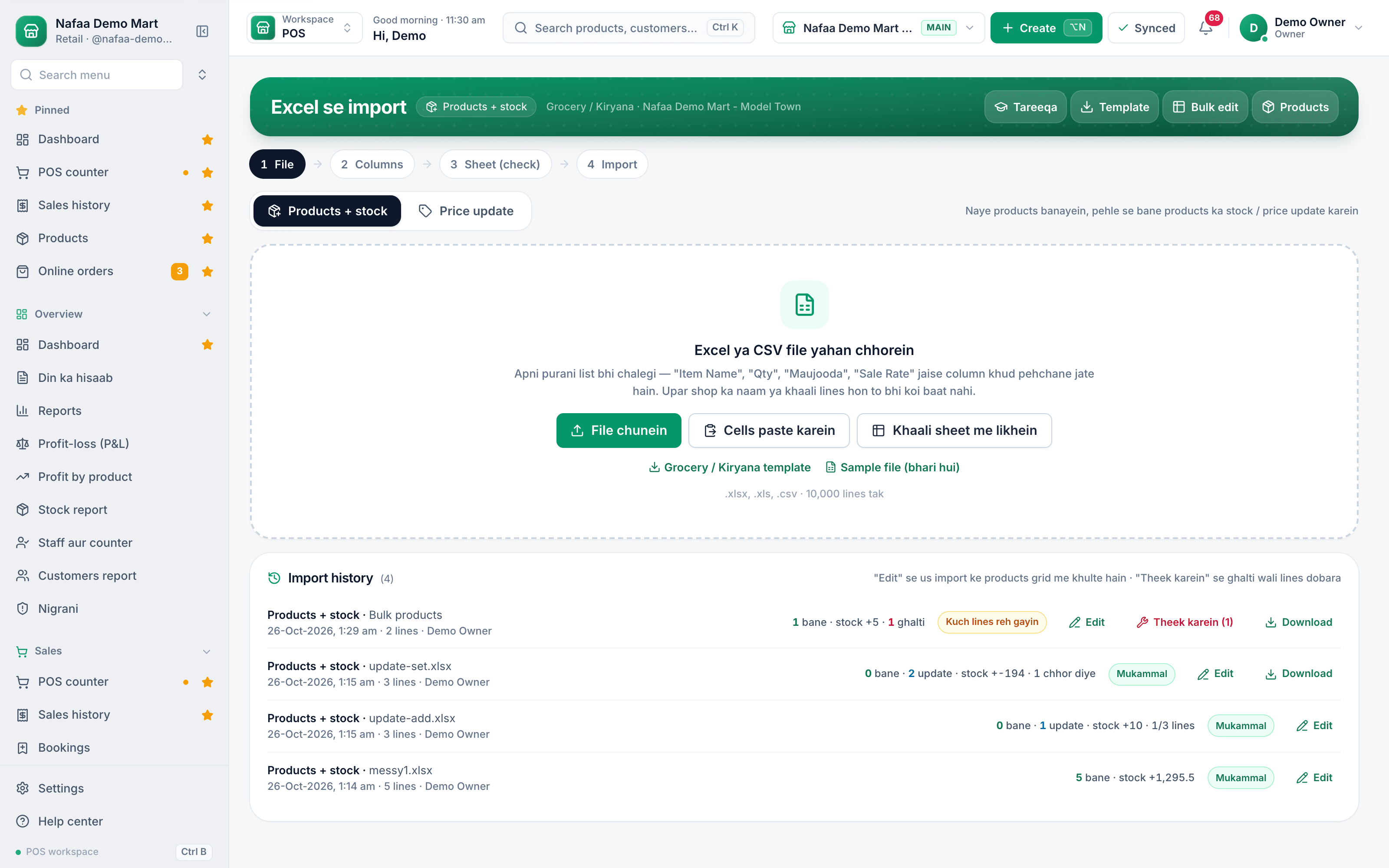
- Four steps
- Price update mode
- Upload a file
- Paste from Excel
- Template for your trade
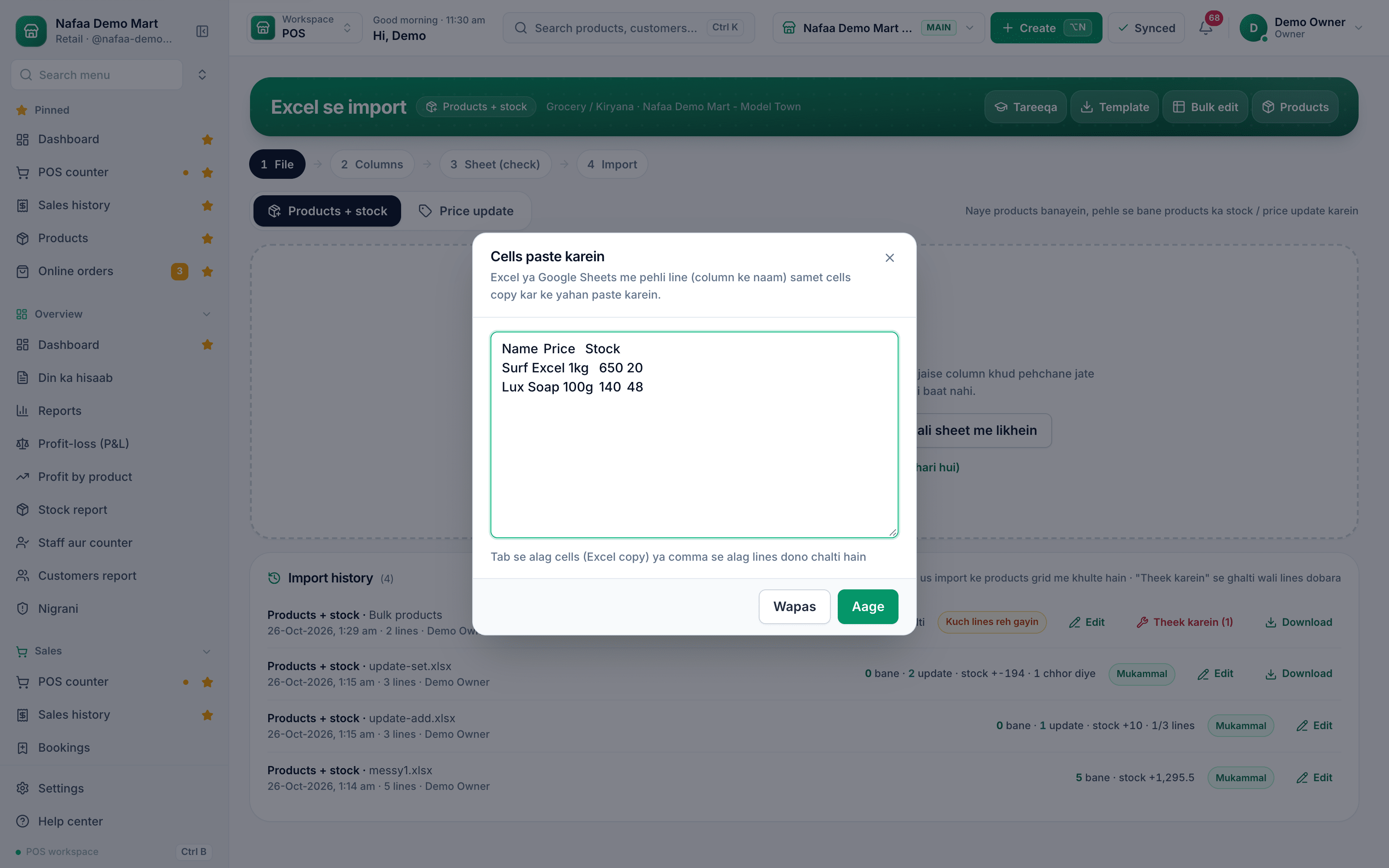
- Header row first
- Aage: match columns
Questions
How many products can I import at once?
The upload area accepts files of up to 10,000 lines.
Will importing twice create duplicates?
No. A line whose name, SKU or barcode matches an existing product updates that product instead, following the choice you made for existing products.
Can I type products in a sheet instead of uploading?
Yes. Press Bulk banayein on the Products page, or Khaali sheet me likhein on the import page. Type row by row and press Sab save karein.
Related
- Product
Inventory
Nafaa Inventory keeps stock right in every unit and every branch: products with cost, price and margin, barcodes and labels, combos, low-stock alerts, damage and adjustments with reasons, stock transfers between branches, and a full movement history. Import from Excel or paste from a spreadsheet, and change many prices at once in the bulk editor. - Template
Product Import Template (Excel)
An Excel sheet for your product list with the same column names Nafaa's import reads: name, price, cost, stock, unit, category, brand, SKU, barcode, low stock alert, packs, batch and expiry. Fill it once and upload it to put your whole shop into Nafaa in one go. - Page
How to edit many products at once
Change names, categories, prices, costs, barcodes, low stock levels and stock for many products in one spreadsheet. Only changed cells are saved, you see every change before saving, and stock changes are recorded as adjustments. - Page
How to add a product in Nafaa
Add a new item to your shop in three short steps: name and category, cost and selling price, and the stock you have today. The product then shows on the POS counter, in search, on barcode labels and in every stock and profit report. - Page
How to sell in units and packs
Sell the same item loose and by the pack: dozen, box, carton or bori. Each pack gets its own rate and barcode, stock is always counted in the base unit, and scanning a carton barcode at the counter puts the carton on the bill.
Terms used here
SKU (Stock Keeping Unit)
An SKU is a code for one exact product variant in stock, so each size, colour or pack size is counted separately.Opening Stock
Opening stock is the quantity and value of goods a business has at the start of a period, or when it starts using a new system.Barcode
A barcode is a machine-readable pattern of bars or squares printed on a product or label that a scanner reads to identify the item.
Put your product list and stock in one place
Import products from a sheet, print barcode labels and watch stock value at cost. 7-day free trial.