Help center
How to set low stock alerts and reorder
Set a low stock level on each product and see what is out, low, running out soon or near expiry in every branch. Nafaa works out how many days the stock will last and turns the list into purchase orders or a WhatsApp message to the supplier.
Updated
Running out of a fast-selling item costs sales you never see. Nafaa watches stock against a level you set and against how fast each item sells.
Each product has a Kam stock ki had (low stock level), set on the Stock step of the product editor. New products start with the shop default from Settings → Stock rules. Setting it to 0 turns the alert off for that product.
The Low stock page (sidebar, under Inventory) groups items as Khatam (out), Kam (low), Jaldi khatam hoga (will run out soon) and Expiry qareeb (expiry near).
Set alerts and reorder
Step 1: Set the shop default
Open Settings → Stock rules and enter Kam stock ki had. New products start with this level.
Step 2: Set levels for key items
Open a product, go to the Stock step and change Kam stock ki had. You can also change the level from a line on the Low stock page.
Step 3: Open Low stock
The cards at the top show how many items are out, low, running out soon or near expiry. Tap a card to filter the list.
Step 4: Read each line
Each line shows stock, daily sales, how many days it will last, how much to order under Kya karna hai, and the last supplier.
Step 5: Make orders
Tick lines and press Order banayein. Nafaa makes one purchase order per supplier, with the rate from the last purchase. Or send the list to the supplier on WhatsApp.
Step 6: Hide what you will not reorder
Use Chhupayein (hide) for items you are not restocking. They move to the hidden list and can be shown again.
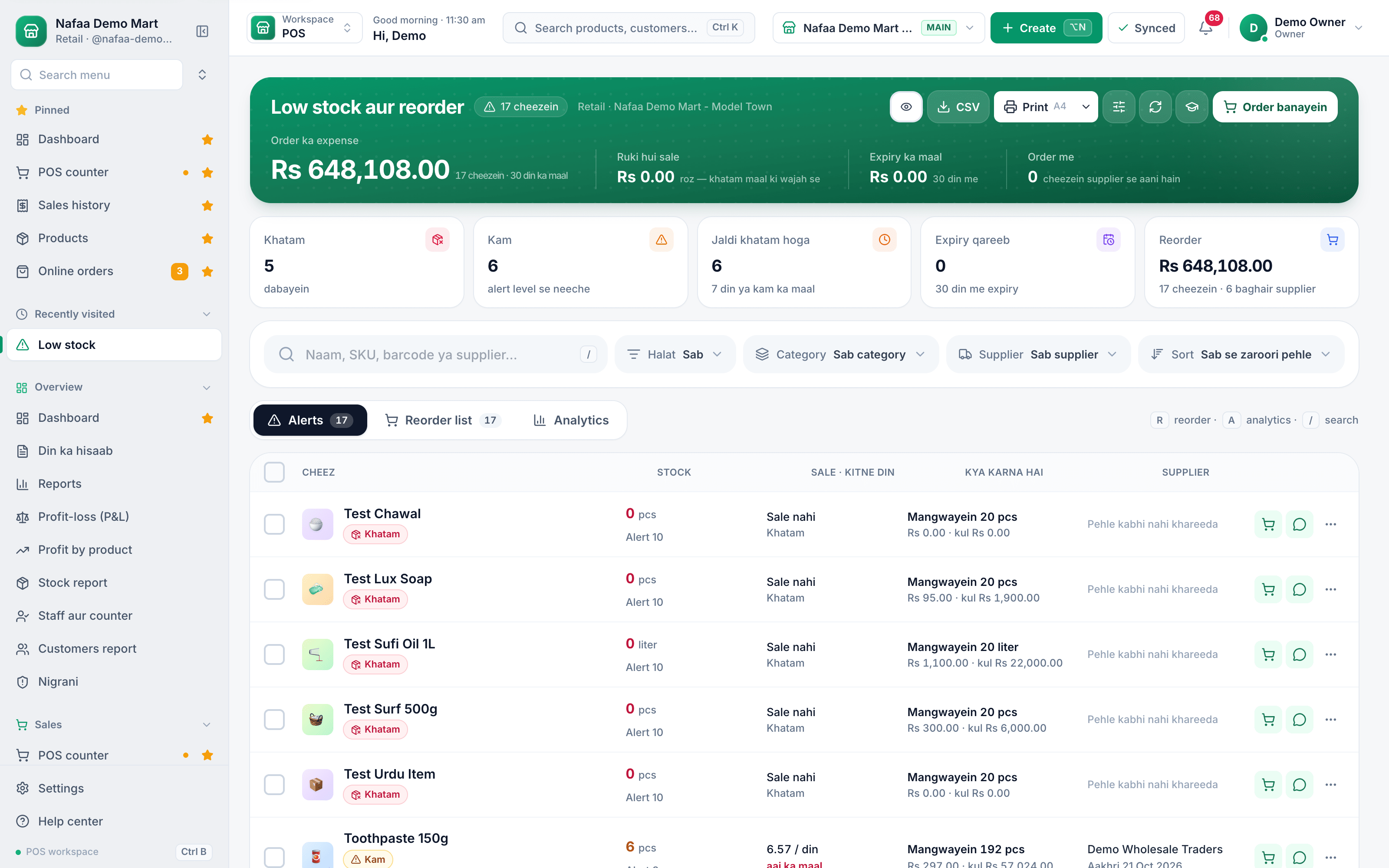
- Out of stock
- Below the level
- How much to order
- Order this item
- WhatsApp supplier
- Orders for all
Questions
How does Nafaa decide how much to order?
It averages daily sales over the chosen period (30 days by default) and suggests enough to last the number of days set in Order kitne din ka.
Does each branch get its own list?
Yes. With all branches selected, each branch has its own line, and the order is made for that branch.
Related
- Product
Inventory
Nafaa Inventory keeps stock right in every unit and every branch: products with cost, price and margin, barcodes and labels, combos, low-stock alerts, damage and adjustments with reasons, stock transfers between branches, and a full movement history. Import from Excel or paste from a spreadsheet, and change many prices at once in the bulk editor. - Tool
Reorder Level Calculator
Find the stock level at which to place your next order, so a product does not run out while the supplier delivers. Enter what you sold, the supplier's lead time and a safety margin; add today's stock to see whether to order now and how much. - Page
How to make purchase orders and receive goods
Order stock from a supplier, send the order on WhatsApp, and receive the goods when they arrive, in full or in part. Received goods go into stock at the right cost, the supplier’s balance updates, and a goods received note can be printed. - Page
How to add a product in Nafaa
Add a new item to your shop in three short steps: name and category, cost and selling price, and the stock you have today. The product then shows on the POS counter, in search, on barcode labels and in every stock and profit report. - Guide
Inventory Management for Small Businesses: A Practical Guide
A practical guide to inventory for small shops and businesses in Pakistan: setting up the product list, units and opening stock, buying to a reorder level, costing stock correctly, counting without closing the shop, cutting losses from damage, expiry and theft, and reading the few stock reports that matter. Blog post
Festival and Season Planning for Shops in Pakistan, Beyond Ramadan
Eid ul Adha, 14 August, back-to-school, wedding season and winter each bring a different rush, and each needs its own stock, staff and cash plan about six weeks ahead. Start from what sold in the same weeks last year, arrange the cash before you order, and plan the clearance before the season ends.
Terms used here
Reorder Level
A reorder level is the stock quantity at which a new order should be placed, so stock arrives before the shelf runs empty.Dead Stock
Dead stock is inventory that has not sold for a long time and is unlikely to sell at its normal price.Inventory Turnover
Inventory turnover is how many times a business sells through its average stock in a period, calculated as cost of goods sold divided by average stock at cost.Purchase Order (PO)
A purchase order is a document a buyer sends a supplier listing the items, quantities and agreed prices it wants to buy.
Put your product list and stock in one place
Import products from a sheet, print barcode labels and watch stock value at cost. 7-day free trial.