Help center
Give a discount at the counter
Give a bill discount as a percentage or in rupees, round the bill off, apply a discount code or loyalty points, and set the limit a cashier can give without the owner’s PIN.
Updated
Discounts at the counter are usually small and quick: 5% for a regular, a few rupees off to round the bill, or a code from a promotion. Nafaa keeps all of these in one Discount window, and the owner decides how far a cashier can go.
By default a cashier can give up to 50% by hand. Anything above the limit needs the owner’s PIN, if one is set, or is blocked.
Give a discount on a bill
Step 1: Open Discount
With items on the bill press F4 or click Discount under the bill. The window shows the bill and the Naya total (new total).
Step 2: Choose percent or rupees
Pick Percent % or Rupay, then type the value or click one of the preset buttons such as 10%. The saving shows as Customer ki bachat.
Step 3: Or round the bill off
Under Bill gol karein click a rounded total (to the nearest 10, 50 or 100) and the difference becomes the discount.
Step 4: Add a code or points (optional)
Type a Discount code and click Lagayein (apply). When the bill has a customer with loyalty points, you can use their points in the same window.
Step 5: Apply
Click the green button or press Enter. The discount shows on the bill; click the × next to it to remove it.
Step 6: Use one-click buttons
The 5% and 10% buttons next to Discount apply that discount at once. The owner sets these buttons in Counter rules.
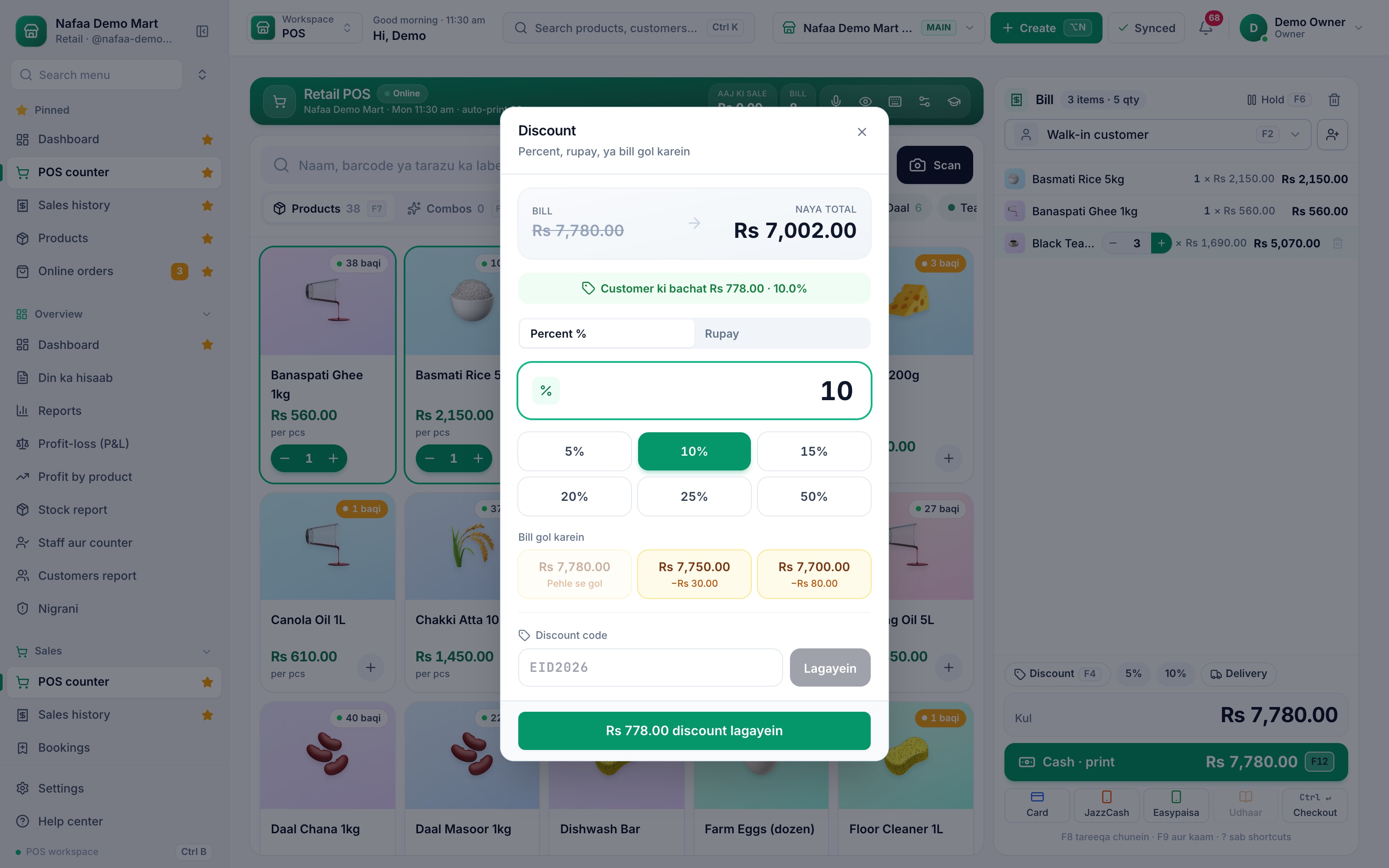
- New total
- Percent or rupees
- Presets
- Round off
- Discount code
Set the cashier’s limit
Go to Settings → Counter & POS → Counter rules. In the Discount card:
- Haath se Discount (hand discount) switches manual discounts on or off. When it is off, the Discount button does nothing.
- Zyada se zyada Discount (maximum discount) is the percentage a cashier can give. A lowered item rate counts toward the same limit.
- Under Malik ka PIN kab maangein (when to ask for the owner’s PIN), Har Discount par PIN asks for the PIN on every hand discount, even within the limit.
The server checks the same rules again when the bill is saved. Discount codes and loyalty points follow their own rules on the Discounts and Loyalty pages.
Questions
What happens when a cashier goes over the limit?
If the owner has set a PIN, the counter asks for it before the bill is saved. Without a PIN, the bill cannot go through with that discount.
Can staff be allowed to skip the limit?
Yes. A role with the permission to give more than the limit ("Had se zyada discount") skips the limit and its PIN.
Related
- Product
POS
Nafaa POS is the billing counter for any business: scan a barcode or tap a quick key, sell by piece, dozen or carton, take cash, card, JazzCash, Easypaisa or khata in one bill, print or WhatsApp the receipt, and keep billing when the internet drops. It runs on the phone, tablet or computer you already have. - Page
How to set up loyalty points
Turn on loyalty points so named customers earn points on every bill, set how many points a rupee earns and what a point is worth, let customers spend points at the counter, and add or remove points by hand with a reason. - Page
How to make a bill at the POS counter
Open the POS counter, add items by barcode, name or tile, set quantities, pick the customer and take payment. Covers the one-key cash bill (F12), the checkout window for other payment methods, and what to do on the success screen. - Page
How to add staff and give them a login
Add each person who works for you, then give a login to those who use the app. Pick a role (Manager, Cashier or Staff), lock the login to one branch if needed, adjust permissions, and print the login slip with the first password. - Tool
Discount Calculator
Find the sale price after a percentage or rupee discount, or the discount % between two prices. Add your cost to see the profit left after the discount and how many more items you must sell to earn the same profit, before you announce a sale. - Glossary term
SaaS (Software as a Service)
SaaS, or Software as a Service, is software you use over the internet and pay for on a monthly or yearly plan, instead of buying and installing it once.
Terms used here
Discount
A discount is a reduction from the normal selling price, given as a fixed amount or a percentage on an item or a whole bill.Loyalty Points
Loyalty points are credits a customer earns on purchases and can later redeem for a discount or a gift, to encourage repeat visits.POS (Point of Sale)
The point of sale is where a sale is completed: items are scanned or picked, payment is taken and a receipt is given.
Try Nafaa POS on your own products
Add a few items and make a test bill in minutes. The free trial runs for 7 days.