Help center
Bakery: take cake and custom orders
Book a cake order with size, flavour, design, message and pickup or delivery time, take an advance, move it through baking and decorating, and hand it over with the balance billed. Orders for weddings and events go under Bare orders.
Updated
Cake and custom orders are booked today and handed over later, often with an advance. In a bakery account they live under Cake Orders in the sidebar. The list shows orders due today, late orders, orders in progress and the balance still to collect. Large orders for weddings and events have their own list under Bare orders.
Book a cake order
Step 1: Start the order
Press Naya order on Cake Orders (or N). Find a returning customer by name or phone, or type a new name and phone. The phone is used for the WhatsApp confirmation.
Step 2: Describe the cake
Under Cake, pick the Size (half pound to 5 pound, kilo or Custom), Shakal, Cream and flavour. Add the text under Cake par kya likhna hai, design notes and photos, and any diet notes such as egg-free or sugar-free.
Step 3: Link stock (optional)
Search Maal se jorein to link the order to a product, for example "Chocolate cake 2 pound". Stock then goes down when the order is billed.
Step 4: Set when and how
Under Kab aur kaise, choose Dukaan se lenge (pickup), Ghar pahunchana (home delivery), Hall / venue or Courier, and the date and time the customer will collect it.
Step 5: Price and advance
Under Qeemat aur advance, enter Cake ki qeemat, design and photo charges, tax, discount, and the advance taken now with how it was paid. Press Order banayein (Ctrl + Enter). The order goes into that day’s baking plan.
Step 6: Follow it to handover
On the list, each order has its next step: Banana shuru (start), then decorating and Tayyar hai (ready). Record extra money with Paisa mila. At handover press De diya — bill: the balance is billed and the order closes.
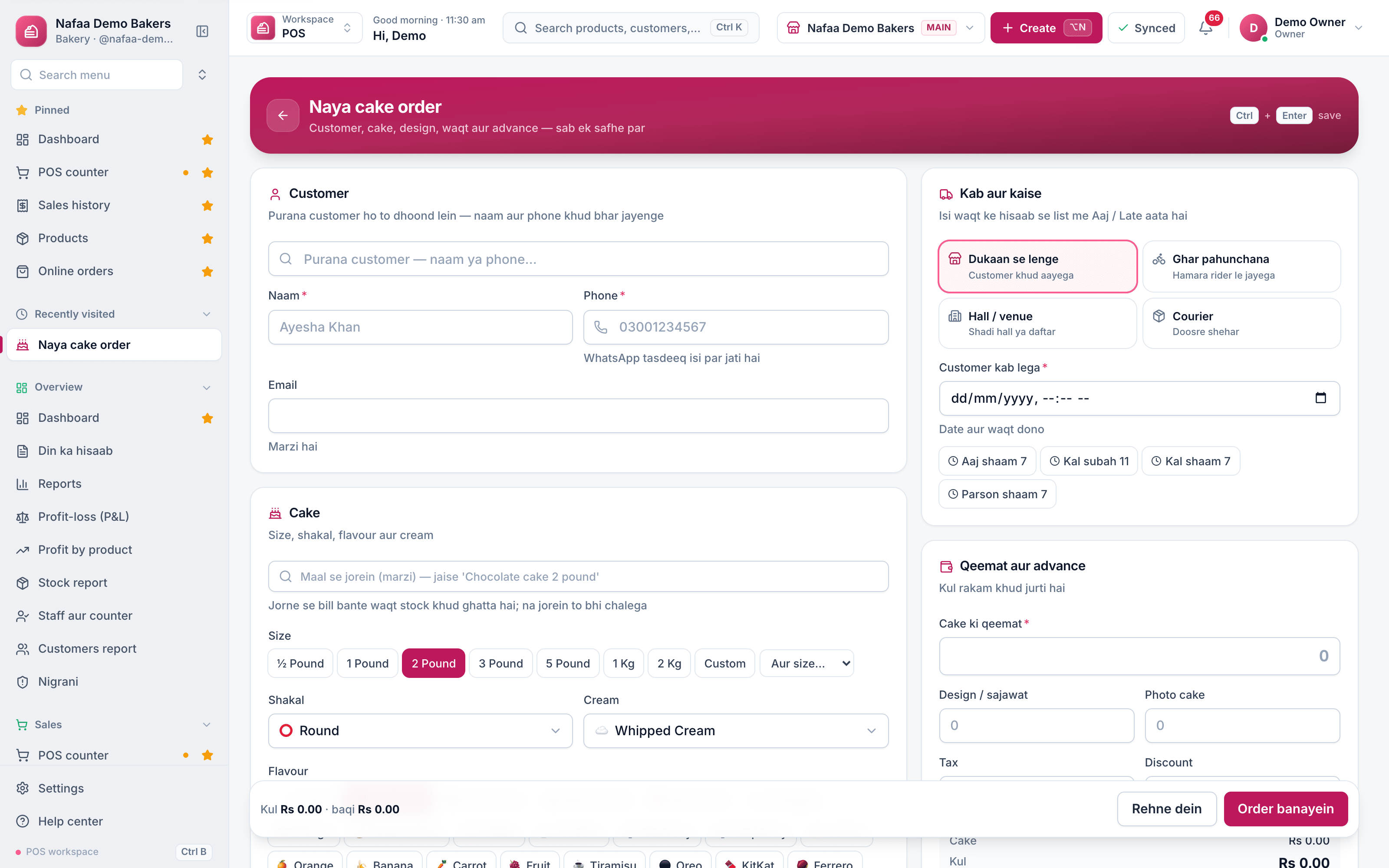
- Returning or new customer
- Size, shape, cream, flavour
- Pickup, delivery, venue, courier
- Price and advance
- Order banayein
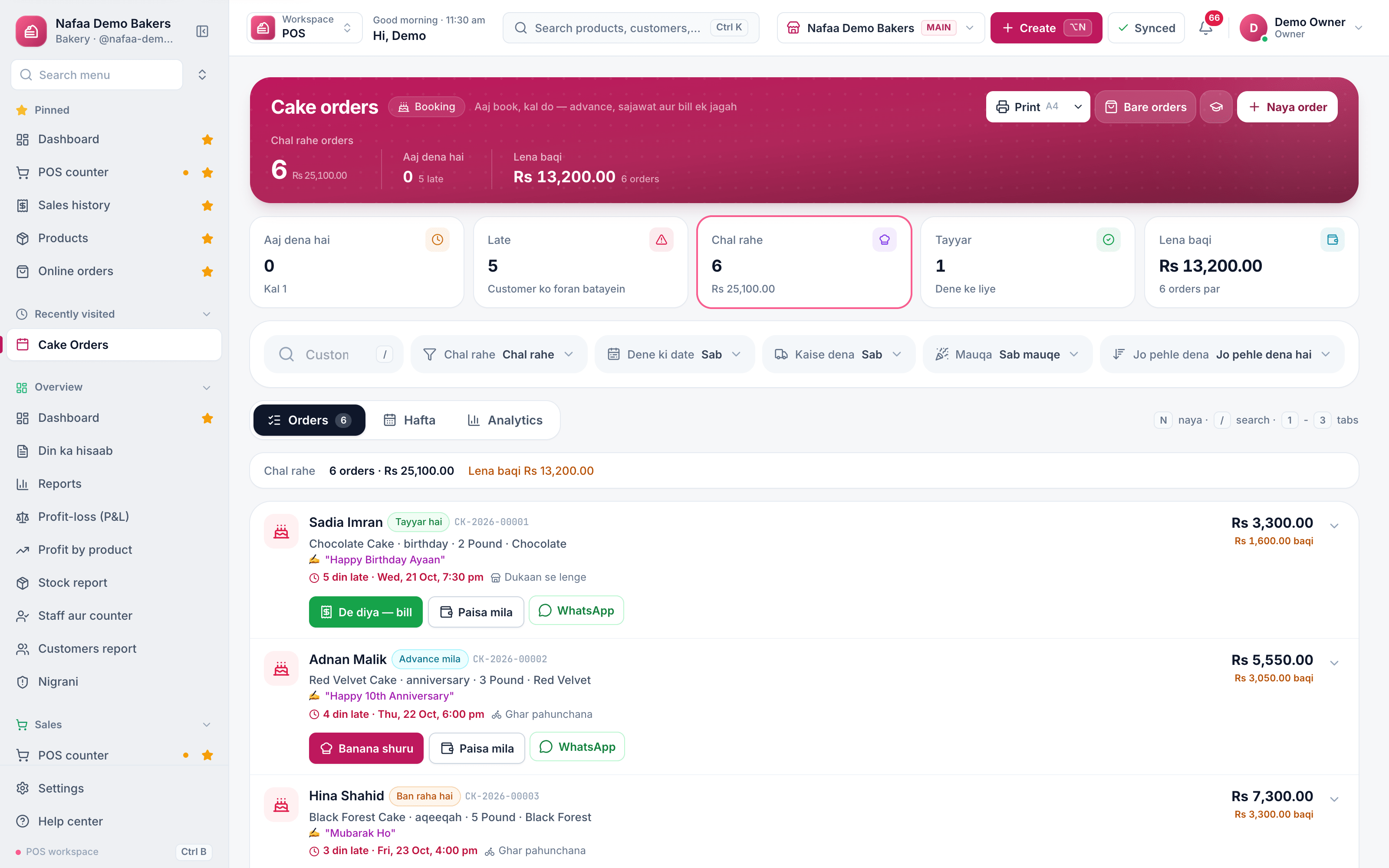
- Late orders
- Balance to collect
- Next step for the order
- WhatsApp the customer
Questions
Where does the advance go?
It is saved on the order and shown as Ab tak mila (received so far). The list shows the balance still due, and De diya — bill charges only that balance.
Can I print a slip for the kitchen?
Yes. After saving you can print a Kitchen parchi for the bakers and a Customer parchi for the customer.
Related
- Industry
Bakery
Nafaa runs bakeries and sweet shops: take custom cake orders with an advance, plan the day's baking, keep raw materials with their cost, see each recipe's live cost, track freshness and waste, and manage wedding and event bulk orders, alongside the normal counter, stock and khata. - Product
POS
Nafaa POS is the billing counter for any business: scan a barcode or tap a quick key, sell by piece, dozen or carton, take cash, card, JazzCash, Easypaisa or khata in one bill, print or WhatsApp the receipt, and keep billing when the internet drops. It runs on the phone, tablet or computer you already have. - Page
How to send udhaar reminders on WhatsApp
Remind customers about their udhaar on WhatsApp from the Khata page. Nafaa writes the message with the name, amount and days due, picks a polite, firm or final tone by age, and opens WhatsApp so you only press Send. - Page
How to receive a khata payment
Record money a customer pays against their udhaar. Pick the customer on the Khata page, enter the amount and how it was paid, and Nafaa lowers the balance, counts cash in the drawer and settles the oldest udhaar first. - Page
How to make a bill at the POS counter
Open the POS counter, add items by barcode, name or tile, set quantities, pick the customer and take payment. Covers the one-key cash bill (F12), the checkout window for other payment methods, and what to do on the success screen.
Terms used here
Work Order
A work order is an instruction to carry out a specific job, such as a repair, an installation or a production run, with the work, parts and person responsible.Receipt
A receipt is the slip given to a customer as proof of payment, listing what was bought, the prices, any discount, the total and how it was paid.
Plan production and cake orders in one place
Track ingredients, daily production, cake orders with advance and your profit by item. 7-day free trial.