Help center
IMEI tracking for mobile shops with PTA status
Add a phone model once, then put each handset into stock by its IMEI with cost, warranty and PTA status. Sell by scanning the IMEI at the counter, and use IMEI check to see when and to whom a phone was sold.
Updated
A mobile shop account keeps new phones by IMEI, not just by count. The model (for example a 4GB/64GB phone in black) is the product; each handset in the box is a separate IMEI with its own cost, warranty and PTA status. Accessories such as chargers and covers are ordinary products sold by count.
The main screen is IMEI stock in the sidebar. It shows how many phones are on the shelf, phones older than 60 days, non-PTA phones on the shelf and what sold this month.
Add phones by IMEI and sell them
Step 1: Create the model
Add the product with Naya product · Mobile and choose Phone / tablet (Har piece ka IMEI). Set the model number, the shop warranty and the price. Variants such as storage and colour are added in the Stock step.
Step 2: Add the handsets
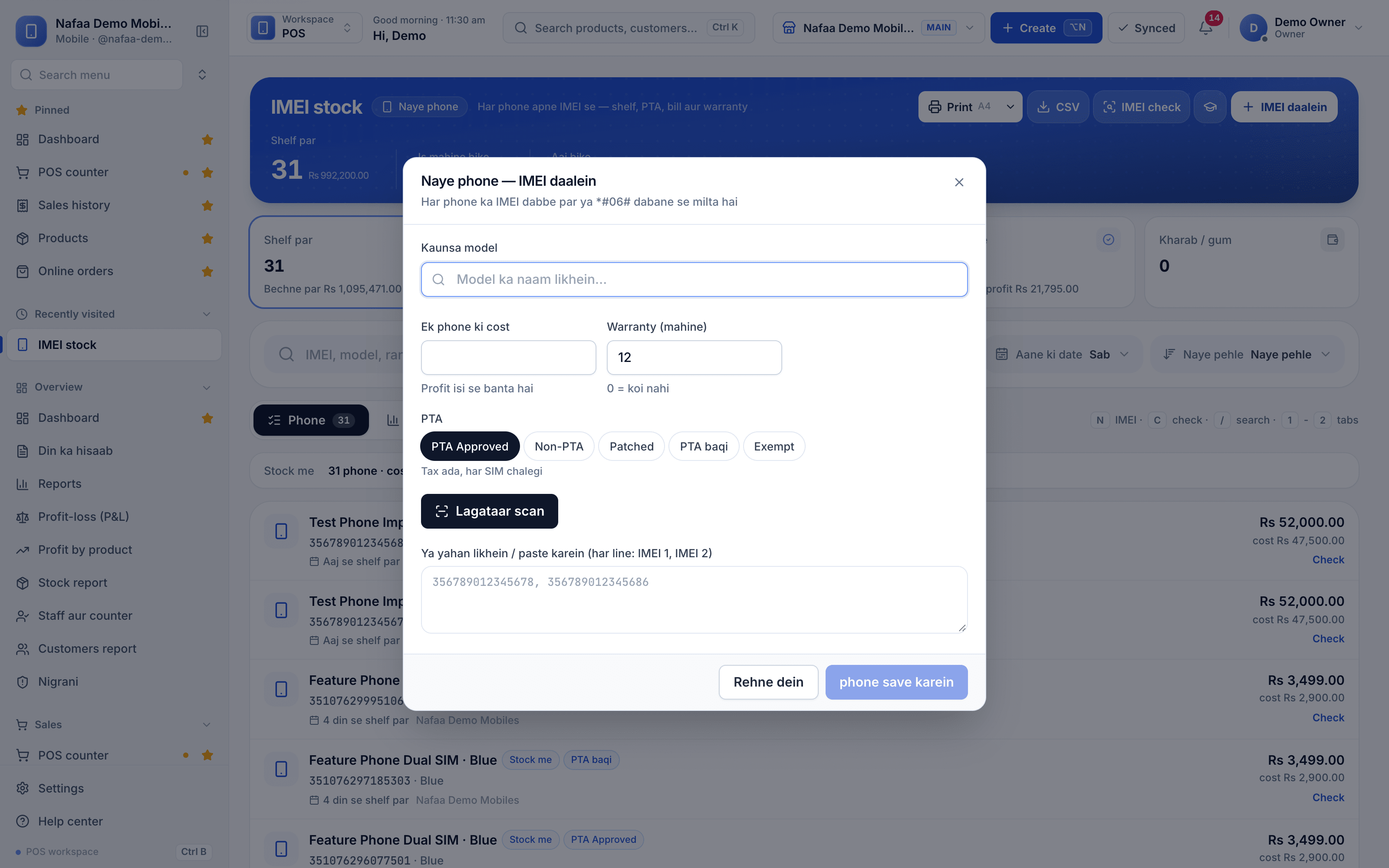
On IMEI stock press IMEI daalein (or N). Pick the model and variant, enter the cost of one phone, the warranty in months and the PTA status: PTA Approved, Non-PTA, Patched, PTA baqi (pending) or Exempt.
Step 3: Scan or paste the IMEIs
Scan each box with Lagataar scan on, or paste one line per phone as "IMEI 1, IMEI 2". Nafaa accepts 15-digit IMEIs, skips duplicates and flags a wrong check digit. Press phone save karein.
Step 4: Sell by IMEI
At the counter, scan the IMEI and that exact phone goes on the bill. Tapping the model instead lists its phones in stock at this branch to choose from.
Step 5: Check an IMEI later
When a customer comes back for warranty, or someone offers a phone for sale, press IMEI check (or C) and enter the number. You see when it was sold, to whom, the warranty left and its history.
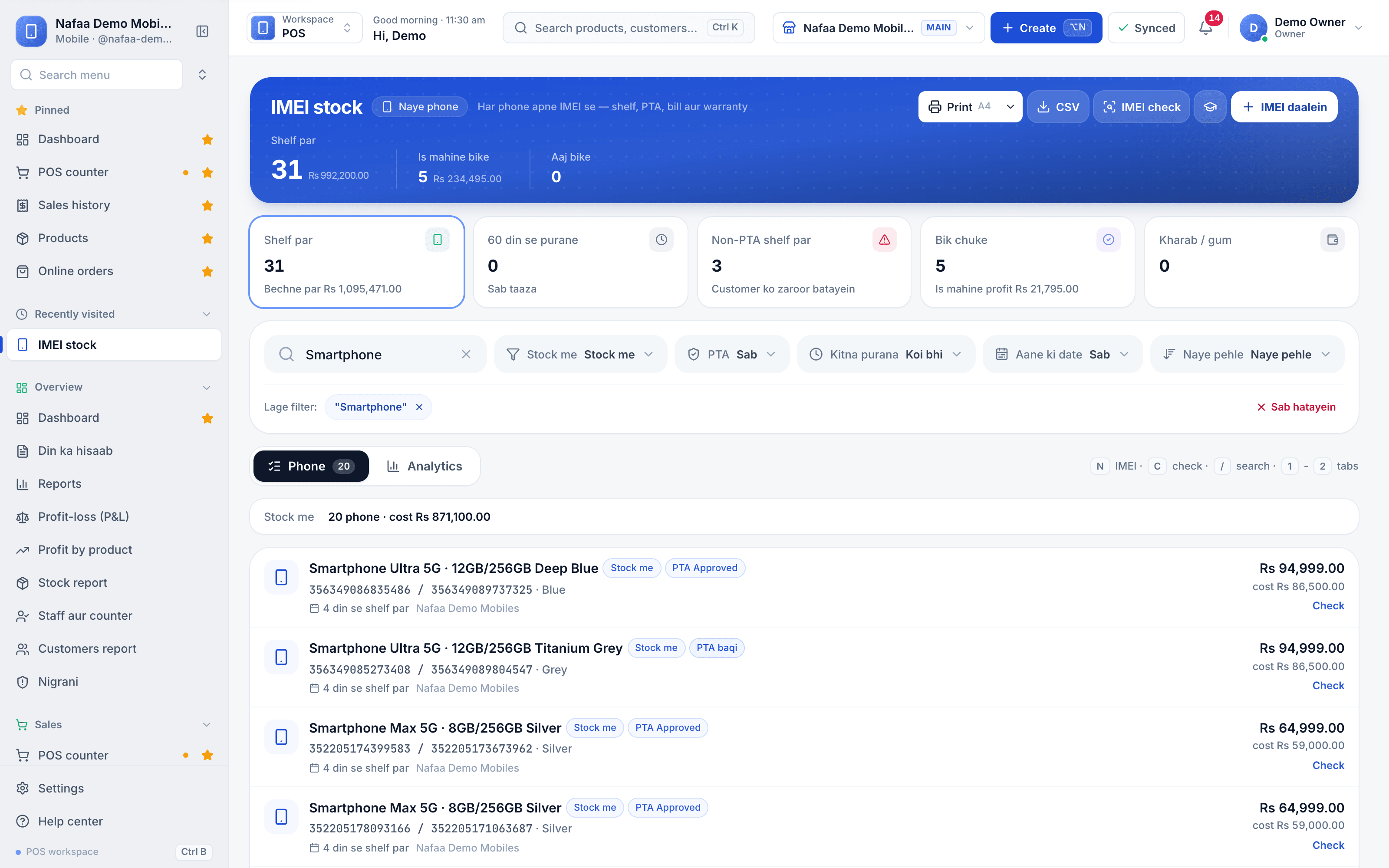
- IMEI daalein (N)
- IMEI check (C)
- Non-PTA phones on the shelf
- IMEI 1 / IMEI 2
- PTA status
- Check: sale and warranty
Questions
Can I sell a phone without scanning the IMEI?
Yes. Tap the model on the counter and pick the handset from the list of phones in stock. The bill still records which IMEI was sold.
Do used phones and repairs use the same screen?
No. Used phones have their own Used phones screen and repairs are under Repairs. Used phones taken in as an exchange can pay part of a bill at checkout.
Does IMEI tracking work offline?
Accessories sell offline like any product. Phones need the internet at the moment of sale, because the IMEI is checked on the server.
Related
- Industry
Mobile shop
Nafaa runs mobile phone shops: keep stock by IMEI, record each phone's PTA status, buy used phones and take trade-ins, open repair job cards, and sell on instalments with a qist plan, while the counter, khata and reports work the same as in any shop. - Product
Inventory
Nafaa Inventory keeps stock right in every unit and every branch: products with cost, price and margin, barcodes and labels, combos, low-stock alerts, damage and adjustments with reasons, stock transfers between branches, and a full movement history. Import from Excel or paste from a spreadsheet, and change many prices at once in the bulk editor. - Product
POS
Nafaa POS is the billing counter for any business: scan a barcode or tap a quick key, sell by piece, dozen or carton, take cash, card, JazzCash, Easypaisa or khata in one bill, print or WhatsApp the receipt, and keep billing when the internet drops. It runs on the phone, tablet or computer you already have. - Page
How to add a product in Nafaa
Add a new item to your shop in three short steps: name and category, cost and selling price, and the stock you have today. The product then shows on the POS counter, in search, on barcode labels and in every stock and profit report. - Page
How to make a bill at the POS counter
Open the POS counter, add items by barcode, name or tile, set quantities, pick the customer and take payment. Covers the one-key cash bill (F12), the checkout window for other payment methods, and what to do on the success screen. - Page
How to print barcode labels
Give products a barcode and print price stickers on a thermal label roll or an A4 sticker sheet. Add items by search, scan or whole category, design the label once for the shop, test print one label, then print the full list.
Terms used here
IMEI
An IMEI is the 15-digit number that identifies a mobile phone handset.PTA Approved
A PTA-approved phone is a handset registered with the Pakistan Telecommunication Authority, so it keeps working on Pakistani mobile networks.Serial Number Tracking
Serial number tracking records the unique serial of each high-value unit from purchase to sale, so every piece can be traced for warranty, returns and theft.Warranty
A warranty is a promise by the seller or maker to repair, replace or refund a product that develops a fault within a stated period.Trade-In
A trade-in is when a customer hands over an old item, such as a used phone or old gold, and its agreed value is counted towards the price of a new one.
Run your mobile shop with IMEI-level stock
Sell by IMEI, keep instalment khata for phones sold on qist, and see profit per handset. Try it free for 7 days.