Help center
Pharmacy: batches and expiry dates
Record each medicine batch with its expiry when stock comes in, let the counter sell the earliest valid expiry first, and use the Expiry screen to find batches that are expired or close to it, then return them to the distributor or write them off.
Updated
In a pharmacy account every medicine’s stock is kept by batch, with the batch number and expiry date printed on the strip or box. Nafaa uses those batches in three places: when stock comes in, at the counter, and on the Expiry screen.
Batch and expiry tracking is on by default for pharmacies. You can see or change it in Settings → Business type (Batch & Expiry Tracking).
Track batches from purchase to shelf
Step 1: Add the medicine
Create it with Naya product · Pharmacy: name, form (Shakal), company, pack and the salt in the Formula step. Opening stock that is already on the shelf goes in the Stock step under Batch aur expiry → Batch jorein (batch number, date made, expiry, quantity and cost).
Step 2: Enter new stock with its batch
When a distributor’s bill arrives, record it in Purchases. On each line open Bechne ka rate, batch, expiry and fill Batch # and the expiry. Each batch is then kept separately. See purchase orders and GRN.
Step 3: Sell at the counter
Bill as usual. The counter takes the batch with the earliest valid expiry, and the batch and expiry are written on the bill line.
Step 4: Check the Expiry screen
Open Expiry from the sidebar. The tabs Expire ho chuki (expired), 30 din, 90 din, 6 mahine and Sab batch list batches that still have stock, with the batch number, expiry, stock and its cost and sale value.
Step 5: Act on a batch
Press Kya karein (what to do) on a batch. Choose Distributor ko wapas to return it against the purchase it came on, which lowers both the stock and what you owe the distributor, or Kharab / zaya to write it off as damaged. If the batch came in as opening stock with no purchase bill, Nafaa says so and suggests writing it off unless the distributor agrees to take it back.
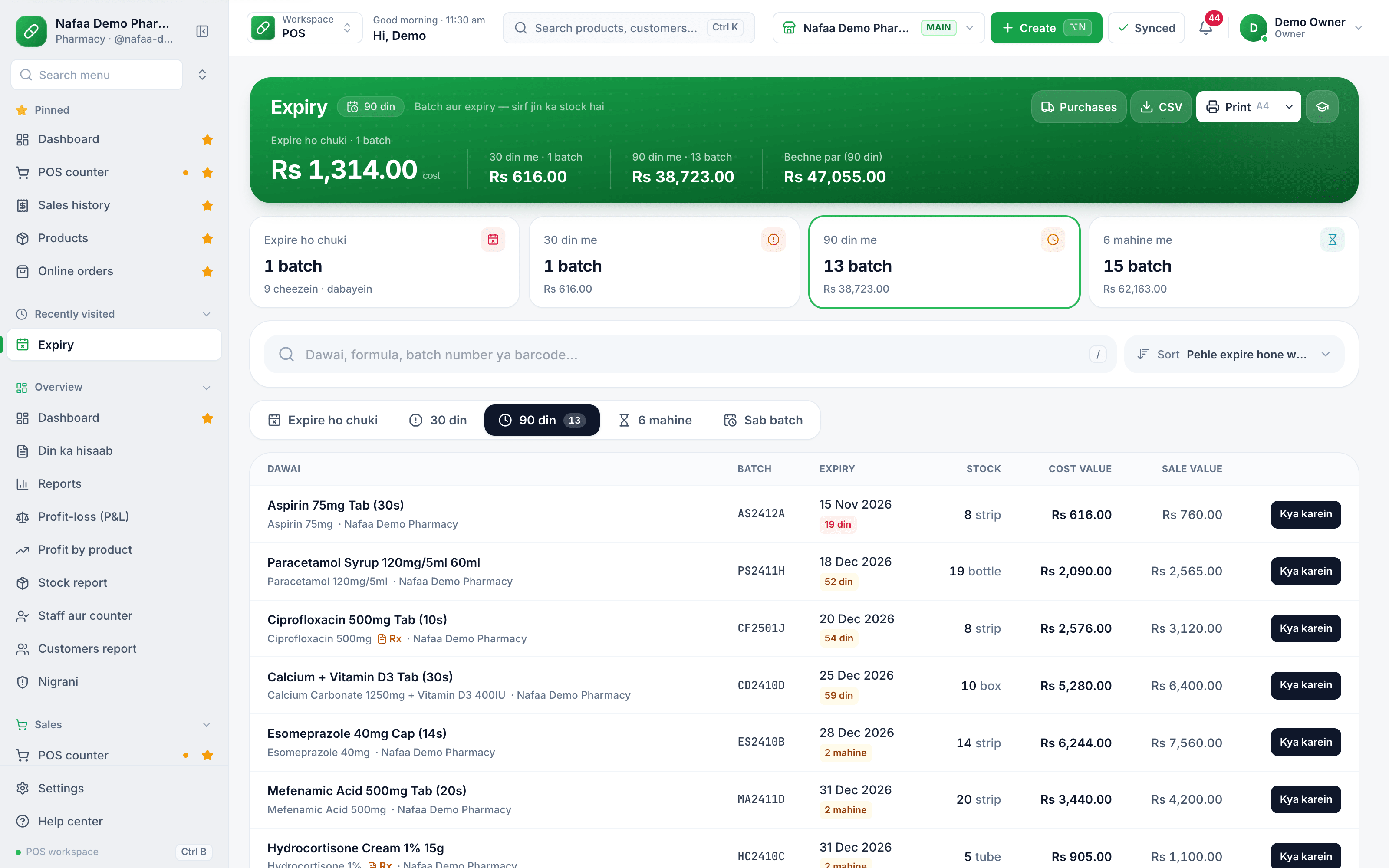
- Expired, 30, 90 days, 6 months
- Batch number
- Expiry and days left
- Kya karein: return or write off
Questions
Does Nafaa sell the oldest batch first?
It sells the batch with the earliest valid expiry first (the FEFO rule), which is usually the oldest stock. Expired batches are skipped.
Where do I see expiring stock without opening the Expiry screen?
The pharmacy dashboard has an Expiry qareeb (expiry near) tile and a link to Expiry with the count of expired batches. The Expiry screen is the full list with values.
Related
- Industry
Pharmacy
Nafaa is software for pharmacies and medical stores in Pakistan: search medicines by salt or formula and find substitutes, track batches and expiry, keep prescriptions and doctors, record controlled and narcotic sales in a register with patient and doctor details, and log fridge temperatures for the cold chain. - Product
Inventory
Nafaa Inventory keeps stock right in every unit and every branch: products with cost, price and margin, barcodes and labels, combos, low-stock alerts, damage and adjustments with reasons, stock transfers between branches, and a full movement history. Import from Excel or paste from a spreadsheet, and change many prices at once in the bulk editor. - Page
How to make purchase orders and receive goods
Order stock from a supplier, send the order on WhatsApp, and receive the goods when they arrive, in full or in part. Received goods go into stock at the right cost, the supplier’s balance updates, and a goods received note can be printed. - Page
How to adjust stock and record damage
Correct stock by hand when it does not match the shelf: add stock, remove it, or record damaged and lost goods with a reason. Use a stock count to enter what you actually counted and let Nafaa post the difference. - Page
How to set low stock alerts and reorder
Set a low stock level on each product and see what is out, low, running out soon or near expiry in every branch. Nafaa works out how many days the stock will last and turns the list into purchase orders or a WhatsApp message to the supplier. - Page
Restaurant: KOT, tables and the kitchen screen
Take a dine-in order from the table floor, send it to the kitchen as a KOT, follow it on the kitchen screen, add more items later, print the bill at the table and close it with payment. Takeaway and delivery orders use the same order screen.
Terms used here
Batch Tracking
Batch tracking records each purchase lot separately with its own expiry date.Expiry Management
Expiry management is the routine of tracking expiry dates, selling near-expiry stock in time, and removing or returning expired goods before they reach customers.FEFO (First Expiry, First Out)
FEFO is the stock rule that the batch with the nearest expiry date is sold or used first, whatever order it arrived in.Purchase Return
A purchase return is goods sent back to the supplier because they were damaged, wrong, short-dated or unsold under an agreed return arrangement.
Track batch and expiry in your pharmacy
Nafaa lists batches by expiry date, warns before they run out and keeps controlled-drug entries. 7-day free trial.