Help center
How to sell on udhaar (credit)
Make a credit sale at the Nafaa POS counter: pick the customer, then put the whole bill or the unpaid part in their khata. The customer’s old balance shows on the bill, and the credit limit is checked before the bill is saved.
Updated
An udhaar sale is a normal bill where some or all of the money is added to the customer’s khata. Nafaa needs to know who the customer is, so a walk-in bill can never go on credit.
Before you start, check that credit selling is on in Settings → Credit & loyalty: the Udhaar par bechna switch must show Chalu (on). When it is off, every bill must be paid in full.
Put a bill on udhaar at the counter
Step 1: Add the items
Open POS counter and add the items as usual by scanning, searching or tapping.
Step 2: Choose the customer
Press F2 (or click Walk-in customer) and type the name or phone. Each customer in the list shows their current udhaar. After you pick one, the bill panel shows Pichhla udhaar (previous udhaar) if they already owe money.
Step 3: Open checkout
Press Ctrl + Enter or click Checkout to see all payment options.
Step 4: Full bill on credit
Choose Udhaar (into the khata) and confirm with Udhaar mein daalein. In checkout, F6 selects full udhaar. From the bill panel, F8 then 5 does the same without opening checkout.
Step 5: Part payment
Choose Kuch paisa (part payment) and type what the customer paid. The button shows how much was received and how much goes to udhaar. Confirm it.
Step 6: Note who took the goods
If someone else is collecting the goods, such as a driver or a family member, write their name in the receiver field so the khata shows who took them.
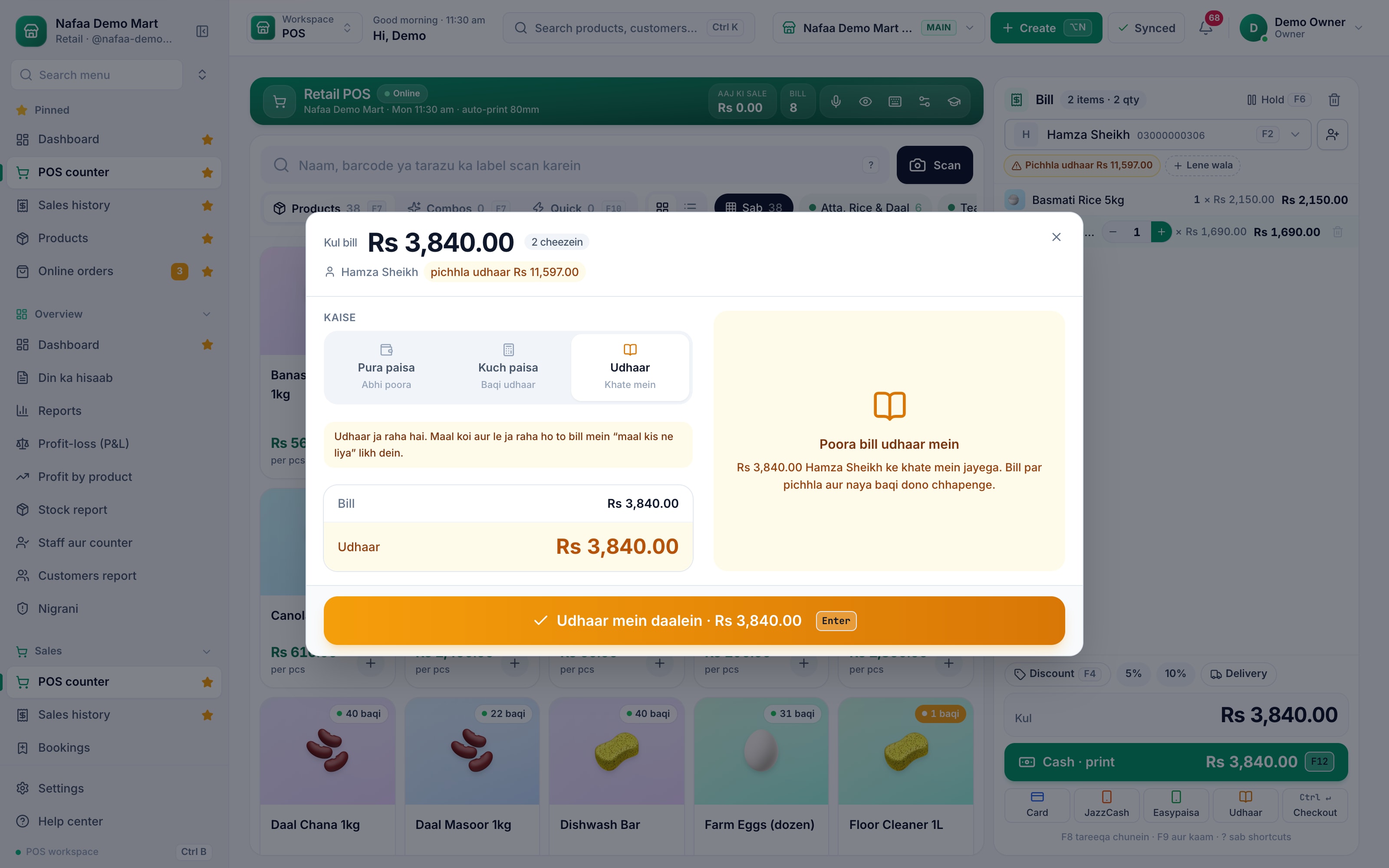
- Customer (F2)
- Previous udhaar
- Udhaar mode
- Amount to khata
- Udhaar mein daalein
Questions
Why is the Udhaar button greyed out?
Either no customer is selected on the bill (press F2 to pick one) or credit selling is switched off in Settings → Credit & loyalty.
Can a customer pay part now and the rest later?
Yes. Choose Kuch paisa, type what they paid, and the rest goes to their khata. Record later payments from the Khata page.
What if the customer pays more than the bill?
When a customer is selected and gives more than the total, checkout offers to keep the change in their khata as an advance instead of handing it back.
Related
- Product
Khata
Nafaa Digital Khata replaces the paper udhaar register: every credit sale lands in the customer's khata from the counter, payments and old balances are recorded, balances are grouped by age, credit limits stop runaway udhaar, and a WhatsApp reminder goes out in one tap. - Product
POS
Nafaa POS is the billing counter for any business: scan a barcode or tap a quick key, sell by piece, dozen or carton, take cash, card, JazzCash, Easypaisa or khata in one bill, print or WhatsApp the receipt, and keep billing when the internet drops. It runs on the phone, tablet or computer you already have. - Page
How to make a bill at the POS counter
Open the POS counter, add items by barcode, name or tile, set quantities, pick the customer and take payment. Covers the one-key cash bill (F12), the checkout window for other payment methods, and what to do on the success screen. - Page
How to receive a khata payment
Record money a customer pays against their udhaar. Pick the customer on the Khata page, enter the amount and how it was paid, and Nafaa lowers the balance, counts cash in the drawer and settles the oldest udhaar first. - Page
How to set a credit limit
Set how much udhaar a customer can take. Nafaa has a default limit for new customers and a limit on each customer, checks it at the counter before a credit bill is saved, and lists everyone who has gone over it. - Glossary term
Credit Sale
A credit sale is a sale where the customer takes the goods now and pays later, so the amount is recorded as money owed to the shop.
Terms used here
Udhaar
Udhaar is credit given to a customer: goods are taken now and paid for later.Khata
A khata is a ledger, traditionally a paper register, that records what each customer owes a shop on credit and what they have paid back.POS (Point of Sale)
The point of sale is where a sale is completed: items are scanned or picked, payment is taken and a receipt is given.
Collect udhaar without chasing it by memory
See who owes what by age of the balance and send a reminder in one tap. Try it free for 7 days.