Help center
Take a split payment
Take one bill in two or more ways, such as part cash and part card or JazzCash. Open checkout, switch on Split payment, enter each amount, and Nafaa records every method on the bill and gives change only from cash.
Updated
Customers often pay a large bill partly in cash and the rest by card or a wallet transfer. A split payment records each part against its own method, so the cash drawer, card and wallet totals in your reports each match what really came in.
A split can have up to five parts. Change can only come from cash: the card, wallet or bank amounts can add up to the bill, but not more.
Split a bill between methods
Step 1: Open split checkout
With items on the bill press F8 then 6 (Split). Or open checkout with Ctrl + Enter and click Split payment (or press Alt + S).
Step 2: Enter the first part
The first row is ready. Pick the method from its list and type the amount. If you had already typed an amount before switching to split, it becomes the first part and the rest goes to the second row.
Step 3: Enter the second part
Click the next row and set its method and amount. In a split, F1 Cash, F3 JazzCash, F4 Easypaisa, F5 Card and F7 Bank change the method of the row you are on.
Step 4: Add more methods if needed
Click Aur tareeqa (another method) or press Alt + A.
Step 5: Check the totals
Under the rows Nafaa shows Mila (received), Baqi (still due) and Wapas (cash) (change).
Step 6: Complete
Press Enter. If something is still due, add another payment, or choose Kuch paisa at the top so the rest goes to the customer’s khata.
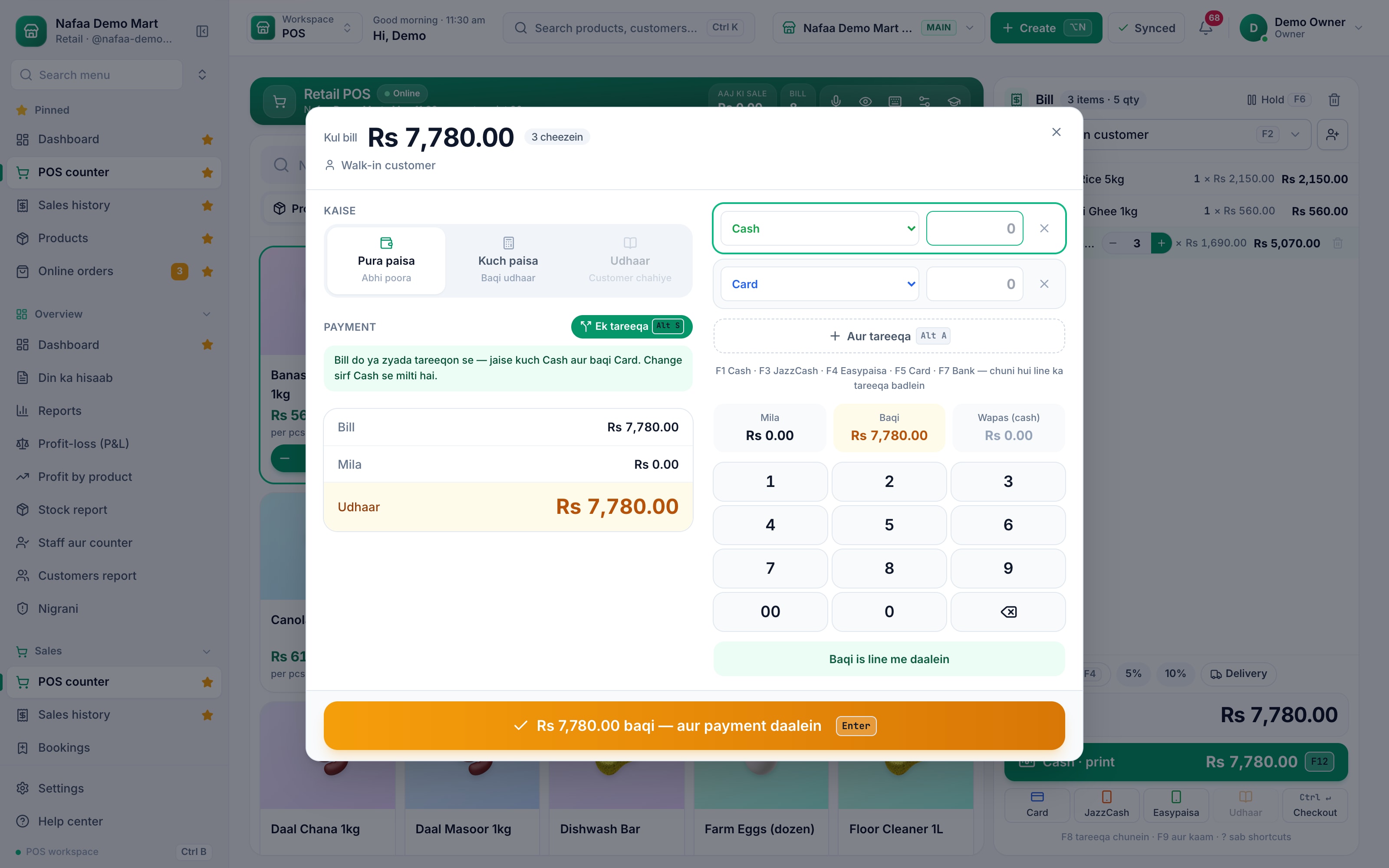
- Split on (Alt + S)
- One row per method
- Aur tareeqa (Alt + A)
- Received, due, change
Questions
Why can’t I enter more on the card than the bill?
Change can only be given in cash. Enter the card, wallet or bank part up to what the customer owes and take the rest in cash.
Can part of a split go on udhaar?
Yes, for a bill with a customer. Choose Kuch paisa (part paid) and whatever is not covered by the rows is added to their khata.
Related
- Product
Payments
Nafaa takes every way Pakistan pays: cash, card, JazzCash, Easypaisa, bank transfer, QR and the customer's khata, split across one bill if needed, with a cash register that balances at the end of every shift and payment links for online and phone orders. - Product
POS
Nafaa POS is the billing counter for any business: scan a barcode or tap a quick key, sell by piece, dozen or carton, take cash, card, JazzCash, Easypaisa or khata in one bill, print or WhatsApp the receipt, and keep billing when the internet drops. It runs on the phone, tablet or computer you already have. - Page
How to make a bill at the POS counter
Open the POS counter, add items by barcode, name or tile, set quantities, pick the customer and take payment. Covers the one-key cash bill (F12), the checkout window for other payment methods, and what to do on the success screen. - Page
How to sell on udhaar (credit)
Make a credit sale at the Nafaa POS counter: pick the customer, then put the whole bill or the unpaid part in their khata. The customer’s old balance shows on the bill, and the credit limit is checked before the bill is saved. - Page
How to close the cash drawer
Close the galla at the end of a shift in Nafaa’s Cash register: count the cash, compare it with what the system expects, give a reason for any difference, and print the Z-report. Also covers opening a shift and recording cash in or out.
Terms used here
Split Payment
A split payment is one bill paid with more than one method, such as part cash and part card, wallet or khata.JazzCash
JazzCash is a mobile wallet and branchless banking service in Pakistan, used to send and receive money, pay bills and pay shops by number or QR code.Easypaisa
Easypaisa is a mobile wallet and digital banking service in Pakistan, used to send and receive money, pay bills and pay merchants by account number or QR code.Cash Drawer
A cash drawer is the lockable drawer under the counter that holds notes and coins and opens when a cash sale is completed.
Billing software for a Pakistani counter
Discounts, returns with a PIN, hold and recall, and printed receipts in one screen. Start a 7-day free trial.