Help center
How to send udhaar reminders on WhatsApp
Remind customers about their udhaar on WhatsApp from the Khata page. Nafaa writes the message with the name, amount and days due, picks a polite, firm or final tone by age, and opens WhatsApp so you only press Send.
Updated
Nafaa prepares udhaar reminders for you but does not send them on its own. When you send one, WhatsApp opens on your phone or computer with the message already written, and you press Send. There is no API to connect and no fee.
Reminders need the customer’s phone number. Customers without a number are skipped.
Send reminders to everyone who owes
Step 1: Open the Khata page
In the sidebar, open Customers → Khata (credit). Use the filters first if you only want some customers, for example the 30–90 day box.
Step 2: Start Yaad-dihani
Click Yaad-dihani (reminders) at the top, or press N. Nafaa goes through the list one customer at a time, showing the name, the amount and how many days it has been due.
Step 3: Check the tone
Nafaa picks Narm (polite) for recent udhaar, Sakht (firm) after 7 days and Aakhri (final) after 30 days. Click another tone to change it.
Step 4: Pick the greeting
Choose how to address the customer: Khud (automatic), Bhai, Baji, Uncle, Aunty, Sahib or Kuch nahi (none). You can also edit the text directly.
Step 5: Send or skip
Click WhatsApp par bhejein to open WhatsApp with the message, then press Send there. Click Chhor dein (skip) to move to the next customer.
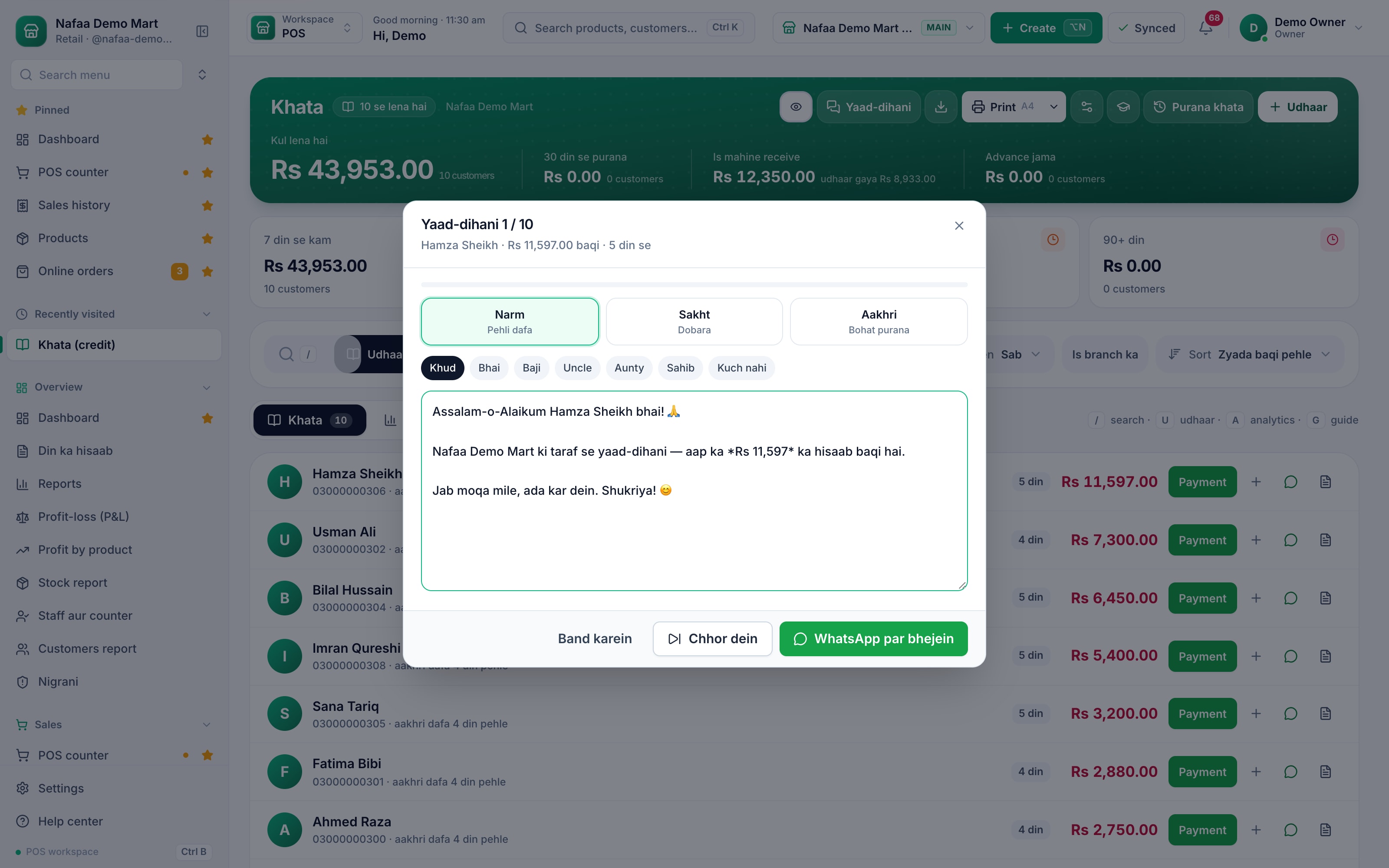
- Tone
- Greeting
- Message (editable)
- Chhor dein
- WhatsApp par bhejein
Questions
Does Nafaa send reminders automatically?
No. Nafaa writes the message and opens WhatsApp; the message goes only when you press Send.
Do I need the WhatsApp Business API?
No. Reminders open the normal WhatsApp or WhatsApp Business app on your phone or computer.
Why is a customer missing from the reminder list?
The list includes only customers who owe money and have a phone number. Add the number on their profile and start again.
Related
- Product
WhatsApp
Nafaa talks to customers and suppliers where they already are: receipts on WhatsApp instead of paper, udhaar reminders with the exact balance, thank-you and birthday messages, purchase orders to suppliers, and a WhatsApp chat with online buyers opened straight from their order, all in wording you can edit to sound like your shop. - Product
Khata
Nafaa Digital Khata replaces the paper udhaar register: every credit sale lands in the customer's khata from the counter, payments and old balances are recorded, balances are grouped by age, credit limits stop runaway udhaar, and a WhatsApp reminder goes out in one tap. - Page
How to receive a khata payment
Record money a customer pays against their udhaar. Pick the customer on the Khata page, enter the amount and how it was paid, and Nafaa lowers the balance, counts cash in the drawer and settles the oldest udhaar first. - Page
How to set a credit limit
Set how much udhaar a customer can take. Nafaa has a default limit for new customers and a limit on each customer, checks it at the counter before a credit bill is saved, and lists everyone who has gone over it. - Guide
Managing Udhaar and Khata: A Complete Guide for Shops
How to give udhaar without losing money: who should get credit, how much, how to record it so nobody can argue, how to tell which balances are going bad, how to remind customers without losing them, how to recover old balances, and how to handle the credit you take from your own suppliers.
Send bills and reminders on WhatsApp and SMS
Share a bill or an udhaar reminder with the customer straight from Nafaa. 7-day free trial.