Updated
IndustryFor kiryana and grocery stores
The kiryana counter, the khata and the stock in one app
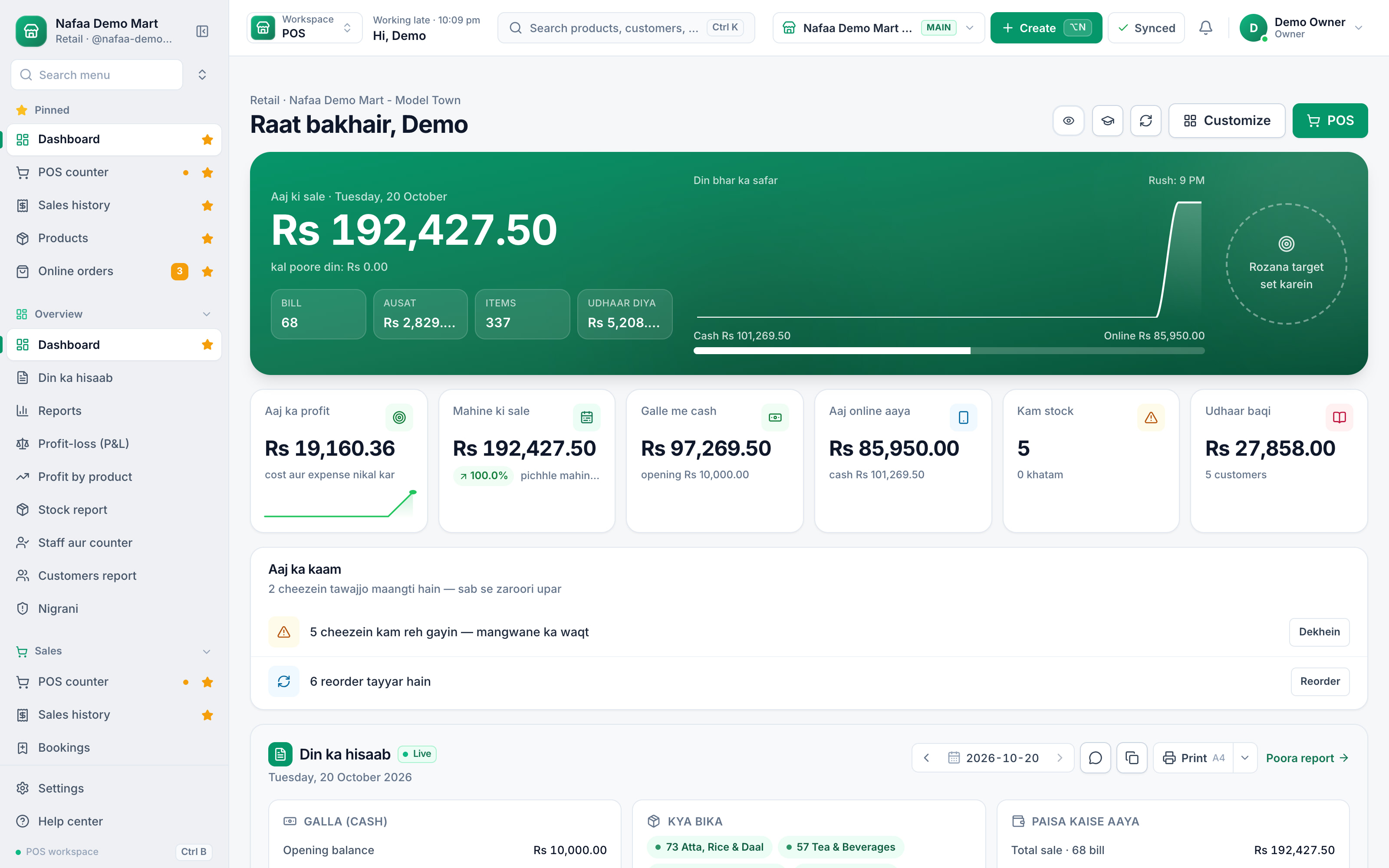
Bill faster with barcodes and quick keys, sell atta by the kilo and oil by the carton, keep every customer's udhaar in a digital khata, and keep selling when the internet drops.
- Udhaar on WhatsApp
- Piece, dozen, carton
- Works offline
- 7 din Free Trial
- Keeps billing offline
- Help on WhatsApp
- English and Roman Urdu
- Phone, tablet or computer
Short answer
Nafaa is POS and khata software for kiryana and grocery stores in Pakistan. Scan barcodes at the counter, sell by piece, dozen or carton, keep every customer's udhaar in a digital khata with WhatsApp reminders, import products from Excel, and keep billing when the internet drops.
Roman Urdu mein
Nafaa kiryana aur grocery store ke liye POS aur khata app hai. Barcode se bill banayein, piece, darjan ya carton me bechein, udhaar digital khata me rakhein aur WhatsApp par yaad-dihani bhejein. Internet na ho to bhi counter chalta rehta hai.
Key facts
- Built for
- Kiryana, grocery and general stores, from one counter to several branches
- Everyday tools
- Counter (POS), stock, khata (udhaar) and reports in one app
- Without internet
- The counter keeps billing offline and sends the sales when the connection returns
- Price
- Paid plans from Rs 1,500 a month, with a free trial first
- Tax
- Optional FBR/PRA integration, only if you need it
For kiryana and grocery stores
What Nafaa does for kiryana and grocery stores
Barcode counter
Scan with a barcode scanner, search by name, or tap a quick key for loose items.
Piece, dozen and carton
Sell one product in more than one unit, each with its own price.
Digital khata
Udhaar, payments and old-register balances per customer, with WhatsApp reminders sent one by one.
Import from Excel
Download a template, upload your list, check it in a dry run, then import.
Combos and deals
Bundle items into a combo with its own price.
Damage and low stock
Record broken or expired stock and see what is running low.
Inside the app
A counter built for a busy kiryana
Daal, chawal, chai and soap sit in big tiles by category, with the stock left on every tile. Loose items get quick keys, packed items scan, and the bill stays on the right with every way to pay.
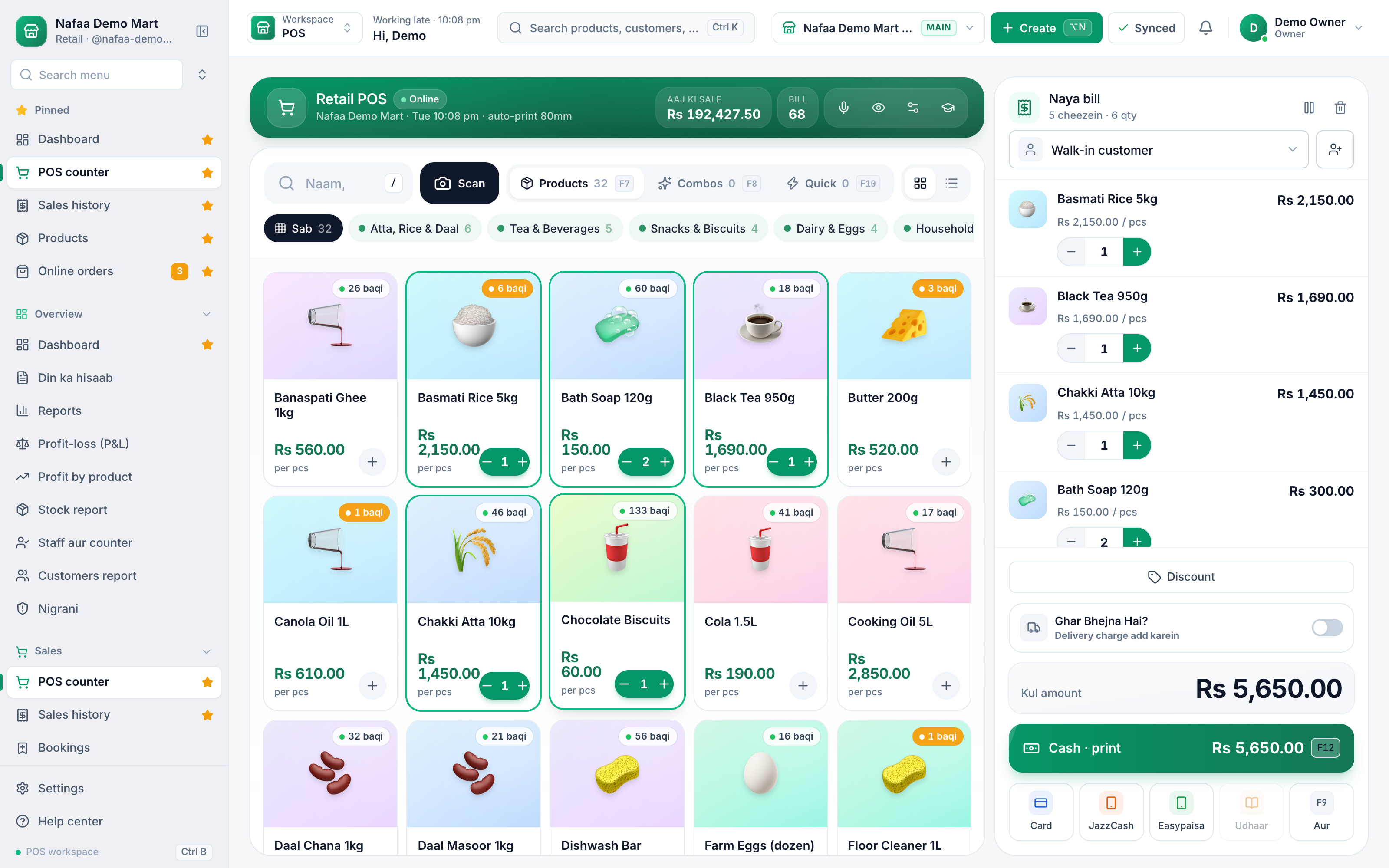
- Categories like Atta, Rice & Daal
- Stock left on each item
- Cash, JazzCash, Easypaisa or udhaar
A day at the counter
A day at the kiryana counter
- 1
Morning
Open the low-stock list and call the supplier before the rush starts.
- 2
Rush hour
Scan packed items, tap quick keys for loose ones, and print or WhatsApp the bill.
- 3
Udhaar customers
Put the bill on the customer's khata; the counter stops at their credit limit unless you approve it.
- 4
Closing
Count the galla, read today's profit and send a few udhaar reminders on WhatsApp.
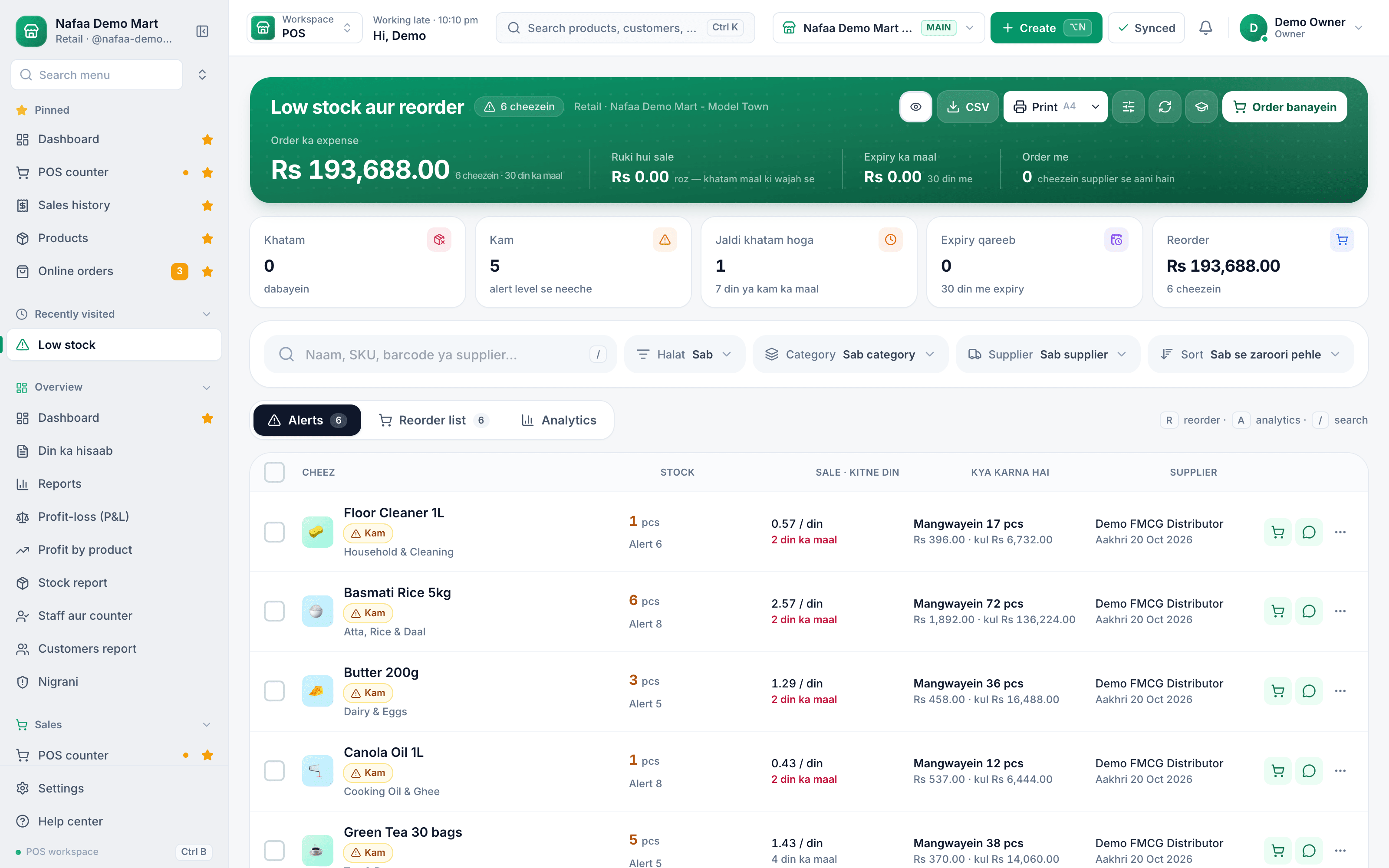
The udhaar register, finally under control
Every udhaar bill lands in the customer's khata from the counter. See total receivable by age, and send a polite WhatsApp reminder with the exact balance in one tap.
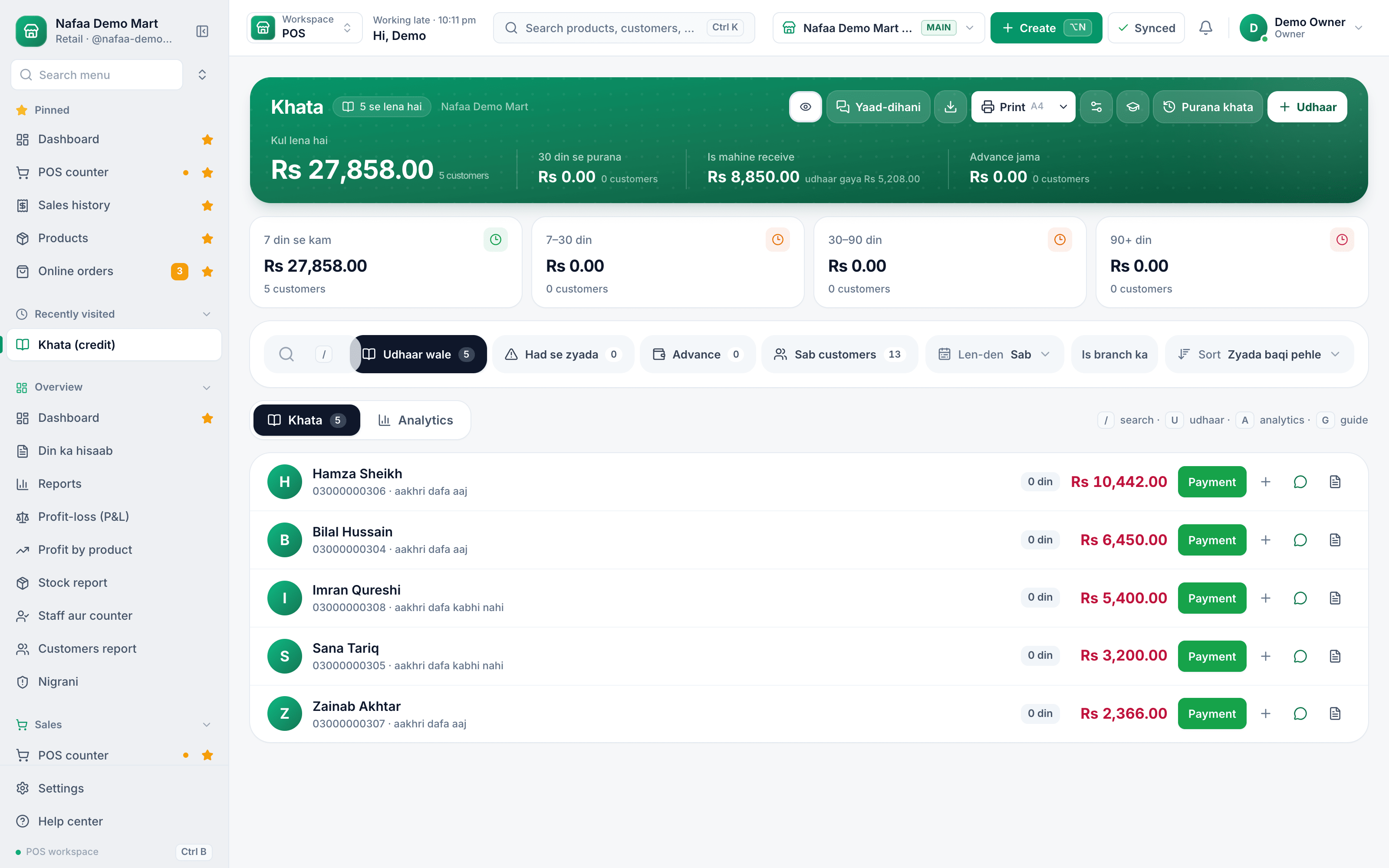
Paper register or Nafaa?
| Feature | Paper register | Nafaa |
|---|---|---|
| Writing the bill | By hand, totals on a calculator | Scan or tap; totals and receipt by themselves |
| Udhaar | Pages that get lost or wet | Digital khata per customer with ageing |
| Reminders | Phone calls and awkward talks | One-tap WhatsApp message with the balance |
| Stock | Guessing from the shelf | Live stock in every unit with low-stock alerts |
| Profit | Known at the end of the month, roughly | Profit after cost and expenses, every day |
What to look for in kiryana software
A kiryana store sells hundreds of small items to the same neighbourhood every day, so the software has to be fast, forgiving and honest about money. Before you choose, check that it can:
- Sell in more than one unit. Cooking oil by the bottle and the carton, eggs by the piece and the dozen, each with its own price.
- Keep udhaar properly. A khata per customer, balances brought over from the old register, and reminders that do not embarrass anyone.
- Keep billing without internet. Load-shedding and weak signal should never stop the counter.
- Show real profit. Sales minus cost and expenses, not just the day's takings.
- Grow with you. A second counter or a second branch should not mean new software.
Nafaa does all of this on the phone or computer you already have, in English or Roman Urdu.
Plans for one counter or many
Free Trial
7 din Free Trial
7-day Free Trial
What is included
- 30 products
- 100 sales a month
- 2 users
- 1 shop
Basic
Chhoti dukan ke liye perfect
Rs 1,500/ monthRs 4,000/ quarterSave 11%Rs 15,000/ yearSave 16%Get startedStarts with a 7-day free trial
What is included
- 500 products
- 2,000 sales a month
- 3 users
- 1 shop
Pro
RecommendedBari shops aur multi-branch ke liye
Rs 3,500/ monthRs 9,500/ quarterSave 9%Rs 36,000/ yearSave 14%Get startedStarts with a 7-day free trial
What is included
- 5,000 products
- 10,000 sales a month
- 10 users
- 3 shops
Enterprise
Unlimited everything + 24/7 support
Rs 9,500/ monthRs 27,000/ quarterSave 5%Rs 99,000/ yearSave 13%Get startedStarts with a 7-day free trial
What is included
- Unlimited products
- Unlimited sales
- Unlimited users
- Unlimited shops
Common questions
Do I need a computer to use Nafaa?
No. Nafaa runs in a web browser, so the phone, tablet or computer you already have will do. A barcode scanner and a receipt printer can be added later but are not required to start. The counter also keeps working without internet and sends the sales to your account when the connection returns.
Can I sell the same item by piece, dozen and carton?
Yes. A product can be sold in more than one unit, such as piece, dozen and carton, and each unit has its own price. So the same biscuit can go out as a single packet to one customer and as a full carton to a shopkeeper who buys in bulk, each at its own price.
Can I add my products from Excel?
Yes. Download the template made for your business, fill it or paste your list, and upload it. Nafaa first checks every line in a dry run, flagging duplicates by name, SKU or barcode and bad prices, without saving anything. Then the import runs in chunks, and lines that need fixing download as Excel with the reason.
Can Nafaa send udhaar reminders on WhatsApp?
Yes. The khata keeps each customer's udhaar, payments and balances brought over from the old register. From the khata you send a customer a WhatsApp reminder with their balance in one tap. Reminders go one by one from your own WhatsApp, and the wording gets firmer as the udhaar gets older.
Does Nafaa work without internet?
Yes, the counter keeps billing when the internet drops. Sales made offline are saved on the device and sent to your account automatically when the connection comes back, and you can see the sales still waiting to be sent. Reports and other branches see those sales once they have synced.
How much does Nafaa cost?
Paid plans start at Rs 1,500 a month. The pricing page lists every plan with its price and limits, taken straight from our plan settings, so it is always current. You can start with the free trial first, and no credit card is needed to sign up.
Products kiryana and grocery stores use
POS & Billing
Nafaa POS is the billing counter for any business: scan a barcode or tap a quick key, sell by piece, dozen or carton, take cash, card, JazzCash, Easypaisa or khata in one bill, print or WhatsApp the receipt, and keep billing when the internet drops. It runs on the phone, tablet or computer you already have.Digital Khata
Nafaa Digital Khata replaces the paper udhaar register: every credit sale lands in the customer's khata from the counter, payments and old balances are recorded, balances are grouped by age, credit limits stop runaway udhaar, and a WhatsApp reminder goes out in one tap.Inventory
Nafaa Inventory keeps stock right in every unit and every branch: products with cost, price and margin, barcodes and labels, combos, low-stock alerts, damage and adjustments with reasons, stock transfers between branches, and a full movement history. Import your list from Excel in minutes.Purchasing
Nafaa Purchasing records what you buy and what you owe: suppliers with their contact details and balances, purchase bills in any unit that add stock and update cost, full or partial payments to suppliers, and reorders started straight from the low-stock list.WhatsApp Messages
Nafaa talks to customers where they already are: receipts on WhatsApp instead of paper, udhaar reminders with the exact balance, thank-you messages after a purchase, and a WhatsApp chat with online buyers opened straight from their order, all in wording you can edit to sound like your shop.
Solutions
Retail & Shops
Nafaa for a single shop puts the whole business on the device you already own: a fast counter that works offline, stock in every unit, a digital khata with WhatsApp reminders, and a daily profit report, from a 7-day free trial.Wholesale & Distribution
Nafaa for wholesalers and distributors handles trade the way it is done in Pakistan: carton and piece prices, separate wholesale prices, credit limits and khata for every trade customer, supplier accounts and purchasing, stock across godowns and branches, and A4 invoices.
Related industries
General Retail Shop
Nafaa works for any shop that does not fit a specific industry: a fast counter with quick keys and barcodes, combos, stock with low-stock and damage records, bulk import from Excel, a digital khata for udhaar, and reports on sales and profit, all in one app.Dairy & Milk Shop
Nafaa runs dairy and milk shops: record milk bought from gawalas, deliver to homes on routes, send a monthly bill to each delivery customer, make dahi and makhan and record spoiled stock, run quality tests, and sell loose milk at the counter.
Try Nafaa in your kiryana business
Start with the free trial. No card needed.
- 7 din Free Trial
- Keeps billing offline
- Help on WhatsApp