Updated
ProductInventory
Know what is on the shelf without counting it
Every sale, purchase, return and transfer moves stock by itself, in the right unit and the right branch. See value, margin and what is running low at a glance, and fix the rest with reasons on record.
- Excel import and paste
- Bulk edit
- Low-stock alerts
- 7 din Free Trial
- Keeps billing offline
- Help on WhatsApp
- English and Roman Urdu
- Phone, tablet or computer
Short answer
Nafaa Inventory keeps stock right in every unit and every branch: products with cost, price and margin, barcodes and labels, combos, low-stock alerts, damage and adjustments with reasons, stock transfers between branches, and a full movement history. Import from Excel or paste from a spreadsheet, and change many prices at once in the bulk editor.
Roman Urdu mein
Nafaa me har bikri, khareed, wapsi aur transfer se stock khud update hota hai. Kam stock ki list, har cheez ka cost aur margin, Excel se ya copy-paste se poori list ek dafa me, aur bulk edit se sau cheezon ki qeemat ek saath badlein.
Key facts
- Tracks
- Stock, cost, sale price and margin for every product and unit
- Moves stock
- Sales, purchases, returns, damage, adjustments and transfers
- Alerts
- Low-stock list with days of stock left and a reorder shortcut
- Setup
- Excel or CSV import, or cells pasted from a spreadsheet, checked line by line before saving
- Changes
- Bulk editor for prices, cost, barcodes, alerts and stock counts
Inside the app
Your whole stock, priced and valued
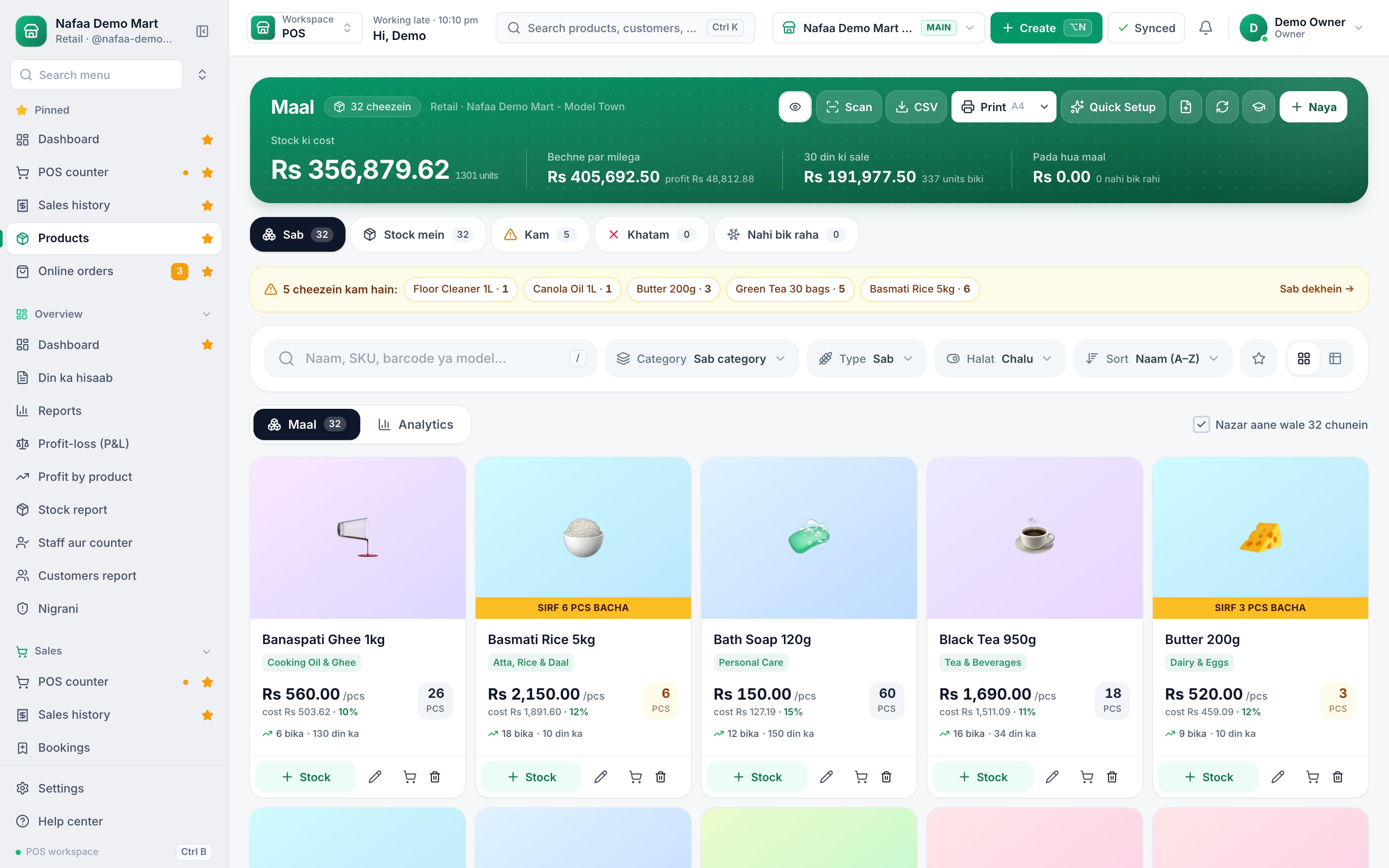
The top line shows what your stock cost, what it would sell for and how much sold in the last 30 days. Each product card shows the sale price, cost, margin and stock left, and items running low are listed above the grid. Filter by category, type or status, and open any product to see every movement behind its number.
- Stock value at cost
- Items running low
- Category, type and status filters
- Price, cost and margin
- Stock left, marked when low
From supplier to shelf
Features
Stock control without the spreadsheet
Units and packs
Buy in cartons, sell in pieces. Stock is kept in the base unit and shown in the one you choose.
Barcodes and labels
Use the maker's barcode or create your own. Design the sticker once and print on a thermal roll or an A4 sticker sheet.
Low-stock alerts
A live list of what is about to run out, with days of stock left, ready to turn into a purchase order.
Damage with approval
Staff report broken, expired or missing stock with a reason; stock only leaves when a manager approves.
Branch transfers
Send stock to another branch; the other side receives it and any short delivery is recorded.
Combos and deals
Bundle items into a deal with its own price; each item's stock goes down when it sells.
Never run out of the fast movers
The low-stock list works out how many days each item will last at its current sale, suggests how much to order and from which supplier, and turns the list into a purchase order or a WhatsApp message to the supplier.
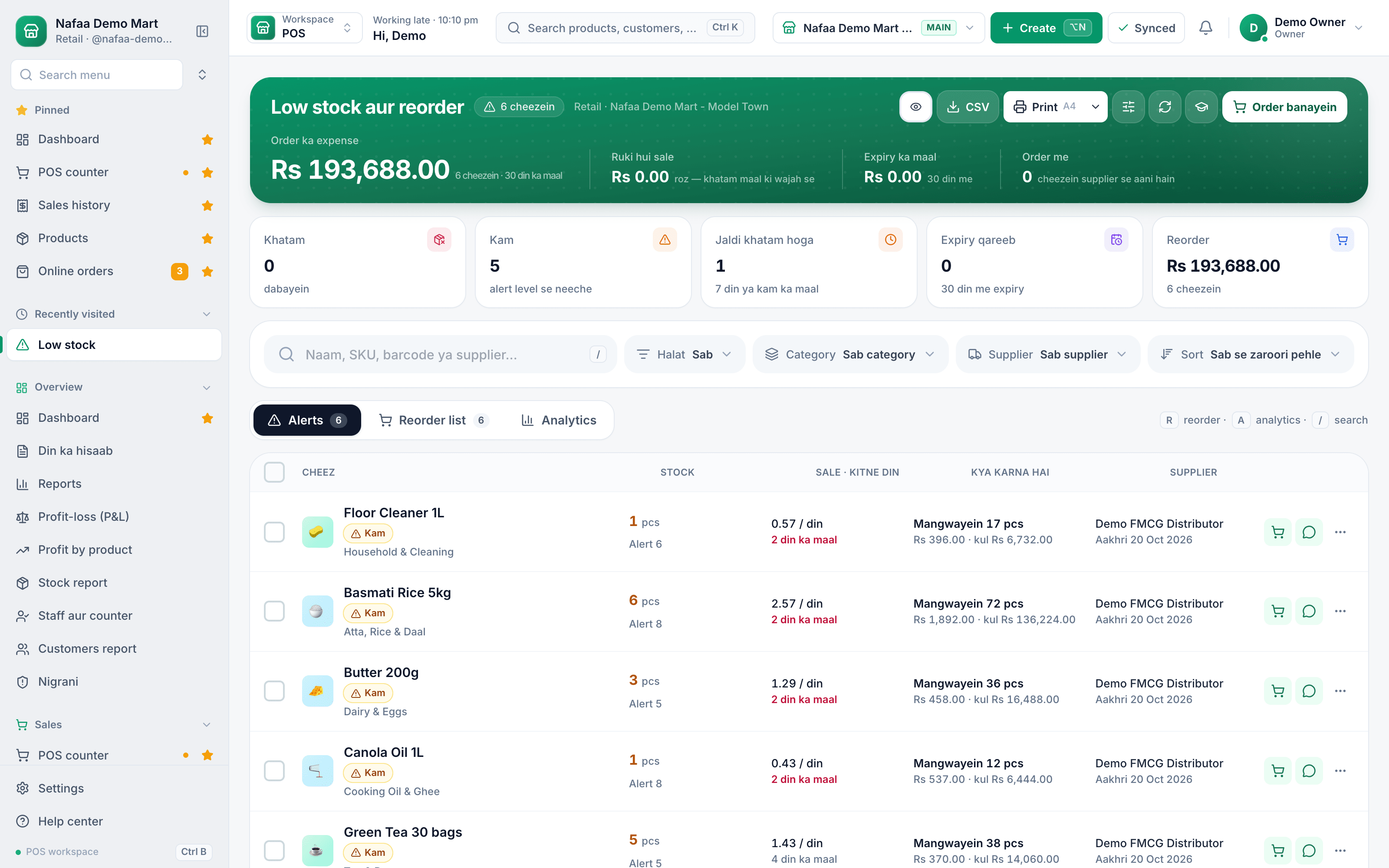
- Days of stock left
- Suggested order
- Order or WhatsApp the supplier
From an Excel sheet to live stock
How it works
Set up your stock in an afternoon
- 1
Bring the file, or paste
Upload an Excel or CSV file, download a sample made for your business type, or copy cells from any spreadsheet and paste them in.
- 2
Check the columns
Nafaa finds the header row and matches columns from English, Roman Urdu or Urdu names. Pick the branch that receives the stock.
- 3
Fix lines in the sheet
Every line opens in an editable grid. Errors show in their cells while you type, with find and replace, undo and paste from Excel.
- 4
Import and start selling
Lines go in chunks with a progress bar that can pause and resume. Failed lines open again to fix, or download as Excel.
Three ways to change many products at once
| Feature | Use it when | What happens to stock |
|---|---|---|
| Excel import | You have a list from old software, a supplier or a notebook typed into Excel | For products already in the shop you choose: set stock to the file, add the file to stock, or leave stock alone |
| Bulk create | You are typing new products row by row, like in a spreadsheet | Opening stock is added for the branch you choose |
| Bulk edit | Prices, cost, barcodes, categories or low-stock alerts need changing on many items | A changed stock cell becomes a stock count, posted as an adjustment with the difference |
One stock for the shop, the website and the marketplace
One stock for the counter, the website and the marketplace
Stock in Nafaa is not a separate list that someone updates at night. The counter, purchase bills, returns, online orders and Nafaa Market all move the same numbers, so what you see is what is on the shelf. Businesses with branches see each branch's stock and can transfer between them, and the stock report shows value at cost and at sale price, what is dead or slow, what is near expiry, and the stock on any past date for your accountant.
Who it is for
Any business that buys goods and sells them on: kiryana and general stores with thousands of small items, pharmacies that need batch and expiry dates, hardware and auto parts shops with odd units like feet and bori, garment and shoe shops with sizes and colours, and mobile shops that track every IMEI. Each industry pack adds its own fields on top of the same stock.
What to check before you choose inventory software
- Units. Can you buy a carton of 24 and sell single pieces without doing the maths yourself?
- Re-import safety. If you import the same file twice, does stock double? In Nafaa, "set stock to the file" posts only the difference.
- A reason for every change. Damage, adjustments and transfers should leave a trail with a name, so a missing carton can be traced.
- Speed of change. Price rises come often. A bulk editor that saves only the changed cells saves an evening of typing.
For the routines behind good stock, from reorder levels to counting without closing the shop, read the inventory management guide.
Common questions
Can I bring my product list from Excel?
Yes. Download the import template, fill in names, prices, cost, stock and barcodes, and upload it. Nafaa checks the file first and shows every row it would add or change, so you can fix mistakes before anything is saved. Products can be exported back to Excel at any time.
Can I move stock from one branch to another?
Yes. Create a stock transfer from one branch, and the receiving branch confirms what arrived. Stock leaves one shop and lands in the other with a record of who sent and received it. Head office sees every branch's stock, sales and profit and loss side by side.
Does Nafaa work without internet?
Yes, the counter keeps billing when the internet drops. Sales made offline are saved on the device and sent to your account automatically when the connection comes back, and you can see the sales still waiting to be sent. Reports and other branches see those sales once they have synced.
Industries using it
Kiryana & Grocery Store
Nafaa is POS and khata software for kiryana and grocery stores in Pakistan. Scan barcodes at the counter, sell by piece, dozen or carton, keep every customer's udhaar in a digital khata with WhatsApp reminders, import products from Excel, and keep billing when the internet drops.Hardware & Building Materials
Nafaa runs hardware and building material shops: items by size and shade, retail, contractor and bulk rates, quotations that turn into bills, delivery challans, contractor sites with their own khata, brands, and reorder rules that flag what to buy before it runs out.Pharmacy & Medical Store
Nafaa is software for pharmacies and medical stores in Pakistan: search medicines by salt or formula and find substitutes, track batches and expiry, keep prescriptions and doctors, record controlled and narcotic sales in a register with patient and doctor details, and log fridge temperatures for the cold chain.Garments & Boutique
Nafaa runs garment shops and boutiques that sell ready-made and custom-stitched clothes: stock by size and colour, tailoring (silai) orders, alterations, saved customer measurements, items put on hold, qist plans, exchanges, collections and size charts, alongside the counter, khata and reports.Auto Parts & Workshop
Nafaa runs auto parts shops and workshops: parts matched to vehicle make and model, customer vehicles, workshop job cards with mechanics, service reminders for oil change, token tax and insurance, and returned old parts, together with the counter, stock and khata.Electronics & Gadgets
Nafaa runs electronics and gadget shops: serial and IMEI tracking, warranty claims, brands, technical specs on products, bundles, and condition grading for used or open-box items, together with the counter, stock and khata used by every Nafaa shop. It runs in the browser on a phone, tablet or computer.
Related
Data Migration to Nafaa
Our team moves your business into Nafaa from Excel, a paper register or another POS: products with prices, cost, barcodes and stock, customers with their old udhaar as opening khata balances, and suppliers with what you owe them, all cleaned and checked with you before go-live.SKU (Stock Keeping Unit)
An SKU is a code for one exact product variant in stock, so each size, colour or pack size is counted separately.Batch Tracking
Batch tracking records each purchase lot separately with its own expiry date.Inventory Management for Small Businesses: A Practical Guide
A practical guide to inventory for small shops and businesses in Pakistan: setting up the product list, units and opening stock, buying to a reorder level, costing stock correctly, counting without closing the shop, cutting losses from damage, expiry and theft, and reading the few stock reports that matter.Reorder Level Calculator
Find the stock level at which to place your next order, so a product does not run out while the supplier delivers. Enter what you sold, the supplier's lead time and a safety margin; add today's stock to see whether to order now and how much.Stock Take Sheet (Excel, Printable)
A printable stock count sheet: product, SKU, unit, system stock and a box for the counted quantity. Type the counts back in and the sheet works out the difference and its value at cost, with a total for the shrinkage or gain.Product Import Template (Excel)
An Excel sheet for your product list with the same column names Nafaa's import reads: name, price, cost, stock, unit, category, brand, SKU, barcode, low stock alert, packs, batch and expiry. Fill it once and upload it to put your whole shop into Nafaa in one go.Opening Stock
Opening stock is the quantity and value of goods a business has at the start of a period, or when it starts using a new system.Batches and expiry now follow real stock
Batches now belong to a branch and move with every sale, return, transfer, count and write-off, so expiry lists match the stock on the shelf.Shared stock tools for every business type
Low stock and reorder, transfers, adjustments with stock count, damage and wastage, barcode labels, combos, multi-units and quick keys now work the same for every industry.Products and stock
Add products one by one or from Excel, sell in units and packs, print barcode labels, keep stock correct with adjustments and transfers, and buy from suppliers with purchase orders and goods received notes.
More from Nafaa
POS & Billing
Nafaa POS is the billing counter for any business: scan a barcode or tap a quick key, sell by piece, dozen or carton, take cash, card, JazzCash, Easypaisa or khata in one bill, print or WhatsApp the receipt, and keep billing when the internet drops. It runs on the phone, tablet or computer you already have.Purchasing
Nafaa Purchasing records what you buy and what you owe: suppliers with their khata and rate history, purchase bills in any unit that add stock at the real landed cost, purchase orders that wait until goods arrive, returns to suppliers, full or partial payments, and reorders started straight from the low-stock list.Multi-Branch
Nafaa Multi-Branch runs every shop, warehouse or godown from one account: each branch keeps its own counter, stock and cash, head office compares sales and profit side by side, stock moves between branches with transfers that the other side receives, and each staff member works in the branch they are assigned to.Digital Khata
Nafaa Digital Khata replaces the paper udhaar register: every credit sale lands in the customer's khata from the counter, payments and old balances are recorded, balances are grouped by age, credit limits stop runaway udhaar, and a WhatsApp reminder goes out in one tap.
Put your stock in order this week
Import or paste your products and see your real stock value today.
- 7 din Free Trial
- Keeps billing offline
- Help on WhatsApp