Updated
IndustryFor jewellery shops
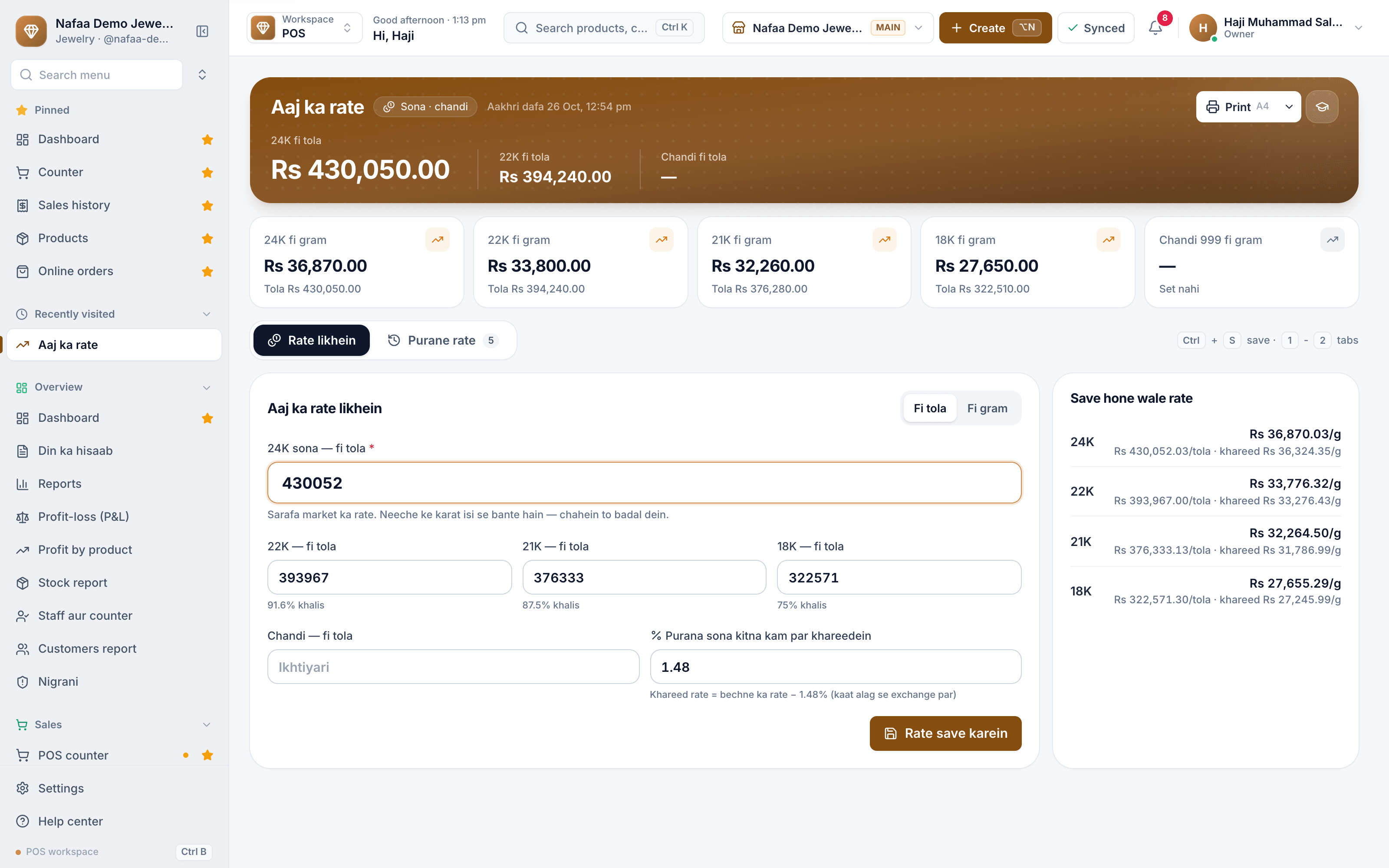
Today's rate, every tola and every karigar in one app
Set the 24K rate once and price every piece by its weight, banwai and stones, take old gold in at the counter, and know how much gold each karigar is holding.
- Daily gold rate
- Old gold exchange
- Karigar accounts
- 7 din Free Trial
- Keeps billing offline
- Help on WhatsApp
- English and Roman Urdu
- Phone, tablet or computer
Short answer
Nafaa runs jewellery shops: set today's gold and silver rate, keep each piece with its metal and stones, sell at the counter, take custom orders, buy back old gold, handle repairs, track work given to karigars, and keep metal stock by weight.
Roman Urdu mein
Sonar ke liye Nafaa: aaj ka rate, har zewar ka metal aur nageena, custom order, purana sona, repair, karigar ka kaam aur metal ka stock.
Key facts
- Built for
- Jewellers, sonars and gold and silver shops
- Everyday tools
- Counter (POS), stock, khata (udhaar) and reports in one app
- Without internet
- The counter keeps billing offline and sends the sales when the connection returns
- Price
- Paid plans from Rs 1,500 a month, with a free trial first
- Tax
- Optional FBR/PRA integration, only if you need it
For jewellery shops
What Nafaa does for jewellery shops
Today's rate
Type the 24K rate per tola or per gram; 22K, 21K and 18K follow from their purity and can be changed.
Pieces with metal and stones
Karat, gross, stone and net weight, banwai, kaat, polish and hallmark charges, and stones on each piece.
Counter priced by weight
Every piece is priced at today's rate for its karat; the cashier can change the rate or banwai while bargaining.
Old gold
Weigh, test the karat, take off the stones and value at the buying rate less kaat, with a slip carrying the customer's CNIC.
Custom orders
Made-to-order pieces with the advance in cash or old gold, the karigar, the due date and money still to come.
Karigar accounts
Gold given to each karigar, what came back with wastage allowed, and the labour owed.
Repairs
The customer's piece with its weight and karat, the promised day, the charge and any advance.
Metal stock
Kachcha sona and chandi by karat, its value at today's rate, and every movement in and out of the safe.
A day at the counter
A day at the jewellery shop
- 1
Morning
Type today's 24K rate as the market quotes it. 22K, 21K and 18K, and the buying rate for old gold, follow from it, and every piece on the shelf is repriced.
- 2
A bride's family arrives
Pick the set at the counter. Its price shows weight at today's rate plus banwai, kaat and stones. Bargain on banwai if you choose.
- 3
Old gold against new
Weigh their old bangles, test the karat and value them at the buying rate. The old gold pays part of the new bill and goes into metal stock.
- 4
A custom order
Book a necklace with an advance, give 50 grams to the karigar, and watch the order move from karigar to ready.
- 5
Closing
Check metal stock in the safe by karat, gold still with each karigar, and count the galla.
Inside the app
Every bill by karat, weight and making
Each jewellery bill keeps the karat, the weight in grams and the making charges (banwai) of every piece, priced at the day's rate. The sales record shows the day's total, what came into hand, the profit, and any balance a customer still owes on the khata.
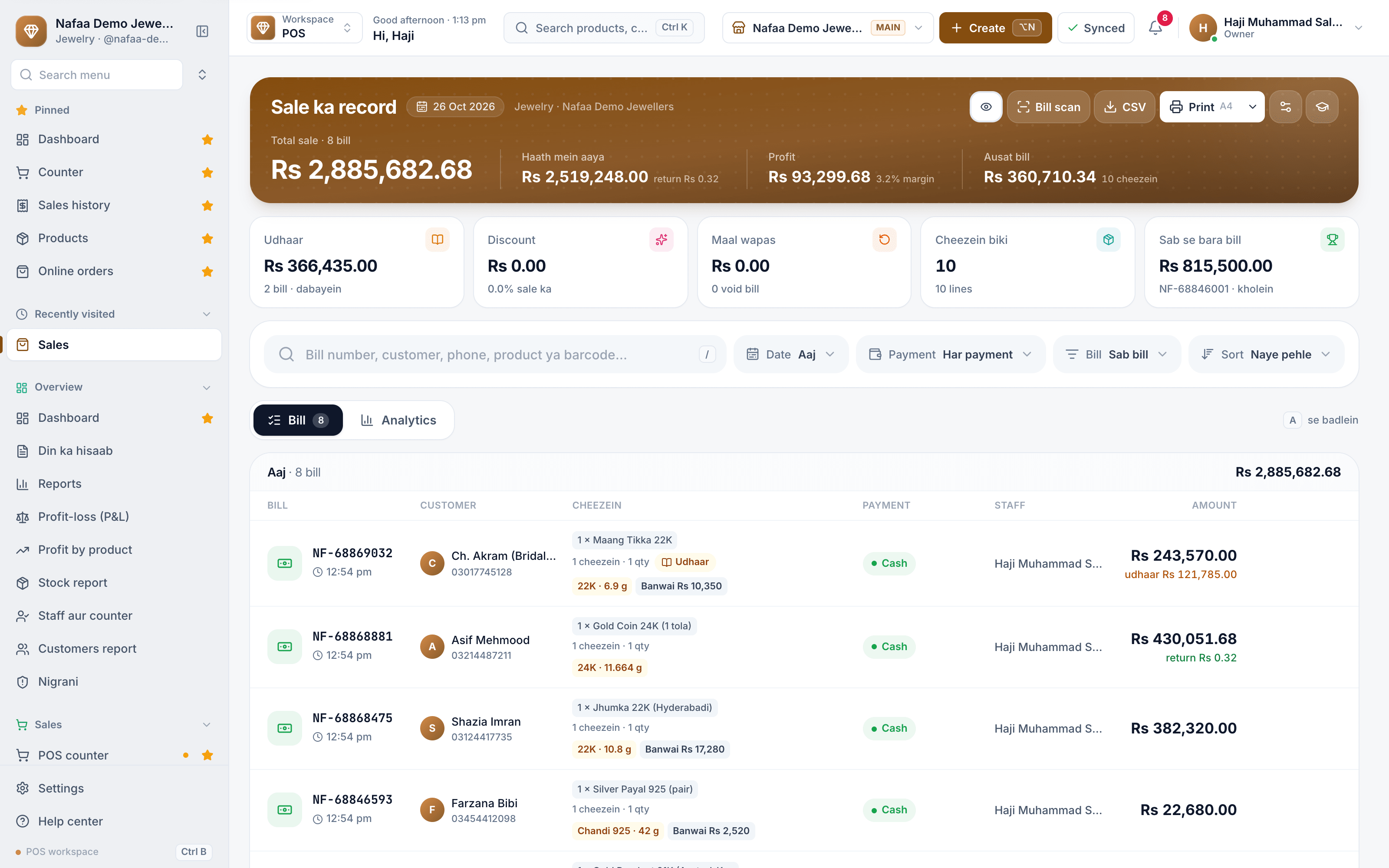
- Sale for the day
- Udhaar still to collect
- Karat, weight and making charges
- Udhaar left on the bill
Custom orders with advance and karigar
A bridal set or a pair of rings made to order is tracked from the advance to delivery: karat, expected weight, design, the karigar making it, the due date, the advance taken and the balance. The karigar's slip prints from the order.

- Advance held on open orders
- Karat, weight and design
- Estimate, advance and balance
- Print the karigar's slip
Kacha register or Nafaa?
| Feature | Register and calculator | Nafaa |
|---|---|---|
| Today's rate | Written on a board, worked out per karat by hand | 24K typed once; other karats follow |
| Pricing a piece | Weight × rate + banwai on a calculator | Priced by itself from the piece's weights and charges |
| Old gold | Valued by hand, slip written | Weight, karat, kaat and CNIC on a printed slip |
| Karigar gold | A notebook that only the owner understands | Gold given, returned and wastage per karigar |
| Metal in the safe | Weighed when someone remembers | Every movement recorded, value at today's rate |
What to look for in jewellery software
A jeweller's stock changes value every morning with the gold rate, and much of the business happens in weight rather than in pieces. A normal shop POS with fixed prices cannot handle it. Before you choose, check that the software can:
- Price from the day's rate. One 24K rate should reprice every piece by karat, weight, banwai, kaat and stones.
- Let the counter bargain. Banwai and the rate are often negotiated; the software should allow it without breaking the record.
- Take old gold properly. Weight, karat test, stones removed, kaat and the customer's CNIC, whether bought for cash or taken against a new piece.
- Track gold with karigars. Gold given out, pieces and leftover gold returned, wastage allowed and labour owed.
- Keep metal stock by karat. The safe should match the books, at today's value.
- Handle custom orders and repairs. With advances, due dates and the karigar on each job.
Nafaa covers each of these in the jewellery setup, with the khata, expenses and reports every Nafaa business uses.
Plans for one shop or several counters
Free
Choti dukaan ke liye hamesha muft: 1 dukaan, 1 user, 300 bill mahana.
Rs 0
What is included
- 100 products
- 300 sales a month
- 1 user
- 1 shop
Basic
Chhoti dukan ke liye perfect
Rs 1,500/ monthRs 4,000/ quarterSave 11%Rs 15,000/ yearSave 16%Get startedStarts with a 7-day free trial
What is included
- 5,000 products
- Unlimited sales
- 3 users
- 1 shop
Pro
RecommendedBari shops aur multi-branch ke liye
Rs 3,500/ monthRs 9,500/ quarterSave 9%Rs 36,000/ yearSave 14%Get startedStarts with a 7-day free trial
What is included
- Unlimited products
- Unlimited sales
- 10 users
- 3 shops
Enterprise
Unlimited everything + 24/7 support
Rs 9,500/ monthRs 27,000/ quarterSave 5%Rs 99,000/ yearSave 13%Get startedStarts with a 7-day free trial
What is included
- Unlimited products
- Unlimited sales
- Unlimited users
- Unlimited shops
Common questions
Does Nafaa work without internet?
Yes, the counter keeps billing when the internet drops. Sales made offline are saved on the device and sent to your account automatically when the connection comes back, and you can see the sales still waiting to be sent. Reports and other branches see those sales once they have synced.
How much does Nafaa cost?
Paid plans start at Rs 1,500 a month. The pricing page lists every plan with its price and limits, taken straight from our plan settings, so it is always current. You can start with the free trial first, and no credit card is needed to sign up.
Products jewellery shops use
POS & Billing
Nafaa POS is the billing counter for any business: scan a barcode or tap a quick key, sell by piece, dozen or carton, take cash, card, JazzCash, Easypaisa or khata in one bill, print or WhatsApp the receipt, and keep billing when the internet drops. It runs on the phone, tablet or computer you already have.Digital Khata
Nafaa Digital Khata replaces the paper udhaar register: every credit sale lands in the customer's khata from the counter, payments and old balances are recorded, balances are grouped by age, credit limits stop runaway udhaar, and a WhatsApp reminder goes out in one tap.Inventory
Nafaa Inventory keeps stock right in every unit and every branch: products with cost, price and margin, barcodes and labels, combos, low-stock alerts, damage and adjustments with reasons, stock transfers between branches, and a full movement history. Import from Excel or paste from a spreadsheet, and change many prices at once in the bulk editor.Staff & Payroll
Nafaa Staff gives every team member a login and a role, sets counter rules like the refund PIN, tracks attendance and leave, works out sales commission, runs payroll with advances and payslips, and logs every sensitive action with a name, so the owner can trust the counter without standing behind it.
Related industries
Garments & Boutique
Nafaa runs garment shops and boutiques that sell ready-made and custom-stitched clothes: stock by size and colour, tailoring (silai) orders, alterations, saved customer measurements, items put on hold, qist plans, exchanges, collections and size charts, alongside the counter, khata and reports.Cosmetics & Beauty Shop
Nafaa runs cosmetics and beauty shops that sell makeup, skincare, fragrance and haircare: brands and shades, batch expiry, tester records, deals and gift sets, and a loyalty programme for regular customers, with the counter, stock and khata built in. It runs in the browser on a phone, tablet or computer.Florist & Flower Shop
Nafaa runs florists and flower shops: bouquet and occasion orders, today's delivery list, wedding decoration contracts, regular flower subscriptions, and freshness tracking so ageing stock is sold or written off in time, with the counter and khata built in. It runs in the browser on a phone, tablet or computer.
Related
Tola
A tola is the traditional South Asian unit for weighing gold and silver, equal to about 11.66 grams, and the unit in which gold rates are quoted in Pakistan.Jewellery shop software in Lahore
Nafaa is software for Lahore jewellers: today's gold rate per tola or gram with other karats worked out, pieces priced by weight with banwai and stones, old gold valued with a CNIC slip, custom orders with the karigar and advance, and metal stock by karat. It suits a counter in the old city's gold bazaar or a society showroom.
Try Nafaa in your jewellery business
Start with the free trial. No card needed.
- 7 din Free Trial
- Keeps billing offline
- Help on WhatsApp