Updated
SolutionFor enterprise
A business platform that fits into your company
Run every branch on Nafaa and connect it to the systems you already have: accounting through daily journals, your own apps through the API and webhooks, and online channels through ready connections. Our team builds the rest.
- API & webhooks
- Accounting sync
- Audit logs
- 7 din Free Trial
- Keeps billing offline
- Help on WhatsApp
- English and Roman Urdu
- Phone, tablet or computer
Short answer
Nafaa for enterprises connects many branches, teams and systems: permissions per person and branch, audit and activity logs, the Nafaa API and webhooks, daily accounting journals to QuickBooks, Xero or Zoho Books, owner-only backups, and custom modules and data migration from our own team.
Roman Urdu mein
Bari companies ke liye: bohat si branches, har shakhs ki alag ijazat, audit log, API aur webhooks, accounting software se roz ka hisaab, aur hamari team se custom modules aur data migration.
Key facts
- Scale
- Many branches and teams in one account
- Control
- Permissions per person and branch, manager PIN, audit and activity logs
- Connect
- REST API, webhooks, QuickBooks, Xero, Zoho Books, Tally export
- Our team
- Custom modules, integrations, data migration and training
Capabilities
Enterprise needs, covered
Many branches
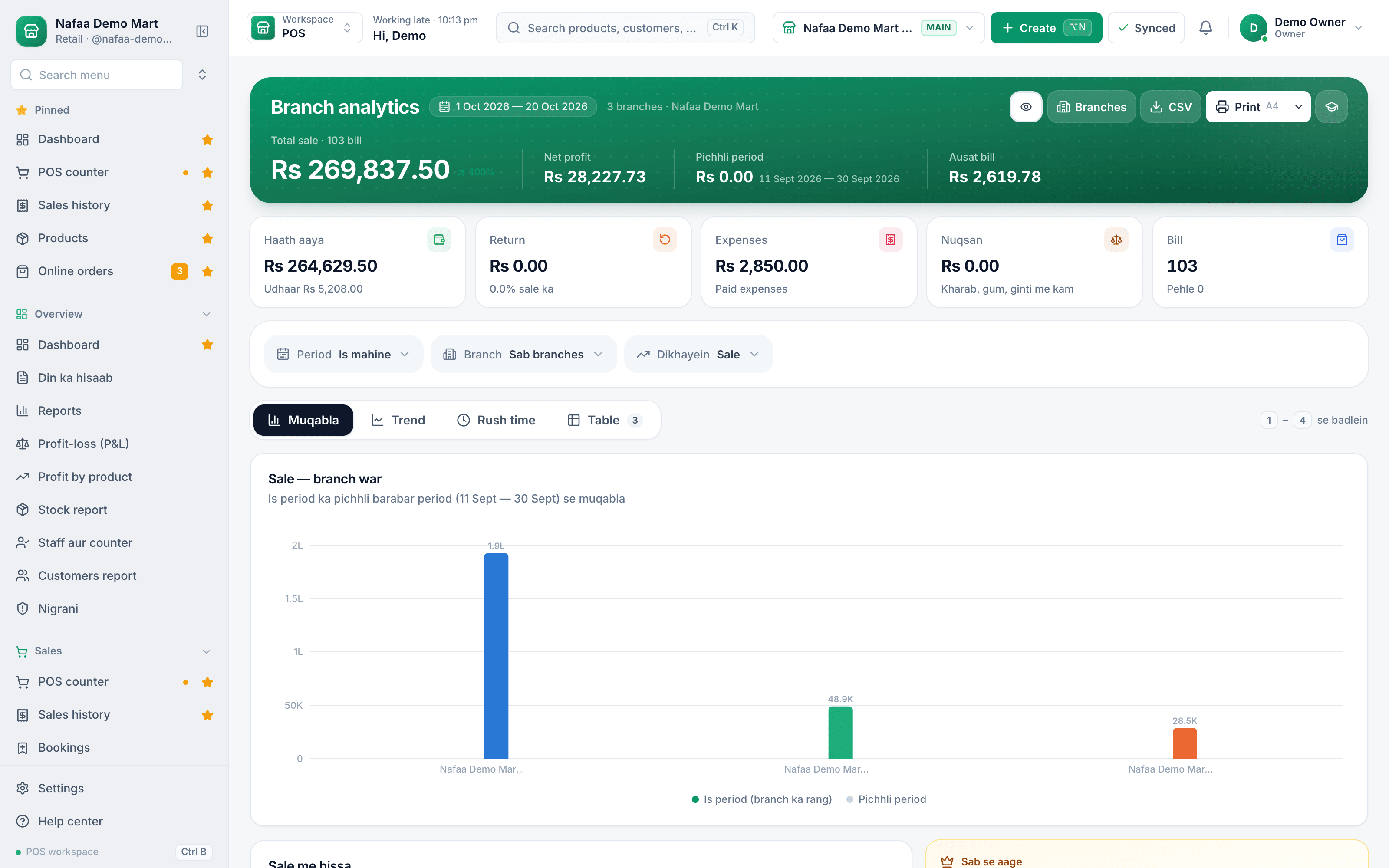
Branch analytics, branch P&L and transfers across the company.
Permissions
Role presets, then each person's own list of permissions and branches.
Audit trail
Nigrani for risky actions and an activity log of who changed what.
API and webhooks
Read products, stock, customers, sales and orders; get events as they happen.
Accounting sync
Daily journals to QuickBooks, Xero or Zoho Books, or a Tally export.
Custom modules
Our team builds the screens and connectors your process needs.
Every branch, one dashboard
Where your data can go
Controls that IT and finance ask about
| Feature | In Nafaa | Where |
|---|---|---|
| Access | A login per person; role presets fill the permissions once, then each person keeps their own list, limited to their branches | Staff, roles and permissions |
| Sensitive actions | Refunds need a manager PIN by default; hand discounts have a limit; voids and price changes are logged | Counter settings |
| Audit | Voids, refunds, large discounts, sales below cost, drawer shorts, write-offs and failed or new-device logins | Nigrani |
| Change history | Who changed what and when, filterable and exportable to CSV | Activity log |
| Data out | Excel exports with a download history, and an owner-only backup of all records as one file | Exports and backup |
| Finance | Daily journals to QuickBooks, Xero or Zoho Books, and a Tally export | Accounting |
Connect your own systems
Inside the app
One view across the company
Head office compares every branch for any period, while each branch runs its own day.
How it runs
How an enterprise rollout runs
- 1
Discovery
We map your branches, roles, price lists and the systems Nafaa must talk to.
- 2
Migration
Products, customers, balances and suppliers are imported and checked with you.
- 3
Integration
Accounting and your own systems are connected through the API and webhooks.
- 4
Training and go-live
Teams are trained branch by branch, then each branch goes live.
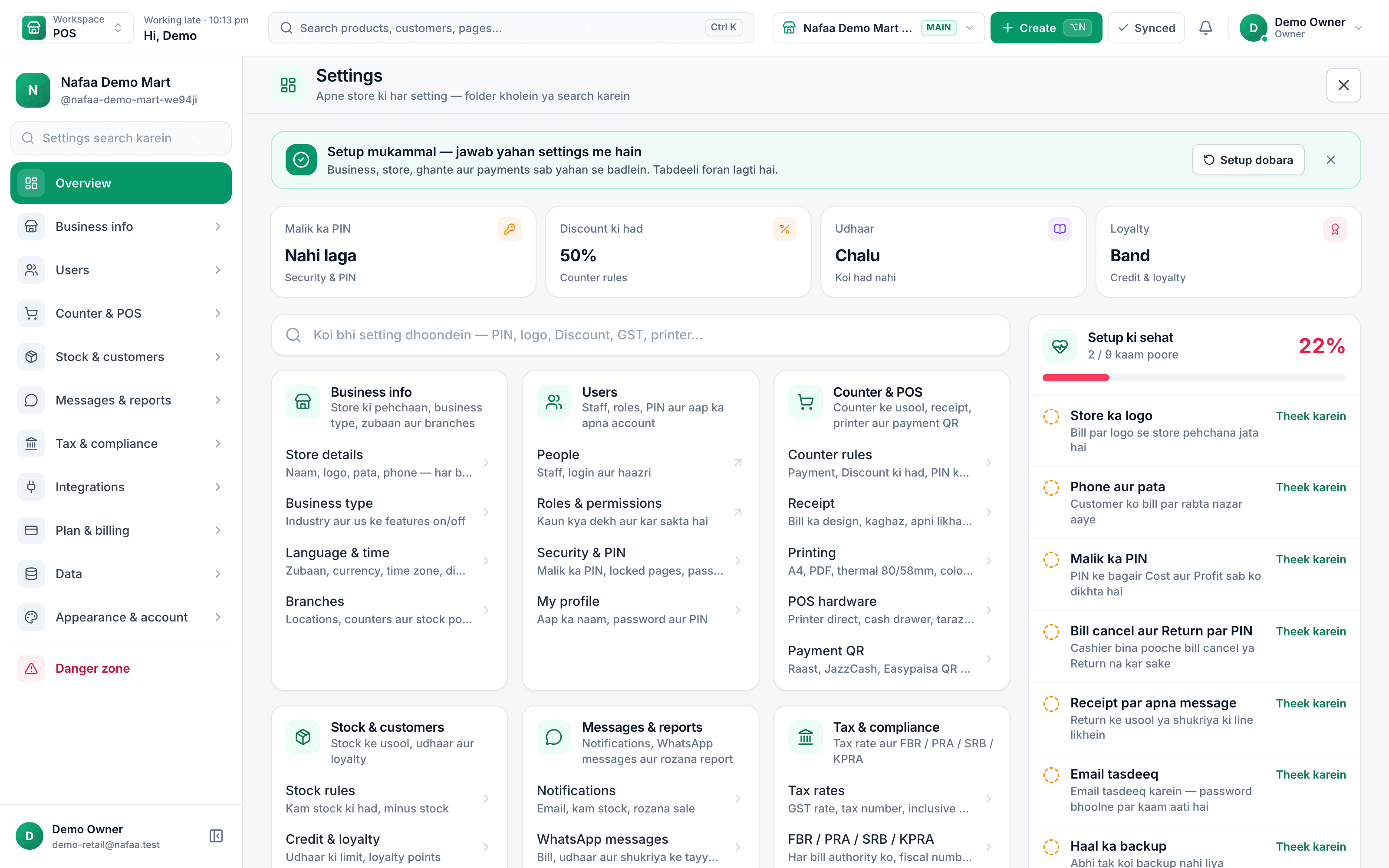
Settings in one place
Business details, users, counter rules, tax and a setup health check, so head office can see what each part of the account is set to.
When a ready product is not enough
Large businesses rarely fit any software exactly. Nafaa covers the daily work of every branch, and the gaps are closed in one of three ways:
- Configuration. Permissions, counter rules, receipt layouts, price units and industry screens are settings, not code.
- Integration. The developer API and signed webhooks let your own systems read Nafaa data and react to sales and orders. Accounting connects through daily journals.
- Custom modules. When a process is specific to your company, the Nafaa engineering team builds it as a custom software project, with a written scope and one fixed quote.
Every rollout includes data migration and training by role, so teams start on day one with their own products, customers and balances already in place.
Talk to our team
Tell us about your branches, teams and the systems Nafaa must connect to. We reply with questions and a rollout plan, usually within one working day.
Prefer WhatsApp?
Chat on WhatsAppCommon questions
Can Nafaa connect to our other systems?
Yes. The Nafaa API reads products, stock, customers, sales and online orders and can create customers, using keys you create in Settings. Webhooks tell your systems when a sale or order happens. Accounting journals go to QuickBooks, Xero or Zoho Books, and our team can build any connector you need.
Can I stop staff from giving discounts or refunds?
Yes. Each staff member gets a role with its own permissions, and counter rules decide what needs a manager. By default a refund needs the manager PIN, and a discount above the limit you set needs it too. Every sensitive action is written to the activity log with the name of the person who did it.
Can we take our data out of Nafaa?
Yes. Exports give Excel files of the business records for any period and branch, with a history of who downloaded which file. The owner can also download a backup of all records as one file. Exports and backups are plan features; the pricing page shows which plans include them.
How does Nafaa send figures to our accounting software?
Nafaa posts one summary journal per day to Zoho Books, QuickBooks or Xero: sales, discounts, udhaar, refunds and expenses, mapped to your own accounts, with each payment method going to the account you choose. For Tally, Nafaa makes a file of each day's sales, receipt and payment vouchers to import.
What can you move into Nafaa from my old system?
Products with prices, cost, barcodes and stock, customers with their old udhaar, and suppliers with what you owe them. We take Excel or CSV files, an export from your old software or photos of the register. Products go in through the app's own import with a dry run, balances go in as opening khata and supplier balances, and we check the totals with you before go-live.
Can I export reports to Excel or my accountant's software?
Yes. Reports export to Excel and print as PDF, so you can share them with a partner or keep them for your records. Businesses with an accountant can also send each day's sales, returns, expenses and payments as a journal to QuickBooks, Xero or Zoho Books, or export them for Tally.
Products in this setup
Multi-Branch
Nafaa Multi-Branch runs every shop, warehouse or godown from one account: each branch keeps its own counter, stock and cash, head office compares sales and profit side by side, stock moves between branches with transfers that the other side receives, and each staff member works in the branch they are assigned to.Staff & Payroll
Nafaa Staff gives every team member a login and a role, sets counter rules like the refund PIN, tracks attendance and leave, works out sales commission, runs payroll with advances and payslips, and logs every sensitive action with a name, so the owner can trust the counter without standing behind it.Reports
Nafaa Reports answer the owner's questions in plain numbers: today's sale and profit on the dashboard, profit by product, profit and loss with expenses, the day book, stock value, staff and customer reports, with Excel export and journals for QuickBooks, Xero, Zoho Books or Tally.Online Store
Nafaa brings online selling into the same account as the shop: orders from your own website, Shopify, WooCommerce, Daraz and Foodpanda arrive next to counter sales, take stock from the same shelf, and ship with TCS, Leopards, M&P, PostEx, Trax or CallCourier booked from the order.
Industries it fits
General Retail Shop
Nafaa works for any shop that does not fit a specific industry: a fast counter with quick keys and barcodes, combos, stock with low-stock and damage records, bulk import from Excel, a digital khata for udhaar, and reports on sales and profit, all in one app.Pharmacy & Medical Store
Nafaa is software for pharmacies and medical stores in Pakistan: search medicines by salt or formula and find substitutes, track batches and expiry, keep prescriptions and doctors, record controlled and narcotic sales in a register with patient and doctor details, and log fridge temperatures for the cold chain.
Services that help
Custom Software Development
Nafaa's engineering team builds custom software for businesses in Pakistan and worldwide: ERP modules, internal tools, dashboards, customer and dealer portals, and integrations with Nafaa or any other system, delivered in visible stages for one fixed quote in PKR or USD.Data Migration to Nafaa
Our team moves your business into Nafaa from Excel, a paper register or another POS: products with prices, cost, barcodes and stock, customers with their old udhaar as opening khata balances, and suppliers with what you owe them, all cleaned and checked with you before go-live.Training
Nafaa trains your team to run the business on the app: cashiers on the counter, managers on stock, khata and reports, and owners on profit and control, online over video call and WhatsApp or on site by arrangement, in Urdu or English.
Other solutions
Retail & Shops
Nafaa for a single shop puts the whole business on the device you already own: a fast counter that works offline, stock in every unit, a digital khata with WhatsApp reminders, the cash drawer, expenses and a daily profit report, from a 7-day free trial.Retail Chains
Nafaa for retail chains runs every branch from one account: each branch has its own counter, stock and cash, head office compares sales and profit across branches, stock moves by transfer with a check on arrival, staff only reach their own branches, and every refund and discount is on the record.E-commerce Sellers
Nafaa for e-commerce sellers runs your online orders and the Nafaa Market marketplace from the same stock as your shop: orders from your website, Shopify, WooCommerce and Daraz in one list, courier booking with TCS, Leopards, PostEx and more, COD tracking, risk checks and payment links.Restaurants & Cafés
Nafaa for restaurants and cafés runs dine-in, takeaway and delivery from one system: a table layout with running bills, kitchen order tickets sent to each station, a menu with add-ons, happy hours and recipes that cost every plate, riders with their cash, and Foodpanda orders.Wholesale & Distribution
Nafaa for wholesalers and distributors handles trade the way it is done in Pakistan: carton and piece prices, a separate wholesale price, khata and credit limits for every trade customer, supplier accounts and purchase orders, stock across godowns and branches, A4 invoices and price lists you can send on WhatsApp.Manufacturing
Nafaa for manufacturers and food producers covers raw materials, recipes with costing and daily production plans, milk-to-product production for dairies, made-to-order jobs with karigars for furniture, purchasing from suppliers, finished stock across godowns and branches, and sales through the counter, trade khata and online. General bills of materials and work orders are coming soon.
Plan your rollout with our team
Tell us about your branches and systems. We will reply with a plan.
- 7 din Free Trial
- Keeps billing offline
- Help on WhatsApp