Updated
ProductDigital khata
The udhaar register that collects for you
Credit sales go into the customer's khata straight from the counter. See who owes what and for how long, stop new udhaar at a limit, and send a polite WhatsApp reminder with the balance in one tap.
- WhatsApp reminders
- Credit limits
- Ageing buckets
- 7 din Free Trial
- Keeps billing offline
- Help on WhatsApp
- English and Roman Urdu
- Phone, tablet or computer
Short answer
Nafaa Digital Khata replaces the paper udhaar register: every credit sale lands in the customer's khata from the counter, payments and old balances are recorded, balances are grouped by age, credit limits stop runaway udhaar, and a WhatsApp reminder goes out in one tap.
Roman Urdu mein
Nafaa khata me udhaar seedha counter se judta hai. Kis ne kitna dena hai aur kab se, sab saamne. Credit limit lagayein aur WhatsApp par ek click me yaad-dihani bhejein.
Key facts
- From the counter
- Any bill, or part of one, can go on the customer's khata
- Old register
- Bring opening balances over from the paper khata
- Reminders
- One-tap WhatsApp message with the balance, firmer as udhaar ages
- Control
- Credit limit per customer; going over needs the manager PIN
- Without internet
- Payments and khata entries wait on the device and sync later
Inside the app
See every rupee you are owed
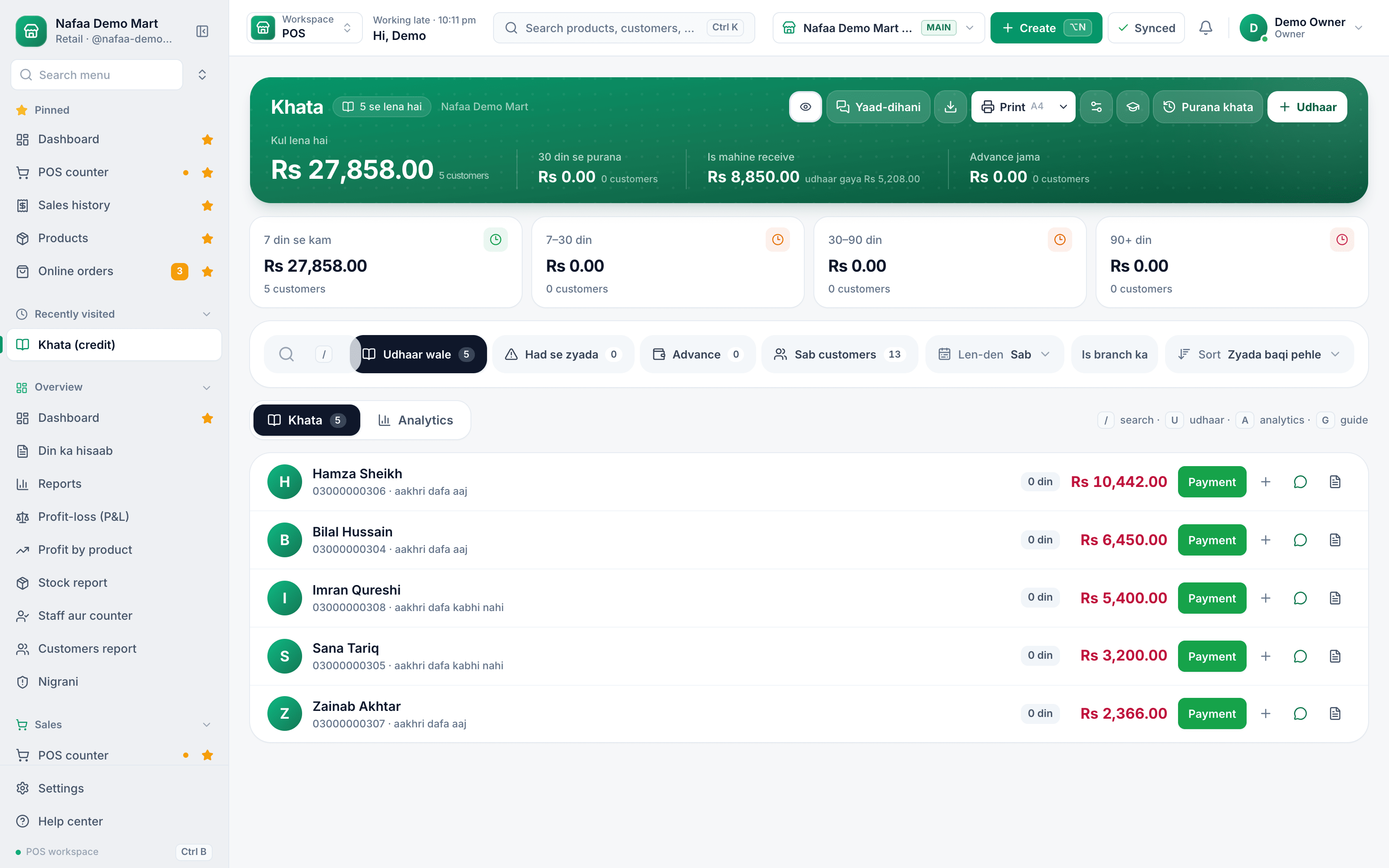
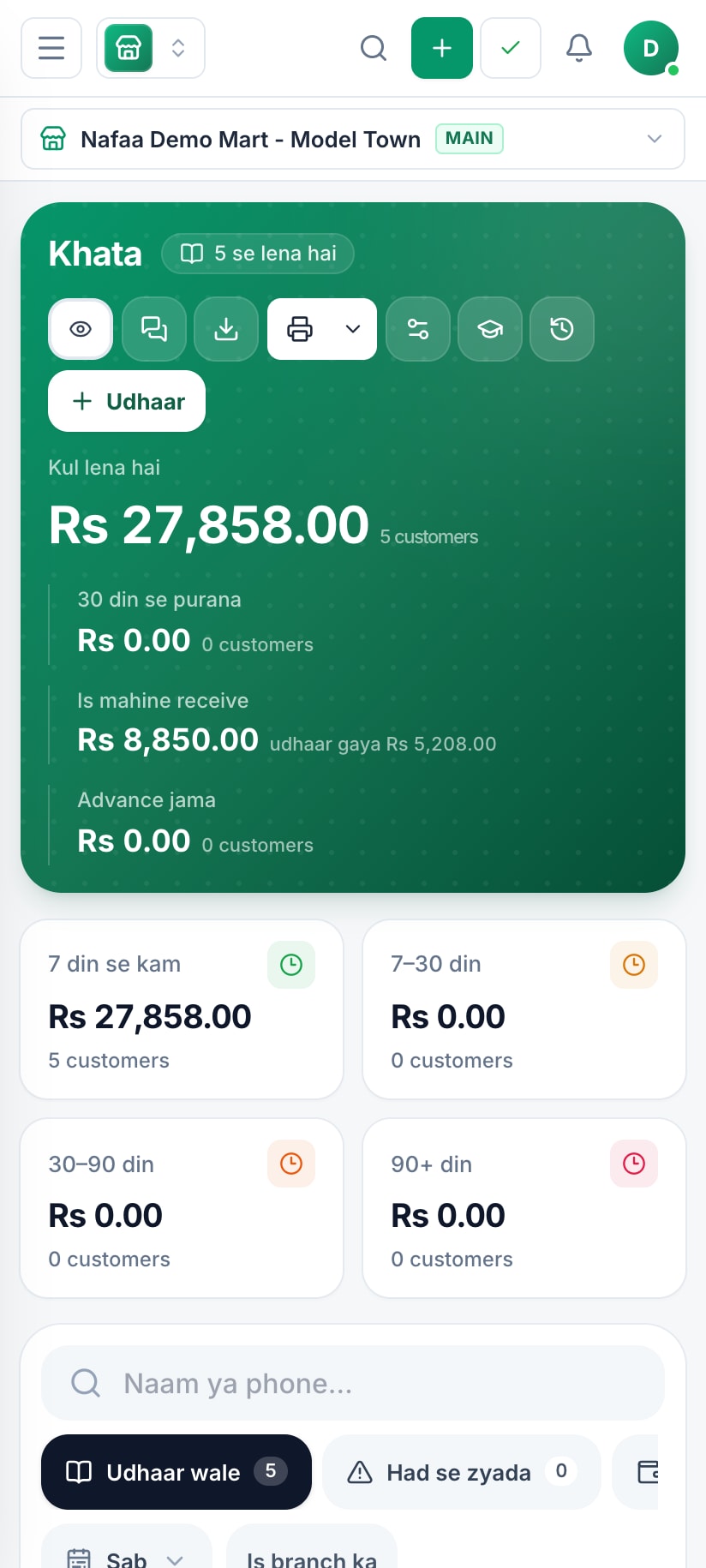
The khata opens on the total receivable and what came in this month, then splits the udhaar by age: under 7 days, 7 to 30, 30 to 90 and over 90. Customers who owe the most sit at the top, each with a Payment button, a WhatsApp reminder and a statement one tap away.
- Total udhaar to collect
- Udhaar by age
- Record a payment
- WhatsApp reminder and statement
- Old register and new udhaar
How udhaar comes back
How it works
How udhaar comes back
- 1
Sell on khata
Pick the customer at the counter and put the bill, or the part not paid, on their khata. Over the credit limit, the counter asks for the manager PIN.
- 2
Watch the age
Balances move from under 7 days to 7 to 30, 30 to 90 and over 90 days, so slow payers stand out before they become bad debt.
- 3
Remind on WhatsApp
Send the balance from your own WhatsApp in one tap. The wording gets firmer as the udhaar gets older.
- 4
Record the payment
Cash, JazzCash, Easypaisa or bank: the payment clears the oldest udhaar first and shows in the day book.
Features
A khata your customers trust
Full history
Every sale, payment and opening balance with date and bill number, printable as a statement or PDF.
Partial payments and advances
Take whatever the customer can pay today; money paid ahead is kept as advance.
Credit limits
Stop udhaar at the limit you set, unless a manager approves with the PIN.
Reminders in your words
Edit the three reminder messages once; Nafaa fills in the name, the balance and a fitting salutation such as bhai or baji.
Suppliers too
Track what you owe each supplier next to what customers owe you.
Private by default
The khata sits behind the app PIN, and one tap hides every amount when a customer is looking at the screen.
From udhaar to paid
Which reminder goes when
| Feature | Reminder tone | Why it works |
|---|---|---|
| Under 7 days | Polite | A friendly note with the balance. Most regulars simply forgot. |
| 7 to 30 days | Firm | States the amount and asks for a date. Clear, never rude. |
| 30 days and more | Final | Asks for payment now, plainly. A good moment to lower the credit limit too. |
Balances in your pocket
The khata works on a phone, so you can answer "kitna banta hai?" from home or the market, not only at the counter. Payments taken without internet are saved on the phone and sync later.
Why a digital khata beats the register
A paper register cannot remind anyone, cannot add up ageing, and is lost the day it gets wet. For limits, reminders and old balances, read the udhaar and khata guide. With Nafaa, the khata is written by the counter itself, so there are no missed entries, and every balance can be shown to the customer line by line. Shops that move their old register into Nafaa usually start with the opening balances only, using the "Purana khata" entry, then let the counter do the rest.
Who it is for
Any business that sells on trust: kiryana and general stores with monthly accounts, milk shops and dairies with daily customers, hardware and building material dealers who give credit to contractors, pharmacies with family accounts, and wholesalers who sell to shopkeepers on a running khata. If you have ever argued with a customer over a page in the register, it is for you.
What to look for in a khata app
- It must be connected to billing. A khata that you fill in separately misses entries on a busy day.
- Ageing, not just a total. A balance owed for a week is different from the same amount owed since Eid.
- A limit that the counter respects. Credit limits only work if the cashier cannot quietly go past them.
- Statements the customer can read. A clear list of bills and payments ends most disputes.
Common questions
Can Nafaa send udhaar reminders on WhatsApp?
Yes. The khata keeps each customer's udhaar, payments and balances brought over from the old register. From the khata you send a customer a WhatsApp reminder with their balance in one tap. Reminders go one by one from your own WhatsApp, and the wording gets firmer as the udhaar gets older.
Can I set a credit limit for a customer?
Yes. Each khata customer can have a credit limit. When a new udhaar sale would take them over it, the counter stops the bill until a manager approves it with the PIN. The khata also groups what is owed by age, so you can see which balances are new and which have been waiting for months.
Does Nafaa work without internet?
Yes, the counter keeps billing when the internet drops. Sales made offline are saved on the device and sent to your account automatically when the connection comes back, and you can see the sales still waiting to be sent. Reports and other branches see those sales once they have synced.
Industries using it
Kiryana & Grocery Store
Nafaa is POS and khata software for kiryana and grocery stores in Pakistan. Scan barcodes at the counter, sell by piece, dozen or carton, keep every customer's udhaar in a digital khata with WhatsApp reminders, import products from Excel, and keep billing when the internet drops.Hardware & Building Materials
Nafaa runs hardware and building material shops: items by size and shade, retail, contractor and bulk rates, quotations that turn into bills, delivery challans, contractor sites with their own khata, brands, and reorder rules that flag what to buy before it runs out.Dairy & Milk Shop
Nafaa runs dairy and milk shops: record milk bought from gawalas, deliver to homes on routes, send a monthly bill to each delivery customer, make dahi and makhan and record spoiled stock, run quality tests, and sell loose milk at the counter.Pharmacy & Medical Store
Nafaa is software for pharmacies and medical stores in Pakistan: search medicines by salt or formula and find substitutes, track batches and expiry, keep prescriptions and doctors, record controlled and narcotic sales in a register with patient and doctor details, and log fridge temperatures for the cold chain.Meat & Butcher Shop
Nafaa runs meat and butcher shops: set today's rate, take orders by weight, keep live animals bought from the mandi, record halal slaughter and cutting, supply restaurants and hotels on account, and handle Qurbani and Aqeeqa orders, alongside the counter, stock and khata.Agri & Feed Store
Nafaa runs agri stores that sell seeds, fertiliser, pesticides and animal feed: keep farmer accounts with credit, take bulk orders, record crop advisories, plan stock by season, and track government subsidy claims, alongside the counter, stock and khata. It runs in the browser on a phone, tablet or computer.
Related
Khata
A khata is a ledger, traditionally a paper register, that records what each customer owes a shop on credit and what they have paid back.Udhaar
Udhaar is credit given to a customer: goods are taken now and paid for later.Digital Khata vs Paper Register: What Changes for Your Shop
Why paper khata registers lose money and time, what a digital khata does differently, and how to move your old balances into Nafaa in one sitting.Managing Udhaar and Khata: A Complete Guide for Shops
How to give udhaar without losing money: who should get credit, how much, how to record it so nobody can argue, how to tell which balances are going bad, how to remind customers without losing them, how to recover old balances, and how to handle the credit you take from your own suppliers.Udhaar (Khata) Ageing Calculator
List what each customer owes and how long it has been unpaid, and see your udhaar split into age bands: under 7 days, 7 to 30, 30 to 90 and over 90 days. It shows how much is getting old, the average age of the money owed, and who to call first.Khata (Udhaar) Register Template
A digital khata register in Excel: list your customers once, add every udhaar and payment as a line, and each customer's balance, last payment date and days since payment fill in by themselves. Balances over the credit limit and payments older than 30 days turn red.Cash vs Credit Sales: What Each Costs Your Shop
Credit sales bring loyal customers and bigger bills, but every rupee of udhaar is cash you have already spent on stock and a small risk of never being paid. This guide shows how to work out what credit costs your shop, when it is worth giving, and how to mix cash and credit safely.Khata App: Paper ka Khata Chhorein
A Roman Urdu guide to moving from a paper khata register to a khata app: the problems with paper, the difference between a standalone khata app and a khata connected to billing, how to move your balances over in one evening, and how the Nafaa digital khata keeps statements, limits and reminders.Khata and customers
Keep customer udhaar in the digital khata: add customers, carry over opening balances from the old register, sell on credit, record payments, send WhatsApp reminders and set credit limits.
More from Nafaa
POS & Billing
Nafaa POS is the billing counter for any business: scan a barcode or tap a quick key, sell by piece, dozen or carton, take cash, card, JazzCash, Easypaisa or khata in one bill, print or WhatsApp the receipt, and keep billing when the internet drops. It runs on the phone, tablet or computer you already have.WhatsApp Messages
Nafaa talks to customers and suppliers where they already are: receipts on WhatsApp instead of paper, udhaar reminders with the exact balance, thank-you and birthday messages, purchase orders to suppliers, and a WhatsApp chat with online buyers opened straight from their order, all in wording you can edit to sound like your shop.Inventory
Nafaa Inventory keeps stock right in every unit and every branch: products with cost, price and margin, barcodes and labels, combos, low-stock alerts, damage and adjustments with reasons, stock transfers between branches, and a full movement history. Import from Excel or paste from a spreadsheet, and change many prices at once in the bulk editor.FBR & PRA Invoicing
Nafaa is an FBR & PRA approved POS integrator. Every sale can be reported to FBR, PRA, SRB or KPRA from the counter, the fiscal invoice number and QR code print on the receipt, failed invoices retry by themselves, and tax reports are ready for your return.
Retire the paper register
Move your opening balances in and let the counter keep the khata.
- 7 din Free Trial
- Keeps billing offline
- Help on WhatsApp