Inventory Management for Small Businesses: A Practical Guide
A practical guide to inventory for small shops and businesses in Pakistan: setting up the product list, units and opening stock, buying to a reorder level, costing stock correctly, counting without closing the shop, cutting losses from damage, expiry and theft, and reading the few stock reports that matter.
- Published
- Reading time
- 9 min read
For most small businesses, stock is the largest amount of money they own. It sits on shelves, in the godown and in the back room, and unlike cash in a bank it can expire, break, go out of fashion or walk out of the door. Inventory management is simply knowing what you have, what it cost, what is selling and what to buy next, and keeping that knowledge true day after day.
This guide is for shops, pharmacies, small wholesalers and other businesses that buy goods and sell them. It starts with setting up, moves through buying and counting, and ends with the reports worth reading each month. If you are choosing software, our inventory software comparison covers the options.
1. Why stock goes wrong
Stock rarely goes wrong in one big event. It drifts, a little every day:
- A sale is made without a bill, so the shelf drops but the record does not.
- A purchase is put on the shelf before the bill is entered.
- A carton is counted as twelve pieces in one place and as one carton in another.
- A damaged or expired item is thrown away without being written off.
- Someone takes stock and nobody notices for months.
Every habit in this guide is aimed at one of these leaks. The most important is the first: if every sale reduces stock automatically at the counter, most of the drift disappears.
2. Build a clean product list
Everything starts with the product list. A messy list, with the same product entered three times under slightly different names, makes every report wrong.
- One product, one entry. "Dalda 1kg", "Dalda Ghee 1 kg" and "dalda 1kg tin" are one product. Merge them before you start.
- A clear name customers and staff recognise, with brand and size.
- A code for each item. Use the manufacturer's barcode where there is one; print your own labels for loose and unbranded goods. Each code is a SKU. Our barcode setup guide explains scanners and labels.
- Category and supplier, so you can report by them later.
- Cost and sale price, kept up to date.
- Variants for products that come in sizes or colours. A shirt in four sizes and three colours is twelve stock items under one product. See stock by size and colour.
If your list already lives in Excel, clean it there and import it rather than typing it again.
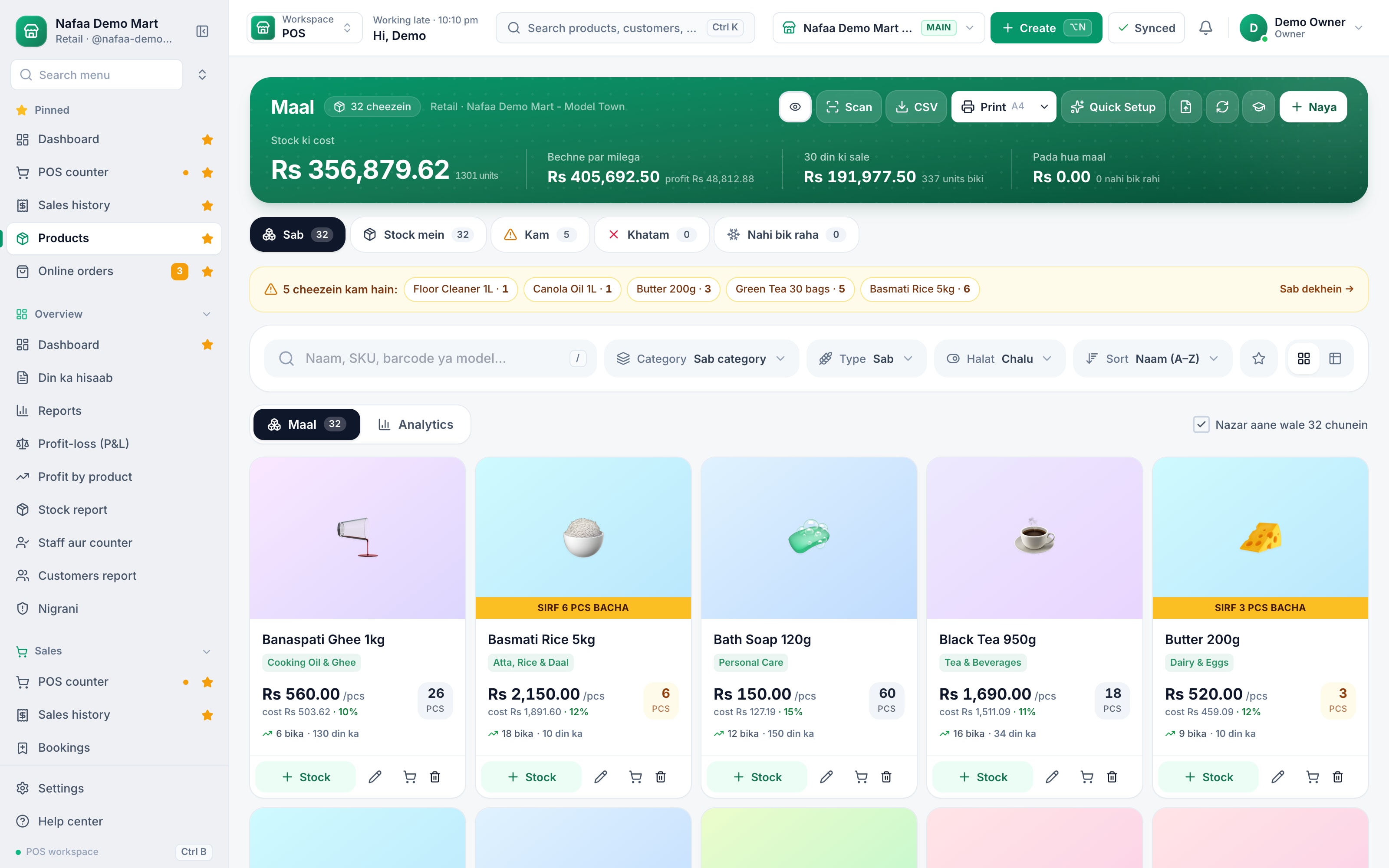
One clean list, with stock, cost and price
Each product shows its stock, cost, sale price and margin. Lists from Excel or CSV are imported and checked line by line before saving.
3. Units: buy one way, sell another
Pakistani businesses rarely buy and sell in the same unit. You buy soap by the carton of 72 and sell it by the piece and the dozen; you buy rice in 25 kg bags and sell it by the kilo; a pharmacy buys boxes and sells strips.
Set a base unit of measure for each product (the smallest unit you sell) and define the larger units in terms of it: 1 dozen = 12 pieces, 1 carton = 72 pieces. Then stock is always counted in one unit, whichever unit is sold or bought, and each unit can carry its own price. This single habit fixes a large share of stock errors in grocery, hardware and pharmacy shops. Loose sale of open packs works the same way.
4. Opening stock
Before software can track stock, it needs to know what you have today. Do one full count on a quiet day, or after closing, and enter the result as opening stock. Value it at cost. From that point, every purchase adds to stock and every sale takes away, and the record only needs checking, not rebuilding.
5. Buying
Good buying is half of inventory management.
- Use purchase orders for regular suppliers. A purchase order records what you asked for. When the goods arrive, check them against it.
- Receive goods properly. Count what arrived, note damages and short supply, and enter the bill the same day. This is your goods received note, whether on paper or in software.
- Return what is wrong. Damaged or wrong items go back to the supplier as a purchase return, so stock and the supplier's balance both change.
- Spread extra costs. Freight, loading and scheme discounts change the real cost of each item. Spreading them over the bill is landed cost.
6. Costing your stock
The value of your stock, and therefore your profit, depends on what each item cost. Prices change, so the same product on your shelf may have been bought at three different rates. There are three common ways to handle that:
- Average cost. Each purchase is blended into one average cost per item. Simple and good enough for most shops.
- FIFO (first in, first out). The oldest stock is treated as sold first. Matches how most shelves are stocked.
- FEFO (first expiry, first out). The stock that expires soonest is sold first. Essential for medicines, food and cosmetics.
Whichever you use, use it consistently. Changing methods from month to month makes profit figures meaningless. Stock valuation explains the effect on your accounts.
7. Reorder before you run out
Running out of a fast item loses the sale and sometimes the customer. Overstocking ties up money. A reorder level for each important item balances the two.
A simple rule with round numbers. If you sell about 10 bottles of an oil a day and the supplier takes 3 days to deliver, you need at least 30 bottles on hand when you order. Add a few days of safety stock, say 20 bottles, and the reorder level is 50. When stock drops to 50, order.
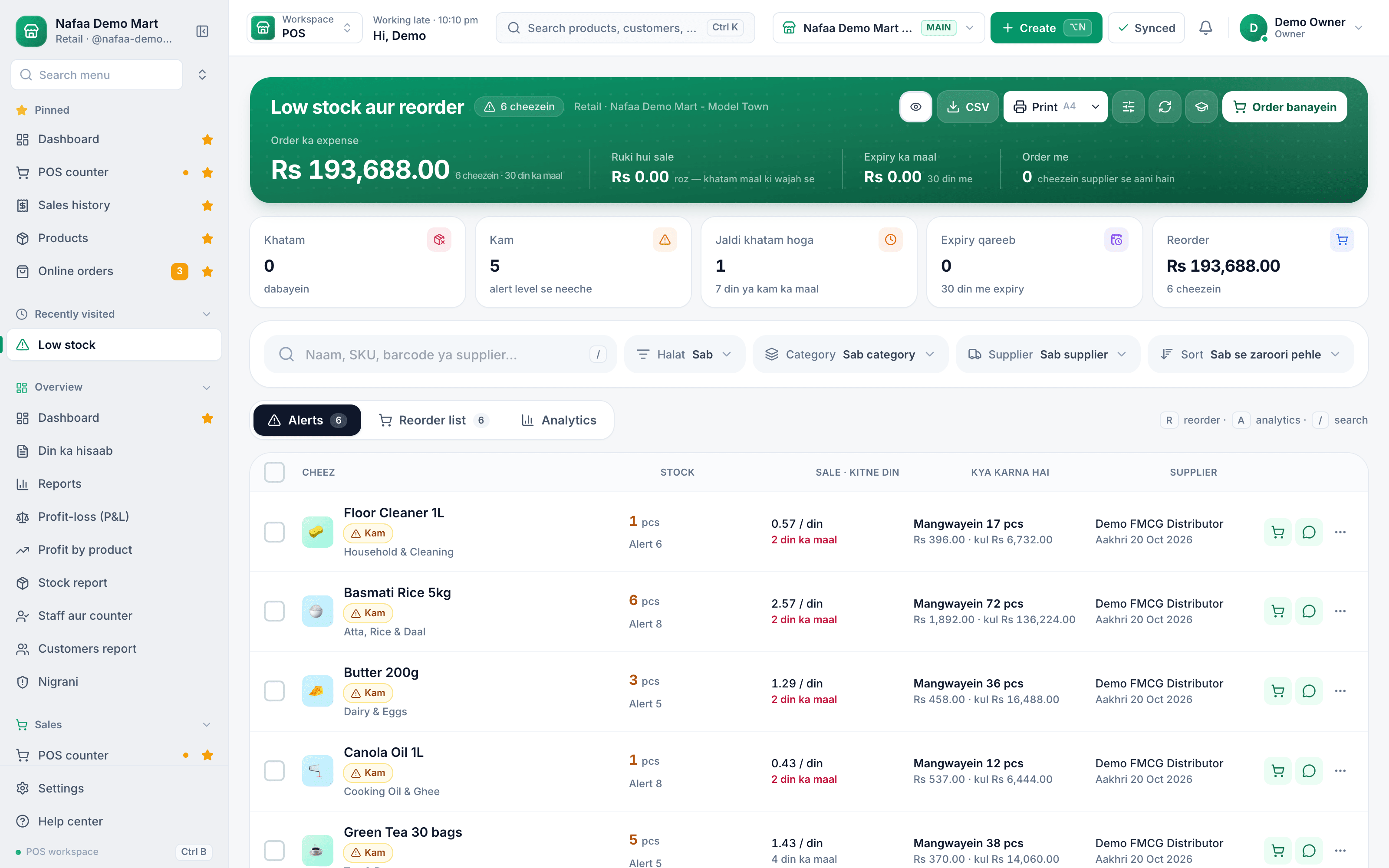
Set reorder levels for your top items first. Review them before Ramadan, Eid and other busy seasons, when daily sales jump. A low-stock list sorted by days of stock left turns this into a two-minute daily check.
What to buy today
Items below their reorder level, with days of stock left at the current sale rate, and a shortcut to start the purchase order.
8. Focus where the money is: ABC
Not every item deserves the same attention. ABC analysis sorts products by how much sale value they bring:
- A items: the small group of products that bring most of your sales. Count them often, never run out, negotiate their prices hard.
- B items: the middle. Normal care.
- C items: the long tail that sells little. Count them less often, buy them in small quantities, and watch for dead stock.
Dead stock, items that have not sold for months, is money frozen on the shelf. Clear it with a discount, a bundle or a return to the supplier, and stop reordering it.
9. Counting without closing the shop
A stock take compares what the records say with what is actually there. The traditional full count once a year is still useful, but it is slow and the differences it finds are a year old.
Cycle counting works better for small businesses: count one section, shelf or category each week, so the whole shop is covered every month or two, and fast or expensive items more often. Differences are recorded as stock adjustments with a reason. Our stock taking guide explains both methods step by step.
A weekly cycle count
Step 1: Pick one section
For example, cooking oil and ghee this week, toiletries next week.
Step 2: Count before opening or after closing
So no sales happen while you count.
Step 3: Enter the counted quantity
Against the system figure for each item.
Step 4: Investigate big differences
Check recent bills, purchases and returns before adjusting.
Step 5: Record the adjustment with a reason
Damage, expiry, counting error or unknown. Unknown losses that repeat are a warning.
10. Losses: damage, expiry and theft
Every shop loses some stock. The point is to know how much, and why. The general word is shrinkage, and it has a few causes:
Where stock goes
Common causes of stock loss in a small shop and the habit that controls each.
| Cause | What controls it |
|---|---|
| Unbilled sales | Every sale through the counter; stock drops with each bill |
| Damage and breakage | Record it as damage with a reason, approved by a manager |
| Expiry | Batch and expiry on receiving, monthly expiry check, FEFO on the shelf |
| Wrong purchase entries | Check goods against the bill on arrival |
| Staff theft | Own logins, roles, refund approvals and an activity log |
| Customer theft | Shop layout, expensive items behind the counter, regular counts |
For food businesses, wastage from cooking and preparation is a separate line to track. Our guide to preventing theft at the counter covers the staff side in detail.
11. Batches, expiry and serial numbers
Some goods need more than a count.
- Medicines, food and cosmetics need batch tracking and expiry management: which batch you hold and when it expires. When a recall names a batch, you can find it in seconds. Pharmacies should read our drug law page for pharmacies.
- Mobile phones and electronics need a serial number or IMEI per unit, so each handset can be traced from purchase to sale and through warranty.
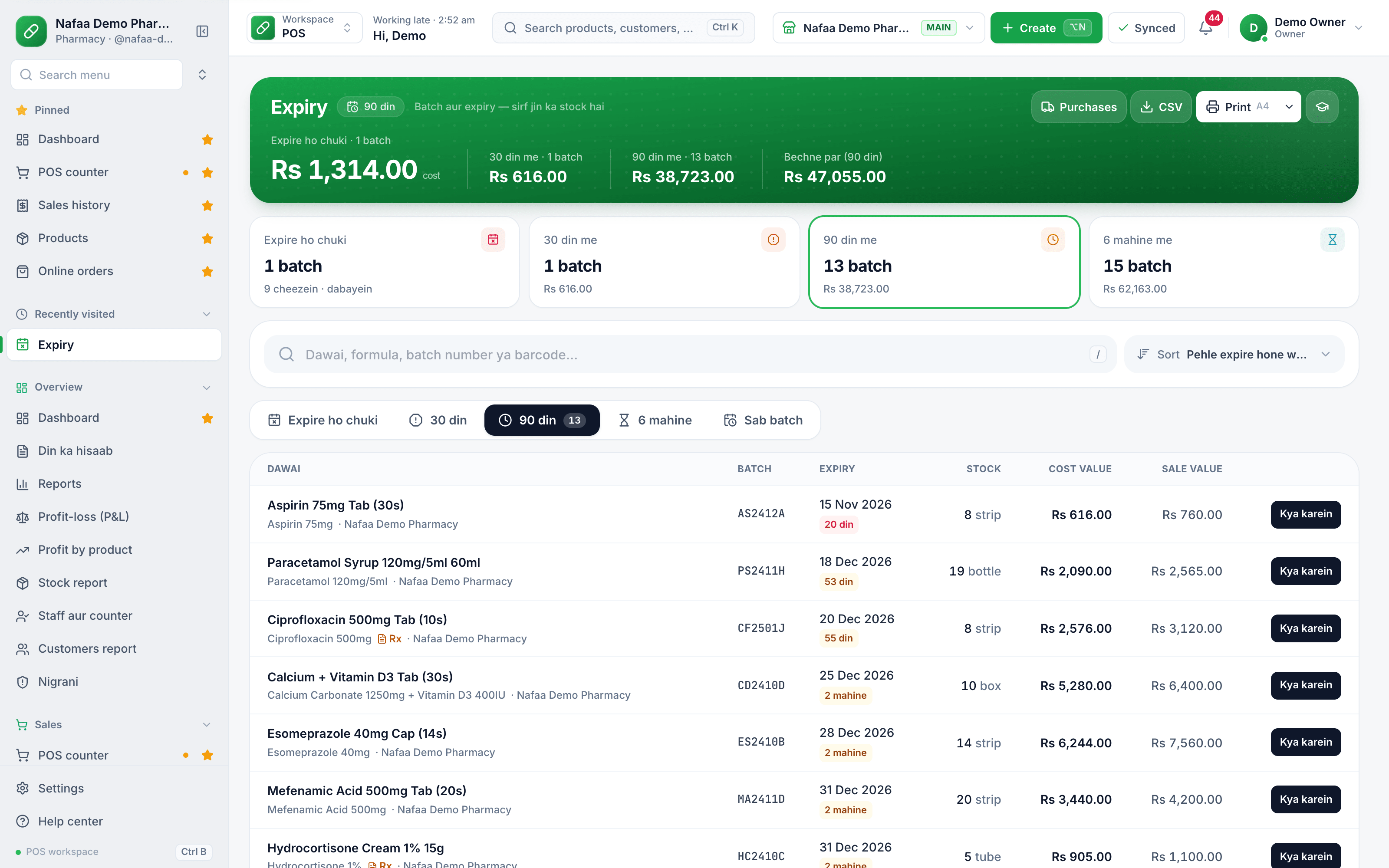
Expiry by batch
Batches close to their expiry date are listed early, so they can be sold first or returned to the supplier.
12. More than one location
When stock sits in two shops, or a shop and a godown, each location needs its own count, and moving goods between them must be recorded as a stock transfer: sent from one, received at the other. A transfer that is sent but never confirmed as received is where stock disappears between branches. Read running more than one shop before opening a second location.
13. The reports worth reading
You do not need dozens of reports. These few, read monthly, tell you most of what matters:
- Stock value at cost, by category. How much money is on the shelves.
- Inventory turnover. How many times a month or year stock is sold and replaced. Low turnover means money is stuck.
- Dead and slow stock. Items with no sales in the last 60 or 90 days.
- Adjustments by reason. How much was lost to damage, expiry and unknown causes.
- Profit by product. Which items earn their shelf space. See how to calculate profit margin.
Frequently asked questions
What is the easiest inventory method for a small shop?
Average cost with every sale billed through the counter. Each purchase updates the average cost, each sale reduces stock, and a weekly count of one section keeps the record honest. Add batch and expiry tracking if you sell medicines, food or cosmetics, and serial numbers for phones and electronics.
How do I set a reorder level?
Multiply how many units you sell in a day by how many days the supplier takes to deliver, then add a few days of safety stock. If you sell 10 a day, delivery takes 3 days and you want 2 days of safety, the reorder level is 50. Review it before busy seasons.
How do I find out where my stock is going?
Count a few fast or expensive items every week and record each difference with a reason. If differences keep showing as unknown, check whether every sale is billed, whether purchases are entered on arrival, and who has access to the stock. Patterns usually point to the cause within a few weeks.


