How to Calculate Profit Margin for Your Shop
Margin and markup explained with simple rupee examples, the difference between gross and net profit, how to price loose and packaged goods, and the hidden costs that make a busy shop earn less than it should.
- Published
- Reading time
- 5 min read

"Sale bohat hai, lekin paisa nazar nahi aata." Many shop owners say some version of this. The shop is busy, the galla fills every evening, and yet at the end of the month there is less money than the sales suggest. The answer is almost always in the margin: the share of each sale that is actually profit, after you pay for what you sold and for running the shop.
This guide explains margin in plain terms, with examples you can check on a calculator or with the free profit margin calculator.
Margin and markup are not the same
Markup is how much you add on top of your cost. Margin is how much of the selling price is profit. They use the same rupees but divide by different numbers, and confusing them is the most common pricing mistake.
Example: you buy an item for 100 rupees and sell it for 125.
- Profit = 125 − 100 = 25 rupees
- Markup = 25 ÷ 100 (cost) = 25%
- Margin = 25 ÷ 125 (selling price) = 20%
If you think "I keep 25% on everything" but you mean markup, your real margin is 20%. Over a month of sales, that gap is a lot of money.
| Markup on cost | Margin on sale |
|---|---|
| 10% | 9.1% |
| 20% | 16.7% |
| 25% | 20% |
| 33.3% | 25% |
| 50% | 33.3% |
| 100% | 50% |
To set a price from a target margin: Price = Cost ÷ (1 − margin). For a 20% margin on a 100-rupee item: 100 ÷ 0.8 = 125.
Gross profit and net profit
Gross profit is sales minus the cost of the goods you sold. It tells you whether your pricing works.
Net profit is gross profit minus everything else it takes to run the shop: rent, salaries, electricity, generator fuel, internet, packing bags, card machine charges, repairs and the owner's own drawings if you pay yourself a salary.
A shop can have healthy gross profit and still lose money if expenses are too high for its sales.
Work out last month's profit in five steps
You need three numbers you may not have written down: opening stock, closing stock and expenses. That is why counting stock matters.
Step 1: Total sales
Add up all sales for the month, after discounts and returns. Count udhaar sales too: they are sales, even if not yet paid.
Step 2: Cost of goods sold
Opening stock value + purchases during the month − closing stock value. This is what the goods you sold cost you.
Step 3: Gross profit
Sales − cost of goods sold. Divide by sales to get gross margin.
Step 4: Expenses
Add every shop expense for the month: rent, salaries, bills, fuel, bags, repairs.
Step 5: Net profit
Gross profit − expenses. This is what the shop earned for you.
Pricing loose and packaged goods
Packaged goods with a printed retail price: your margin is the gap between the distributor's price and the printed price, plus any scheme (free cartons or discounts for volume). You cannot raise the price, so you improve margin by buying better: comparing distributors, taking schemes that make sense, and not overstocking.
Loose goods like rice, daal, sugar and spices: you set the price. Work from your real cost per kilo, including:
- The price per bag from the wholesaler
- Transport from the market to the shop
- Loss when you weigh out small quantities (spillage, moisture, the extra you give to round off)
- Packing bags
Example: a 50 kg bag costs 10,000 rupees and transport adds 200, so 10,200 for 50 kg. If you lose about 1 kg to spillage and rounding, you really have 49 kg to sell, so your cost is about 208 rupees a kilo, not 200. Price from 208.
Hidden costs that eat margin
- Expired and damaged stock. Every expired packet is a sale's profit thrown away. Record damage and expiry so you can see the real loss.
- Discounts at the counter. A small discount on every bill can take a large share of your margin. Track discounts by staff member.
- Udhaar that is never paid. A bad debt wipes out the profit on many good sales. Old udhaar also ties up cash you could have used to buy at better prices.
- Theft and miscounts. Stock that leaves without a bill. A regular stock count is the only way to see it.
- Slow stock. Money on a shelf for six months is money that did not earn anything.
Margin by item, not just by shop
The total margin hides a lot. Some items earn well and sell slowly; some sell fast at almost no margin and only bring customers in; a few lose money once you count wastage. Look at profit by product every month and ask of each low earner: does it bring customers who buy other things? If not, change the price, the supplier, or drop it.
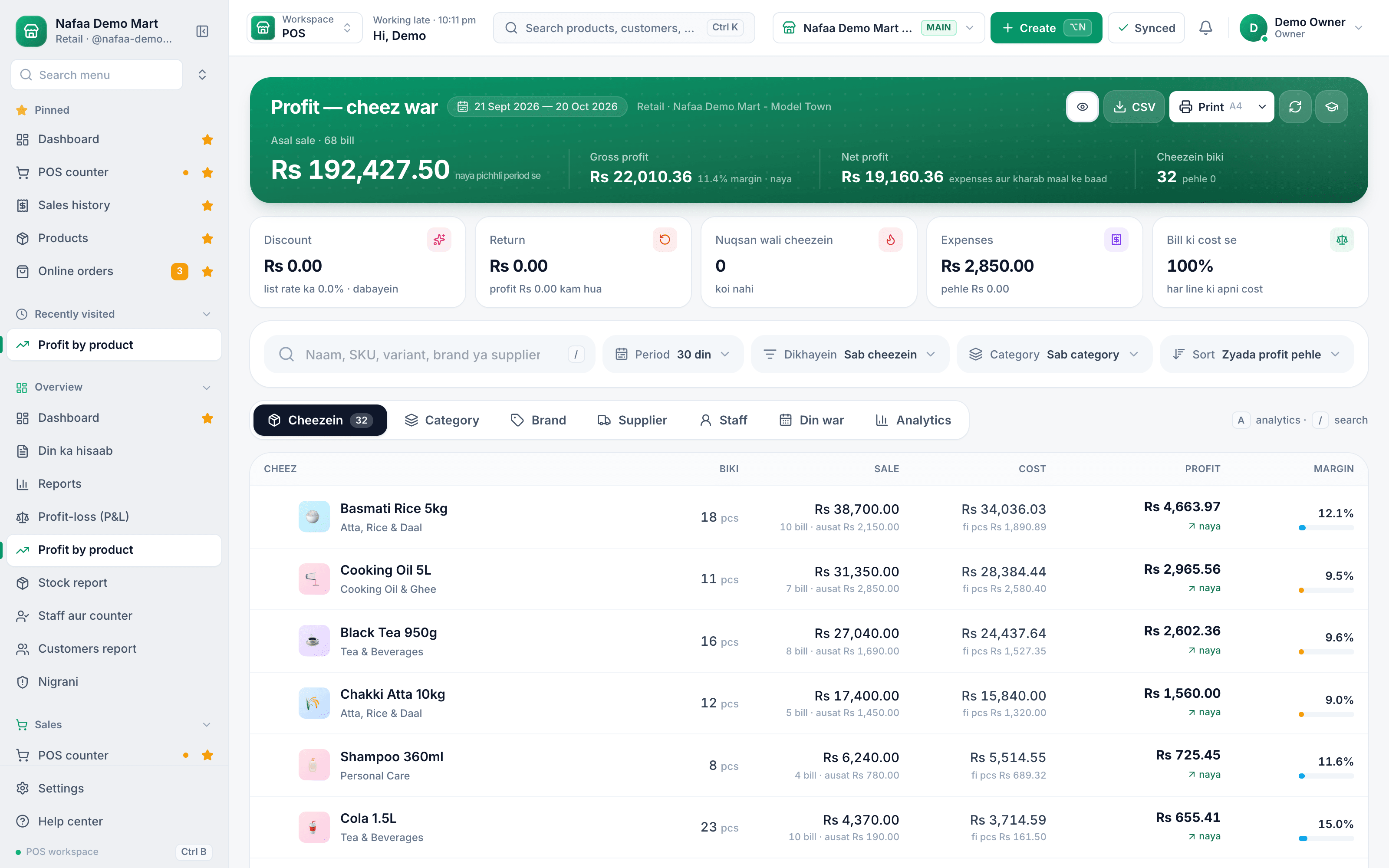
Profit by product
Sale, cost, profit and margin for every item, so you can see which products earn and which only take shelf space.
How Nafaa works it out
Nafaa records the cost of each item when you enter a purchase, so every bill knows what the goods cost. The profit-by-product report shows sale, cost, profit and margin per item; the profit and loss statement takes off expenses you record to give net profit; and product cards show price, cost and margin side by side, so you notice a thin margin when you set the price, not at the end of the month.

