Every businessSolutions
Complete business software for every way you sell
From one counter to a chain of branches, from a shop window to an online store, from a kitchen to a factory floor: Nafaa brings sales, stock, money and people into one system that grows with you.
- Shops to enterprises
- Online and in store
- One stock, one set of books
- 7 din Free Trial
- Keeps billing offline
- Help on WhatsApp
- English and Roman Urdu
- Phone, tablet or computer
Which setup fits you
Nafaa setups for the way a business is run, not only what it sells: a single shop, retail chains with many branches, e-commerce sellers with their own store and the Nafaa marketplace, restaurants, wholesale and distribution, manufacturing and enterprises that need their systems connected.
Roman Urdu mein
Aik dukaan ho, kai branches, online store, restaurant, wholesale ya factory: Nafaa sab ke liye ek hi system hai jisme sale, stock, paisa aur staff ek jagah hain.
Key facts
- One shop
- Counter, stock and khata in one app
- Many branches
- Head-office view, stock transfers and branch P&L
- Selling online
- Your own store, Shopify, WooCommerce, Daraz and Nafaa Market from one stock
- Food service
- Tables, kitchen tickets, takeaway and delivery
- Trade and production
- Carton prices, trade khata, raw materials and costing
Solutions
Pick the way you run your business
Each solution shows the products it uses, real screens and how teams roll it out.
Retail & Shops
Nafaa for a single shop puts the whole business on the device you already own: a fast counter that works offline, stock in every unit, a digital khata with WhatsApp reminders, the cash drawer…
Explore Retail & shopsRetail Chains
Nafaa for retail chains runs every branch from one account: each branch has its own counter, stock and cash, head office compares…
Explore Retail chainsE-commerce Sellers
Nafaa for e-commerce sellers runs your online orders and the Nafaa Market marketplace from the same stock as your shop: orders…
Explore E-commerceRestaurants & Cafés
Nafaa for restaurants and cafés runs dine-in, takeaway and delivery from one system: a table layout with running bills, kitchen…
Explore RestaurantsWholesale & Distribution
Nafaa for wholesalers and distributors handles trade the way it is done in Pakistan: carton and piece prices, a separate…
Explore WholesaleManufacturing
Nafaa for manufacturers and food producers covers raw materials, recipes with costing and daily production plans, milk-to-product…
Explore ManufacturingEnterprise
Nafaa for enterprises connects many branches, teams and systems: permissions per person and branch, audit and activity logs, the Nafaa API and webhooks, daily accounting journals to QuickBooks, Xero…
Explore Enterprise
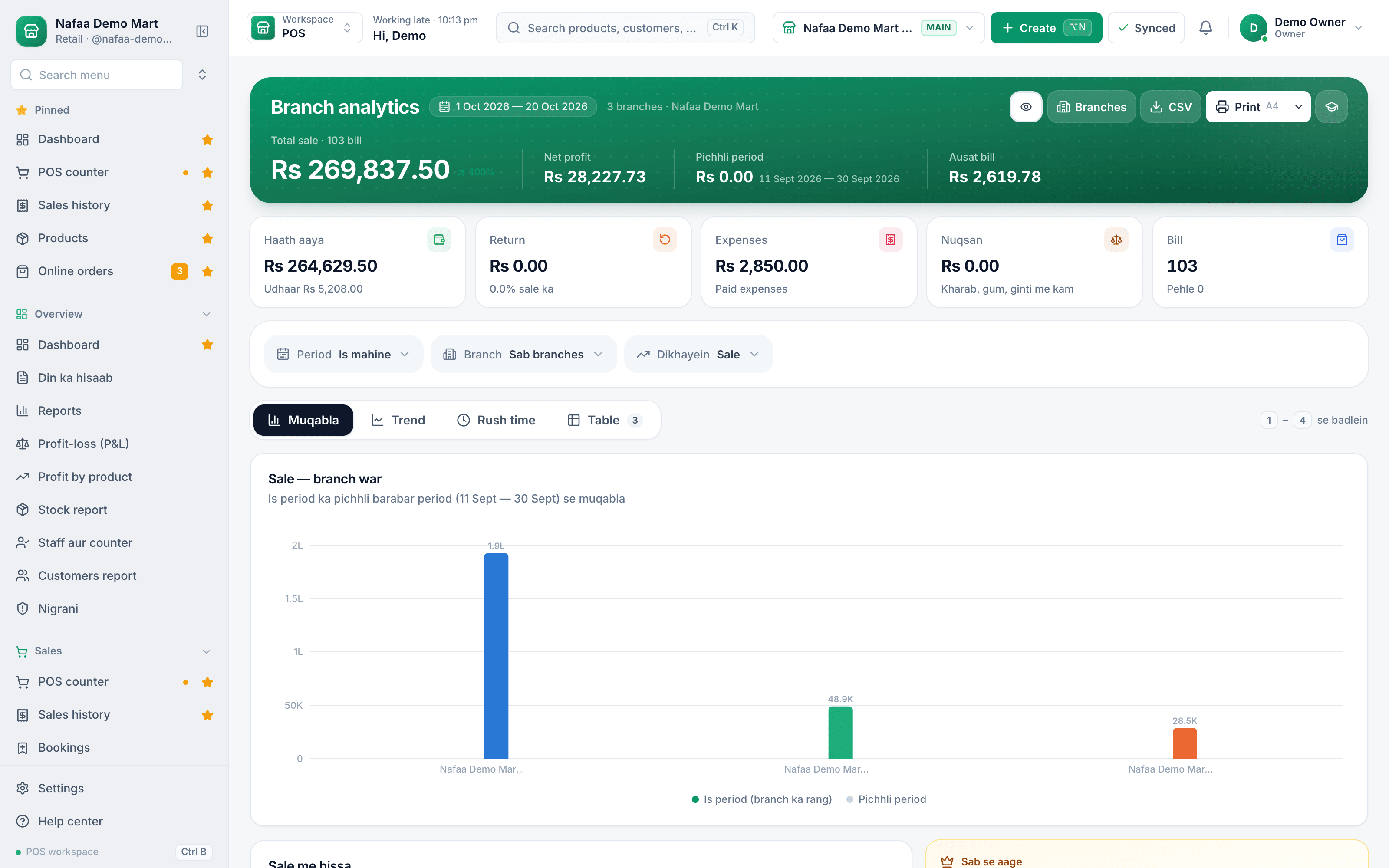
Every branch, one dashboard
Solutions at a glance
| Feature | Best for | Core of the setup |
|---|---|---|
| [Retail & shops](/solutions/single-shop) | Kiryana, pharmacy, garments, mobile and every single-counter shop | POS, stock, khata, reports |
| [Retail chains](/solutions/retail-chains) | Two or more branches under one owner | Branches, stock transfers, staff roles, branch P&L |
| [E-commerce](/solutions/ecommerce) | Sellers with an online store, social or marketplace orders | Online orders, channels, couriers, Nafaa Market |
| [Restaurants](/solutions/restaurants) | Restaurants, cafés, bakeries and cloud kitchens | Tables, kitchen tickets, menu, delivery |
| [Wholesale & distribution](/solutions/wholesale-distribution) | Wholesalers, distributors and dealers | Carton prices, trade khata, A4 invoices |
| [Manufacturing](/solutions/manufacturing) | Small and mid-size production units | Raw materials, production, costing, sales |
| [Enterprise](/solutions/enterprise) | Groups with many teams, systems and branches | API, webhooks, accounting, custom modules |
In store and online, from one stock
Inside the app
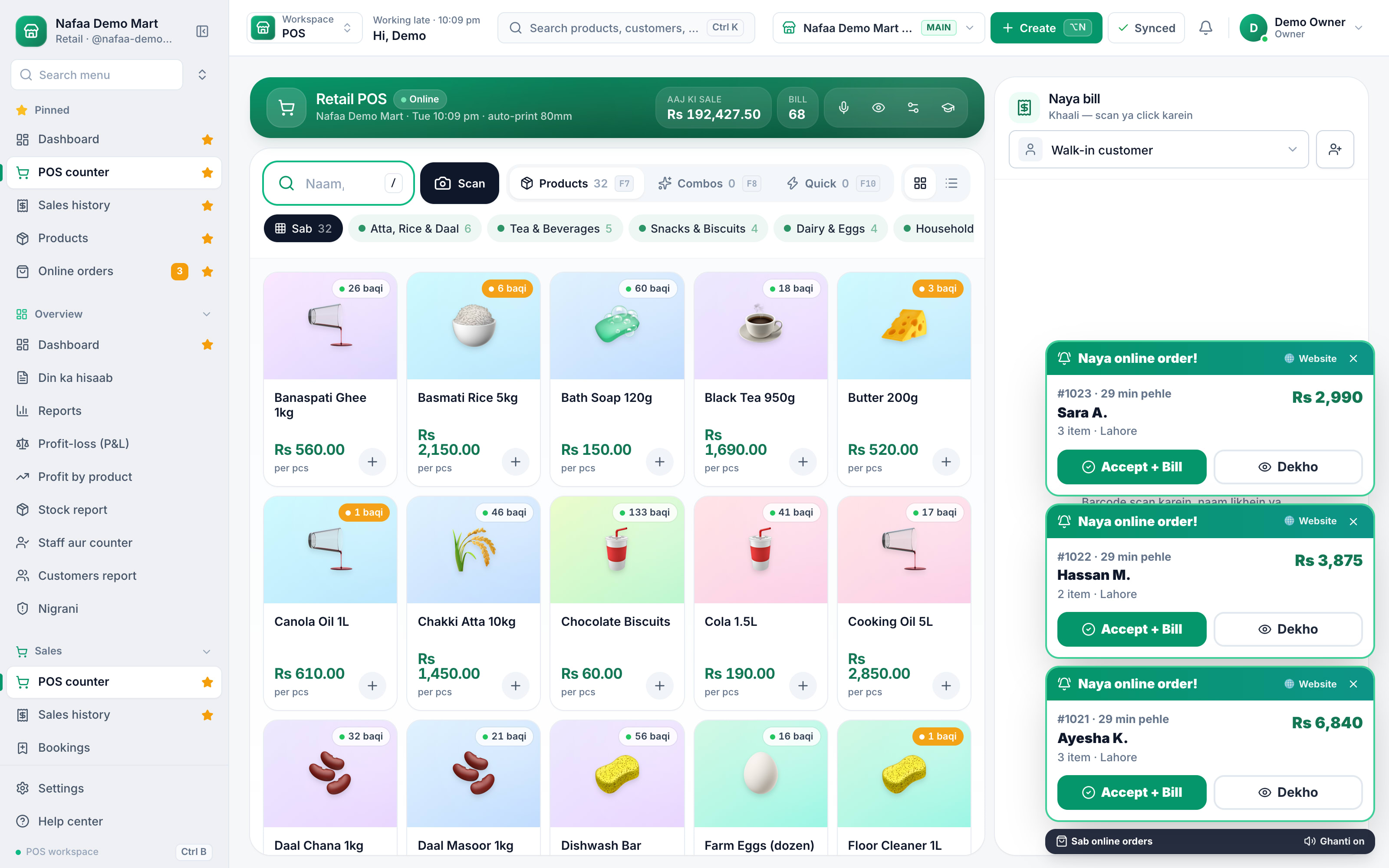
Online orders land next to the counter
When a website order arrives, it pops up over the POS screen with Accept and View, so the same team serves walk-in and online customers from the same shelf.
How it works
How to pick your setup
- 1
Start from how you sell
One counter, several branches, online, food service, trade on credit or production.
- 2
Open the matching solution
Each page shows the screens, the daily flow and how teams roll it out.
- 3
Try it on the free trial
Every solution runs on the same account, so nothing is locked in.
- 4
Add the next one later
A second branch or an online store joins the same data when you grow.
Grow without changing systems
Most businesses use more than one
The solutions are not separate products. A restaurant with delivery also sells online; a wholesaler often has a retail counter at the front; a chain of shops may produce some of what it sells. Because every solution runs on one Nafaa account, you combine them instead of choosing one. A kiryana store can start as a single shop, add a second branch as a retail chain, then open an online store, without moving a single record.
If your business does not fit any of these, start from your trade on the industries page, or tell us how you work and our team will suggest the right setup. For anything the app does not cover, the services team builds it.
Common questions
Is Nafaa only for shops?
No. Nafaa started at the shop counter, but the same account runs restaurants (tables, kitchen tickets, delivery), online sellers (your own store and the Nafaa Market marketplace), service businesses (bookings, memberships, commission), wholesalers (carton prices, credit limits, suppliers) and companies with many branches. Each business type gets its own screens on top of the same POS, stock, khata and reports.
Can one business use more than one solution?
Yes. Solutions are ways of setting up the same Nafaa account, not separate products. A restaurant can also sell online, a wholesaler can run a retail counter, and a shop can add branches, all on one account with one stock and one set of reports.
Can I sell online with Nafaa?
Yes. Orders from your own website, a Shopify store or a WooCommerce store come into Nafaa next to your counter sales and take stock from the same shelf. You can also list products on Nafaa Market, the Nafaa marketplace, to reach new buyers.
Can I move stock from one branch to another?
Yes. Create a stock transfer from one branch, and the receiving branch confirms what arrived. Stock leaves one shop and lands in the other with a record of who sent and received it. Head office sees every branch's stock, sales and profit and loss side by side.
Can Nafaa connect to our other systems?
Yes. The Nafaa API reads products, stock, customers, sales and online orders and can create customers, using keys you create in Settings. Webhooks tell your systems when a sale or order happens. Accounting journals go to QuickBooks, Xero or Zoho Books, and our team can build any connector you need.
Tell us how your business runs
We will suggest the right setup and show it on a call, or start the 7 din Free Trial now.
- 7 din Free Trial
- Keeps billing offline
- Help on WhatsApp
Related
Product
Nafaa is one account for the whole business: the POS counter, stock, digital khata, purchasing, staff, reports, several branches and online orders from your own store or the Nafaa marketplace. Every product page shows how it works in the real app and is marked live, beta or coming soon.Industries
Nafaa has screens made for each trade on top of the same counter, stock and khata: kiryana and grocery, pharmacy, bakery, restaurant, mobile phone shops, garments, hardware, jewellery, salons, clinics and more. Pick your trade to see the features, real screens and questions that matter to it.Services
Services from the team that builds Nafaa, for businesses in Pakistan and worldwide: custom software, websites, e-commerce stores and mobile apps, plus Nafaa setup help such as data migration, hardware and training. Every project starts with a Quote lein request and a fixed quote in PKR or USD.Pricing
Nafaa pricing in Pakistani rupees: start with the 7-day free trial, then choose a plan by the number of products, users, shops and monthly sales you need. Paid plans start at Rs 1,500 a month, quarterly and yearly payment cost less, and no card is needed to start.