Updated
IndustryFor gyms and fitness clubs
Memberships, check-in and fees for your gym in one app
Check members in at the desk in seconds, stop expired cards politely, renew and freeze memberships, pay trainers their PT commission, and see who owes fees before the month ends.
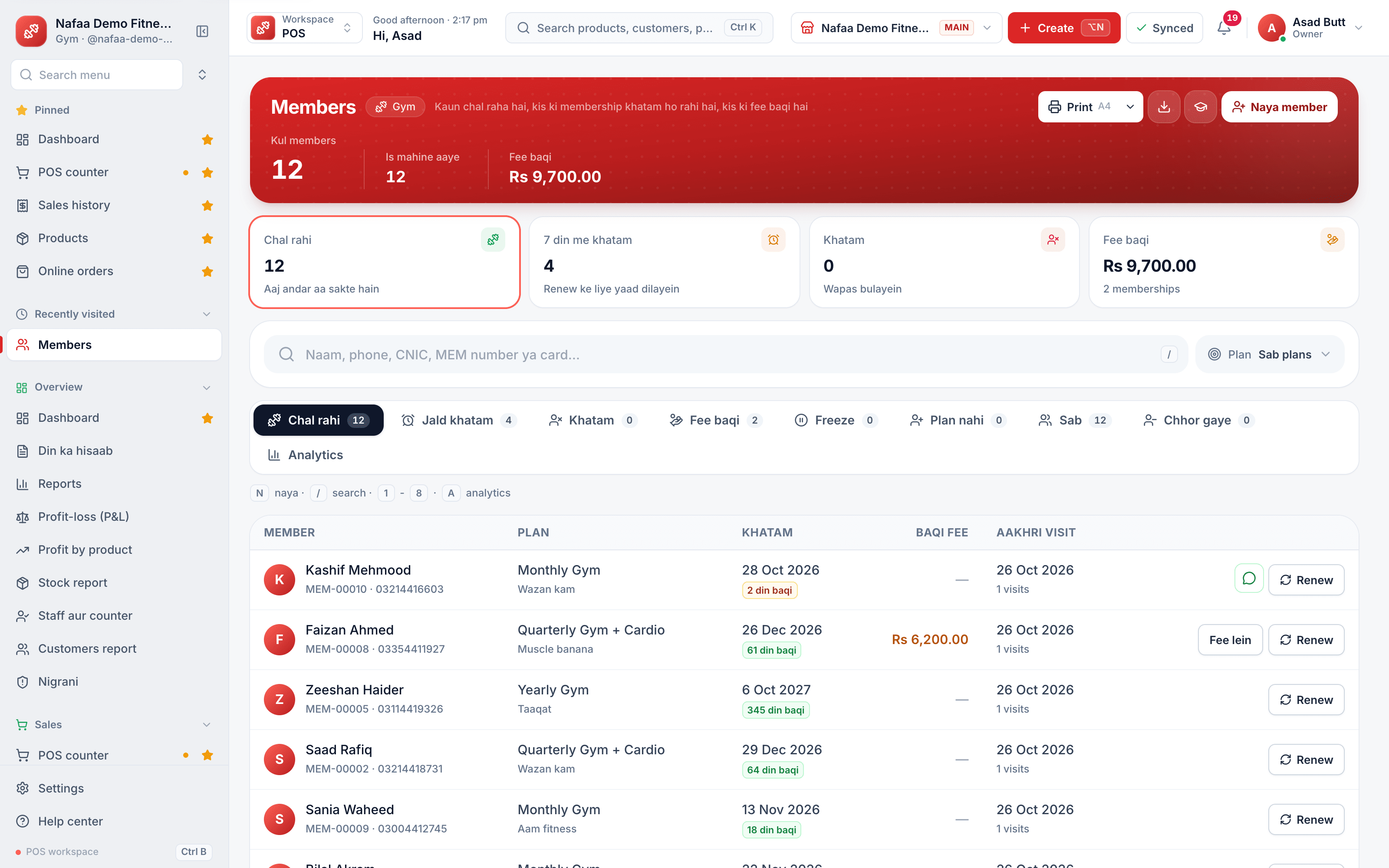
- Fast check-in
- Renewals and freezes
- PT commission
- 7 din Free Trial
- Keeps billing offline
- Help on WhatsApp
- English and Roman Urdu
- Phone, tablet or computer
Short answer
Nafaa runs gyms and fitness clubs: fast member check-in, memberships and renewals, plans, personal training packages with trainer commission, group classes, lockers and machine records, with fees and payments kept in one place. It runs in the browser on a phone, tablet or computer.
Roman Urdu mein
Gym ke liye Nafaa: member check-in, membership aur renewal, personal training aur trainer ki commission, group classes, lockers aur machines.
Key facts
- Built for
- Gyms, fitness clubs and training studios
- Everyday tools
- Counter (POS), stock, khata (udhaar) and reports in one app
- Without internet
- The counter keeps billing offline and sends the sales when the connection returns
- Price
- Paid plans from Rs 1,500 a month, with a free trial first
- Tax
- Optional FBR/PRA integration, only if you need it
For gyms and fitness clubs
What Nafaa does for gyms and fitness clubs
Front-desk check-in
Scan a card or QR, or type the number or phone. A running member goes in with one key; an ended or frozen card is stopped with the reason.
Memberships
Sell, renew, freeze, unfreeze or cancel, and take dues. Unpaid fees go on the member's khata.
Plans
Monthly, quarterly, yearly, couple or student plans with admission fee, deposit, visit limit, gym hours and freeze rules.
Personal training
Single sessions, sessions from a plan, or PT packages sold ahead; each completed session earns the trainer's commission.
Group classes
Yoga, zumba, aerobics or boxing on a repeat schedule, with seats booked and attendance.
Lockers
Who has which locker and until when; one tap puts a month's rent on khata for every locker that ran out.
Machines
Treadmills, cycles and racks with their next service date and repair costs as expenses.
Renewal reminders
Members ending soon or with fees due, each with a WhatsApp reminder link.
Supplements and day passes
Sell shakes, supplements, day passes and towels at the counter, with the member's plan and dues shown on the bill.
A day at the counter
A day at the gym desk
- 1
Opening
The dashboard shows who is inside, today's classes, memberships about to run out, unpaid dues and machines due for service.
- 2
Check-in
A member scans his card. Days left and any fee due show on screen; if the membership has ended, the desk sees why and can renew it there.
- 3
Guests and classes
Log a guest against the member who brought him, and mark attendance for the 7 pm zumba class.
- 4
Personal training
Mark the trainer's session as done. It counts against the member's PT package and earns the trainer's commission.
- 5
Day close
Check everyone out, take the day's renewals, and send WhatsApp reminders to members whose fees are due.
Inside the app
Fees owed and renewals due, by member
Every membership shows its plan, dates, days left, the price and what has been paid. Memberships ending within seven days and those with fee still due have their own tabs, and the fee, renewal or freeze is one tap from the row.
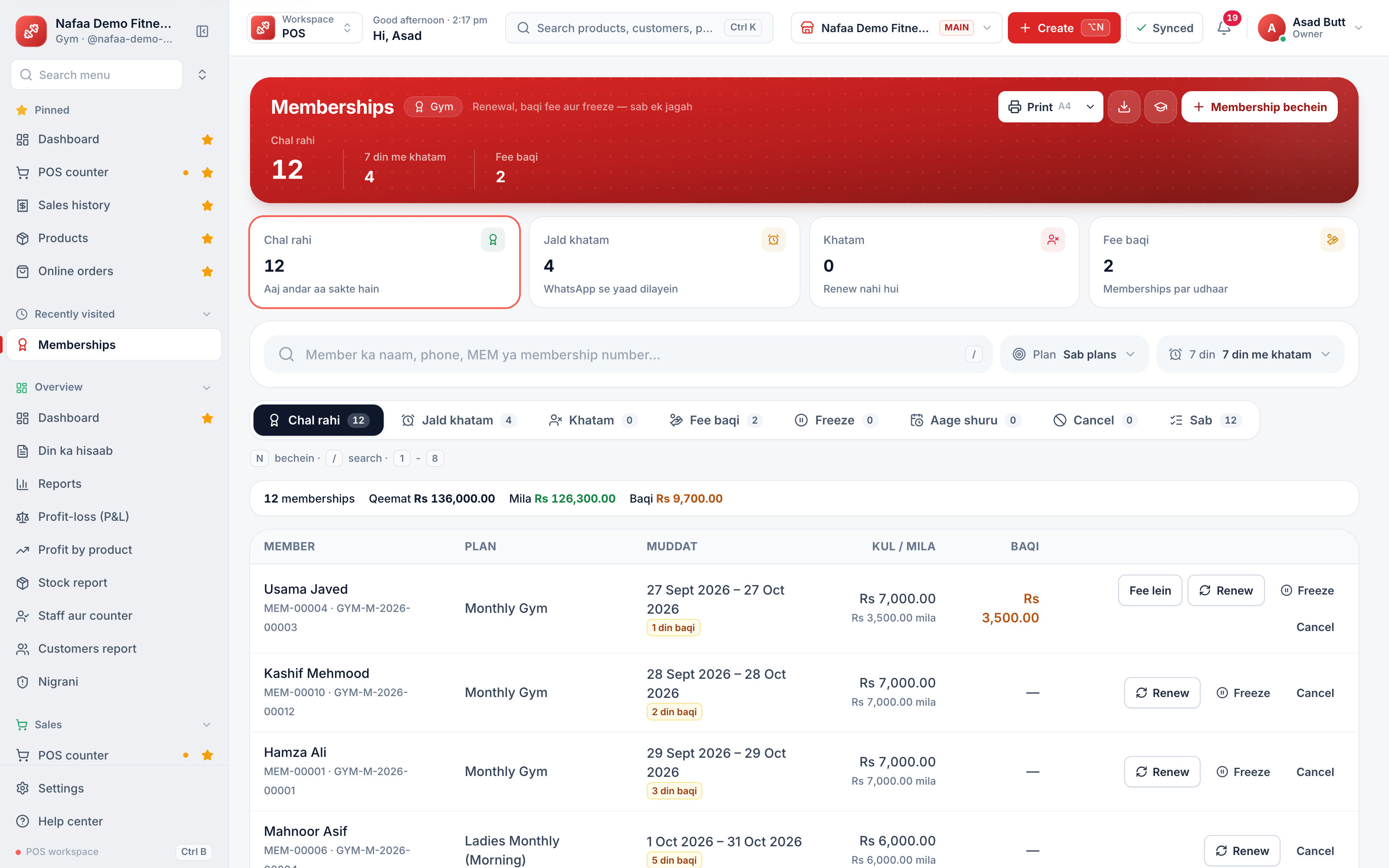
- Ending within 7 days
- Memberships with fee due
- Dates and days left
- Fee still due
- Take the fee or renew
Check-in at the door
Scan a member's card or QR code, or type the member number or phone, and the check-in is recorded against the membership. The desk sees who is inside now, since when, and checks members out at closing in one step.
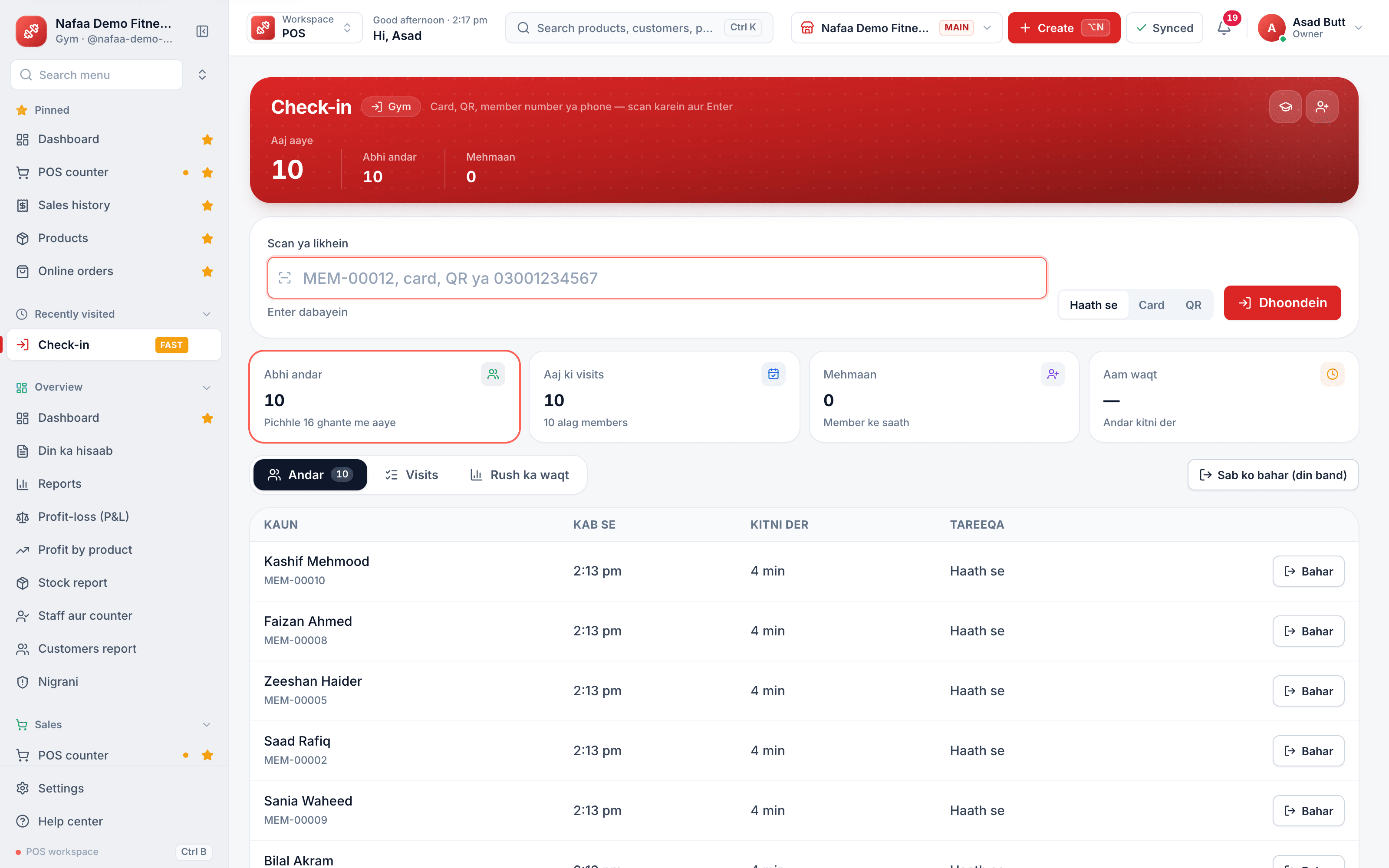
- Scan a card or QR, or type the number
- Members inside now
- Time in and time spent
- Check out
Fee register or Nafaa?
| Feature | Fee register | Nafaa |
|---|---|---|
| Checking a member in | Search the register, or just wave him in | Scan the card; days left and dues on screen |
| Expired memberships | Found weeks later | Stopped at the desk with a Renew button |
| Freezing a membership | A note in the margin | Freeze and unfreeze under the plan's rules |
| Trainer commission | Counted from memory at month end | Earned per completed session, paid as an expense |
| Locker rent | Chased member by member | One tap bills every locker whose rent ran out |
What to look for in gym software
A gym earns from members who pay every month, so its software is really a membership and fee system with a front desk attached. Shop billing software can sell a supplement but cannot tell you who walked in on an expired card. Before you choose, check that it can:
- Check members in quickly. A card, a QR code or a phone number at the desk, with days left and fees due on screen, and a clear stop for ended or frozen memberships.
- Model your real plans. Monthly, quarterly, yearly, couple and student plans, admission fees on the first membership only, deposits, visit limits and freeze rules.
- Keep fees and accounts the same. Every membership and renewal should be a bill, with unpaid parts on the member's khata, so the fee list matches your profit.
- Pay trainers fairly. PT packages counted session by session, with commission earned only on completed sessions.
- Bring members back. A list of memberships ending soon and a reminder on WhatsApp keeps renewals coming.
- Cover the rest of the floor. Classes, lockers, machines and the supplement counter belong in the same app.
Nafaa does this on a phone, tablet or computer at the desk, with the same reports as every Nafaa business.
Plans for one gym or several
Free
Choti dukaan ke liye hamesha muft: 1 dukaan, 1 user, 300 bill mahana.
Rs 0
What is included
- 100 products
- 300 sales a month
- 1 user
- 1 shop
Basic
Chhoti dukan ke liye perfect
Rs 1,500/ monthRs 4,000/ quarterSave 11%Rs 15,000/ yearSave 16%Get startedStarts with a 7-day free trial
What is included
- 5,000 products
- Unlimited sales
- 3 users
- 1 shop
Pro
RecommendedBari shops aur multi-branch ke liye
Rs 3,500/ monthRs 9,500/ quarterSave 9%Rs 36,000/ yearSave 14%Get startedStarts with a 7-day free trial
What is included
- Unlimited products
- Unlimited sales
- 10 users
- 3 shops
Enterprise
Unlimited everything + 24/7 support
Rs 9,500/ monthRs 27,000/ quarterSave 5%Rs 99,000/ yearSave 13%Get startedStarts with a 7-day free trial
What is included
- Unlimited products
- Unlimited sales
- Unlimited users
- Unlimited shops
Common questions
Do I need a computer to use Nafaa?
No. Nafaa runs in a web browser, so the phone, tablet or computer you already have will do. A barcode scanner and a receipt printer can be added later but are not required to start. The counter also keeps working without internet and sends the sales to your account when the connection returns.
Does Nafaa work without internet?
Yes, the counter keeps billing when the internet drops. Sales made offline are saved on the device and sent to your account automatically when the connection comes back, and you can see the sales still waiting to be sent. Reports and other branches see those sales once they have synced.
Can Nafaa send udhaar reminders on WhatsApp?
Yes. The khata keeps each customer's udhaar, payments and balances brought over from the old register. From the khata you send a customer a WhatsApp reminder with their balance in one tap. Reminders go one by one from your own WhatsApp, and the wording gets firmer as the udhaar gets older.
How much does Nafaa cost?
Paid plans start at Rs 1,500 a month. The pricing page lists every plan with its price and limits, taken straight from our plan settings, so it is always current. You can start with the free trial first, and no credit card is needed to sign up.
Products gyms and fitness clubs use
Digital Khata
Nafaa Digital Khata replaces the paper udhaar register: every credit sale lands in the customer's khata from the counter, payments and old balances are recorded, balances are grouped by age, credit limits stop runaway udhaar, and a WhatsApp reminder goes out in one tap.POS & Billing
Nafaa POS is the billing counter for any business: scan a barcode or tap a quick key, sell by piece, dozen or carton, take cash, card, JazzCash, Easypaisa or khata in one bill, print or WhatsApp the receipt, and keep billing when the internet drops. It runs on the phone, tablet or computer you already have.Staff & Payroll
Nafaa Staff gives every team member a login and a role, sets counter rules like the refund PIN, tracks attendance and leave, works out sales commission, runs payroll with advances and payslips, and logs every sensitive action with a name, so the owner can trust the counter without standing behind it.WhatsApp Messages
Nafaa talks to customers and suppliers where they already are: receipts on WhatsApp instead of paper, udhaar reminders with the exact balance, thank-you and birthday messages, purchase orders to suppliers, and a WhatsApp chat with online buyers opened straight from their order, all in wording you can edit to sound like your shop.Reports
Nafaa Reports answer the owner's questions in plain numbers: today's sale and profit on the dashboard, profit by product, profit and loss with expenses, the day book, stock value, staff and customer reports, with Excel export and journals for QuickBooks, Xero, Zoho Books or Tally.
Related industries
Salon & Beauty Parlour
Nafaa runs salons and beauty parlours: book appointments on a calendar, keep a service list with prices, pay stylists commission per service, sell memberships, prepaid packages and gift vouchers, keep customer profiles, and bill services and products together at the salon counter.Sports Goods Shop
Nafaa runs sports goods shops that sell cricket, football and gym equipment: team orders with printing and an advance, bat and racket repairs, and brand records, alongside the counter, stock, khata and reports that every Nafaa shop uses. It runs in the browser on a phone, tablet or computer.Field Service Business
Nafaa runs field service businesses such as plumbers, electricians, AC technicians, IT support and cleaners: create jobs, dispatch technicians, send quotes, keep a service catalogue, manage AMC contracts and warranties, and bill and collect payment in the same app. It runs in the browser on a phone, tablet or computer.
Try Nafaa in your gym business
Start with the free trial. No card needed.
- 7 din Free Trial
- Keeps billing offline
- Help on WhatsApp