Updated
ProductPurchasing
Buy smarter and always know what you owe
Enter a supplier's bill once: stock goes up, cost is updated, and the amount owed lands on the supplier's account. Reorder from the low-stock list and pay suppliers from the same place.
- Supplier balances
- Reorder from low stock
- 7 din Free Trial
- Keeps billing offline
- Help on WhatsApp
- English and Roman Urdu
- Phone, tablet or computer
Short answer
Nafaa Purchasing records what you buy and what you owe: suppliers with their contact details and balances, purchase bills in any unit that add stock and update cost, full or partial payments to suppliers, and reorders started straight from the low-stock list.
Roman Urdu mein
Supplier ka bill ek dafa daalein: stock barh jata hai, cost update hoti hai, aur supplier ka hisaab khud ban jata hai. Kam stock ki list se seedha order banayein.
Key facts
- Suppliers
- Contact details, purchase history and balance owed
- Purchase bills
- Add stock and update cost in one step
- Payables
- Payments to suppliers, full or partial
- Reorders
- Start a purchase from the low-stock list
How it works
A purchase in four steps
- 1
Pick the supplier
Or add a new one with phone and address.
- 2
Enter the bill
Items, quantities in any unit, and the price paid.
- 3
Stock and cost update
Stock goes up and the product's cost follows the new price.
- 4
Pay now or later
Pay in full or in part; the rest stays on the supplier's account.
From supplier to shelf
Features
Purchasing that keeps margins honest
Supplier accounts
Every bill and payment per supplier, with the balance owed.
Cost updates
Profit reports use the latest cost, so margins stay true.
Reorder from low stock
Turn the low-stock list into a purchase in a few taps.
Printable bills
Print or share purchase bills for your records.
Buy in any unit
Buy cartons, sell pieces; Nafaa converts the stock.
Export
Purchases and supplier balances export to Excel.
Inside the app
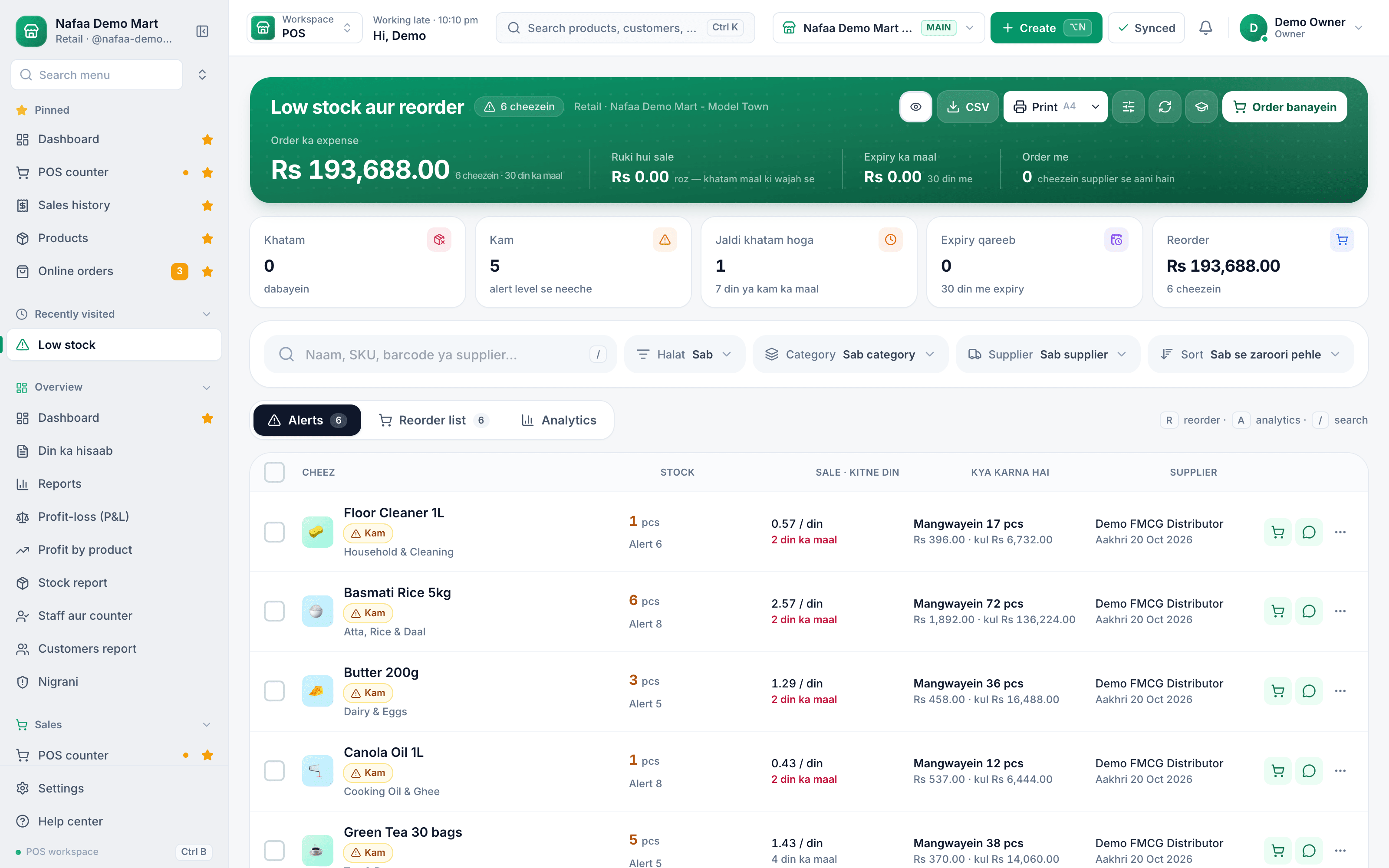
Start from what is running out
The low-stock list is the shopping list: items under their alert level, ready to reorder.
Common questions
Can I bring my product list from Excel?
Yes. Download the import template, fill in names, prices, cost, stock and barcodes, and upload it. Nafaa checks the file first and shows every row it would add or change, so you can fix mistakes before anything is saved. Products can be exported back to Excel at any time.
How much does Nafaa cost?
Paid plans start at Rs 1,500 a month. The pricing page lists every plan with its price and limits, taken straight from our plan settings, so it is always current. You can start with the free trial first, and no credit card is needed to sign up.
Industries using it
More from Nafaa
Inventory
Nafaa Inventory keeps stock right in every unit and every branch: products with cost, price and margin, barcodes and labels, combos, low-stock alerts, damage and adjustments with reasons, stock transfers between branches, and a full movement history. Import your list from Excel in minutes.POS & Billing
Nafaa POS is the billing counter for any business: scan a barcode or tap a quick key, sell by piece, dozen or carton, take cash, card, JazzCash, Easypaisa or khata in one bill, print or WhatsApp the receipt, and keep billing when the internet drops. It runs on the phone, tablet or computer you already have.Digital Khata
Nafaa Digital Khata replaces the paper udhaar register: every credit sale lands in the customer's khata from the counter, payments and old balances are recorded, balances are grouped by age, credit limits stop runaway udhaar, and a WhatsApp reminder goes out in one tap.FBR & PRA Invoicing
Nafaa is an FBR & PRA approved POS integrator. Every sale can be reported to FBR, PRA, SRB or KPRA from the counter, the fiscal invoice number and QR code print on the receipt, failed invoices retry by themselves, and tax reports are ready for your return.Online Store
Nafaa brings online selling into the same account as the shop: orders from your own website, Shopify, WooCommerce, Daraz and Foodpanda arrive next to counter sales, take stock from the same shelf, and ship with TCS, Leopards, M&P, PostEx, Trax or CallCourier booked from the order.
Get your supplier accounts in order
- 7 din Free Trial
- Keeps billing offline
- Help on WhatsApp