PlatformThe Nafaa platform
One account for the counter, the stock room and the books
Billing, stock, khata, purchasing, staff, reports and online orders share one set of data, so a sale at the counter updates everything else on its own. Start with what you need today and switch on the rest as you grow.
- Keeps billing offline
- English and Roman Urdu
- WhatsApp built in
- 7 din Free Trial
- Keeps billing offline
- Help on WhatsApp
- English and Roman Urdu
- Phone, tablet or computer
Nafaa in one minute
Nafaa is one account for the whole business: the POS counter, stock, digital khata, purchasing, staff, reports, several branches and online orders from your own store or the Nafaa marketplace. Every product page shows how it works in the real app and is marked live, beta or coming soon.
Roman Urdu mein
Nafaa ek hi account me bill, stock, khata, kharidari, staff, reports aur online orders chalata hai. Counter par sale hoti hai to stock aur hisaab khud update ho jata hai.
Key facts
- Sell
- POS counter on any phone, tablet or computer, also without internet
- Stock
- Products, units, batches, low-stock alerts, purchasing and suppliers
- Money
- Khata, expenses, cash register, profit and loss, accounting export
- Grow
- Several branches, staff roles, your own online store and Nafaa Bazaar
- Price
- 7 din Free Trial, then plans from Rs 1,500 a month
The platform
Everything in Nafaa
Each product works on its own and better together. Coming-soon items carry a badge and are never sold as available.
POS & Billing
Nafaa POS is the billing counter for any business: scan a barcode or tap a quick key, sell by piece, dozen or carton, take cash, card, JazzCash, Easypaisa or khata in one bill, print or WhatsApp the…
Explore POSInventory
Nafaa Inventory keeps stock right in every unit and every branch: products with cost, price and margin, barcodes and labels…
Explore InventoryDigital Khata
Nafaa Digital Khata replaces the paper udhaar register: every credit sale lands in the customer's khata from the counter…
Explore KhataFBR & PRA Invoicing
Nafaa is an FBR & PRA approved POS integrator.
Explore FBR & PRAOnline Store
Nafaa brings online selling into the same account as the shop: orders from your own website, Shopify, WooCommerce, Daraz and…
Explore Online storeMulti-Branch
Nafaa Multi-Branch runs every shop or branch from one account: each branch keeps its own counter, stock and cash, head office…
Explore Multi-branchReports
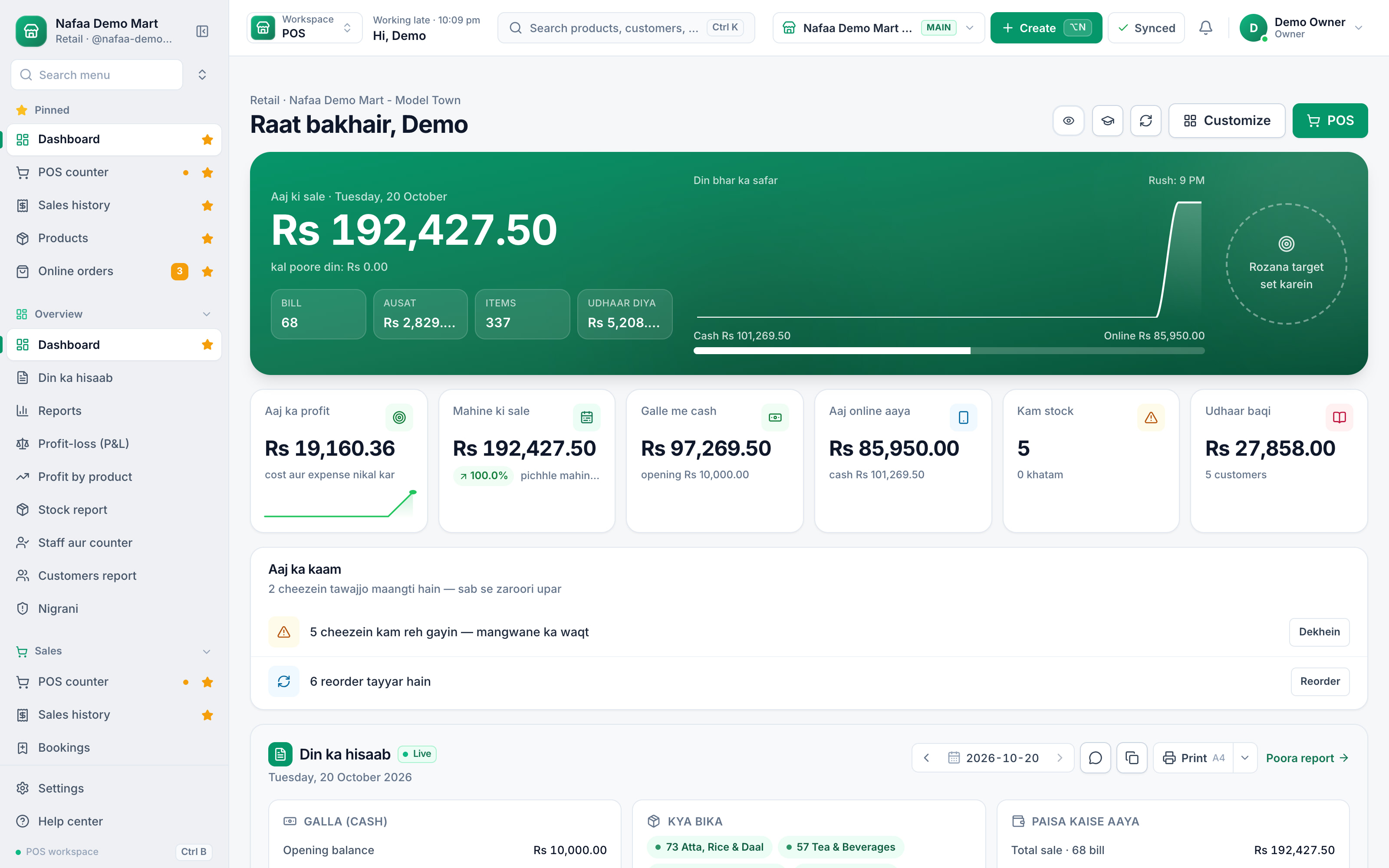
Nafaa Reports answer the owner's questions in plain numbers: today's sale and profit on the dashboard, profit by product, profit and loss with expenses, the day book, stock value, staff and customer…
Explore ReportsPayments
Nafaa takes every way Pakistan pays: cash, card, JazzCash, Easypaisa, bank transfer, QR and the customer's khata, split across…
Explore PaymentsOffline POS
Nafaa keeps billing when the internet drops.
Explore Offline POSPurchasing
Nafaa Purchasing records what you buy and what you owe: suppliers with their contact details and balances, purchase bills in any…
Explore PurchasingStaff & Payroll
Nafaa Staff gives every team member a login and a role, sets counter rules like the refund PIN, tracks attendance, works out…
Explore StaffWhatsApp Messages
Nafaa talks to customers where they already are: receipts on WhatsApp instead of paper, udhaar reminders with the exact balance, thank-you messages after a purchase, and a WhatsApp chat with online…
Explore WhatsAppLoyalty
Nafaa Loyalty turns first-time buyers into regular customers: points on every purchase that can be used on a later bill, tiers…
Explore LoyaltyAI Business Assistant
The Nafaa AI business assistant answers questions about your own sales, stock and khata in plain English or Roman Urdu.
Explore AI assistant
From one sale to every report
One set of data, every part of the business
Inside the app
The whole business on the phone in your pocket
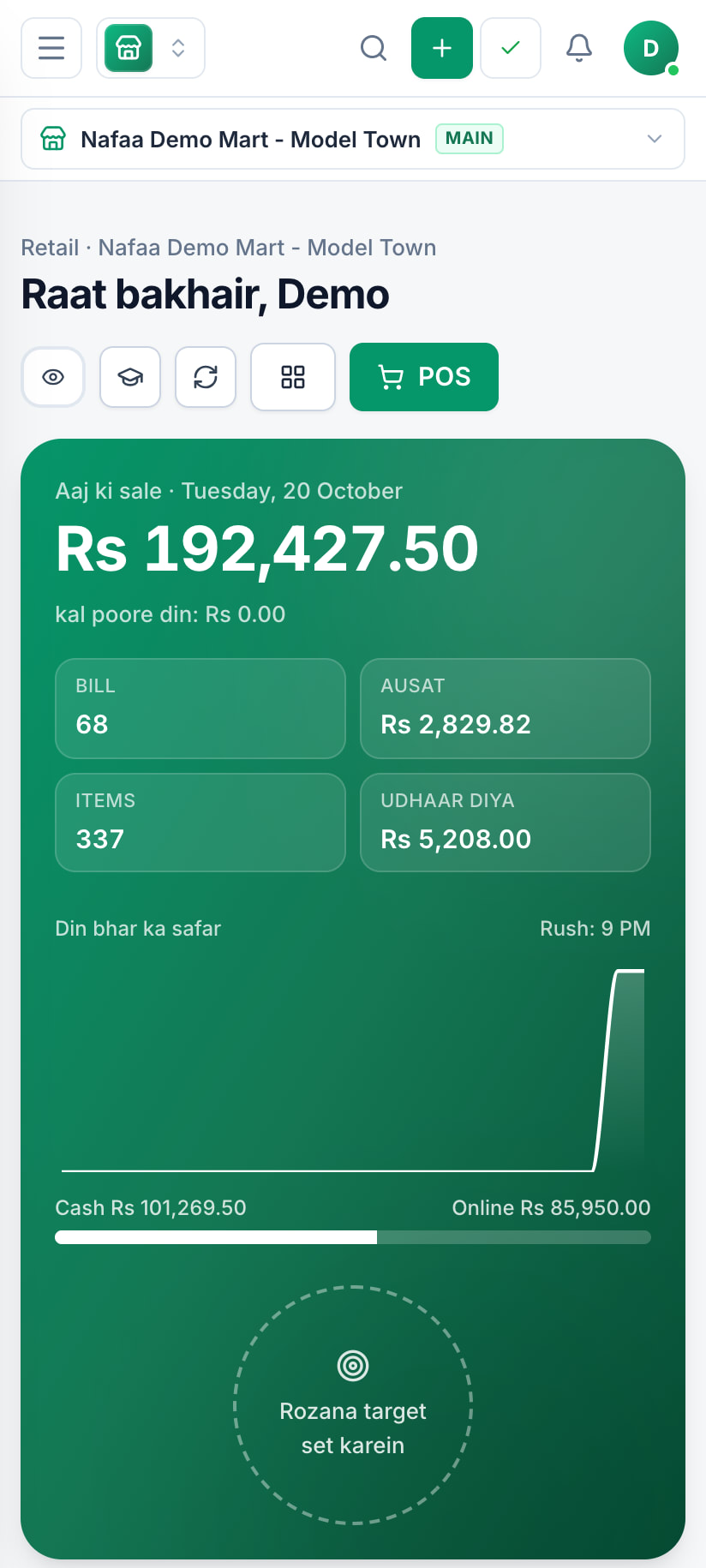
The dashboard, the counter and the khata run in the browser on Android and iPhone, so the owner sees today's sales from anywhere and a small shop can start with nothing else.
Billing never stops
Why Nafaa
Built for how business works in Pakistan
Load-shedding proof
The counter keeps billing without internet and syncs when the connection returns.
English and Roman Urdu
Screens and receipts in the words your team already uses.
Every way Pakistan pays
Cash, card, JazzCash, Easypaisa, bank transfer and khata, split in one bill.
Tax invoices
Optional FBR/PRA integration, only if your business needs it.
WhatsApp built in
Receipts and khata reminders go out on WhatsApp.
Counter rules
Manager PIN for refunds and big discounts, with every sensitive action logged.
Common questions
Is Nafaa only for shops?
No. Nafaa started at the shop counter, but the same account runs restaurants (tables, kitchen tickets, delivery), online sellers (your own store and the Nafaa Bazaar marketplace), service businesses (bookings, memberships, commission), wholesalers (carton prices, credit limits, suppliers) and companies with many branches. Each business type gets its own screens on top of the same POS, stock, khata and reports.
Do I need a computer to use Nafaa?
No. Nafaa runs in a web browser, so the phone, tablet or computer you already have will do. A barcode scanner and a receipt printer can be added later but are not required to start. The counter also keeps working without internet and sends the sales to your account when the connection returns.
Does Nafaa work without internet?
Yes, the counter keeps billing when the internet drops. Sales made offline are saved on the device and sent to your account automatically when the connection comes back, and you can see the sales still waiting to be sent. Reports and other branches see those sales once they have synced.
How much does Nafaa cost?
Paid plans start at Rs 1,500 a month. The pricing page lists every plan with its price and limits, taken straight from our plan settings, so it is always current. You can start with the free trial first, and no credit card is needed to sign up.
Open your Nafaa account today
7 din Free Trial on the device you already have. No card needed.
- 7 din Free Trial
- Keeps billing offline
- Help on WhatsApp