Updated
IndustryFor bookstores and stationery shops
School sets, books and stationery on one counter
Sell a whole class's book list in one tap during admission season, keep schools and publishers on their own khata, rent books against a deposit, and know what every title earns.
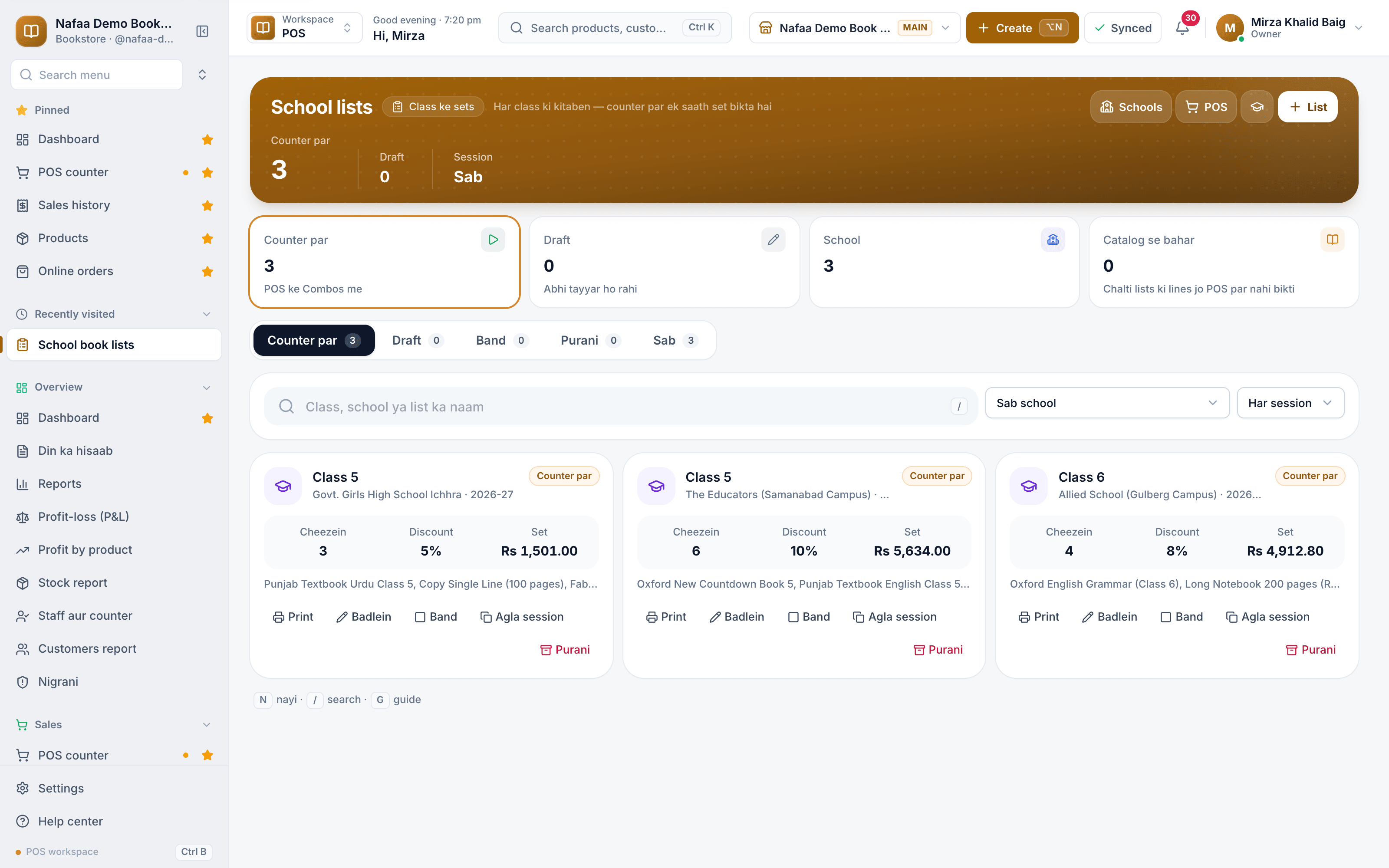
- School book lists
- ISBN search
- Book rentals
- 7 din Free Trial
- Keeps billing offline
- Help on WhatsApp
- English and Roman Urdu
- Phone, tablet or computer
Short answer
Nafaa runs bookstores and stationery shops: books with ISBN, authors and publishers, textbooks by class, school book lists sold as one set at the counter, schools on credit, book rentals with a deposit, and stationery sold loose or by the dozen, alongside the counter, stock and khata.
Roman Urdu mein
Kitabon aur stationery ki dukaan ke liye: ISBN, author aur publisher, class ke hisaab se textbooks, school ki book list ek set me, schools ka khata, kitab kiraye par, aur stationery khuli ya darjan me.
Key facts
- Built for
- Bookstores, stationery shops and art supply shops
- Everyday tools
- Counter (POS), stock, khata (udhaar) and reports in one app
- Without internet
- The counter keeps billing offline and sends the sales when the connection returns
- Price
- Paid plans from Rs 1,500 a month, with a free trial first
- Tax
- Optional FBR/PRA integration, only if you need it
For bookstores and stationery shops
What Nafaa does for bookstores and stationery shops
Books by ISBN
Title, ISBN, authors, publisher, edition, and class, subject and board for textbooks. Search by any of them at the counter.
School book lists
The books and stationery for each school, session and class, sold at the counter as one set or only the books a child still needs.
Schools on credit
Each school gets its own discount, credit terms and khata; its bills and payments land there.
Publishers
Usual discount and credit days per publisher; a purchase from them fills each book at list price less that discount.
Book rentals
Issue a copy with rent and a deposit; on return, any late fine comes out of the deposit and the rest goes back.
Stationery loose or by the pack
Copies, pens and registers sold by the piece, the pack or the dozen, each with its own price.
Art supplies
Colours, brushes and canvas with type, brand, rate and stock, printed as an order sheet.
Authors
Link books to their writers so "any book by this author" is one search.
A day at the counter
Admission season at the bookstore
- 1
Before the session
Copy last year's list for each school and class, and change only the books the school changed. Print the lists for parents.
- 2
At the counter
Tap the school set: the whole set goes on the bill at the set price, or tick only the books the child still needs.
- 3
School orders
Pick the school as the customer and put the bill on udhaar. It lands on the school's khata, where its payments are also taken.
- 4
Restocking
Print a stock or order sheet for a publisher. When the books arrive, each one is costed at list price less that publisher's discount.
Inside the app
Every title, priced and counted
The products page shows author, publisher, edition and class under each book, with the price, cost and stock on every card and the total stock value at the top. Filter by class, publisher or textbooks, and see what is running low before the rush.
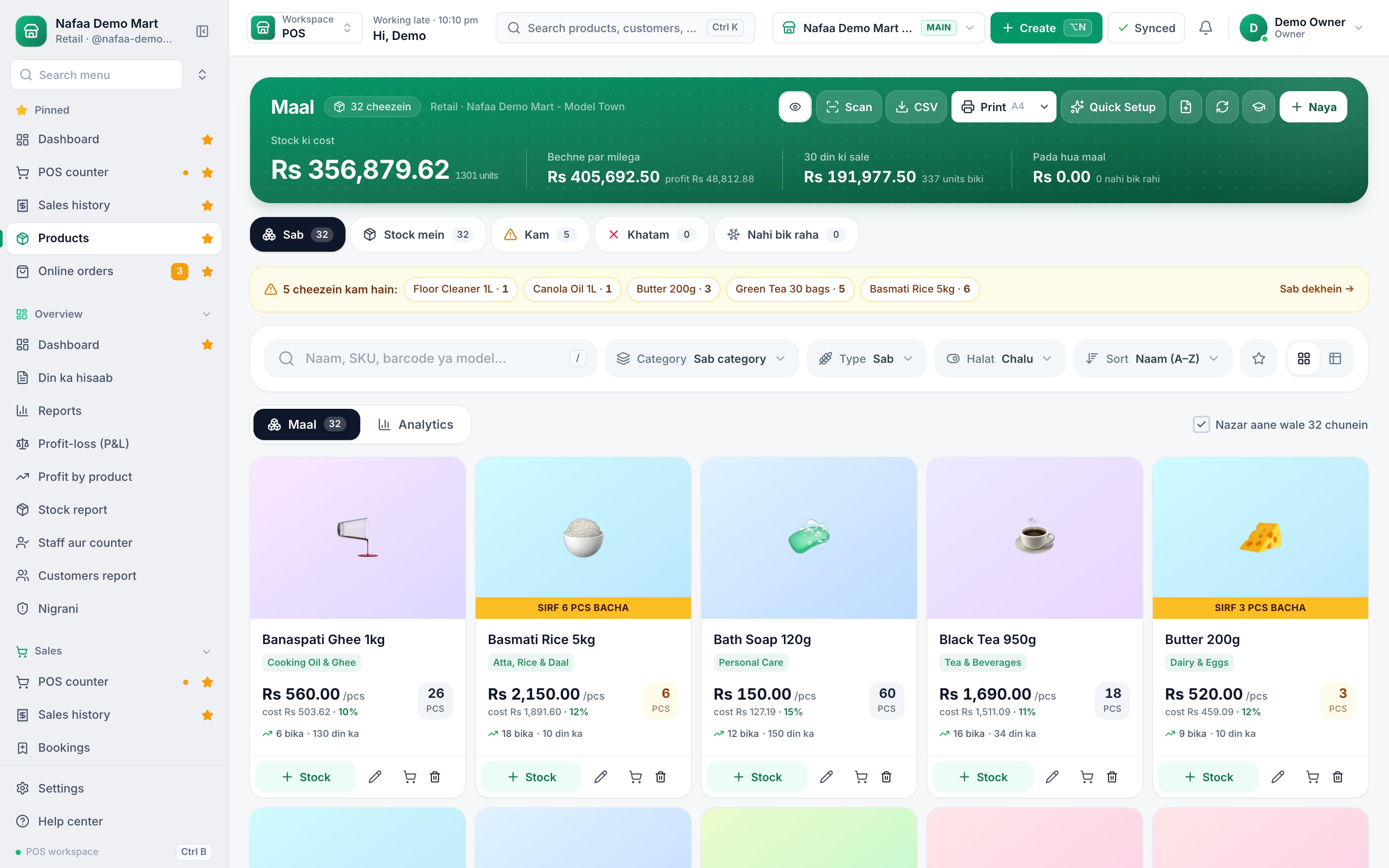
- Stock value at cost
- Items running low
- Price, cost and margin per item
Schools and parents who pay later
Each school has its own discount, credit days and limit. Book lists are linked to the school, its orders can be billed on udhaar, and the school's khata shows what is still to collect.
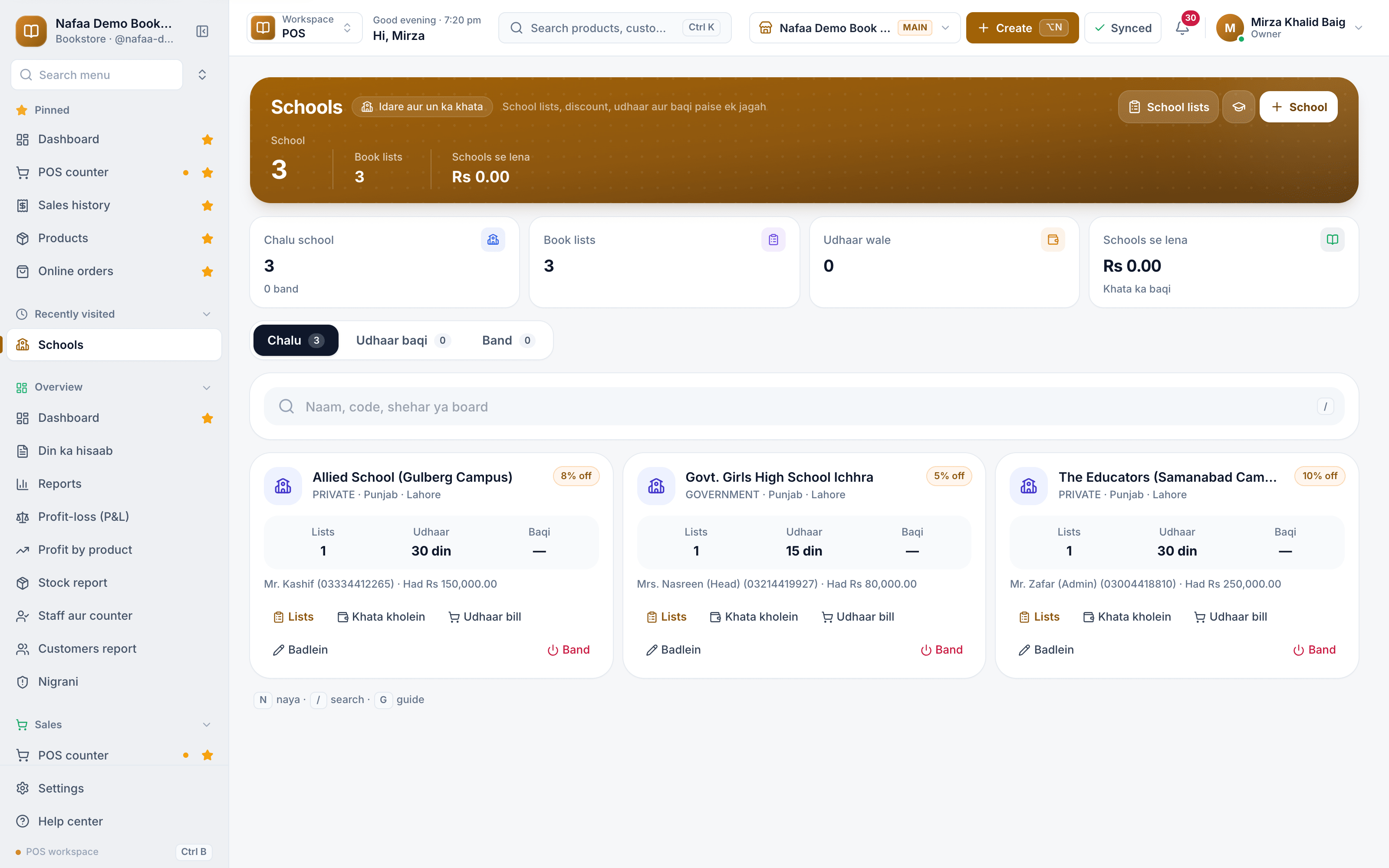
- School discount
- Credit days
- Contact and credit limit
- Bill the school on udhaar
Register and lists on paper, or Nafaa?
| Feature | Register and photocopied lists | Nafaa |
|---|---|---|
| Selling a class set | Pick each book from the list, add up by hand | One tap for the set, or tick only what is needed |
| New session lists | Rewrite every list | Copy last year's list and change what changed |
| Publisher discount | Worked out on each bill | Filled in on the purchase from the publisher's discount |
| Rented books | Names in a notebook, deposits mixed with cash | Rent, deposit and late fine each recorded |
| School accounts | A separate register per school | A khata per school with bills and payments |
What to look for in bookstore software
A bookstore's year is uneven. Most of the money comes in a few weeks around the new school session, when parents arrive with a list and want everything at once. The rest of the year is stationery, general books and slow titles. Before you choose software, check that it can:
- Sell a school list as a set. The busiest days depend on billing a whole class's books in one step, and on handling the parent who already has half of them.
- Find books the way customers ask. By title, author, publisher, class or ISBN, not only by a code you made up.
- Cost books from the publisher's discount. Books are bought at list price less a discount; entering cost by hand on every title is where mistakes start.
- Keep schools and publishers on credit. Schools buy on terms and publishers give credit days. Both need their own khata, not a note in the margin.
- Sell stationery loose and by the pack. One pen, a packet of ten or a dozen copies, each at its own price.
- Handle rentals honestly. Rent and late fines as sales, the deposit kept apart and returned.
Nafaa does all of this on a phone or computer, and the counter keeps billing during load-shedding and admission-day rush.
Plans for one shop or several
Free
Choti dukaan ke liye hamesha muft: 1 dukaan, 1 user, 300 bill mahana.
Rs 0
What is included
- 100 products
- 300 sales a month
- 1 user
- 1 shop
Basic
Chhoti dukan ke liye perfect
Rs 1,500/ monthRs 4,000/ quarterSave 11%Rs 15,000/ yearSave 16%Get startedStarts with a 7-day free trial
What is included
- 5,000 products
- Unlimited sales
- 3 users
- 1 shop
Pro
RecommendedBari shops aur multi-branch ke liye
Rs 3,500/ monthRs 9,500/ quarterSave 9%Rs 36,000/ yearSave 14%Get startedStarts with a 7-day free trial
What is included
- Unlimited products
- Unlimited sales
- 10 users
- 3 shops
Enterprise
Unlimited everything + 24/7 support
Rs 9,500/ monthRs 27,000/ quarterSave 5%Rs 99,000/ yearSave 13%Get startedStarts with a 7-day free trial
What is included
- Unlimited products
- Unlimited sales
- Unlimited users
- Unlimited shops
Common questions
Do I need a computer to use Nafaa?
No. Nafaa runs in a web browser, so the phone, tablet or computer you already have will do. A barcode scanner and a receipt printer can be added later but are not required to start. The counter also keeps working without internet and sends the sales to your account when the connection returns.
Does Nafaa work without internet?
Yes, the counter keeps billing when the internet drops. Sales made offline are saved on the device and sent to your account automatically when the connection comes back, and you can see the sales still waiting to be sent. Reports and other branches see those sales once they have synced.
Can Nafaa send udhaar reminders on WhatsApp?
Yes. The khata keeps each customer's udhaar, payments and balances brought over from the old register. From the khata you send a customer a WhatsApp reminder with their balance in one tap. Reminders go one by one from your own WhatsApp, and the wording gets firmer as the udhaar gets older.
How much does Nafaa cost?
Paid plans start at Rs 1,500 a month. The pricing page lists every plan with its price and limits, taken straight from our plan settings, so it is always current. You can start with the free trial first, and no credit card is needed to sign up.
Products bookstores and stationery shops use
POS & Billing
Nafaa POS is the billing counter for any business: scan a barcode or tap a quick key, sell by piece, dozen or carton, take cash, card, JazzCash, Easypaisa or khata in one bill, print or WhatsApp the receipt, and keep billing when the internet drops. It runs on the phone, tablet or computer you already have.Inventory
Nafaa Inventory keeps stock right in every unit and every branch: products with cost, price and margin, barcodes and labels, combos, low-stock alerts, damage and adjustments with reasons, stock transfers between branches, and a full movement history. Import from Excel or paste from a spreadsheet, and change many prices at once in the bulk editor.Digital Khata
Nafaa Digital Khata replaces the paper udhaar register: every credit sale lands in the customer's khata from the counter, payments and old balances are recorded, balances are grouped by age, credit limits stop runaway udhaar, and a WhatsApp reminder goes out in one tap.Purchasing
Nafaa Purchasing records what you buy and what you owe: suppliers with their khata and rate history, purchase bills in any unit that add stock at the real landed cost, purchase orders that wait until goods arrive, returns to suppliers, full or partial payments, and reorders started straight from the low-stock list.
Related industries
Toy Store
Nafaa runs toy stores: filter toys by age, review safety certification, build gift packs, help parents with a gift finder, and keep children's birthdays for reminders, while the counter, stock and khata work the same as in every Nafaa shop.General Retail Shop
Nafaa works for any shop that does not fit a specific industry: a fast counter with quick keys and barcodes, combos, stock with low-stock and damage records, bulk import from Excel, a digital khata for udhaar, and reports on sales and profit, all in one app.
Try Nafaa in your bookstore business
Start with the free trial. No card needed.
- 7 din Free Trial
- Keeps billing offline
- Help on WhatsApp