NafaaBill aur receipt
Bill banane wali app: seconds me bill, print ya WhatsApp par
Scan karein ya tap karein, Discount lagayein, cash, card, JazzCash, Easypaisa ya udhaar me paise lein, aur parchi print karein ya customer ke WhatsApp par bhej dein. Saath hi Stock aur hisaab khud update.
Seedha jawab
How to make a proper shop bill, in simple Roman Urdu: what every bill should show, thermal receipt or A4 invoice, which printer to buy, and sending the bill on WhatsApp instead of paper. Includes the free receipt maker and invoice template, and how Nafaa makes the bill while it updates stock and udhaar.
Roman Urdu mein
Achha bill saaf ho, number wala ho, aur customer ko mil jaye, chahe kaghaz par ho ya WhatsApp par. Nafaa bill ke saath poora hisaab bhi likhta hai.
Key facts
- Bill par zaroori
- Dukaan ka naam, tareekh, bill number, cheezein, qeemat, Discount, total aur payment ka tareeqa
- Paper
- 58 mm ya 80 mm thermal parchi, ya A4 invoice / PDF
- Free tools
- Receipt maker aur simple invoice template
- Nafaa me
- Bill ke saath Stock kam, udhaar khate me, Sale report me
- Printer
- Zaroori nahi; bill WhatsApp par bhi ja sakta hai
Ek sahi bill par kya hona chahiye?
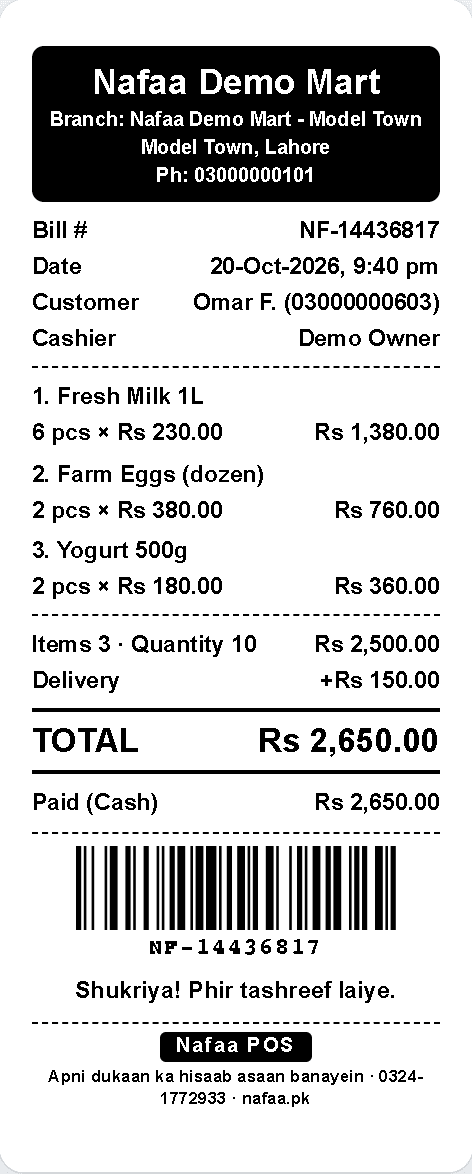
Bill sirf raqam ki parchi nahi. Yahi customer ke liye saboot hai, wapsi (return) ki bunyaad hai, aur aap ke hisaab ka pehla qadam hai. Ek achhe bill par ye cheezein hon:
- Dukaan ka naam, pata aur phone. Customer dobara rabta kar sake.
- Tareekh, waqt aur bill number. Har bill ka alag number, taake koi bill gum ho to pata chale.
- Har cheez ki line. Naam, kitni (quantity), qeemat aur line ka total.
- Discount alag likha ho. Customer ko nazar aaye ke kitni bachat hui.
- Kul raqam aur payment ka tareeqa. Cash, card, JazzCash, Easypaisa ya udhaar, aur kitna wapas diya.
- Wapsi ki policy. Ek line kaafi hai, jaise "saman 7 din me tabdeel ho sakta hai".
Haath se likha bill bhi ye sab kar sakta hai, lekin us ka number aur hisaab khud nahi banta, aur copy aksar gum ho jati hai.
Parchi, A4 ya WhatsApp?
| Feature | Kab | Note |
|---|---|---|
| 58 mm thermal parchi | Chhota counter, kiryana, medical | Sasta printer, chhoti parchi |
| 80 mm thermal parchi | Zyada cheezon wale bill, restaurant | Parhne me saaf, logo aur footer ke liye jagah |
| A4 invoice ya PDF | Wholesale, company ko bill, quotation | Party ka naam, signature ki jagah |
| WhatsApp bill | Har jagah | Kaghaz ka kharcha nahi, customer ke paas hamesha |
Nafaa ki parchi
Dukaan ka naam aur logo, bill number, har line, Discount, kul raqam, payment ka tareeqa aur aap ka apna footer. Yahi bill 58 mm, 80 mm ya A4 par chhapta hai, ya WhatsApp par jata hai.
How it works
Nafaa me bill kaise banta hai
Keyboard se chalne wale counter par poora bill bina mouse ke ban jata hai.
- 1
Cheez daalein
Barcode scan karein, quick key dabayein ya naam likh kar search karein. Unit chunein: piece, darjan, carton ya kilo.
- 2
Discount aur customer
Line ya poore bill par Discount, aur udhaar ho to customer chunein.
- 3
Paise lein
Cash, card, JazzCash, Easypaisa, bank ya udhaar; ek bill me do tareeqe bhi.
- 4
Bill dein
Parchi print karein ya customer ke number par WhatsApp karein. Bill number khud lagta hai.
Counter jo rush me tez chale
Bill ki screen par search, categories, quick keys aur payment sab ek jagah. Bill bante hi Stock kam ho jata hai, udhaar khate me jata hai, aur aaj ki Sale me jud jata hai.
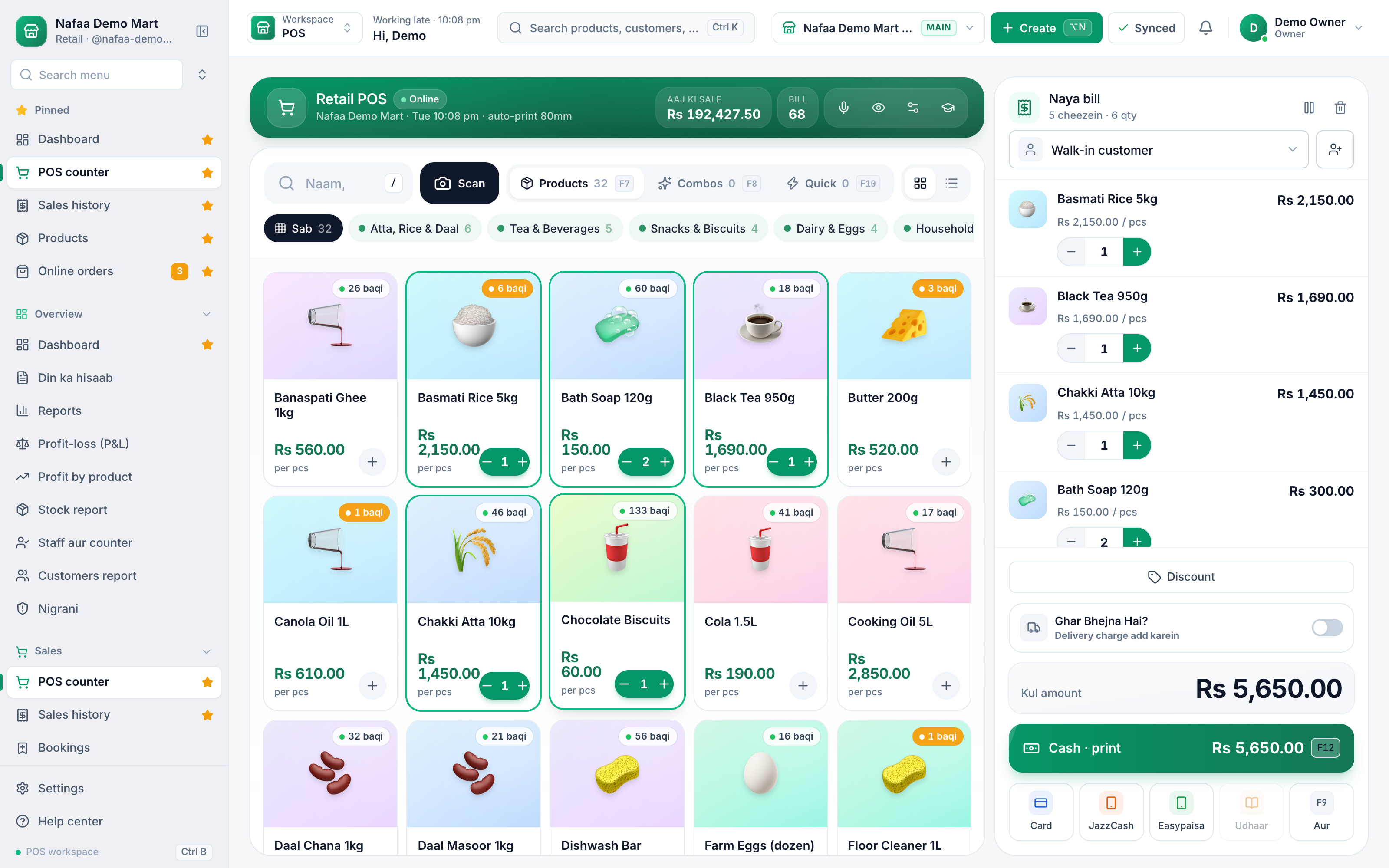
- Search ya scan
- Bacha hua Stock
- Bill aur parchi
Features
Bill ke saath aur kya hota hai
Stock khud kam
Har bill se cheez ka Stock us ki unit ke hisaab se kam.
Udhaar khate me
Baqi raqam customer ke khate me, tareekh aur bill number ke saath.
Wapsi (return)
Purana bill dhoond kar wapsi; refund par manager PIN.
WhatsApp bill
Customer ke number par poora bill, aap ke apne WhatsApp se.
Printer marzi ka
58 ya 80 mm thermal, ya A4. Cash drawer bhi jur jata hai.
Bina internet
Bill device par save, receipt chhapti hai, baad me sync.
App ke baghair bill chahiye?
Kabhi kabhar ek do bill chahiye hon to hamara free receipt maker browser me bill bana kar 58 ya 80 mm printer par print kar deta hai, sign-up ke baghair. Wholesale ya company ke liye simple invoice template aur rate list ke liye price list template bhi free hain. Discount ki sahi raqam nikaalni ho to discount calculator dekhein.
Roz ke darjanon bill hon to app hi behtar hai, kyunki har bill ke saath Stock, udhaar aur Profit ka hisaab bhi chahiye. Nafaa ke counter ki poori tafseel POS & billing par, printer chunne ka tareeqa choosing a POS printer par, aur WhatsApp bill ki tafseel WhatsApp & SMS par. Bijli jane par bill kaise bante hain, ye offline billing software wala safha batata hai.
Log ye bhi poochte hain
Mobile se bill kaise banayein?
Nafaa phone ke browser me chalta hai. Cheez search ya scan karein, paise ka tareeqa chunein aur bill customer ke WhatsApp par bhej dein. Printer chahiye to Bluetooth ya USB thermal printer bhi jor sakte hain. Is tarah phone hi poora counter ban jata hai.
Bill banane ke liye kaun sa printer lein?
Chhote counter ke liye 58 mm thermal printer kaafi hai; zyada lines wale bill aur restaurant ke liye 80 mm behtar hai. A4 invoice ke liye aam printer. Shuru me printer na lein to bhi chalega, bill WhatsApp par chala jata hai.
Kya bill par apni dukaan ka naam aur logo aa sakta hai?
Ji haan. Nafaa me dukaan ka naam, pata, phone, logo aur neeche ka footer message settings me ek dafa likhte hain, aur har bill par khud aata hai. A4 invoice ka design bhi chuna ja sakta hai. Wapsi ki policy footer me likh dein.
WhatsApp par bill bhejne ke liye WhatsApp Business API chahiye?
Nahi. Nafaa aap ka apna WhatsApp kholta hai jis me bill ka message likha hota hai; aap send dabate hain. Koi alag API ya mahana WhatsApp kharcha nahi. Customer ka number bill par ya us ke khate me hona chahiye.
Bill ka number khud lagta hai?
Haan. Har bill ko khud agla number milta hai. Internet ke baghair bane bill par device ka apna code hota hai, taake do counter ek waqt me offline hon to bhi number na takrayein. Gum hua bill number se dhoonda ja sakta hai.
Related
POS & Billing
Nafaa POS is the billing counter for any business: scan a barcode or tap a quick key, sell by piece, dozen or carton, take cash, card, JazzCash, Easypaisa or khata in one bill, print or WhatsApp the receipt, and keep billing when the internet drops. It runs on the phone, tablet or computer you already have.WhatsApp Messages
Nafaa talks to customers and suppliers where they already are: receipts on WhatsApp instead of paper, udhaar reminders with the exact balance, thank-you and birthday messages, purchase orders to suppliers, and a WhatsApp chat with online buyers opened straight from their order, all in wording you can edit to sound like your shop.Receipt Maker
Make a shop receipt and print it on a 58 mm or 80 mm thermal printer, or any printer. Add your shop details once, then the items, discount, optional sales tax and payment method; for cash it works out the change. Free, no sign-up, and nothing leaves your browser.Simple Invoice Template (Excel)
A clean one-page invoice in Excel for shops, wholesalers and service businesses: invoice number, dates, payment terms, customer details and up to 20 lines. Subtotal, discount, sales tax, delivery, total, amount paid and balance due calculate themselves.Discount Calculator
Find the sale price after a percentage or rupee discount, or the discount % between two prices. Add your cost to see the profit left after the discount and how many more items you must sell to earn the same profit, before you announce a sale.Choosing a Receipt Printer for Your Shop
How to pick a receipt printer for a shop or restaurant in Pakistan: 58mm or 80mm paper, USB, Bluetooth or serial, cash drawers, kitchen printers, label printers and A4 invoices, with a test to run before you pay.Offline Billing Software
What offline billing really means for a Pakistani shop, in simple Roman Urdu: the difference between desktop-only, online-only and offline-first software, what must keep working when the internet or power goes, a simple power-backup setup for the counter, and how Nafaa keeps bills, receipts and khata entries on the device and syncs them later.Dukaan ka Hisaab Rakhne Wali App
How to keep a shop's accounts in Pakistan, explained in simple Roman Urdu: the five things to record every day (sale, expense, purchase, udhaar and stock), how to do it on paper, the free sheets and calculators that help, and how Nafaa records all of it from each bill.Hisaab Kitaab: Dukaan ke Sawal, Aasaan Jawab
Practical answers in simple Roman Urdu to the questions Pakistani shop owners search for: keeping accounts, writing udhaar, making bills, counting stock and working out profit, plus what to look for in software for kiryana stores, medical stores, mobile shops, clothing shops, restaurants and bakeries.
Pehla bill aaj banayein
Apni dukaan ka naam daalein, das cheezein add karein, aur pehli parchi print ya WhatsApp karein.
- 7 din Free Trial
- Keeps billing offline
- Help on WhatsApp