NafaaUdhaar ki yaad-dihani
WhatsApp par udhaar reminder: izzat se maangein, paisa wapas layein
Zyada tar customer bhool jate hain, bhagte nahi. Sahi waqt par, sahi lehje me, saaf raqam ke saath ek message aksar kaafi hota hai. Nafaa ye message customer ke naam aur baqi raqam ke saath khud likhta hai; aap sirf send dabate hain.
Seedha jawab
How to remind customers about udhaar on WhatsApp without losing them, in simple Roman Urdu: when to send, three sample messages from polite to final, what never to do, and how Nafaa writes the reminder with the customer's exact balance and sends it from your own WhatsApp in one tap, with no WhatsApp Business API.
Roman Urdu mein
Udhaar ka reminder chhota, izzat wala aur saaf raqam ke saath ho. Nafaa udhaar ki umar dekh kar sahi lehja chunta hai aur message khud likhta hai.
Key facts
- Kab
- Mahine ki tankhwah ke aas paas, din ke waqt; raat ko nahi
- Lehja
- Pehle narm, phir saaf tareekh, aakhir me seedha
- Message me
- Naam, baqi raqam, aakhri bill ki tareekh aur payment ka tareeqa
- Nafaa me
- Ek click, udhaar ki umar ke hisaab se lehja, aap ke apne WhatsApp se
- API
- WhatsApp Business API ki zaroorat nahi
Reminder kab bhejein
Waqt sab kuch hai. Ye chand aasaan usool hain:
- Tankhwah ke din. Mahine ki pehli se dasween tareekh tak aksar log paisa dete hain. Pehla reminder isi waqt.
- Din ke waqt. Subah das se shaam saat tak. Raat ko ya Jumma ki namaz ke waqt message bura lagta hai.
- Ek hafte me ek dafa se zyada nahi. Roz ka message customer ko door kar deta hai.
- Bari khareed ke foran baad nahi. Pehle customer ko ghar pohnchne dein.
Sab se zaroori: reminder hamesha akele customer ko, kabhi group me ya status par nahi. Kisi ka udhaar sab ke saamne lana rishta aur customer dono khatam kar deta hai.
Teen message: narm se aakhri tak
| Feature | Message ki misaal | Maqsad |
|---|---|---|
| Narm (7 din se kam) | Assalam o alaikum Bilal bhai! Ummeed hai khairiyat se hain. Aap ka hisaab 3,450 rupay hai. Jab mauqa mile, de dijiye. Shukriya! | Yaad dilana; zyada tar log bas bhool jate hain |
| Saaf (7 se 30 din) | Assalam o alaikum Bilal bhai, aap ka 3,450 rupay ka hisaab teen hafte se baqi hai. Bata dein kis tareekh tak de sakenge? JazzCash par bhi bhej sakte hain. | Ek pakki tareekh lena |
| Aakhri (30 din se zyada) | Bilal bhai, 3,450 rupay ka hisaab ek mahine se zyada purana ho gaya hai. Is hafte ada kar dein, warna naya udhaar band karna parega. Shukriya. | Saaf faisla; naya udhaar band |
Ek click ka reminder
Features
Nafaa ka WhatsApp reminder
Lehja khud
Udhaar 7 din se kam ho to narm, 7 se 30 din saaf, 30 se zyada aakhri message.
Aap ke lafz
Teeno message ek dafa apne andaaz me likh lein; naam aur raqam Nafaa bharta hai.
Bhai ya baji
Customer ke hisaab se sahi lafz, jaise bhai ya baji, khud lagta hai.
Kai customer, ek ek kar ke
Udhaar walon ki list se har ek ko message, aur pata rehta hai kis ko bhej diya.
Apna number
Message aap ke apne WhatsApp se jata hai, customer aap ko pehchanta hai.
Koi API nahi
WhatsApp Business API ya mahana message kharcha nahi.
Kis ko reminder chahiye, ek nazar me
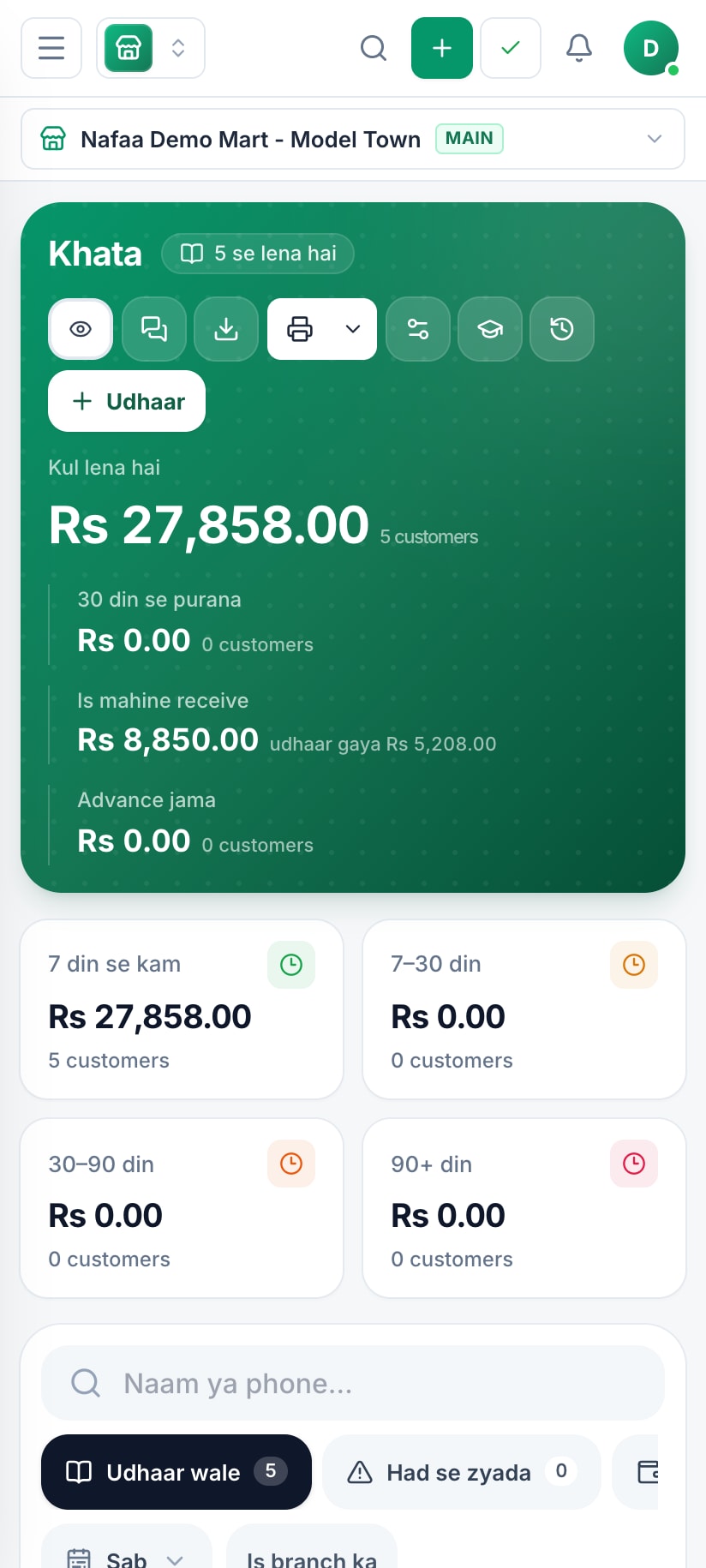
Khata udhaar ko umar ke hisaab se baant deta hai. Har customer ke saath WhatsApp ka button hai jo baqi raqam ke saath message tayyar kar deta hai, aur customer ka statement bhi ek tap par hai.
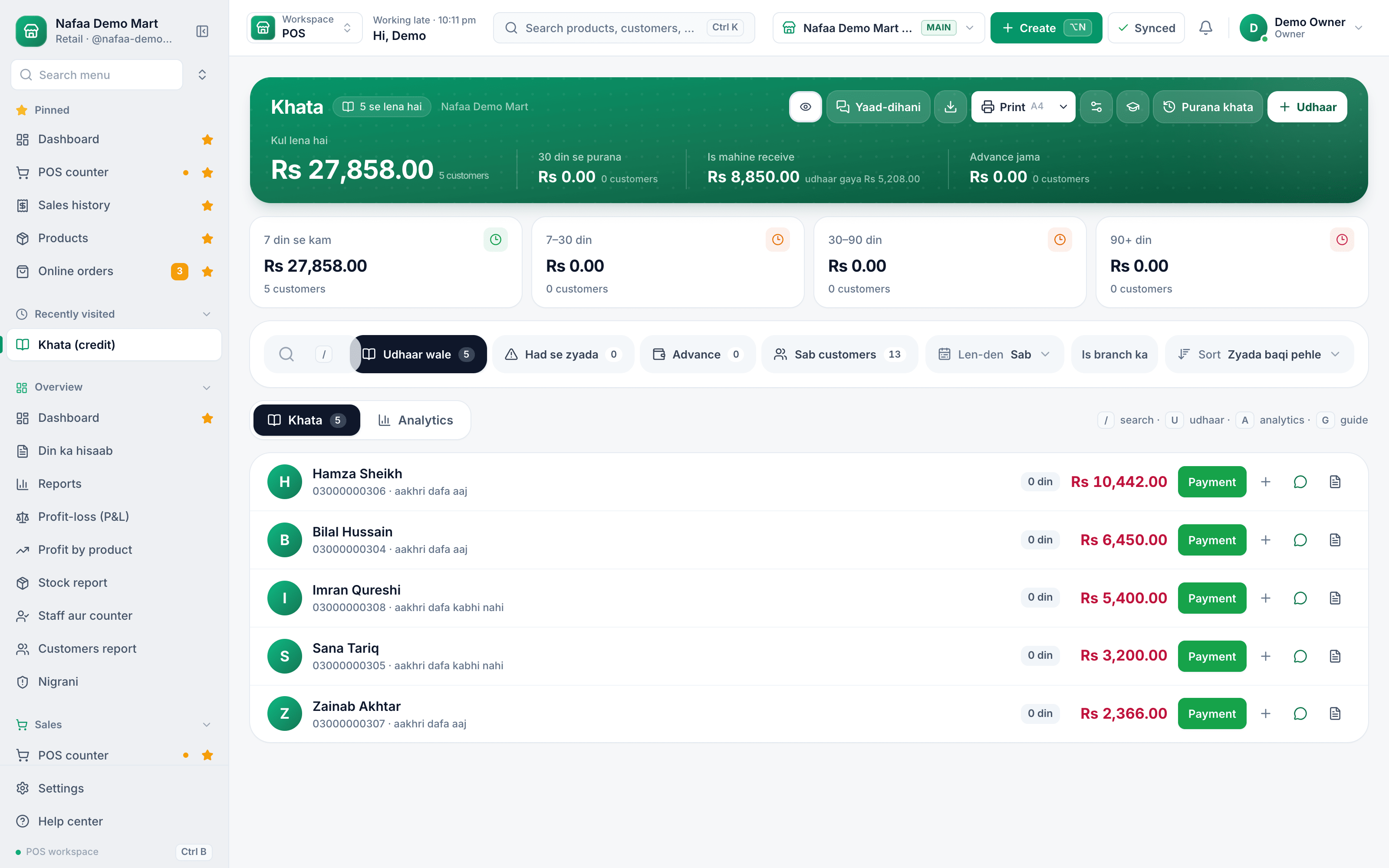
- Udhaar kitna purana
- Payment likhein
- WhatsApp reminder aur statement
How it works
Bina app ke WhatsApp reminder kaise bhejein
Das customer tak ye haath se ho jata hai. Pachaas hon to app ke baghair mushkil hai.
- 1
Number save karein
Customer ka number apne phone me us ke poore naam se save karein.
- 2
Raqam pakki karein
Register se baqi raqam aur aakhri bill ki tareekh dobara jor kar dekhein. Ghalat raqam sab se bura reminder hai.
- 3
Message likhein
Upar wali misaal se, naam aur raqam badal kar. JazzCash ya Easypaisa number bhi likh dein.
- 4
Jawab ka intezar
Ek hafta. Jawab na aaye to agla, thora saaf message.
Ye ghaltiyan na karein
- Group ya status par udhaar ka zikr. Kabhi nahi.
- Andaze ki raqam. "Kuch 3,000 ke qareeb" se behas shuru hoti hai. Saaf raqam likhein.
- Gussa ya dhamki. Aakhri message bhi seedha ho, bad-tameez nahi.
- Payment ke baad shukriya na kehna. Paisa aaye to chhota sa "shukriya" agle udhaar ko aasaan banata hai.
Udhaar ka poora nizaam udhaar likhne wali app par hai, aur kitna udhaar purana ho chuka hai, ye free khata ageing calculator batata hai. Nafaa ke WhatsApp features English me WhatsApp & SMS par hain, aur customers ko WhatsApp par wapas lane ke tareeqe WhatsApp customer retention aur WhatsApp Business for shops me.
Log ye bhi poochte hain
Udhaar maangne ke liye WhatsApp par kya likhein?
Salaam ke baad customer ka naam, baqi raqam aur ek narm guzarish, jaise "jab mauqa mile de dijiye". Der zyada ho to tareekh poochein. Message chhota rakhein aur raqam bilkul saaf. Nafaa ye message naam, raqam aur sahi lehje ke saath khud likh deta hai.
Kya Nafaa khud WhatsApp message bhej deta hai?
Nahi, aur ye jaan boojh kar hai. Nafaa aap ka apna WhatsApp kholta hai jis me message likha hota hai, aur aap send dabate hain. Is liye message aap ke number se jata hai jise customer pehchanta hai, aur WhatsApp Business API ki zaroorat nahi.
Ek saath bohat se customers ko udhaar reminder kaise bhejein?
Nafaa me udhaar walon ki list se WhatsApp list kholein. Har customer ke liye us ka apna message tayyar hota hai; ek bhejein to agla khul jata hai, aur list me nishan lag jata hai ke kis ko bhej diya. Ek ek kar ke, lekin minuton me.
Customer reminder se naraaz ho jaye to?
Aksar naraazgi lehje se hoti hai, raqam se nahi. Pehla message hamesha narm rakhein, din ke waqt bhejein, aur kabhi group me nahi. Statement saath dein taake customer khud dekh le. Nafaa udhaar ki umar ke hisaab se lehja chunta hai, is liye naya udhaar wala customer sakht message nahi paata.
Kya reminder ka message apni marzi ka likh sakte hain?
Ji haan. Nafaa me teeno reminder, narm, saaf aur aakhri, apne lafzon me ek dafa likh lein. Customer ka naam, baqi raqam aur bhai ya baji jaisa lafz har message me khud bhar jata hai. Dukaan ka naam bhi message me aata hai.
Related
WhatsApp Messages
Nafaa talks to customers and suppliers where they already are: receipts on WhatsApp instead of paper, udhaar reminders with the exact balance, thank-you and birthday messages, purchase orders to suppliers, and a WhatsApp chat with online buyers opened straight from their order, all in wording you can edit to sound like your shop.Digital Khata
Nafaa Digital Khata replaces the paper udhaar register: every credit sale lands in the customer's khata from the counter, payments and old balances are recorded, balances are grouped by age, credit limits stop runaway udhaar, and a WhatsApp reminder goes out in one tap.Udhaar (Khata) Ageing Calculator
List what each customer owes and how long it has been unpaid, and see your udhaar split into age bands: under 7 days, 7 to 30, 30 to 90 and over 90 days. It shows how much is getting old, the average age of the money owed, and who to call first.WhatsApp Messages for Shops: Templates That Bring Customers Back
When a shop should message customers on WhatsApp, ready-to-use templates in Roman Urdu for thanks, new stock, birthdays, quiet customers and udhaar, and how to stay polite and within WhatsApp's rules.How to Set Up WhatsApp Business for Your Shop
Put the WhatsApp Business app on a separate shop number, fill in the business profile, add your top products to the catalogue, and use labels, quick replies and away messages so orders do not get lost. Message only people who agreed to hear from you, and stop the moment someone asks.How to Reduce Udhaar Without Losing Customers
Practical ways to keep credit under control at a Pakistani shop: a simple udhaar policy, a limit for each customer, watching how old balances get, a polite reminder routine, easier ways to pay, and how to handle balances that have gone stale.Udhaar Likhne Wali App
How to record customer credit (udhaar) so that it comes back, in simple Roman Urdu: what every entry needs, setting a credit limit, watching how old each balance is, and asking for payment politely. Includes a free register template, an ageing calculator, and how Nafaa writes udhaar straight from the bill.Khata App: Paper ka Khata Chhorein
A Roman Urdu guide to moving from a paper khata register to a khata app: the problems with paper, the difference between a standalone khata app and a khata connected to billing, how to move your balances over in one evening, and how the Nafaa digital khata keeps statements, limits and reminders.Hisaab Kitaab: Dukaan ke Sawal, Aasaan Jawab
Practical answers in simple Roman Urdu to the questions Pakistani shop owners search for: keeping accounts, writing udhaar, making bills, counting stock and working out profit, plus what to look for in software for kiryana stores, medical stores, mobile shops, clothing shops, restaurants and bakeries.
Is hafte ka pehla reminder Nafaa se
Udhaar walon ke balance daalein aur ek click me pehla narm reminder bhejein.
- 7 din Free Trial
- Keeps billing offline
- Help on WhatsApp