Kitchen Order Tickets (KOT): How They Work in a Restaurant
What a KOT is, how orders reach the right kitchen station, when to use printers or a kitchen screen, and a clear flow from the waiter's order to the table, with the mistakes that cause wrong and late dishes.
- Published
- Reading time
- 5 min read
Every restaurant has a moment in the evening rush when the kitchen and the floor stop agreeing. A table says it ordered karahi forty minutes ago, the kitchen has no record of it, and the waiter swears he called it in. Kitchen order tickets exist to end that argument. A KOT is the written instruction from the floor to the kitchen: what to cook, for which table, with which changes, and when it was asked for.
What a KOT is (and is not)
A KOT is not the customer's bill. The bill has prices and tax; the KOT has dishes, quantities, notes and a table or token number. It goes to the people who cook, not the person who pays. One order can produce several KOTs, one for each station that has to cook something.
A good KOT shows:
- Table number or takeaway token
- Waiter's name
- Time the order was sent
- Each dish with quantity
- Options and notes ("less spicy", "no onion", "extra raita")
- Whether it is a new order, an addition to a running order, or a cancellation
Stations: sending each dish to the right place
In a typical Pakistani restaurant, one order can touch the tandoor, the karahi or handi section, the BBQ grill, the Chinese wok and the drinks counter. If the whole order prints in one place, someone has to read it out to everyone else, and that is where dishes get missed.
Stations solve this. You set up each station once and give it whole menu categories: breads go to tandoor, karahis to the karahi section, tikka and kebabs to the grill, soups and chowmein to Chinese, drinks and desserts to the bar. When an order is placed, each station gets only its own dishes.
How one order becomes three tickets
Printers or a kitchen screen?
KOT printers are small thermal printers at each station. They are cheap, work well in heat and smoke, and cooks are used to paper slips. The downside is that a printed slip cannot change: a cancelled dish needs a second slip, and nobody knows how long a ticket has been waiting unless they look at the time printed on it.
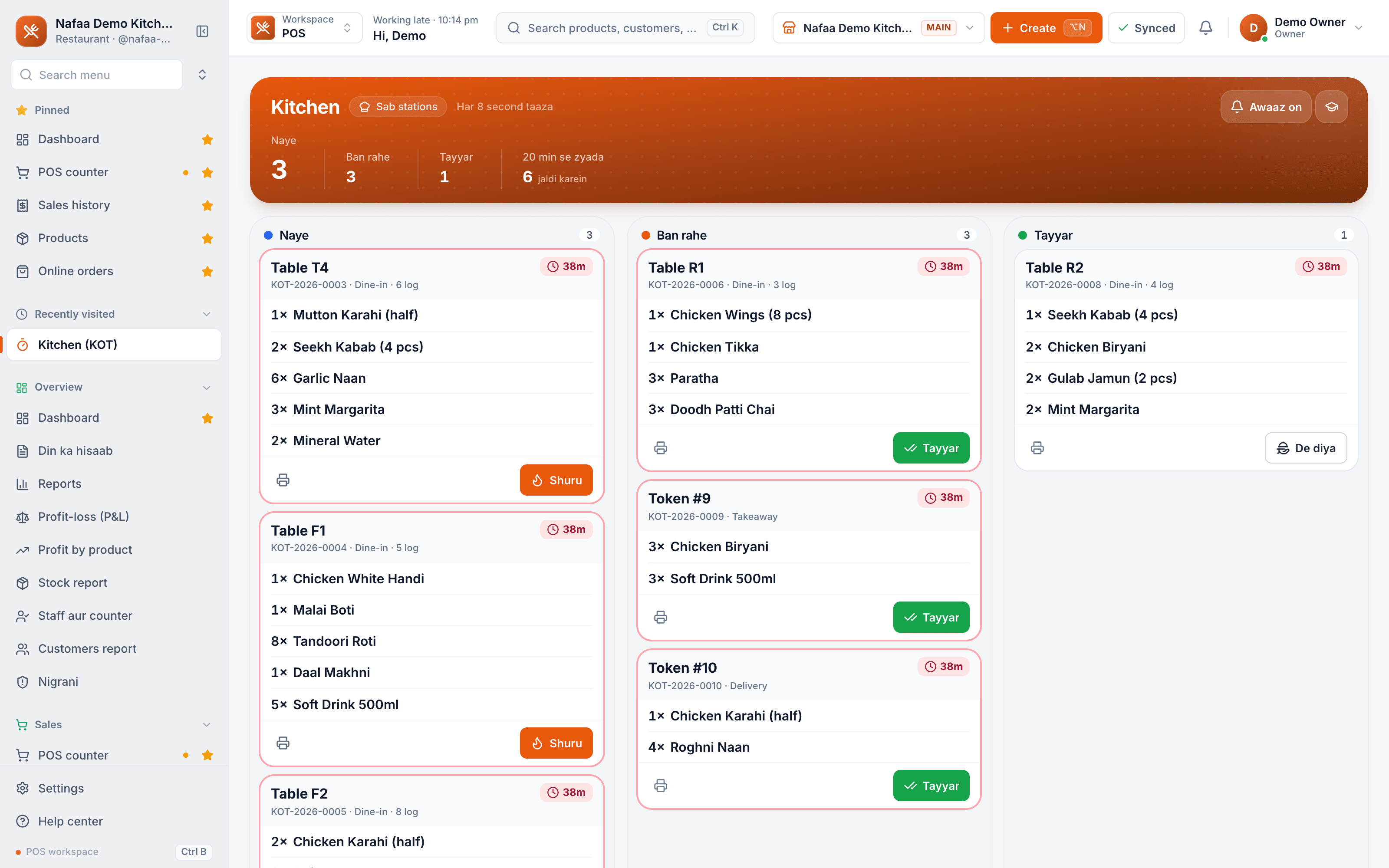
A kitchen display (screen) shows tickets in lanes: new, cooking, ready. The cook taps a ticket to move it along. Each ticket shows how many minutes it has waited, so late orders stand out. Cancellations appear at once. The downside is the cost of a screen per station and keeping it clean and powered.
Many restaurants mix both: printers at the tandoor and grill, where hands are busy, and a screen at the pass where the head cook or manager watches everything.
A kitchen screen with three lanes
New, cooking and ready tickets per station. Each ticket shows the table or token, the minutes waited, and every dish with its options and notes.
From order to table
Step 1: Take the order at the table
The waiter adds dishes with options on a tablet or phone. Only the dishes go to the kitchen, not the prices.
Step 2: Send to stations
Each station gets its own KOT, on its printer or screen, with the table, waiter and time.
Step 3: Cook and mark progress
The station moves the ticket from new to cooking to ready. Late tickets stand out.
Step 4: Add more later
When the table orders another round, only the new dishes go to the kitchen. The running bill grows on the table.
Step 5: Serve and bill
When everything is served, print the bill from the table, take payment and free the table.
Mistakes that cause wrong and late dishes
- Verbal orders. Anything not on a KOT did not happen. Make it a rule that the kitchen cooks only from tickets.
- One printer for everything. It turns the head cook into a dispatcher. Split by station.
- Notes in the wrong place. "No chillies" written on the bill but not on the KOT will be ignored. Options must travel with the dish.
- Cancellations by shouting. A cancelled dish needs a cancel ticket, or the kitchen cooks it anyway and you pay for the food.
- No timing. Without minutes on the ticket, nobody notices a table waiting until the customer complains.
- Takeaway mixed with dine-in. Give takeaway orders a token number so the counter can call them when ready.
Using KOT data after service
The tickets are also a record. Over a few weeks they show which dishes are slow, which stations are overloaded at peak, and how many dishes are cancelled after being sent. That is useful when you plan staff for Friday nights, or decide whether a dish is worth keeping.
How Nafaa runs KOTs
In Nafaa's restaurant setup you create stations such as grill, tandoor, karahi, Chinese and bar, and assign menu categories to each, so every dish's KOT goes to the printer or screen of its station. Categories without a station go to the first station, so no order is lost. The kitchen screen shows new, cooking and ready lanes per station; a ticket turns amber after 10 minutes and red after 20, cancel tickets show in red at the top, and a short beep marks a new ticket. Waiters take orders on the floor plan with add-on groups for extras, removals and spice level, and adding dishes to a running table sends only the new ones to the kitchen.
