How to Read a Profit and Loss Report for Your Shop
A profit and loss report starts with what you sold, takes off discounts, returns and the cost of the goods, then takes off running expenses and stock losses to show what the shop really earned. This guide explains each line with a worked example and gives a monthly routine for reading it.
- Published
- Reading time
- 6 min read

A profit and loss report, also called a P&L or an income statement, answers one question: over a period, did the shop earn money, and how much? It is the most useful report an owner can read, and the one most often skipped, because a page full of lines and brackets looks like accountant's work.
It is not. Every line is something you already know from running the shop: what you sold, what you gave off, what came back, what the goods cost and what you spent to keep the doors open. This guide walks through each line in order, with an example, and ends with a routine for reading it every month. For the basic margin arithmetic, see how to calculate profit margin.
Profit is not the same as cash
Before the lines, one warning. The P&L is not your galla or your bank balance.
- Udhaar sales count as sales on the day you sell, even though the cash has not come in.
- Stock you buy is not an expense when you buy it. It becomes cost only when the goods are sold.
- Money you take home is not an expense of the shop. It comes out of profit, not before it.
So a month can show a good profit while the drawer feels empty, because the profit is sitting in udhaar or in new stock on the shelves. That is normal. A P&L tells you whether the business earns; a cash flow view tells you where the money went.
How the lines fit together
A worked example
Here is one month for a small grocery store. The amounts are illustrative. Brackets mean the line is taken away.
| Line | Amount |
|---|---|
| Sale at list rates | 1,250,000 rupees |
| Discounts | (25,000 rupees) |
| Total of bills | 1,225,000 rupees |
| Returns | (15,000 rupees) |
| Net sale | 1,210,000 rupees |
| Cost of goods sold | (968,000 rupees) |
| Gross profit | 242,000 rupees (20% gross margin) |
| Rent | (60,000 rupees) |
| Salaries | (90,000 rupees) |
| Electricity and generator fuel | (25,000 rupees) |
| Bags, internet, repairs and other | (17,000 rupees) |
| Total expenses | (192,000 rupees) |
| Operating profit | 50,000 rupees |
| Stock written off: damage, expiry, counted short | (8,000 rupees) |
| Net profit | 42,000 rupees (about 3.5% net margin) |
Now the lines one by one.
Sales, discounts and returns
Sale at list rates is every item at its full price times the quantity. Discounts are everything you gave off: item discounts, bill discounts, codes and loyalty points. Seeing the two separately matters. In the example, discounts are 2% of list sales. If that figure creeps up month by month, the counter is giving away margin.
Returns are goods that came back in this period. A high return figure points at a product, a supplier or a staff member, and is worth opening.
Net sale is what is left: your real earning from customers, before any cost. Every percentage below is measured against net sale.
Cost of goods sold and gross profit
Cost of goods sold is what the goods you sold in the period cost you to buy. It is not your purchases for the month. If you bought heavily before Eid, purchases are high but cost of goods sold only includes what actually left the shelf.
Gross profit is net sale minus that cost, and gross margin is gross profit as a share of net sale. Gross margin tells you whether your pricing and buying work. In the example, 20 rupees of every 100 rupees sold is left after paying for the goods. If gross margin falls while sales rise, you are selling more of your thin-margin items, buying at higher rates, or discounting more.
One check before you trust this line: cost of goods sold is only as good as the cost prices behind it. Items with no cost entered either show as estimated or make profit look higher than it is. Fix missing costs first.
Expenses and operating profit
Expenses are everything it takes to run the shop in the period: rent, salaries and commission, electricity, fuel, internet, bags, repairs and card machine charges. Read them as a share of net sale. In the example, expenses are about 16% of net sale. Rent does not grow when sales grow, so a busy month spreads it thinner.
Operating profit is gross profit minus expenses. If it is negative, the shop is not covering its running costs at this level of sales, however good the margin on each item.
Stock losses and net profit
The last deductions are goods lost without a sale: damaged or expired items written off, and the difference when a stock count finds less than the system expected. Many owners never see this line because they never record it, and the loss hides inside a lower profit with no explanation.
Net profit is what is left after everything: what the shop earned for you in the period. Net margin is net profit as a share of net sale. In the example, 3.5%: thin, but positive, and you now know which lines to work on.
The statement, with the period before it
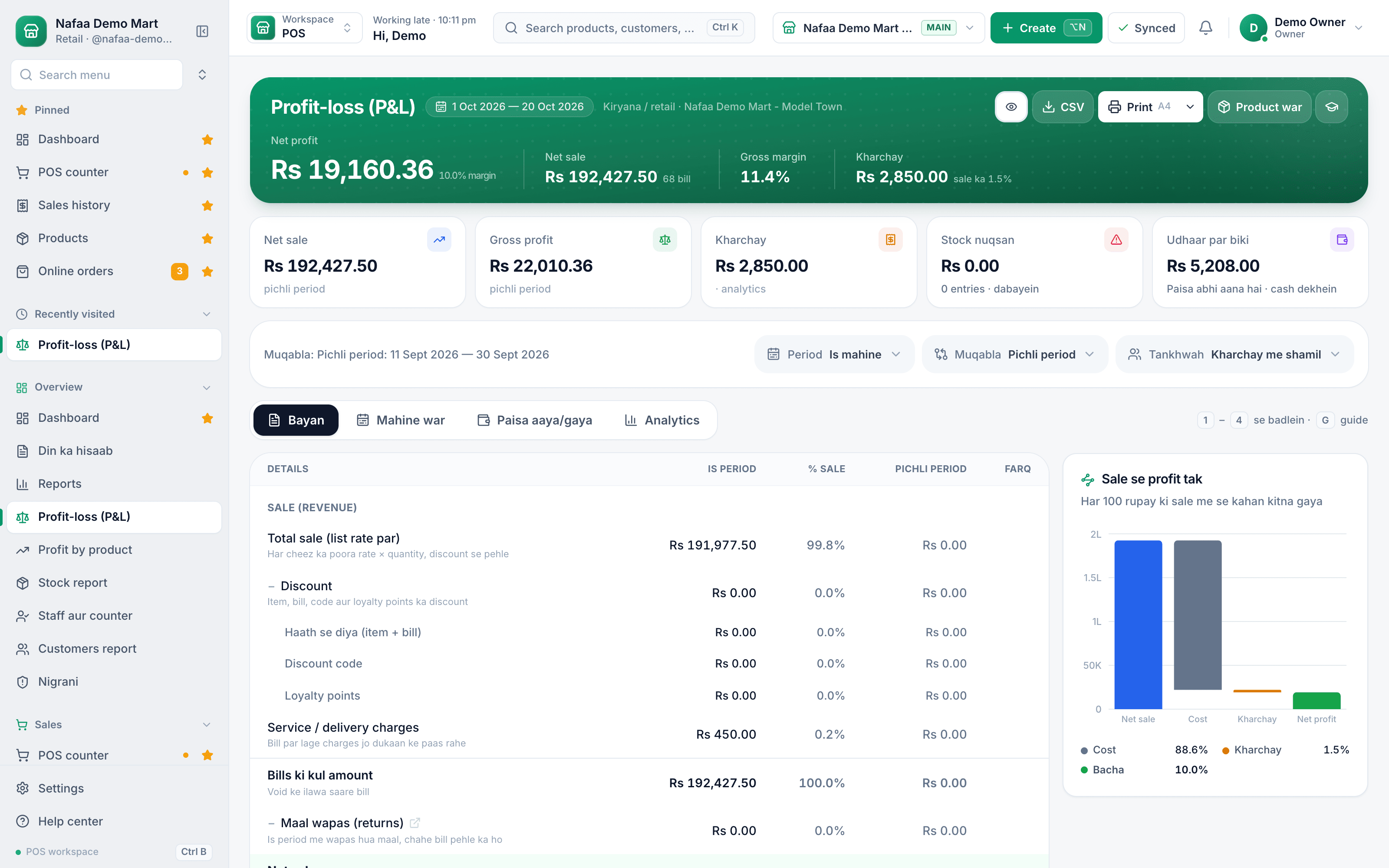
Net sale, gross profit, expenses and net profit for any dates, next to the previous period, with a chart of how sale turns into profit.
Read your P&L every month
Thirty minutes in the first week of each month is enough for a single shop.
Step 1: Close the month first
Enter all purchase bills and expenses, record damage and expiry, and finish any stock count before you read the report.
Step 2: Compare two periods
Put this month next to last month, and next to the same month last year, so Ramadan or wedding season compares with itself.
Step 3: Read percentages, not only rupees
Discount, gross margin, expenses and net margin as a share of net sale show changes that rupee totals hide.
Step 4: Open the line that moved
When a line jumps, look at the bills, expenses or write-offs behind it before deciding anything.
Step 5: Write one action
Pick one thing to change this month: a price, a supplier, a discount rule or an expense. Check it next month.
Common reading mistakes
- Judging by sales alone. Sales up and net profit down usually means discounts, cost rates or expenses grew faster.
- Counting purchases as cost. A heavy buying month looks like a loss when it is really stock on the shelf.
- Missing expenses. Generator fuel paid from the galla, or a salary advance never entered, makes profit look better than it is.
- Comparing unlike months. Thirty-one days against twenty-eight, or Eid month against an ordinary one, misleads.
- Paying yourself from profit you have not checked. Read the P&L before deciding what to take home.
How Nafaa helps
The profit and loss report in Nafaa reports builds these lines from your bills, purchases, expenses and stock adjustments. You choose any dates and compare against the previous period or the same dates last year, see the statement month by month or branch by branch, and switch salaries and commission in or out. Tap a line to open the records behind it. Lines where an item had no cost entered are shown as estimates, so you know what to fix, and damage, loss and counted-short stock appear as their own write-off lines. The statement prints on A4, as a PDF or on a thermal slip, and exports to CSV for your accountant.
Sources
- Income statement · Wikipedia · Accessed
- Cost of goods sold · Wikipedia · Accessed
- Gross margin · Wikipedia · Accessed

