Barcode or No Barcode: How to Decide for Your Shop
Shops where most items come in printed packs, with many items and busy queues, gain the most from barcodes; shops selling loose, weighed or a small set of items often bill faster with quick keys and search. Most Pakistani stores do best with a mix, and this guide shows how to decide section by section.
- Published
- Reading time
- 6 min read
Every shop owner who moves to a POS asks the same question: do I need barcodes? The honest answer is that it depends on what you sell, not on how modern you want the shop to look. A pharmacy and a vegetable stall sit at opposite ends; most kiryana, hardware and general stores sit somewhere in the middle.
This guide helps you decide. If you have already decided to use barcodes, the barcode setup guide covers scanners, label types and the rollout itself.
What a barcode actually saves
A barcode does two jobs at the counter. It finds the item without typing, and it finds the exact item: the 1 litre bottle, not the 1.5 litre one next to it. The second job matters more than the first. Most billing mistakes in a busy shop are not slow searches; they are the wrong size, flavour or brand billed at the wrong price.
Barcodes on packaged goods are printed by the manufacturer. The common retail format is EAN-13, a 13-digit number built on the older 12-digit UPC, and manufacturers get their numbers through GS1, the body that maintains these standards. For you, that means those codes cost nothing: you scan them once into your product list and they work from then on.
The cost appears when items do not come with a barcode, and you have to print and stick labels yourself.
Five questions to decide
Answer these honestly for your shop:
- What share of your items come in a printed pack? If most of your shelf is branded packs (biscuits, soap, medicine, cosmetics, drinks), barcodes are close to free.
- How many different items do you sell? A shop with 200 items can be learned by heart. A shop with 3,000 cannot.
- How many look alike? Ten sizes of the same shampoo, five strengths of one medicine: these are where wrong billing happens.
- How busy is the counter? If customers queue at peak hours, every second per item adds up.
- How often do staff change? A new cashier can scan on day one. Learning names, prices and shortcuts takes weeks.
The more "yes, a lot" answers you have, the stronger the case for barcodes.
| Shop type | Usual answer | Why |
|---|---|---|
| Pharmacy, cosmetics, mart | Barcodes | Mostly printed packs, many look-alike items |
| Kiryana and general store | Mix | Packs on shelves, loose daal, rice and sugar by weight |
| Hardware store | Mix | Branded items scan; pipe, wire and nails sold by length or weight |
| Garments and shoes | Own labels | No usable maker barcode; size and colour must be exact |
| Bakery, sweets, sabzi, meat | Mostly no barcode | Few items, sold loose or by weight |
| Restaurant, salon | No barcode | Menu and service items picked on screen |
Billing without a scanner
Items as tiles on the counter screen, with search above them. A small shop with a few hundred items can bill most sales from here without scanning.
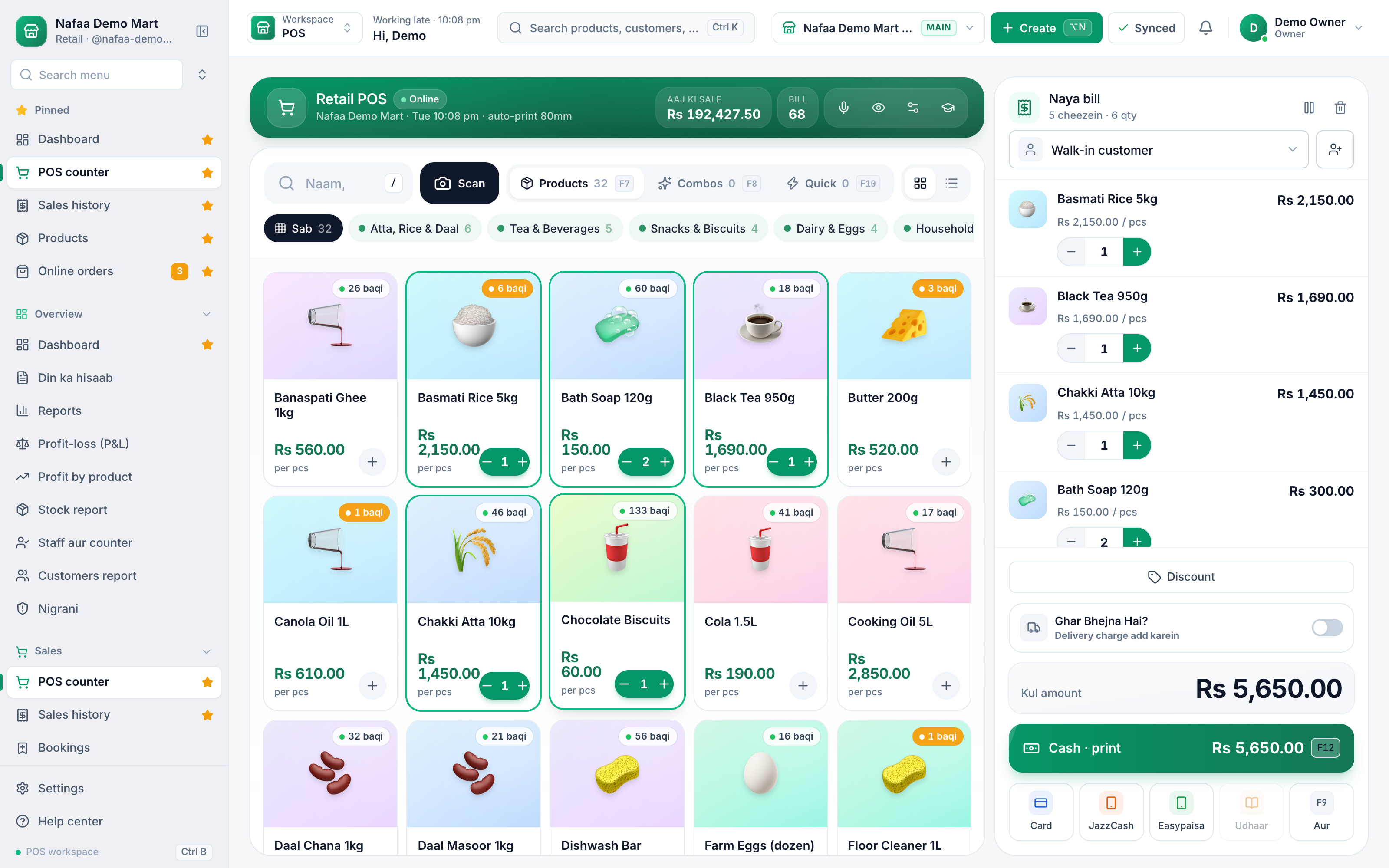
Billing fast without barcodes
Going without barcodes does not mean typing full product names. A well set-up counter without a scanner uses three tools:
- Quick keys: one-tap buttons for your 20 to 60 fastest items, grouped (bread and eggs, cold drinks, loose daal). This alone covers a large part of sales in a small shop.
- Short, predictable names: if every item starts with its type ("Sugar 1 kg", "Oil 5 L brand"), typing three letters finds it. See the naming pattern in our hardware inventory guide; it works for any trade.
- Weight or money entry: for loose goods, the cashier picks the item and types the weight, or the amount the customer asked for ("200 rupay ka"), and the quantity is worked out.
The weakness of this approach is look-alike items and new staff. If either is a problem in your shop, barcode those sections at least.
The real cost of printing your own labels
For items without a maker barcode, you print labels. Before you commit, count the work, for example:
- 800 unlabelled items on the shelf, at roughly 10 seconds each to print and stick, is a little over two hours of work once.
- New stock: if 150 unlabelled pieces arrive each week, that is about 25 minutes a week, every week.
- Price changes: each changed price needs new labels on every piece already on the shelf, unless the label shows only the name and code, not the price.
That last point is often missed. If your prices move often, print labels without the price and keep the price in the system. Own labels usually use Code 128, which holds numbers and letters and is read by almost every scanner.
Scale labels
Some shops selling meat, cheese, sweets or dry fruit use a label-printing scale. The scale weighs the item and prints a scale barcode that carries the item and its weight or price, so the counter only scans. It suits shops where items are weighed and packed behind a counter and paid for at a separate till. If you consider this, check before buying that your POS reads the exact label format the scale prints, and test it with a few real labels.
A simpler path for most shops is a scale connected to the counter, so the weight goes straight into the bill without a label.
A one-week test before you decide
Step 1: Pick one section
Choose the section with the most look-alike packed items, such as shampoo, medicine or biscuits.
Step 2: Scan in the maker codes
Scan each item's existing barcode into its product. Generate codes and print labels only for the few without one.
Step 3: Run it for a week
Bill that section by scanner and everything else as before.
Step 4: Compare
Check wrong-item returns, the cash difference at closing and how long peak-hour queues were.
Step 5: Decide section by section
Extend barcodes to sections where it helped. Keep quick keys for loose and weighed items.
The mixed approach most stores end up with
In practice, most kiryana stores and general stores settle on a mix: maker barcodes on all packed goods, quick keys for the fast loose items, search for the rest, and a few own labels only where items look alike. Each pack size of the same product can carry its own barcode, so a single bottle and a carton both scan correctly. That gives the speed and accuracy of scanning where it pays, without labelling every bag of daal.
How Nafaa helps
Nafaa's counter takes a barcode scan, a search or a voice search, and quick keys that you arrange in your own groups; keys can be shared, limited to one branch or personal. A product can carry its maker barcode, and Nafaa can generate codes for items and pack units that have none. Each pack unit (piece, dozen, carton) can have its own barcode on the same stock. Barcode labels print on a thermal roll or A4 sticker sheets, with or without the price. Loose items can be billed by weight or by amount, and a connected scale can fill in the weight. If you are not sure which scanner or printer to buy, our hardware service can advise, and the POS page shows the counter.
Sources
- International Article Number (EAN) · Wikipedia · Accessed
- GS1 · Wikipedia · Accessed
- Code 128 · Wikipedia · Accessed
