Hardware Store Inventory: Managing Thousands of Items
A hardware store stays in control of thousands of items by naming every item the same way, setting the right selling and buying units, and spending most of its attention on the few items that carry most of the money. This guide shows how to set up names, units, categories, ABC groups and reorder points, and how to handle loose items like wire, pipe and nails.
- Published
- Reading time
- 7 min read

A hardware store can easily carry three or four thousand different items: pipe in six sizes and three grades, fittings for each size, wire by the coil and by the metre, screws by the box and by the piece, paint in dozens of shades. The owner usually knows where everything is. The trouble starts when the owner is not at the counter, when a supplier raises prices on half the range, or when the shop runs out of the one fitting a plumber needs today.
You cannot watch four thousand items with the same care, and you do not need to. The method below gives every item a clean record, then puts most of your attention on the few items that carry most of the money.
Name every item the same way
Duplicate and badly named items are the biggest cause of wrong stock in hardware shops. "PVC pipe 1 inch", "1" pipe PVC" and "pipe pvc 1 in" become three records, and none of them shows the real stock.
Pick one pattern and use it for every item:
Item type, size, grade or class, brand, then colour or finish.
For example:
- PPRC pipe 25 mm PN-16 (brand)
- GI elbow 1/2 inch (brand)
- Copper wire 7/29 single core red (brand)
- Wall putty 20 kg (brand)
- Gloss enamel 1 litre, white (brand)
Write sizes the same way every time (decide between mm and inches for each product family and stick to it), put the size before the brand, and avoid abbreviations only one person understands. A stock keeping unit, or SKU, is one distinct item you stock; the name is how your staff find it, so it must be predictable.
Get the units right before anything else
Hardware is sold in more units than almost any other trade. A coil of wire is bought by the coil and sold by the metre or yard. Pipe comes in full lengths and is cut to feet. Nails come by the kg, screws by the box of 100 and also loose. Cement is bought by the truck and sold by the bag.
For each item, decide three things:
| Question | Example: electric wire | Example: screws |
|---|---|---|
| What is the base unit stock is counted in? | Metre | Piece |
| What do you buy in? | Coil of 90 metres | Box of 100 |
| What do you sell in? | Metre, or full coil | Piece, or full box |
Keep stock in the smallest unit you sell, and set the bigger units as packs of it. Then a sale of 15 metres and a sale of one full coil both reduce the same stock correctly, and the unit of measure never needs mental arithmetic at the counter.
From messy list to a buying routine
Categories that match how you buy
Group items by how you buy them and how customers ask for them: sanitary (pipe, fittings, sanitary ware), electric (wire, switches, lights), paint (paint, primer, putty, thinner), tools (hand tools, power tools, fasteners), and construction material (cement, steel bar, bricks, sand). Two levels are usually enough. Categories make it possible to count one section at a time, run reports by section and print labels for a whole shelf.
ABC analysis: spend your attention where the money is
ABC analysis sorts items by their value to the business so that you control the important ones tightly and the rest simply. A simple version for a hardware store:
- Take the last three months of sales by item.
- Sort items from the highest sale value to the lowest.
- Mark the items at the top that together make most of your sale value as A, the middle band as B, and the long tail of slow, low-value items as C.
Do not worry about exact cut-offs; what matters is the order. In most stores the A list is short: fast cement and steel items, popular pipe and fitting sizes, wire, branded paint. The C list is long: odd sizes, rare tools, spare parts that sell twice a year.
Then treat the groups differently:
| Group | Count | Reorder point | Price check |
|---|---|---|---|
| A | Every week | Set and reviewed monthly | Every new purchase |
| B | Every month | Set once, reviewed quarterly | Quarterly |
| C | Twice a year | Only for items you must never be without | When the supplier list changes |
The stock-taking guide explains how to run these counts without closing the shop.
Reorder points for the items that matter
A reorder point is the stock level at which you order again. For example, if you sell about 4 coils of a common wire a week and your supplier takes one week to deliver, a reorder point of 6 coils gives you a week of sales plus a small buffer. Set reorder points for your A and B items first; for C items, set them only for things a customer would leave the shop over, such as common washers or a standard tap. Learn more about reorder levels.
Each morning, the list of items at or below their point becomes the day's buying list, grouped by supplier, so one call to each supplier covers everything.
Loose items without losing stock
Step 1: Weigh or measure every loose sale
Nails by the kg, wire by the metre, pipe by the foot. Record the exact amount, not "a handful".
Step 2: Open a pack on purpose
When you open a box of screws or start a new coil, record that one box became 100 pieces, so the stock stays true in both units.
Step 3: Keep offcuts visible
Short pipe and wire pieces left after cutting go in one marked bin, sold at an offcut price or written off, not hidden.
Step 4: Count loose bins often
Loose items lose the most to waste and small theft; count them with your A items.
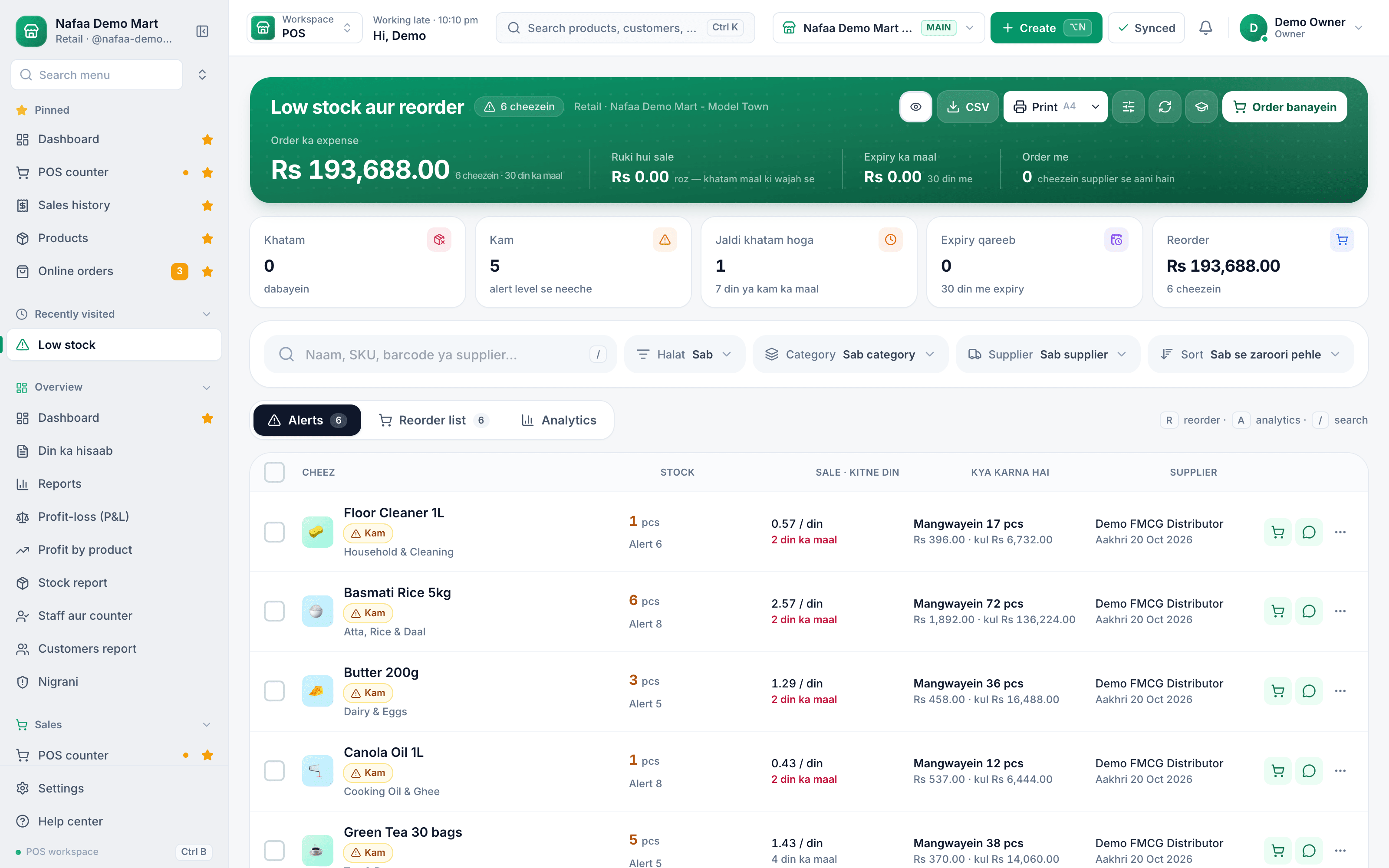
One list of what to order
Items below their alert level, how long the rest will last at the recent selling rate, and what to order, turned into purchase orders by supplier.
Mistakes that make large catalogues unmanageable
- Creating a new item when a price changes. Update the price on the existing item; a new record splits the stock.
- Selling "misc" items. A quick "miscellaneous, 350 rupees" line is easy at the counter but leaves stock wrong and hides what sells. Add the item, even with an estimated cost, and fix it later.
- Contractor rates kept in someone's head. Keep a retail rate and a contractor or wholesale rate on the item, so any staff member charges the same. The wholesale vs retail pricing guide covers how to set them.
- Never removing dead items. Items with no sale in a year clutter search. Clear them out at a discount and mark them inactive.
A first-month plan
Week one: export or type your item list and clean the names. Week two: set base units and packs for loose and boxed items. Week three: set categories and run the ABC sort on sales. Week four: set reorder points for A and B items and start the daily buying list. After that, each new item follows the naming pattern from the day it arrives.
How Nafaa helps a hardware store
Nafaa's hardware setup groups items by type (cement, sarya, pipe, fitting, paint, wire, tools and more) and searches by size, grade and paint shade. Product units let one item sell loose and by the pack, such as feet and full length or piece and box, and items can carry quantity rates so 50 bags get the bulk rate. The counter switches between retail and contractor rate on a bill, and can make a delivery challan for site delivery. The reorder list shows items at or below their reorder point with a printable buying list per supplier, and the shared low-stock page turns lines into purchase orders. Large item lists can be brought in from Excel through product import. See inventory for the full stock features.
Sources
- ABC analysis · Wikipedia · Accessed
- Stock keeping unit · Wikipedia · Accessed
