IMEI Record Keeping for Mobile Shops
A mobile shop should record every handset by its IMEI from the day it is bought until the day it is sold, with the supplier, PTA status, customer and warranty attached. This guide covers checking IMEIs with PTA DIRBS, what to record at purchase, sale, buy-back and repair, and how good records protect you from stolen phones and warranty disputes.
- Published
- Reading time
- 7 min read

In a grocery store, one packet of biscuits is the same as the next. In a mobile shop, no two phones are the same. Each handset has its own IMEI, its own PTA status, its own warranty and, once sold, its own customer. A shop that records stock only as “Samsung A15, 6 pieces” cannot answer the questions that matter: which unit did this customer buy, when, at what price, and is its warranty still running?
Good IMEI records protect you in three situations: when a customer comes back with a warranty claim, when someone offers to sell you a used phone, and when the police or a customer asks where a phone came from.
What the IMEI is
According to Wikipedia’s IMEI article, the IMEI is a 15-digit number that identifies a mobile device; the last digit is a check digit calculated with the Luhn formula. Dual-SIM phones normally have two IMEI numbers. You can see it on most phones by dialling *#06#, in the phone’s settings, and on the box and the device itself.
The check digit is useful at the counter. A mistyped IMEI almost always fails the check, so software can warn you about a typing error before it goes into your records. A number that fails the check on a real device is a reason to look more closely at that phone.
Networks also use the IMEI to block devices. Wikipedia notes that if a phone is stolen, the owner can ask their network to blocklist it by IMEI, which makes it useless on that network even with a new SIM. For a shop, that means a stolen phone you buy and resell can stop working in your customer’s hands, and the customer will come back to you.
Check status with PTA DIRBS
In Pakistan, the Pakistan Telecommunication Authority runs DIRBS, its device identification, registration and blocking system. The DIRBS site says you can check a device’s status by sending each 15-digit IMEI by SMS to 8484, and it offers a DIRBS DVS app for the same check. For dual-SIM phones, check both IMEIs. Registration of devices is done through the DIRBS site, the USSD code *8484# or a mobile operator’s franchise centre, as listed on the same page.
Make the DIRBS check a habit at three points: when stock arrives, before you buy any used phone, and before you hand over a phone a customer is collecting after a long hold. Note the result and the date in your records. Read the PTA approved glossary entry for what the term means for a shop.
What to record, and when
| Event | Record | Why it matters |
|---|---|---|
| Purchase (new stock) | IMEI 1 and 2, model, variant, colour, supplier, purchase bill, cost, PTA status | Proves where the phone came from and what it cost you |
| Sale | IMEI on the bill, customer name and phone, sale price, warranty months and start date | Settles warranty claims and returns without argument |
| Buy-back or exchange | Seller name, CNIC, phone number, IMEI, PTA status, condition, accessories, price paid | Your defence if the phone turns out to be stolen |
| Repair | IMEI, fault, parts used, charge, repair warranty | Separates repair warranty from the original sale warranty |
| Return or damage | IMEI, reason, who approved it, where the unit went | Keeps stock counts and supplier claims correct |
One row per event in a phone’s life in your shop. Every row is tied to the IMEI.
Recording new stock
When a supplier delivers, do not enter quantities alone. Enter each unit:
- Scan or type IMEI 1 (and IMEI 2 for dual-SIM phones) from the box.
- Spot-check a few units by dialling
*#06#and matching the screen with the box. A box that does not match its phone is a problem to raise with the supplier immediately. - Record the model, storage and colour as variants, so you can see that you have three 128 GB blacks and no 256 GB blues.
- Note the PTA status of each unit and the warranty the supplier or brand gives.
- Attach the purchase bill. If a phone is ever questioned, the bill and IMEI together show where it came from.
Selling by IMEI
At the counter, sell the specific phone, not just the model. Scan the IMEI of the unit in the customer’s hand onto the bill, so the receipt carries it. Take the customer’s name and phone number for any phone sale; a warranty claim months later starts with finding that bill.
Tell the customer what the warranty covers and for how long, and write the months on the receipt. If you sell on instalments (qist), the IMEI also identifies which phone the plan is for.
Buying a used phone safely
A few extra minutes at buy-back costs far less than a returned phone and a police visit.
Step 1: Check the seller
Take the seller’s name, phone number and a copy or photo of their CNIC. Be cautious with sellers who will not give these.
Step 2: Match the IMEI three ways
The box (if any), the settings screen and *#06# should all show the same number.
Step 3: Check DIRBS
Send the IMEI to 8484 or use the DIRBS DVS app, and record the result with the date.
Step 4: Check account locks
Make sure the seller has signed out of their phone account and reset the phone in front of you, so it is not locked to them.
Step 5: Inspect and record condition
Screen, battery, camera, charging, buttons and accessories. Note scratches and faults in writing.
Step 6: Write a purchase slip
Price paid, IMEI, condition and the seller’s signature. Keep it with the phone’s record.
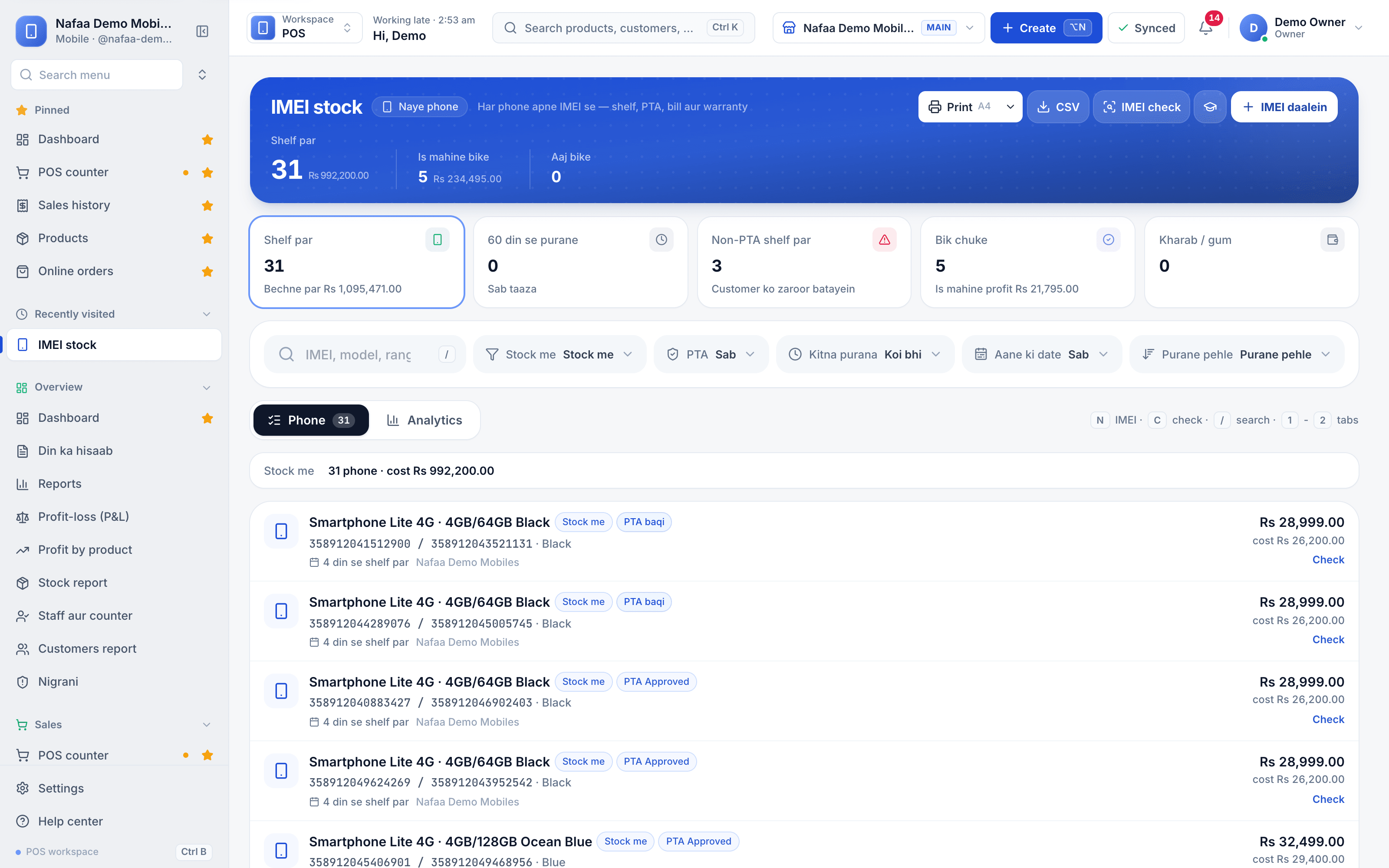
Every handset by IMEI
The IMEI stock list shows each phone with its variant, colour, PTA status, days on the shelf, sale price and cost.
Warranty claims
When a customer returns with a fault, look up the IMEI first. Your records should tell you in seconds whether you sold that phone, on which date, to whom, and how much warranty is left. If the phone was not sold by you, or the warranty has ended, you can say so politely and show the record. If it was repaired by you before, the repair has its own warranty, separate from the original sale.
Without IMEI records, every claim becomes an argument about memory.
Profit per handset, not per model
Prices of phones move often, and you may buy the same model at different costs over a month. Averages hide this. For example, you buy one unit of a model at 58,000 rupees and a later unit at 61,000 rupees, and sell both at 62,500 rupees. Your profit is 4,500 rupees on the first and 1,500 rupees on the second. If the second unit sat on the shelf for two months, its real return is even lower. Recording cost and sale price by IMEI shows the true profit of each phone and warns you when a model is no longer worth stocking.
Days on the shelf matters too. A phone that has not sold in 60 days is cash you cannot use for faster-moving stock, and its market price is probably falling.
Mistakes to avoid
- Recording only the model and quantity, so no sale can be traced to a unit.
- Typing IMEIs by hand without a check, so records hold wrong numbers.
- Buying used phones without a CNIC copy and a written slip.
- Skipping the DIRBS check because the seller is a regular.
- Not recording the warranty start date on the bill.
How Nafaa helps
In Nafaa’s mobile shop setup, phones are added to stock by IMEI, one by one or in bulk, with a warning when an IMEI’s check digit does not match. The IMEI stock list shows each phone’s variant, PTA status, days on the shelf, cost and sale price, and for sold phones the bill, customer and warranty left. At the counter the cashier scans or picks the exact IMEI, which prints on the receipt. An IMEI check looks up one number’s history in the shop, including new sales, buy-backs with the seller’s CNIC and repairs, for warranty claims and before buying a phone in. Used phones are taken in with the seller’s CNIC, IMEI, PTA status, condition and accessories, and can be used as a trade-in payment at the counter. The profit report shows profit by model and per IMEI, and instalment plans are tracked in the khata.
Sources
- DIRBS: Device Identification Registration and Blocking System · Pakistan Telecommunication Authority · Accessed
- International Mobile Equipment Identity · Wikipedia · Accessed
