How to Hire and Train Counter Staff for Your Shop
Hire a cashier for honesty, numbers and patience, test them on a paid trial day, and train them for a week with a written plan before they run the counter alone. Give each person their own login and role, keep voids and refunds behind the owner's PIN, and review their numbers every month.
- Published
- Reading time
- 7 min read

The person at your counter handles your cash, your stock and your customers' first impression, often for ten or twelve hours a day. Many shops still hire for this job the quick way: a cousin's reference, a short chat, and "kal se aa jao". Then the new cashier learns by watching, makes the same mistakes for months, and the owner cannot leave the shop.
A little structure fixes most of this. This guide covers how to define the job, interview, run a trial day, train in the first week, set up logins and permissions, and review performance. For the counter rules that stop leakage, see our guide to preventing theft at the counter; this post is about getting the right person and making them good at the job.
Write down the job before you hire
Spend fifteen minutes writing what the person will actually do. A cashier in a kiryana store, a salesman in a garment shop and a counter assistant in a pharmacy are different jobs. Write:
- Hours and days, including late nights in Ramadan and the weeks before Eid.
- Duties: billing, handling cash and wallet payments, packing, shelf filling, receiving deliveries, answering WhatsApp orders.
- What they will not do: give credit, change prices, take cash out of the drawer. Saying this on day one avoids arguments later.
- Pay: salary, overtime, any commission, when it is paid and how leave works.
What to look for
Experience with a particular POS matters less than you think; a sensible person learns the software in a few days. Look for:
- Honesty and a clean record. Call the last employer yourself. Ask why the person left and whether the employer would hire them again.
- Comfort with numbers. Can they add a bill quickly, give change correctly, and notice when something does not add up?
- Patience with customers. The counter sees rushed, angry and confused people every day.
- Basic phone and reading skills. They need to read product names, scan barcodes and use a screen.
- Reliability. Ask how far they live and how they will travel. Long, difficult commutes are a common reason staff leave in the first months.
The interview: short and practical
Keep the talk short and test the work:
- Give them a printed bill with five or six items and ask them to check the total.
- Hand them a mix of notes and ask them to give change for a sample amount.
- Ask what they would do if a regular customer asks for a discount, or says "baad me de doon ga".
- Ask them to find three products on your shelves.
Their answers tell you more than a CV.
A paid trial day
Before you commit, ask the best candidate to work one full day, and pay them for it. Put them next to your most reliable staff member. Watch how they greet customers, whether they ask when unsure, and whether they stay busy when the shop is quiet. A trial day protects both sides: the candidate also sees what the job really is.
A first-week training plan
Write the plan on one page and tick each day off. If a day goes badly, repeat it rather than moving on.
Step 1: Day 1: the shop
Product layout, godown, prices of the top sellers, opening and closing times, and who to call for what. No billing yet; they watch and help pack.
Step 2: Day 2: billing with supervision
Bills with an experienced person beside them: scan, search by name, change quantities, select a customer, choose cash, JazzCash, Easypaisa or card.
Step 3: Day 3: returns, holds and credit rules
How a return works against the original bill, how to hold a bill and serve the next customer, and why they never give udhaar without the owner.
Step 4: Day 4: the drawer
Open the shift with a counted float, take cash in and out only through the system, and close the shift by counting notes before seeing the expected figure.
Step 5: Day 5: a full shift alone, checked
They run the counter for the whole day. The owner checks the shift report at night and goes through any mistakes the next morning.
Most training mistakes come from skipping day 4. A cashier who has never closed a shift properly will count "to the number" once they see what the system expects. Our daily cash closing routine covers the full drawer process, including the opening float and the Z report.
Paperwork and pay
Put the agreement in writing, even if it is one page: name, CNIC copy, address, start date, salary, hours, leave and notice period. Keep a copy of the CNIC on file.
Check the minimum wage for your province before you fix a salary. In Punjab, the Labour & Human Resource Department publishes its minimum wages notification on its website; other provinces publish their own. Also find out whether your business must register its staff with the Employees' Old-Age Benefits Institution (EOBI), the government's old-age pension and social insurance body. If you are unsure about any labour rule, ask your provincial labour department or an accountant.
Logins, roles and PINs
Give every person their own login on day one. Shared logins make every report useless, because you can no longer tell who made which bill, gave which discount or closed which shift. Then give each person only what their job needs. A typical setup for a single shop:
| Role | Typical person | What they work on |
|---|---|---|
| Owner | Owner (malik) | Everything, including settings, staff and the PIN for sensitive actions |
| Manager | Senior salesman or branch in-charge | Runs the branch: sales, stock, expenses and reports |
| Cashier | Counter staff | Sales at the counter, the drawer (galla) and customers |
| Staff | Helper or stock boy | Looks up stock and helps, but does not run the counter |
| No login | Cleaner, driver, kitchen helper | An HR record only, for salary and attendance |
Add or remove individual permissions when someone's job is different.
Set the counter rules before the new person starts: the highest discount a cashier can give, and a PIN for cancelling a bill or giving a refund. Rules that exist from day one feel like how the shop works. Rules added after a problem feel like an accusation.
Review every month
Sit down with each staff member once a month for ten minutes. Bring numbers, not impressions:
- Sales and number of bills on their shifts.
- Discounts given, voids and returns, compared with the rest of the team.
- Cash over or short at shift close, and how often.
- Attendance and late arrivals.
Praise what went well first. Then pick one thing to improve next month. A cashier who sees that good work is noticed tends to stay longer, and replacing and retraining staff costs far more than a small raise.
Mistakes to avoid
- Hiring in a panic before the season. Hire and train in the quiet weeks, not three days before Eid.
- Letting the new person learn from whoever is free. One trainer, one plan.
- Giving the owner's login "just for today". It is rarely just for today.
- Skipping the written agreement with relatives. Family staff need clear terms most of all.
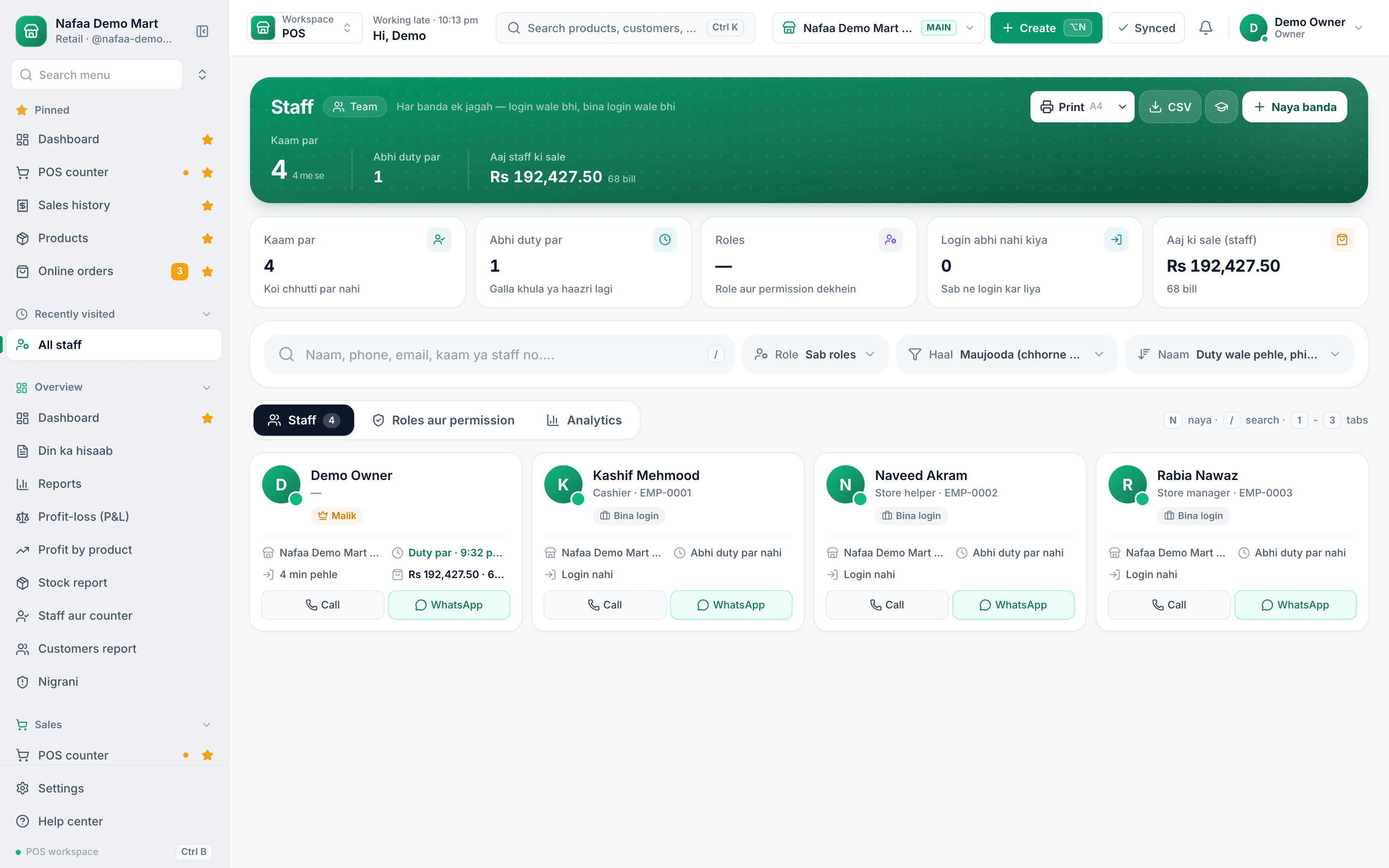
Your team on one screen
Each person with their role, whether they are on duty, and their sales, so the monthly review starts from real numbers.
How Nafaa helps
In Nafaa you add a person on the Staff page and give them a login with a role: Manager, Cashier, Staff, or no login at all for people who only need an HR record. You can add or remove individual permissions on top of the role, and the screen shows how the person differs from the standard role. Counter rules set the cashier's discount limit and ask for the owner's PIN before a bill is cancelled, a refund is given or, if you choose, any discount. Shifts open with a counted float and close with a note-by-note count and the difference.
For reviews, the staff report shows each person's sales, bills, discounts, voids, returns and drawer results, and attendance, payroll and commission each have their own page. Pages carry a short built-in guide (press G) that new staff can open on their own. If you want help training a whole team, see our training service and the Staff product page.
Sources
- Labour & Human Resource Department, Government of the Punjab · Government of the Punjab · Accessed
- Minimum Wages Notification · Labour & Human Resource Department, Punjab · Accessed
- Employees' Old-Age Benefits Institution · Wikipedia · Accessed

